Most gaming PCs still route headphone audio through the DAC and amplifier built into the motherboard. That onboard path sits among electrically noisy components, its headphone output is often weak, and its microphone input rarely gets the same engineering attention as the playback side. A dedicated sound card or external DAC amp moves conversion and amplification into hardware designed for the job, and the difference shows up as a lower noise floor, more usable volume headroom, and cleaner voice input for team chat.
The five picks below cover both ways of getting there. Internal PCIe cards suit a fixed desktop build and keep the desk clear, while external USB units move between PC, laptop, and console and put volume control within reach. Every specification quoted here is a manufacturer-published figure, kept separate from the general guidance. Match the hardware to your headphone impedance, your microphone setup, and the platforms you play on.
As an Amazon Associate we earn from qualifying purchases
How to Choose a Sound Card for Gaming Headphones
Connection platform comes first. A PCIe card such as the Sound Blaster AE-7 installs inside a desktop case, draws power from the slot, and disappears from the desk entirely, but it cannot follow you to a laptop or console. USB units like the Sound BlasterX G6, Sound Blaster X4, Fosi Audio K5 Pro, and EPOS GSX 300 sit outside the case, work with laptops, and in some cases support consoles over USB or optical. If your setup includes more than one machine, external hardware is the practical route.
Headphone impedance support decides usable volume. Easy-to-drive gaming headsets in the 32 ohm range run happily from almost anything. Studio-style headphones between 150 and 300 ohms, and high-impedance models up to 600 ohms, need an amplifier stage rated for them. Each product below lists the impedance range or output power its maker publishes, and those figures matter more than headline DAC resolution.
Microphone input quality is half the product. A headset is only as clear as the input it plugs into. Look for a dedicated microphone jack rather than a shared combo socket, published input features such as noise reduction or voice processing in the companion software, and sidetone monitoring where offered. Players in noisy rooms benefit most from the processing suites on the Creative and EPOS models.
Virtual surround and software are optional layers, not the foundation. Every pick here handles plain stereo well, which is what competitive play usually calls for. Surround modes, equalizers, and processing from suites such as Sound Blaster Command, Super X-Fi, and the EPOS Gaming Suite are worth having for single-player titles or films, but they should never be the reason to overlook weak amplification. If you are still deciding on the headphones themselves, our guide to the best gaming headphones covers the current field in detail.
Creative Sound BlasterX G6
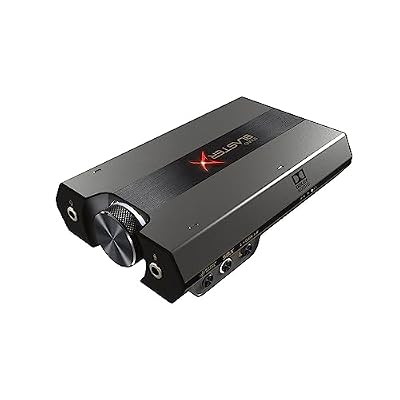
The Sound BlasterX G6 is an external USB sound card built around a discrete Xamp headphone amplifier, in which each audio channel gets its own amplification stage. Creative positions it as the step up from onboard audio for PC, PlayStation, Xbox, and Switch owners who want one device across platforms, connecting over USB for PC and optical for console audio.
Specs
- Connection: USB to PC, optical input for consoles, line input
- DAC: Cirrus Logic CS43131, published dynamic range of 130 dB
- Playback: PCM up to 32-bit / 384 kHz, DSD64 over DoP
- Headphone amplifier: discrete Xamp bi-amp design, published support for headphones from 16 to 600 ohms
- Surround: 7.1 virtual surround, Dolby Digital decoding, Scout Mode
- Microphone: 3.5 mm mic input with sidetone monitoring and voice effects in software
- Software: Sound Blaster Command with equalizer and acoustic engine processing
For headphone users, the published 16 to 600 ohm amplifier range is the headline: it covers sensitive gaming headsets and demanding studio headphones in one device. The sidetone control deserves a mention too, since hearing your own voice keeps you from shouting during late sessions. Choose the G6 if you play across PC and console and want the strongest all-round external option.
Creative Sound Blaster AE-7

The Sound Blaster AE-7 is the internal alternative, a PCIe card for builders who want the audio hardware inside the case and an external Audio Control Module on the desk for volume and connections. It pairs Creative’s Sound Core3D processor with an ESS SABRE-class 9018 DAC, aimed at desktop players running wired headphones and discrete speaker setups from the same machine.
Specs
- Connection: internal PCIe x1 card with external Audio Control Module
- DAC: ESS SABRE-class 9018, published dynamic range of 127 dB
- Playback: PCM up to 32-bit / 384 kHz, DSD64
- Headphone amplifier: Xamp discrete custom bi-amp, published support for headphones from 16 to 600 ohms with a low output impedance design
- Surround: discrete 5.1 speaker output, virtual 7.1 for headphones, Dolby and DTS encoding
- Microphone: mic input on the Audio Control Module with software voice processing
- Software: Sound Blaster Command
The AE-7 makes the most sense in a permanent battlestation where the PC is the only source. The control module keeps headphone and microphone jacks on the desk rather than behind the case, solving the usual internal-card inconvenience. Pick it if your build has a free slot and you value the cleanest published DAC figures plus proper 5.1 speaker outputs for when the headphones come off.
Creative Sound Blaster X4

The Sound Blaster X4 is an external USB DAC and amp designed as a desktop hub rather than a pure headphone device. It adds analog outputs for up to 7.1 discrete speaker systems alongside its headphone stage, plus optical input and output, a line input, and a dedicated microphone input. Its distinguishing technology is Super X-Fi, Creative’s headphone holography processing, which sits alongside Acoustic Engine surround virtualization and Dolby Digital Live encoding, giving one box three surround delivery methods.
Specs
- Connection: USB-C to PC or Mac, optical input and output, line input
- DAC performance: published dynamic range of 114 dB
- Playback: up to 24-bit / 192 kHz
- Headphone amplifier: published support for studio-grade headphones up to 600 ohms
- Surround: up to 7.1 discrete for speakers, Super X-Fi and virtual surround for headphones, Dolby Digital Live
- Microphone: dedicated mic input with SmartComms Kit noise reduction and voice clarity processing in software
- Software: Creative app with equalizer, audio balance control, and speaker or headphone switching
The X4 suits a desk where headphones share duty with powered speakers, because switching between them happens in software instead of by unplugging cables. Its SmartComms Kit processing targets the microphone side, reducing background noise for calls and team chat. Choose it if your setup mixes headphones, speakers, and a console feed through optical in one hub.
Fosi Audio K5 Pro

The Fosi Audio K5 Pro takes a different approach: no gaming software suite, no virtual surround, just a compact DAC and headphone amplifier with physical knobs. It accepts USB-C, optical, and coaxial digital inputs, drives headphones from a front 3.5 mm output, and feeds powered speakers through RCA line outputs. A separate 3.5 mm microphone input with an included splitter covers headset voice chat, which is unusual at this level and is exactly why the K5 Pro keeps appearing in gaming desk setups.
Specs
- Connection: USB-C, optical, and coaxial inputs; RCA line output and 3.5 mm headphone output
- DAC performance: published signal-to-noise ratio of at least 110 dB, Texas Instruments NE5532 op-amp
- Playback: up to 24-bit / 192 kHz over optical and coaxial, up to 24-bit / 96 kHz over USB
- Headphone output power, as published: 1000 mW at 16 ohms, 500 mW at 32 ohms, 300 mW at 64 ohms, 150 mW at 128 ohms, 80 mW at 300 ohms
- Recommended headphone impedance: 16 to 300 ohms
- Microphone: 3.5 mm mic input, splitter cable included for combo-jack headsets
- Controls: physical volume, bass, and treble knobs; input selector
Because Fosi publishes output power at several impedances, you can judge drive capability honestly instead of guessing from a single peak figure. The trade-off is equally clear: there is no surround processing and no app, so equalization beyond the tone knobs is up to your system software. Pick the K5 Pro for straightforward stereo, hardware tone controls, and multiple digital inputs on one desk.
EPOS GSX 300

The EPOS GSX 300 is the smallest and simplest unit here, an external USB sound card from EPOS, the gaming audio brand built on Sennheiser’s engineering heritage. It provides separate 3.5 mm headphone and microphone jacks, a large LED-ringed volume dial, and a customizable smart button that toggles between stereo and surround or between sound profiles. Surround processing and equalization live in the EPOS Gaming Suite on Windows, which also handles microphone settings.
Specs
- Connection: USB to PC, separate 3.5 mm headphone jack and 3.5 mm microphone jack
- Playback: high-resolution audio up to 24-bit / 96 kHz, per the published maximum sample rate
- Surround: EPOS-engineered 7.1 virtual surround through the EPOS Gaming Suite
- Headphone support: aimed at gaming headsets, with published guidance covering typical headset impedances
- Microphone: dedicated mic input with software controls in the Gaming Suite
- Controls: LED volume dial and customizable smart button on the unit
- Platform: Windows PC
The GSX 300 is deliberately not a high-impedance amplifier; it is a convenience and processing upgrade for standard gaming headsets, and it should be judged on those terms. The big dial and one-press profile switching are genuinely useful mid-game. Choose it if your headset is easy to drive and you mainly want cleaner input, desk-level volume control, and per-game sound profiles without opening your PC case.
Frequently Asked Questions
Is a sound card still worth it when motherboards advertise gaming audio?
Often, yes, for two published reasons. First, a dedicated amplifier stage with a stated impedance range drives high-impedance headphones to proper volume where many onboard outputs run out of headroom. Second, the microphone path on a dedicated unit is usually better shielded and better processed than a motherboard input. If you use a USB headset, though, none of this applies, because a USB headset carries its own DAC and bypasses any sound card entirely.
Should I choose a PCIe card or a USB sound card for headphones?
Choose PCIe if the PC is your only source and you want the hardware hidden inside the build, as with the Sound Blaster AE-7. Choose USB if you also use a laptop or console, want desk-level controls, or plan to move the setup, as with the G6, X4, K5 Pro, and GSX 300. Neither connection is inherently cleaner; the published figures of the specific model matter more than the bus it rides on.
How much amplifier power do my headphones actually need?
Check the impedance rating on your headphone’s specification sheet and compare it with the ranges published for each pick. Headsets under 80 ohms are easy loads for everything here. Models between 150 and 300 ohms benefit from the G6, AE-7, X4, or K5 Pro, all of which publish support or output power in that range. A 600 ohm studio headphone narrows the field to the Creative units with explicit 600 ohm support.
Does virtual surround actually help in games?
It depends on the game and the processing. Virtual surround can widen the perceived soundstage in single-player titles and films, and suites such as Super X-Fi and the EPOS surround mode are built for that. For competitive play, most players end up on plain stereo because it keeps positional cues consistent. Treat surround as a bonus feature, not a requirement, and judge a sound card first on its DAC figures, amplifier range, and microphone input.
Final Verdict
For most headphone gamers, the Creative Sound BlasterX G6 is the safest single recommendation: it publishes the strongest external DAC figure here, drives headphones from 16 to 600 ohms, adds sidetone and Dolby Digital decoding, and works across PC and console. Desktop builders should look at the Sound Blaster AE-7 instead, which pairs a 127 dB ESS SABRE-class DAC with a desk control module. The Sound Blaster X4 is the pick when speakers and consoles share the same hub, the Fosi Audio K5 Pro wins on honest published power figures and physical controls, and the EPOS GSX 300 is the simple, headset-focused option for cleaner voice input and a proper volume dial.
Product and ASIN Reference
| Product | Type | ASIN |
|---|---|---|
| Creative Sound BlasterX G6 | External USB DAC and headphone amp | B07FY45F2S |
| Creative Sound Blaster AE-7 | Internal PCIe sound card | B07T9YYVV6 |
| Creative Sound Blaster X4 | External USB DAC and amp hub | B0953LL5R6 |
| Fosi Audio K5 Pro | External DAC and headphone amp | B0BFHFSX4C |
| EPOS GSX 300 | External USB sound card | B088FXH2GK |