For most gaming PCs, 64GB of RAM is more memory than games can use, and the honest short answer is that it is overkill for a machine built only to play games. Capacity beyond what your software actually touches does not add frames, because a game cannot run faster simply because empty memory is sitting beside the data it loaded. What matters is having enough RAM that the game, Windows, and your background apps never fight over space, plus a sensible margin for the next few years of new releases.
That said, “most” is not “all.” Some players stream, record, edit video, run heavily modded games, or keep dozens of browser tabs and apps open while they play, and for those workloads 64GB can be a reasonable, even sensible, purchase. This guide walks through how much RAM current games really use, compares 16GB, 32GB, and 64GB by use case, covers the DDR4 and DDR5 context, and explains when the extra capacity earns its place and when the money would serve you better spent on a faster GPU or a larger SSD.
As an Amazon Associate we earn from qualifying purchases
How Much RAM Do Games Actually Use?
A typical modern game, together with Windows and a few background apps, usually sits somewhere in the low-to-mid teens of gigabytes of total system memory usage. That is why 16GB remained the standard recommendation for so long: it covered the game itself with a small margin left over. In recent years, though, several big releases have pushed recommended specifications to 16GB as a baseline rather than a target, and memory usage during play can climb close to that ceiling once a launcher, voice chat, a browser, and recording software are added to the pile.
Reviewers who measure memory usage directly, including TechPowerUp and Hardware Unboxed, have generally found that moving from 16GB to 32GB removes stutters and hitching in the most demanding titles without raising average frame rates much, while moving from 32GB to 64GB changes almost nothing for gaming alone. The pattern is consistent: capacity helps until you have enough, and then it stops helping entirely. The real enemy is running out, because when RAM fills up, Windows swaps data to storage, and even a fast SSD is far slower than memory, which shows up as stutters, texture pop-in, and long pauses.
There is also a difference between RAM a game allocates and RAM it truly needs. Some engines reserve more memory than they actively use, which can make monitoring tools report alarming numbers that do not reflect real pressure. What matters is whether the system starts paging to disk, not whether a graph looks full.
16GB vs 32GB vs 64GB by Use Case
Pure gaming
If the PC does nothing but play games, with a voice chat app and maybe a browser tab or two alongside, 32GB is the comfortable sweet spot today and 64GB adds nothing measurable. A 16GB machine still plays the vast majority of games well, especially at 1080p, but it has the least headroom: the heaviest current releases can push total usage close to the limit, and future titles are unlikely to ask for less. For a new build aimed purely at gaming, 32GB is the capacity that balances cost and longevity, and reviewers at Gamers Nexus have repeatedly characterized 32GB as the point where capacity stops being a concern for gaming-focused systems.
Gaming plus streaming and content creation
Streaming changes the math because the streaming software, the encoder, overlays, chat tools, and a browser all compete with the game for memory. Recording and editing gameplay adds more pressure, since video editors happily consume whatever RAM is available and work faster when they do not have to swap. For a player who streams regularly or edits footage on the same machine, 32GB is still workable, but 64GB removes memory from the list of things to think about, particularly when editing long recordings or running several production apps at once. This is the first use case where 64GB stops being a luxury and starts being a practical choice.
Heavy multitasking
Some people simply never close anything: dozens of browser tabs, office apps, a virtual machine, a game server running in the background, and a game on top. Browsers alone can consume many gigabytes across enough tabs. If that describes your desk, capacity is not about the game at all, and 64GB can be justified on multitasking grounds alone. The game still will not use the extra memory, but the rest of your software will, and the machine stays responsive when you alt-tab between everything.
Modded games and simulation titles
Heavily modded games are the classic exception to gaming memory rules. Large mod lists for city builders, flight simulators, and open-world RPGs can push memory usage far beyond the base game’s footprint, because user-made assets load on top of everything else. Flight simulation in particular, with high-resolution terrain and add-on aircraft, is known for rewarding generous memory. Players deep into these hobbies are the gamers most likely to see a genuine benefit from 64GB, and community testing covered by outlets such as TechPowerUp has shown the most demanding simulation setups using well beyond 32GB in total system memory.
DDR4 vs DDR5 Context
Capacity is only one part of the decision; the generation matters for how you buy. DDR4 platforms, such as Intel’s older generations and AMD’s AM4, use cheaper, widely available memory, and upgrading an existing DDR4 system to 64GB is often inexpensive relative to a platform change. DDR5, used by current Intel platforms and AMD’s AM5, costs more per kit but pairs with newer CPUs and offers higher speeds. The practical rule is simple: buy the generation your motherboard requires, because the two are physically and electrically incompatible, and do not choose a platform based on RAM capacity alone. A gamer on a healthy DDR4 system who wants more headroom is usually better served by a larger DDR4 kit than by rebuilding around DDR5 just for memory’s sake.
Speed and timings also deserve a mention. Within a generation, faster kits with tighter timings can deliver small gaming gains, especially at lower resolutions where the CPU is the bottleneck, but those gains come from speed, not capacity. Hardware Unboxed testing has generally shown speed and timing differences to be modest next to the jump from not enough RAM to enough RAM.
Dual-Channel, Slots, and Ranks
However much memory you buy, run it in dual channel: two matched sticks, one in each channel, so the CPU can access both in parallel. A single stick of 32GB leaves performance on the table compared with two sticks of 16GB. For 64GB, the common configurations are two sticks of 32GB or four sticks of 16GB. Two sticks are generally the safer choice on modern platforms, because filling all four slots can make high memory speeds harder to run stably, especially on DDR5. Two-stick kits also leave room to add more later on a four-slot board.
Ranks, meaning how memory chips are organized on each stick, are a finer detail most buyers can safely treat as secondary. Dual-rank sticks have occasionally shown small advantages in testing, but the effect is minor next to capacity, channel configuration, and speed, and it is not worth paying a large premium or hunting down specific part numbers for a gaming build. Buy a matched kit from the motherboard’s qualified vendor list when you can, enable the rated speed profile in the BIOS, and you have handled the details that actually matter.
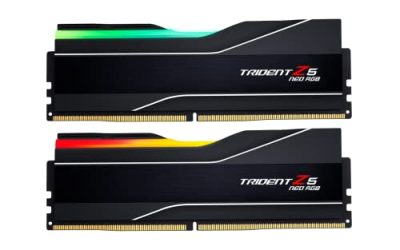
If you are shopping for a kit, the roundup of the best 64GB RAM options for gaming covers the current kits worth considering, along with the 32GB alternatives that suit most builds.
When 64GB Is Justified, and When the Money Serves Better Elsewhere
Sixty-four gigabytes is justified when the machine does more than game: regular streaming and video editing, heavy multitasking, professional software running beside games, or deeply modded simulation titles. It also makes sense as a longevity play on a high-end build you plan to keep for many years, where the extra cost is small next to the total budget and you never want to think about memory again.
For everyone else, the money almost always serves better elsewhere. A GPU upgrade delivers visible frame-rate gains that extra RAM cannot. A larger or faster SSD removes loading hitches and gives your game library room to grow. Even stepping from 16GB to 32GB, rather than to 64GB, is the upgrade most gaming PCs actually benefit from. Capacity is a threshold, not a dial: cross the threshold your workload needs, and spend the rest where it changes what you see on screen.
FAQ
Will 64GB of RAM make my games run faster than 32GB?
For gaming alone, essentially no. Once a system has enough memory for the game and your background apps, additional capacity sits unused and does not raise frame rates. Reviewers consistently find the meaningful jump is from 16GB to 32GB in the most demanding titles, not from 32GB to 64GB.
Is 16GB of RAM still enough for gaming in 2026?
It is enough for the majority of games, particularly at 1080p with modest background usage, but it is the minimum comfortable amount rather than a generous one. The heaviest current releases can push total system usage close to the limit, so new builds are better served by 32GB.
Should I buy two sticks or four sticks for 64GB?
Two sticks of 32GB is the safer default. It guarantees dual-channel operation, tends to run rated speeds more reliably than a fully populated four-slot board, especially with DDR5, and leaves slots free for a future upgrade.
Is it better to upgrade RAM or the GPU with a limited budget?
The GPU, in almost every gaming scenario. Extra RAM beyond your workload’s needs adds no frames, while a stronger graphics card improves frame rates and settings headroom in every game. Only upgrade capacity first if your system is genuinely running out of memory and stuttering because of it.
Final Verdict
For a PC built purely for gaming, 64GB of RAM is overkill: 32GB covers every current game with room to spare, and the surplus budget does more good in a faster GPU or a bigger SSD. Sixty-four gigabytes earns its place on machines that also stream, edit video, multitask heavily, or run deeply modded simulation titles, and as a set-and-forget choice on high-end builds meant to last. Match the capacity to the workload, run it in dual channel with two sticks, and you will have spent your memory budget exactly where it counts.