

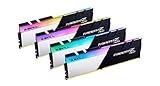
- Top Pick: G.SKILL Trident Z Neo Series DDR4 RAM (XMP) 64GB (4x16GB) Up to 3600MT/s CL16-19-19-39 1.35V Intel AMD Desktop Computer Memory U-DIMM (F4-3600C16Q-64GTZNC)
- Best Value: G.SKILL Trident Z5 Neo RGB Series DDR5 RAM (AMD EXPO) 64GB (2x32GB) Up to 6000MT/s* CL30-40-40-96 1.40V Desktop Computer Memory U-DIMM – Matte Black (F5-6000J3040G32GX2-TZ5NR)
- Premium Choice: CORSAIR Vengeance LPX DDR4 RAM 32GB (2x16GB) Up to 3200MHz CL16-20-20-38 1.35V Intel XMP AMD EXPO Computer Memory – Black (CMK32GX4M2E3200C16)
64GB of RAM has gone from overkill to genuinely useful for a growing number of people. If you game while streaming and running a dozen browser tabs, edit high-resolution video, work with large datasets, or simply want a system you will not have to think about for years, a 64GB kit gives you breathing room that 16GB or 32GB cannot. This guide rounds up the best 64GB RAM kits in 2026 across the configurations people actually buy: DDR4 and DDR5, desktop UDIMM and laptop SODIMM, and a spread of speeds and prices.
- Best 64GB RAM at a Glance
- 1. CORSAIR Vengeance LPX 32GB (2x16GB) DDR4-3200 CL16
- 2. Crucial 64GB DDR4 Kit (2x32GB) DDR4-3200 SODIMM (Laptop)
- 3. Crucial Pro 64GB DDR4 Kit (2x32GB) Desktop (3200/3000/2666)
- 4. Crucial 64GB DDR4 Kit (2x32GB) DDR4-3200 UDIMM (Desktop)
- 5. G.SKILL Ripjaws V 64GB (4x16GB) DDR4-3200 CL16 XMP
- 6. Crucial 64GB DDR5 Kit (2x32GB) DDR5-4800 SODIMM (Laptop)
- How to Choose the Right 64GB RAM Kit
- Frequently Asked Questions
- Related Guides
- Related Articles
- Related Guides
Our picks were chosen on the criteria that matter for memory: capacity per kit, real-world speed and latency, compatibility with desktop versus laptop platforms, and value for money. We have deliberately included both DDR4 and DDR5 because the right kit depends entirely on the motherboard you own — there is no point buying DDR5 for a DDR4 board, or vice versa. Prices here run from around $220 to around $686. Below you will find an at-a-glance comparison, then a closer look at each kit and a buyer’s guide covering the things that genuinely separate a good 64GB kit from the wrong one for your build.
As an Amazon Associate we earn from qualifying purchases at no extra cost to you.


🛒 Best Price Today on Amazon
Prime members get fast, free shipping on everything above, plus member-only deals. New members get a 30-day free trial — cancel anytime.
Best 64GB RAM at a Glance
| Memory Kit | Best For | Standout Spec | Approx Price |
|---|---|---|---|
| CORSAIR Vengeance LPX 32GB DDR4 | DDR4 value starter | Low-profile DDR4-3200 CL16 | around $220 |
| Crucial 64GB DDR4 SODIMM (laptop) | Laptop 64GB upgrade | 2x32GB DDR4-3200 SODIMM | around $419 |
| Crucial Pro 64GB DDR4 Desktop | Flexible DDR4 desktop | Selectable 3200/3000/2666 | around $500 |
| Crucial 64GB DDR4 UDIMM Desktop | Reliable DDR4 desktop | 2x32GB DDR4-3200 UDIMM | around $500 |
| G.SKILL Ripjaws V 64GB DDR4 | Enthusiast DDR4 with XMP | 4x16GB DDR4-3200 CL16, XMP | around $530 |
| Crucial 64GB DDR5 SODIMM (laptop) | DDR5 laptop futureproofing | 2x32GB DDR5-4800 SODIMM | around $686 |
1. CORSAIR Vengeance LPX 32GB (2x16GB) DDR4-3200 CL16

CORSAIR Vengeance LPX DDR4 RAM 32GB (2x16GB) Up to 3200MHz CL16-20-20-38 1.35V Intel XMP AMD EXPO Computer Memory – Black (CMK32GX4M2E3200C16)


As an Amazon Associate we earn from qualifying purchases. Product prices and availability are accurate as of the date/time indicated.
The CORSAIR Vengeance LPX is the value entry point of this list, and a useful reality check: at around $220 this is a 32GB (2x16GB) DDR4-3200 kit rather than a full 64GB kit, included here as the affordable building block many people start from. The low-profile heat spreader clears most CPU coolers, the CL16 timings are genuinely quick for DDR4, and Vengeance LPX is one of the most widely trusted memory lines on desktop AMD and Intel platforms.
This is the pick for the builder on a DDR4 board who wants to begin with a fast, reliable 32GB pair and add a second matching kit later, or who simply does not yet need the full 64GB. The 1.35V XMP profile makes hitting 3200MHz a one-click affair, and the low height avoids clearance headaches. If your budget or needs sit below a full 64GB today but you want a clear upgrade path, the Vengeance LPX is the sensible starting point.
Pros: Fast CL16 DDR4-3200, low-profile design, trusted brand, great value per stick.
Cons: 32GB kit (not 64GB) at this price; pair a second kit for full 64GB.
2. Crucial 64GB DDR4 Kit (2x32GB) DDR4-3200 SODIMM (Laptop)
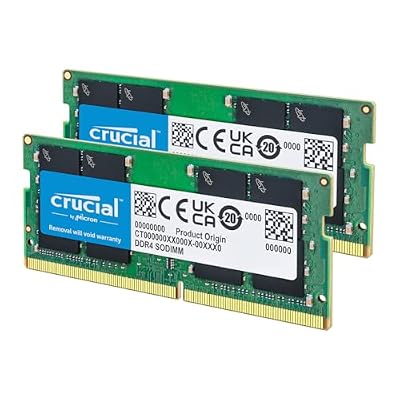
Crucial 64GB DDR4 RAM Kit (2x32GB), 3200MHz (PC4-25600) CL22 Laptop Memory, SODIMM 260-Pin, Downclockable to 2933/2666MHz, Compatible with 13th Gen Intel Core and AMD Ryzen 7000 - CT2K32G4SFD832A


As an Amazon Associate we earn from qualifying purchases. Product prices and availability are accurate as of the date/time indicated.
The Crucial 64GB DDR4 SODIMM kit is the pick for laptop and small-form-factor owners. It is a true 64GB kit — two 32GB SODIMM modules running at 3200MHz (PC4-25600) with CL22 timings — designed for the SODIMM slots found in laptops, mini PCs and some compact systems rather than full-size desktop boards. At around $419 it is the most affordable way onto this list with a genuine 64GB capacity.
This is the kit to buy if you want to max out a DDR4 laptop or NUC-style mini PC for heavy multitasking, virtual machines or creative work on the move. Crucial is Micron’s consumer brand, so the modules use first-party DRAM and carry a strong reputation for compatibility. Before buying, confirm your laptop supports 64GB and uses DDR4 SODIMMs; if it does, this kit is a straightforward, dependable upgrade.
Pros: True 64GB capacity, laptop SODIMM form factor, first-party Micron DRAM, good value.
Cons: SODIMM only (not for desktops); CL22 timings are relaxed for DDR4.
3. Crucial Pro 64GB DDR4 Kit (2x32GB) Desktop (3200/3000/2666)

Crucial Pro 64GB DDR4 RAM Kit (2x32GB), 3200MHz (or 3000MHz or 2666MHz) Desktop Memory, Compatible with Intel and AMD Ryzen - CP2K32G4DFRA32A


As an Amazon Associate we earn from qualifying purchases. Product prices and availability are accurate as of the date/time indicated.
The Crucial Pro 64GB DDR4 kit is the flexible desktop choice. It is a true 64GB (2x32GB) UDIMM kit for full-size desktop boards, and its standout feature is selectable speed: the same kit supports 3200MHz, 3000MHz or 2666MHz depending on what your motherboard and CPU comfortably run. At around $500 it brings Crucial’s Pro-tier validation to a high-capacity desktop upgrade.
This kit suits the desktop builder or upgrader who wants 64GB that simply works across a range of DDR4 platforms without hunting for a perfectly matched speed bin. The multi-speed support takes the guesswork out of compatibility — if 3200MHz is not stable on an older board, you drop a step and carry on. For a no-drama, high-capacity DDR4 desktop kit from a first-party brand, the Crucial Pro is a smart, safe pick.
Pros: True 64GB desktop UDIMM, selectable 3200/3000/2666 speeds, Pro-tier validation.
Cons: DDR4 only; desktop UDIMM form factor; premium price.
4. Crucial 64GB DDR4 Kit (2x32GB) DDR4-3200 UDIMM (Desktop)

Crucial 64GB DDR4 RAM Kit (2x32GB), 3200MHz (PC4-25600) CL22 Desktop Memory, UDIMM 288-Pin, Downclockable to 2933/2666MHz, Compatible with Intel and AMD Ryzen - CT2K32G4DFD832A


As an Amazon Associate we earn from qualifying purchases. Product prices and availability are accurate as of the date/time indicated.
The Crucial 64GB DDR4-3200 UDIMM kit is the straightforward desktop workhorse. Like the Pro version it delivers a genuine 64GB across two 32GB desktop modules at 3200MHz (PC4-25600) with CL22 timings, but it keeps things simple: a fixed 3200MHz target and Crucial’s standard validation, at around $500. For most DDR4 desktops this is all the memory you will need.
This is the pick for the desktop owner who wants a reliable, high-capacity DDR4 upgrade and does not need the multi-speed flexibility of the Pro kit. The first-party Micron DRAM and Crucial’s long compatibility track record make it an easy recommendation for gaming rigs, workstations and home servers alike. Confirm your board takes 32GB UDIMMs, slot it in, and you have 64GB of dependable desktop memory.
Pros: True 64GB desktop UDIMM, reliable DDR4-3200, first-party Micron DRAM.
Cons: Relaxed CL22 timings; DDR4 desktop only; not the cheapest route to 64GB.
5. G.SKILL Ripjaws V 64GB (4x16GB) DDR4-3200 CL16 XMP

G.SKILL RipjawsV Series DDR4 RAM (XMP) 64GB (4x16GB) Up to 3200MT/s* CL16-18-18-38 1.35V Intel AMD Desktop Computer Memory U-DIMM - Black (F4-3200C16Q-64GVK)


As an Amazon Associate we earn from qualifying purchases. Product prices and availability are accurate as of the date/time indicated.
The G.SKILL Ripjaws V is the enthusiast DDR4 pick of this list. It reaches 64GB through four 16GB modules at 3200MT/s with tight CL16-18-18-38 timings and a 1.35V XMP profile — noticeably quicker latency than the CL22 high-capacity kits above. At around $530 it is aimed at the builder who wants both capacity and speed from a respected enthusiast memory brand.
This kit is the choice for a high-end DDR4 gaming or creator build where you want to fill all four DIMM slots and squeeze better performance from the platform. The CL16 timings and proven XMP make it a favorite for tuned systems, though running four sticks does ask more of the memory controller than a two-stick kit, so a capable board helps. For enthusiasts who refuse to compromise on DDR4 speed at 64GB, the Ripjaws V is the standout.
Pros: Tight CL16 timings, full 64GB across four sticks, reliable XMP, enthusiast brand.
Cons: Four-DIMM kit stresses the memory controller more; DDR4 desktop only.
6. Crucial 64GB DDR5 Kit (2x32GB) DDR5-4800 SODIMM (Laptop)

Crucial Pro DDR5 RAM 64GB Kit (2x32GB) 6400MHz CL40, Overclocking Desktop Gaming Memory, Intel XMP 3.0 & AMD Expo Compatible – White CP2K32G64C40U5W


As an Amazon Associate we earn from qualifying purchases. Product prices and availability are accurate as of the date/time indicated.
At the top of this list is the Crucial 64GB DDR5 SODIMM kit — the future-facing pick for modern laptops and mini PCs. It pairs two 32GB DDR5 SODIMM modules running at 4800MHz with CL40 timings, bringing the latest memory standard’s bandwidth and on-module power management to portable systems. At around $686 it is the premium option here, reflecting both the capacity and the newer DDR5 technology.
This is the kit for owners of recent DDR5-based laptops who want to max out to 64GB for demanding creative work, virtualization or simply long-term headroom. DDR5 delivers higher bandwidth than DDR4 and the SODIMM form factor fits laptops and compact machines — but it only works in DDR5 systems, so check your platform first. For futureproofing a modern portable workstation at 64GB, this Crucial DDR5 kit is the standout choice.
Pros: Modern DDR5 bandwidth, true 64GB, laptop SODIMM form factor, first-party DRAM.
Cons: Highest price here; DDR5 SODIMM only; CL40 latency typical of early DDR5.
How to Choose the Right 64GB RAM Kit
Choosing a 64GB kit starts with one non-negotiable question: does your motherboard or laptop use DDR4 or DDR5? The two are not interchangeable — they use different slots and are physically keyed differently — so the very first step is to confirm your platform. Most systems from the last few years built on older AMD AM4 or earlier Intel boards use DDR4, while the newest AMD AM5 and recent Intel platforms use DDR5. Buy the wrong type and the memory simply will not fit, so check before anything else.
Next comes form factor: desktop or laptop. Full-size desktop boards use UDIMM modules, while laptops, mini PCs and many compact systems use the smaller SODIMM modules. Several kits here are explicitly SODIMM (the Crucial DDR4 and DDR5 laptop kits) and several are desktop UDIMM (the Crucial Pro, the Crucial DDR4-3200 UDIMM and the G.SKILL Ripjaws V). Match the form factor to your machine, and on laptops confirm the maximum supported capacity is at least 64GB before buying.
Speed and latency are the next consideration, and they are a balance rather than a single number. A higher data rate (such as DDR4-3200 or DDR5-4800) raises bandwidth, while tighter CAS latency (CL16 versus CL22 or CL40) lowers the delay before data arrives. The G.SKILL CL16 kit is quicker than the CL22 high-capacity Crucial kits, for instance. For most users the difference is modest next to simply having 64GB, but enthusiasts chasing every frame may prefer the tighter timings — just make sure your board supports the rated XMP or EXPO profile.
Finally, weigh kit layout and budget. A two-stick kit (2x32GB) leaves slots free for future expansion and is gentler on the memory controller, while a four-stick kit (4x16GB) like the Ripjaws V fills every slot and can be harder to run at top speed on some boards. Decide your platform, confirm the form factor, pick the speed that suits your needs, set a budget, and choose the kit on this list that matches. The best 64GB kit is the one your system recognises, runs at its rated speed, and never makes you think about memory again.
Frequently Asked Questions
Do I really need 64GB of RAM for gaming?
For pure gaming, 16GB to 32GB is plenty in 2026 — most games do not use more. 64GB makes sense if you game while streaming and running many background apps, edit high-resolution video, run virtual machines or large datasets, or simply want long-term headroom. If you only game, a 32GB kit like the CORSAIR Vengeance LPX paired up is usually the smarter spend.
Can I mix DDR4 and DDR5, or different kits?
No, DDR4 and DDR5 are physically incompatible and use different slots, so your motherboard supports only one. Mixing different kits of the same type can also cause instability, so the safest approach is to buy a single matched 64GB kit rather than combining odd sticks. If you plan to expand later, start with a two-stick kit that leaves slots free.
What is the difference between UDIMM and SODIMM memory?
UDIMM modules are the full-size sticks used in desktop motherboards, while SODIMM modules are the shorter sticks used in laptops, mini PCs and many compact systems. They are not interchangeable. In this guide the Crucial laptop kits are SODIMM, while the Crucial Pro, Crucial UDIMM and G.SKILL Ripjaws V are desktop UDIMM — match the form factor to your machine.
Is DDR5 worth it over DDR4 for a 64GB kit?
Only if your platform supports DDR5 in the first place. DDR5, like the Crucial DDR5-4800 SODIMM kit, offers higher bandwidth and better futureproofing, but it costs more and early DDR5 latencies (CL40) are relaxed. If you own a DDR4 board, a quality DDR4 64GB kit is the right and far cheaper choice; only DDR5 systems can use DDR5 memory.
Related Guides
- Best RAM for Gaming
- Best DDR5 RAM
- Best DDR4 RAM
- Best RAM for Content Creation
- Best Motherboards for Your RAM
- Best SSDs for a Boot Drive
Affiliate Disclosure: As an Amazon Associate, we earn from qualifying purchases. If you click a link and make a purchase, we may earn a small commission at no extra cost to you. Prices and availability are accurate as of publication and may change.










