

- Top Pick: Sceptre New 22-Inch Gaming Monitor, FHD 1080p, Up to 144Hz, HDMI, DisplayPort, Built-in Speakers, Machine Black (E225W-FW144 Series, 2026)
- Best Value: Acer 27in FHD 1920×1080 IPS 120Hz Gaming Monitor | Office KB272 G0bi
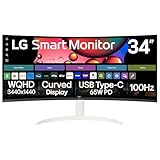
- Premium Choice: LG 34SR60QC-W 34-inch QHD (3440×1440) Curved Smart Monitor with Streaming, UltraWide Screen, webOS, HDR10, 100Hz, Built-in Speaker, AirPlay2, Screen Share, Bluetooth, ThinQ App, White
A good monitor is one of the most useful upgrades a streamer can make. Whether you are playing and broadcasting on a single screen or running a dedicated display for your stream dashboard, chat and OBS, the right monitor helps in two ways at once: accurate colour so your preview matches what viewers see, and a smooth, fast panel so your gameplay looks fluid both to you and on the capture. The encouraging news is that you do not need a premium display to get there — in 2026 there are capable options from around $70 to roughly $270 that cover everything from a tidy second screen to an immersive ultrawide.
- Best Monitors for Streaming at a Glance
- 1. Sceptre 24-inch Prime 1080p LED Monitor
- 2. HP Series 3 27-inch FHD IPS Monitor
- 3. Sceptre Curved 24-inch Gaming Monitor
- 4. KOORUI 22-inch Computer Monitor 120Hz
- 5. Sceptre Curved 27-inch Prime Monitor 100Hz
- 6. Sceptre 30-inch Curved Ultrawide Monitor
- How to Choose
- Frequently Asked Questions
- Related Guides
- Related Articles
In this round-up we compare six of the best monitors for streaming you can buy right now, ranging from an ultra-affordable 22-inch panel up to a 30-inch ultrawide that gives you room for your game and your stream tools side by side. We weigh up the things that matter for a stream setup — colour coverage, refresh rate, resolution, screen size and value — so you can match a display to your channel and budget. Whether you want the cheapest way to add a second monitor or a single big screen to do it all, there is a pick here for you. Prices are approximate and change often.
As an Amazon Associate we earn from qualifying purchases at no extra cost to you.






🛒 Best Price Today on Amazon
Prime members get fast, free shipping on everything above, plus member-only deals. New members get a 30-day free trial — cancel anytime.
Best Monitors for Streaming at a Glance
| Product | Best For | Standout Spec | Approx Price |
|---|---|---|---|
| Sceptre 24″ 1080p | Best all-rounder | 1080p, 99% sRGB, dual HDMI | around $79 |
| HP Series 3 27″ | Best for colour preview | 27-inch FHD IPS, 1300:1 | around $178 |
| Sceptre Curved 24″ | Tightest budget | 1080p curved, 98% sRGB | around $80 |
| KOORUI 22″ 120Hz | Best stream-tools screen | 22-inch, 120Hz, VA | around $70 |
| Sceptre Curved 27″ | Big-screen value | 27-inch, 100Hz, 99% sRGB | around $98 |
| Sceptre 30″ Ultrawide | Multitasking and OBS | 2560×1080, 21:9 ultrawide | around $270 |
1. Sceptre 24-inch Prime 1080p LED Monitor

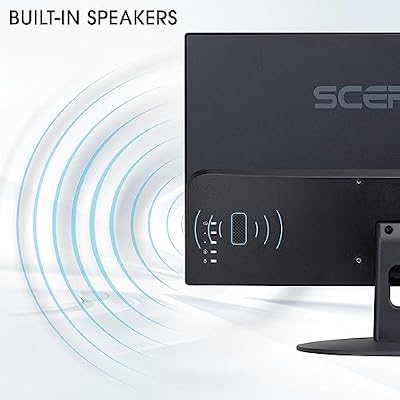
Sceptre 24-inch Prime Monitor Thin 1080p LED Monitor 99% sRGB 2X HDMI VGA Build-in Speakers, Machine Black (E248W-19203R 2025 Series)



As an Amazon Associate we earn from qualifying purchases. Product prices and availability are accurate as of the date/time indicated.
The Sceptre 24-inch Prime is a superb value all-rounder, and a sensible main or second screen for a streamer on a budget — it usually sells for around $79. It pairs a Full HD (1920×1080) resolution with a slim, modern design and a quoted 99% sRGB colour coverage, which is genuinely strong for the price and helps your stream preview look accurate rather than washed out. Connectivity is generous, with two HDMI ports plus VGA and built-in speakers, so it slots easily into a multi-monitor setup.
For a streamer, that wide colour coverage is the headline: it means the colours you see while editing overlays or checking your scene are closer to what your audience sees. At 24 inches and 1080p it is sharp at a normal viewing distance, and the dual HDMI inputs make it easy to switch between a console and a PC or to drive it as a secondary display. It is not a high-refresh gaming panel, but as an accurate, affordable screen for your stream tools or a tidy main display, it is excellent value. Our best budget gaming monitors guide has more affordable picks like it.
Pros: Strong 99% sRGB colour for the price; slim modern design; dual HDMI plus VGA; built-in speakers; very affordable.
Cons: 1080p only; standard refresh rate rather than high-refresh; budget stand.
2. HP Series 3 27-inch FHD IPS Monitor
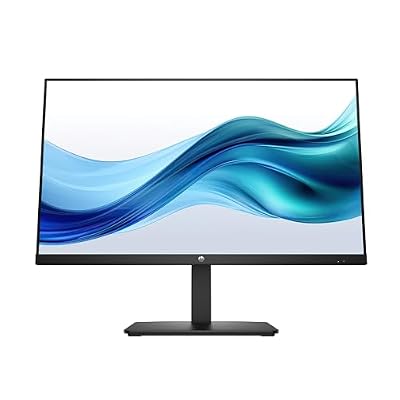
HP Series 3 27 inch FHD Monitor, Full HD Display (1920 x 1080), IPS Panel, 1300:1 Contrast Ratio, 250 Nits, Eye Ease with Eyesafe Certification, Black, 327se (2025)



As an Amazon Associate we earn from qualifying purchases. Product prices and availability are accurate as of the date/time indicated.
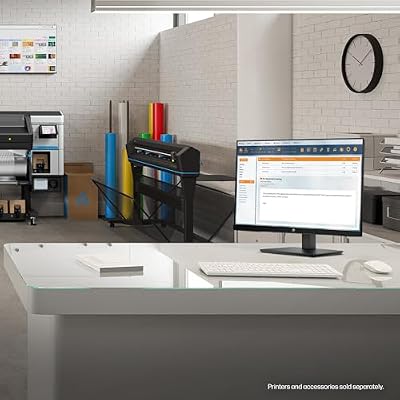
The HP Series 3 27-inch is the colour-preview pick of this round-up, and a smart choice for a streamer who wants a larger, more accurate screen from a major brand — it sells for around $178. It uses a 27-inch IPS panel at Full HD (1920×1080) resolution with a strong 1300:1 contrast ratio, and IPS technology brings the wide viewing angles and accurate, consistent colour that matter when you are setting up scenes, checking your camera feed and making sure your stream looks right.
The larger 27-inch size gives you more room to work — useful for keeping OBS, chat and your game or preview visible at once — while the IPS panel ensures colours stay accurate even when you glance at the screen from an angle, which is common during a live broadcast. HP’s build quality and support network add reassurance for a screen you will rely on every stream. It is a flat, accurate, well-built panel rather than a high-refresh gaming monitor, so it is best paired with a separate fast display if you also chase high frame rates. As an accurate preview and dashboard screen, it is a strong choice. See our best ips monitors guide for more in this class.
Pros: Accurate IPS colour and wide viewing angles; large 27-inch screen; strong 1300:1 contrast; trusted HP brand and support; great for preview and dashboard.
Cons: 1080p across 27 inches is less sharp up close; standard refresh rate; no high-refresh gaming focus.
3. Sceptre Curved 24-inch Gaming Monitor

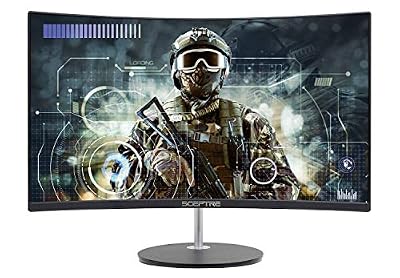
Sceptre Curved 24-inch Gaming Monitor 1080p R1500 98% sRGB HDMI x2 VGA Build-in Speakers, VESA Wall Mount Machine Black (C248W-1920RN Series)



As an Amazon Associate we earn from qualifying purchases. Product prices and availability are accurate as of the date/time indicated.
The Sceptre Curved 24-inch is one of the most affordable ways to get a colour-capable, gently immersive screen onto a stream setup, often selling for around $80. It pairs a 1080p resolution with a 1500R curve that wraps slightly around your field of view, and Sceptre quotes 98% sRGB coverage — strong colour for the price, which keeps your preview looking vivid. Connectivity is generous for a budget panel, with two HDMI ports plus VGA and built-in speakers, so it is genuinely plug-and-play.
For a streamer it works well as either an immersive main gaming screen or an accurate secondary display for chat and OBS. The curve adds a touch of immersion you do not usually find this cheap, and the wide colour coverage means images look rich rather than flat on stream. You will not get the blistering refresh rates of a dedicated gaming panel, but for casual streaming, study and everyday use it is excellent value. If you want a larger or faster screen, the other Sceptre options below are worth a look, and our best curved gaming monitors guide compares more curved displays.
Pros: Very affordable; gentle immersive curve; strong 98% sRGB colour; dual HDMI plus VGA; built-in speakers.
Cons: 1080p only; lower refresh rate than dedicated gaming panels; budget build and stand.
4. KOORUI 22-inch Computer Monitor 120Hz

KOORUI 22 Inch Computer Monitor FHD 120Hz VA VESA Low Blue Light, E2212H | Adaptive Sync, 4000:1 Contrast Ratio, Ultra-Slim Display, HDMI 1.4/VGA, Tilt Adjust, Compact for Dorms, Study and Office


As an Amazon Associate we earn from qualifying purchases. Product prices and availability are accurate as of the date/time indicated.
The KOORUI 22-inch is the most affordable pick here, usually around $70, and it makes an ideal dedicated stream-tools screen — the kind of compact second display where you park OBS, your chat and your alerts while your main monitor handles the game. It offers a Full HD (1920×1080) resolution on a VA panel with a 120Hz refresh rate, which is a pleasant surprise at this price and keeps scrolling chat and desktop motion smooth.
VA panels are known for strong contrast and deep blacks, so text and dashboards look crisp, and the compact 22-inch size fits neatly beside a larger main monitor without crowding the desk. The 120Hz refresh rate also means it can serve as a capable budget gaming screen in its own right. It is a no-frills panel — colour coverage and stand adjustability are basic — but as a cheap, smooth, space-efficient second screen for managing a stream, it is hard to beat for the money. Our best budget gaming monitors guide lists more value options like it.
Pros: Lowest price here; 120Hz refresh is rare at this price; strong VA contrast; compact 22-inch size ideal as a second screen.
Cons: Basic colour coverage; limited stand adjustability; smaller 22-inch panel.
5. Sceptre Curved 27-inch Prime Monitor 100Hz
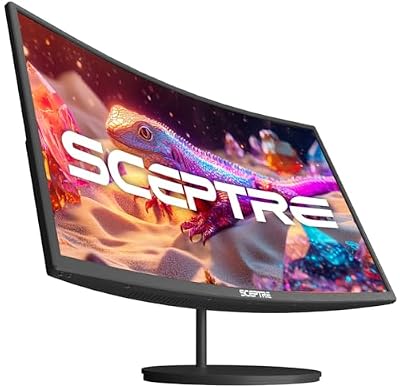
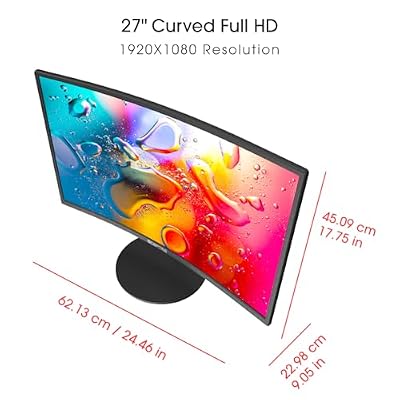
Sceptre Curved 27-inch Prime Monitor up to 100Hz 1080p, HDMI x2, VGA, 99% sRGB, Built-in Speakers, R1500, Machine Black 2025 (C275W-1920RN Series)



As an Amazon Associate we earn from qualifying purchases. Product prices and availability are accurate as of the date/time indicated.
The Sceptre Curved 27-inch Prime is a big-screen value pick for a streamer who wants more real estate without spending much — it typically lands around $98. It pairs a 27-inch 1080p panel with a gentle curve and a refresh rate of up to 100Hz, and Sceptre quotes 99% sRGB coverage, so it combines a generous size with accurate colour and a touch of immersion. Built-in features and multiple inputs make it easy to integrate into a streaming desk.
The larger 27-inch curved panel gives you room for a game plus a slice of your stream tools, or simply a more immersive single display, while the 100Hz refresh is a meaningful step up from a standard 60Hz screen for smoother motion on capture. At 27 inches the 1080p resolution is spread over a larger area, so it looks best from a normal viewing distance rather than up close — a fair trade for the size and price. With 99% sRGB colour it keeps your preview looking accurate. For a big, affordable, colour-capable streaming screen, it is a compelling choice, and our best curved gaming monitors guide compares more curved options.
Pros: Large 27-inch curved panel; up to 100Hz refresh; strong 99% sRGB colour; multiple inputs; affordable for the size.
Cons: 1080p across 27 inches is less sharp up close; curve is a matter of taste; budget build.
6. Sceptre 30-inch Curved Ultrawide Monitor
Sceptre Curved 24-inch Gaming Monitor 1080p R1500 98% sRGB HDMI x2 VGA Build-in Speakers, VESA Wall Mount Machine Black (C248W-1920RN Series)
As an Amazon Associate we earn from qualifying purchases. Product prices and availability are accurate as of the date/time indicated.
The Sceptre 30-inch Curved Ultrawide is the multitasking champion of this round-up, and a genuinely useful single-screen solution for streamers — it sells for around $270. Its 21:9 ultrawide 2560×1080 panel gives you far more horizontal space than a standard 16:9 monitor, which is transformative for streaming: you can run your game alongside OBS, chat and your dashboard without a second display, or split the screen between gameplay and your control surface. The gentle curve helps keep the wide panel comfortable to view.
For a streamer working from one screen, that extra width is the headline benefit — it reduces the need for alt-tabbing and keeps everything you manage live in view at once. The ultrawide format is also immersive for the games themselves, wrapping more of your field of view. It costs more than the other picks here, but it replaces the need for a multi-monitor setup and the desk space that demands. For a streamer who wants to do it all on one big, immersive screen, the 30-inch ultrawide is the standout. See our best ultrawide monitors guide for more in this format.
Pros: Spacious 21:9 ultrawide for game plus stream tools; immersive curve; reduces need for a second monitor; single-cable simplicity; great for OBS multitasking.
Cons: Most expensive pick here; 2560×1080 is wide rather than tall; ultrawide needs game support for best results.
How to Choose
Choosing a monitor for streaming comes down to deciding how you stream and matching the right display to that workflow — whether you run everything on one screen or split your setup across two. Start with that question. If you stream and play on a single monitor, an ultrawide like the Sceptre 30-inch is transformative, giving you room for your game plus OBS, chat and alerts without alt-tabbing. If you run a dual-monitor setup, you can pair a capable main gaming display with a smaller, cheaper second screen — something like the 120Hz KOORUI 22-inch — dedicated to your stream tools, which is often the most cost-effective route.
Next, prioritise colour accuracy. As a streamer, what you see should match what your viewers see, so a panel with strong sRGB coverage matters more than it does for pure gaming. The Sceptre models here quote 98 to 99% sRGB, and the HP Series 3’s IPS panel adds wide viewing angles that keep colour consistent when you glance at the screen from an angle during a live broadcast. If you do any thumbnail or overlay editing, lean towards the more colour-accurate IPS options.
Then weigh refresh rate and resolution against your content. Fast-paced gameplay looks smoother on a higher-refresh panel both to you and on capture, so the 100Hz and 120Hz options have an edge for action games, while a standard-refresh IPS screen is fine for slower titles, Just Chatting or dashboard duty. Size and resolution should suit your desk and viewing distance — 24 inches at 1080p is sharp up close, while 27-inch and ultrawide panels reward a slightly greater distance. Finally, set a realistic budget. Around $70 to $80 buys a capable single screen or a great dedicated stream-tools display; around $100 to $180 adds size and colour accuracy; and around $270 buys the ultrawide that can do it all on one panel. Decide which approach fits your channel, then pick the monitor in that band that best matches your games and desk.
Frequently Asked Questions
What kind of monitor is best for streaming?
It depends on whether you stream on one screen or two. For a single-screen setup, an ultrawide like the Sceptre 30-inch gives you room for your game plus OBS, chat and alerts at once. For a dual-monitor setup, pair a capable main display with a smaller, cheaper second screen for your stream tools. Across both, prioritise strong sRGB colour coverage so your preview matches what viewers see.
Do I need a high refresh rate monitor for streaming?
It helps for fast-paced gameplay but is not essential for every stream. A higher refresh rate, like the 100Hz or 120Hz panels here, makes action games look smoother both to you and on capture. For slower games, Just Chatting or a dedicated stream-tools screen, a standard refresh rate is perfectly fine, so match the refresh rate to the kind of content you broadcast.
Is an ultrawide monitor good for streaming?
Yes, particularly if you stream from a single screen. An ultrawide such as the Sceptre 30-inch 21:9 panel gives you far more horizontal space, so you can keep your game alongside OBS, chat and your dashboard without alt-tabbing or needing a second monitor. The main caveats are that games need ultrawide support for the best results, and the format is wide rather than tall.
Why does colour accuracy matter for a streaming monitor?
Because what you see on screen should match what your audience sees. A panel with strong sRGB coverage — the Sceptre models here quote 98 to 99% sRGB, and the HP Series 3 uses an accurate IPS panel — keeps your scene previews, overlays and camera feed looking correct, which is important when you set up your stream and edit thumbnails or graphics.
Related Guides
- Best Gaming Monitors
- Best IPS Monitors
- Best Ultrawide Monitors
- Best Curved Gaming Monitors
- Best Streaming Setup for Gaming
- Best Budget Gaming Monitors
Affiliate Disclosure: As an Amazon Associate, we earn from qualifying purchases. If you click a link and make a purchase, we may earn a small commission at no extra cost to you. Prices and availability are accurate as of publication and may change.










