The real decision is not how fast a mouse can track. It is how much of your rotation you can move off the keyboard without creating new problems. A thumb grid can hold interrupts, defensives, potions and targeting macros, yet a grid you cannot read by touch slows casts and strains your hand. Too few buttons, though, leaves long cooldowns buried under modifier keys during boss phases and crowded pulls in everyday questing.
This guide serves three kinds of players: MMO regulars who want a full 12-button grid, RPG players who need a handful of extra controls on a comfortable shell, and anyone splitting time between both genres. Every pick below was chosen from the product names and specifications published on its Amazon listing, so button counts, sensors, battery figures and platform notes all come from the seller page rather than from a spec sheet elsewhere.
Quick Picks
As an Amazon Associate we earn from qualifying purchases.
| Product | Best for | Key spec from title |
|---|---|---|
| Razer Naga V2 Pro | Raiders who want one mouse for MMO grids and smaller RPG layouts | Focus Pro 30K optical sensor |
| Corsair Scimitar RGB Elite | Wired players who want a thumb grid that slides to fit their hand | 18,000 DPI, 17 programmable buttons |
| SteelSeries Aerox 9 Wireless | Long sessions where a lighter wireless mouse matters | 18K DPI TrueMove Air optical sensor |
| Logitech G502 X Plus | RPG players who want extra controls without a full grid | HERO 25K sensor, 13 buttons |
| UtechSmart Venus Pro | Players who want a wireless thumb grid for a laptop desk | 16,000 DPI optical sensor, 16 programmable buttons |
How to Choose
Button Count and Layout
Count the abilities you press every fight, not the ones buried in a spellbook. A 12-button thumb grid suits rotations with interrupts, defensives, mounts and consumables all in regular use, and it rewards players who learn positions by touch. Fewer, larger side buttons work better when only four or five commands move off the keyboard. Layout matters as much as the total: staggered rows, raised dividers and a panel that shifts position all change whether your thumb lands on the right key during a hectic pull.
Size, Weight and Grip Fit
An MMO shell is usually wide, because the thumb needs room to travel across a grid without rocking the mouse. That width can cramp a small hand or a fingertip grip, so compare the listed length and weight against the mouse you already use. Palm and claw grips spread contact and suit longer sessions, while a lighter body reduces the effort of constant small corrections. Your surface matters too, since glide changes how a heavy shell feels; a smooth pad, including a glass mousepad, makes a wide mouse feel less sluggish.
Sensor and Polling
For this genre, sensor quality shows up as consistency rather than headline numbers. Any modern optical sensor in this list tracks far beyond what questing, raiding or menu work demands, so treat maximum DPI as headroom, not a ranking. Adjustable steps are more useful, because one setting rarely suits both camera turns and careful cursor placement in a crowded inventory. Polling tells you how often the mouse reports its position; a standard gaming rate is plenty for RPG play, and stability across your desk surface matters more than chasing the highest figure.
Connectivity and Battery
Wired models remove charging from the routine and keep weight down by skipping a battery, which suits a fixed desk. Wireless models free the cable from monitors and mugs, yet they add two checks: which connection you will actually use, and how long the battery lasts on that connection. Headline battery figures often assume the gentler wireless mode, so read the listing for the number tied to the fast 2.4 GHz link if that is your plan. A mouse that also works plugged in covers the evening the battery runs flat mid-raid.
The 5 Best Options
Razer Naga V2 Pro

The Naga V2 Pro answers the layout question with hardware instead of compromise. Its swappable side plates let one mouse carry a 12-button grid for raid nights, a smaller panel for story RPGs, and a plain two-button side for everything else. That flexibility suits players whose main game changes with each expansion cycle. The Focus Pro 30K sensor and optical main switches keep ordinary aiming and camera work sharp, while the wireless design clears cable drag from a desk that already holds a keyboard, headset stand and notebook.
Specs
- Buttons: 19+1 programmable buttons
- Side plates: swappable side plates included in the design
- Scroll wheel: HyperScroll Pro Wheel
- Sensor: Focus Pro 30K optical sensor
- Switches: Optical Mouse Switches Gen-3
- Battery: up to 300 hours per the listing title
- Model: RZ01-04400100-R3U1
- Platform: PC, with Windows, macOS and Linux listed
Best for: MMO players who also play button-light RPGs and want one mouse to cover both.
Watch out for: Confirm the listing is the Pro with swappable plates, not the Naga V2 HyperSpeed, which uses a fixed side panel.
ASIN: B0BGJTLFN5
Corsair Scimitar RGB Elite
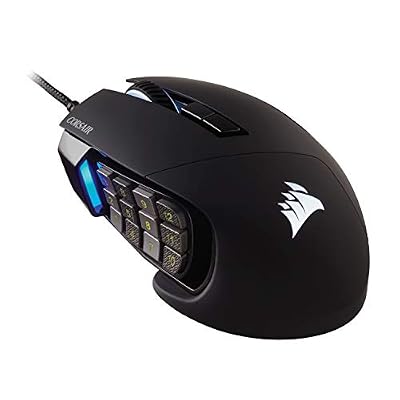
Corsair takes the opposite route: a fixed 12-button side panel that slides forward or back until it sits under your thumb. That single adjustment solves the most common grid complaint, which is reaching the front row without stretching or the back row without curling. With 17 programmable buttons, onboard profile storage and full macro programming through iCUE, it suits a player who keeps one main MMO and wants bindings saved on the mouse itself. The wired connection keeps the routine simple at a desk that never moves.
Specs
- Buttons: 17 programmable buttons, including 12 side buttons
- Side panel: patented Key Slider system repositions the side buttons
- Sensor: PixArt PMW3391 native 18,000 DPI optical sensor, adjustable in 1 DPI steps
- Switches: Omron switches rated for 50 million clicks
- Connectivity: wired with a braided cable
- Software: Corsair iCUE for macros, lighting and surface calibration
- Weight: 122 grams
- Compatibility: PC, Mac, PS5, PS4 and Xbox per the listing title
Best for: Desk-bound MMO players who want a thumb grid adjusted to their exact grip.
Watch out for: Full remapping runs through iCUE on a computer, so check what can be stored in onboard profiles before relying on macros elsewhere.
ASIN: B082LRMY53
SteelSeries Aerox 9 Wireless
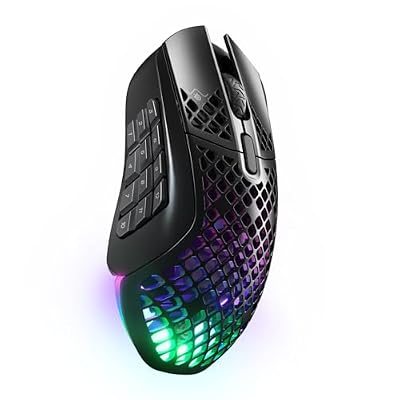
Most grid mice are heavy, and the Aerox 9 is the exception worth considering. At 89 grams it carries 18 programmable buttons, including a 12-button side panel, in a perforated shell that moves more like an ordinary wireless mouse. That makes it the natural pick for long RPG sessions where the grid is used in bursts and the rest of the evening is exploration, dialogue and inventory sorting. Quantum 2.0 wireless offers both a fast 2.4 GHz link and Bluetooth, and the IP54 AquaBarrier protection guards the open shell against dust and splashes.
Specs
- Buttons: 18 programmable buttons, including a 12-button side panel
- Sensor: TrueMove Air optical sensor, 18K DPI
- Weight: 89 grams
- Connectivity: Quantum 2.0 Wireless with 2.4 GHz and Bluetooth 5.0
- Battery: up to 180 hours, with 40 hours from a 15-minute fast charge
- Protection: AquaBarrier IP54 rating
- Glide: 100 percent PTFE glide skates
- Dimensions: 5.07 x 2.47 x 1.05 inches
- Systems: Windows, macOS, Linux and ChromeOS listed
Best for: Players who want a full grid without the usual MMO mouse weight.
Watch out for: The open honeycomb shell is a deliberate trade, so decide whether you are comfortable with a perforated body before choosing it.
ASIN: B09VNPB6Q1
Logitech G502 X Plus

Not every RPG player needs a keypad under the thumb. The G502 X Plus offers 13 programmable controls arranged around a conventional shape, including a removable DPI-shift button by the thumb, which is enough for a dodge, an interrupt, a potion and a map key in most action RPGs. Its HERO 25K sensor and LIGHTFORCE hybrid switches bring aiming quality that grid mice rarely match, and LIGHTSPEED wireless plus USB-C charging keep the setup tidy. Choose it when your library mixes RPGs with shooters and one mouse has to do both jobs well.
Specs
- Controls: 13 programmable controls
- Sensor: HERO 25K, 100 to 25,600 DPI
- Switches: LIGHTFORCE hybrid optical-mechanical switches
- Connectivity: LIGHTSPEED wireless with USB-C charging
- Battery: under 130 hours per the listing title
- Extras: LIGHTSYNC RGB, infinite scroll toggle, PowerPlay wireless charging capable
- Model: 910-006160
- Platform: PC and Mac, Windows 10 and macOS 10.14 or later
Best for: Mixed-genre players who want a few well-placed extra controls and strong aim tracking.
Watch out for: Count what sits under your thumb before buying, because this is a small cluster of buttons rather than a 12-button grid.
ASIN: B092CB69Q4
UtechSmart Venus Pro

The Venus Pro puts a 12-button thumb grid on a wireless body without asking you to learn a new shape language. Its 16 programmable buttons are angled to help your thumb tell rows apart, and the dual-mode design runs either from the 2.4 GHz nano receiver or from the USB-C cable when the battery needs attention. With up to 70 hours listed for wireless play, it covers a week of evening sessions between charges for most people. It is a sensible route into grid play for a laptop desk or a second setup in another room.
Specs
- Buttons: 16 programmable buttons, including 12 thumb grip buttons
- Sensor: 16,000 DPI optical sensor
- Connectivity: 2.4 GHz nano receiver or USB-C wired, 10-meter reception listed
- Battery: up to 70 hours from a 1000 mAh battery
- Switches: micro switches rated for 20 million clicks
- Weight: 126 grams
- Dimensions: 4.6 x 3 inches
- Model: US-D16000-WGM
Best for: Players who want wireless grid play for a laptop or spare-room setup.
Watch out for: The Amazon description notes that macro customization does not work on a MacBook, so Mac players should plan on basic use.
ASIN: B07XP4K152
Which One Fits Your Situation
You raid on a schedule and your rotation fills two action bars
Start with the two true grid designs. The Naga V2 Pro earns its place if your off-raid hours go to other genres, because the side plates change with the game. The Scimitar RGB Elite is the steadier choice for one main MMO, since its sliding panel tunes reach once and its wired link never needs a charge before raid time.
You play long story RPGs and only bind a few commands
The G502 X Plus fits this pattern best. Thirteen controls cover the handful of keys a story RPG actually repeats, and the conventional shape stays comfortable through dialogue-heavy evenings. You give up the full grid, yet you gain a mouse that still feels right in the shooters and action games sitting next to the RPG in your library.
Your wrist tires before the session ends
Look at the Aerox 9 Wireless first. Its 89-gram build is the lightest here by a wide margin, and that difference accumulates across hundreds of small camera movements in an evening. The grid remains available for dungeons and raids, while exploration and crafting stop feeling like a workout. Players who prefer a heavier, planted feel should stay with the wired Scimitar instead.
You play on a laptop or move between desks
The Venus Pro suits a setup that changes location. The nano receiver lives in the laptop, the cable covers charging and wired play, and the listed battery life stretches across days of shorter sessions. Its thumb grid is angled for touch, which helps when you are relearning positions at an unfamiliar desk height or on a smaller mouse surface.
Common Mistakes
- Buying the largest grid available, then leaving half the buttons unbound because they are too hard to reach by touch.
- Judging a mouse by maximum DPI, when comfort and button placement decide how it performs across a long session.
- Ignoring hand size and grip, especially with wide MMO shells that force a small hand to stretch for the front row.
- Assuming every wireless battery figure uses the fast connection, when headline numbers often come from the slower mode.
- Mapping a full rotation on day one instead of adding a few buttons at a time until each position is automatic.
Frequently Asked Questions
How many side buttons does an MMO player actually need?
Most rotations settle comfortably into eight to twelve thumb buttons once interrupts, defensives and consumables are included. Players with simpler classes often use six or fewer. The practical test is reach: every button you bind should be pressable by touch, mid-fight, without shifting your grip or glancing down at the mouse.
Is a wired mouse better than a wireless one for raiding?
A wired mouse removes charging and keeps weight lower, which is why the Scimitar RGB Elite still makes sense at a fixed desk. Modern 2.4 GHz wireless links in this list are built for gaming and do not add a delay you can plan around. Choose by routine: fixed desk, wired; shared or tidy desk, wireless.
Can these mice keep macros when the software is closed?
It depends on the model. The Scimitar RGB Elite lists onboard profile storage, so saved settings travel with the mouse. Others lean more heavily on their desktop software for deeper macro work. Before buying, check the listing for onboard profiles if you plan to play on a machine where installing that software is not an option.
Will an MMO mouse feel wrong for slower RPGs and daily use?
A grid mouse feels wider at first, and the side buttons sit unused during browsing or writing, yet the shape still works as an everyday mouse. Players who switch genres often prefer the Naga V2 Pro, since its two-button plate turns it into a conventional mouse, or the lighter Aerox 9 for mixed daily use.