Disclosure: As an Amazon Associate we earn from qualifying purchases.
Returnal made headlines before it even launched on PC because Housemarque’s Steam listing asked for 32GB of RAM at the recommended tier — double what most shooters of its generation requested. That single line changes how you shop for a laptop to play it. Graphics power still matters, but memory capacity and an SSD move from nice-to-haves to hard requirements, and the detailed settings tiers the developer published split the game cleanly into 1080p, 1440p and 4K targets.
The four laptops below are matched to those published tiers using the specs printed in their Amazon listings and maker spec sheets. Every pick ships with an SSD and at least the 16GB of RAM the minimum spec demands; two of them deliver the full 32GB recommended figure out of the box, and the other two get there — or work around it — in clearly stated ways.
What Returnal Actually Needs
These are the requirements published on Returnal’s Steam page, plus the expanded settings tiers Housemarque released alongside them.
Minimum (Steam):
– CPU: Intel Core i5-6400 or AMD Ryzen 5 1500X
– RAM: 16GB
– GPU: NVIDIA GeForce GTX 1060 (6GB) or AMD Radeon RX 580 (8GB)
– Storage: 60GB, SSD recommended
Recommended (Steam):
– CPU: Intel Core i7-8700 or AMD Ryzen 7 2700X
– RAM: 32GB
– GPU: NVIDIA RTX 2070 Super (8GB) or AMD Radeon RX 6700 XT (12GB)
– Storage: 60GB SSD
The detailed tiers add the resolution targets. The Medium tier (1080p, 60 fps, medium settings) calls for a GTX 1070 or RX 5600 XT with 16GB of RAM and makes the SSD mandatory. The Recommended tier in that chart targets 1080p at high settings with the same RTX 2070 Super / RX 6700 XT pairing. Above that, the Epic tier (4K, 60 fps) steps up to an RTX 3080 or RX 6800 XT with 32GB of RAM, and the Ray Tracing tier (4K, 60 fps, epic settings) asks for an RTX 3080 Ti or RX 6950 XT, again with 32GB.
Three buying rules fall out of those numbers:
- Treat 16GB as the floor and 32GB as the goal. A laptop with 16GB runs the game, but it falls short of the headline recommended spec and both 4K tiers. If a 16GB machine is on your shortlist, it needs memory slots so you can close that gap.
- An SSD is not optional. From the Medium tier up, the published chart lists an SSD as required, and every pick below ships with NVMe storage.
- Laptop GPU wattage matters as much as the GPU name. The recommended desktop cards are 8GB-and-up parts. A laptop RTX 4060 or 4070 carries the same 8GB of GDDR6, but makers set its power limit anywhere from fuel-sipping to full-fat. Each pick below states its published power figure where the maker discloses one. Returnal also supports DLSS and FSR upscaling, which is how the higher tiers stay within reach of laptop hardware.
The Picks
1. MSI Katana A15 AI (B8VF-448US) — the full recommended spec at 1080p
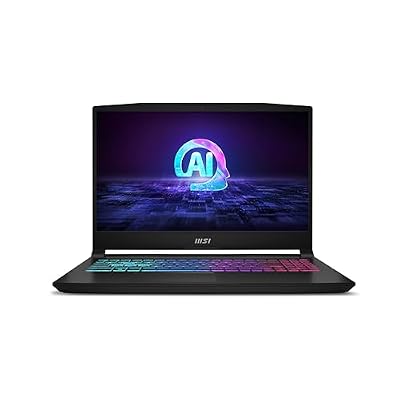
The Katana A15 AI is the straightforward answer to the Steam page: it meets or beats every line of the recommended spec without any upgrades. The Ryzen 7 8845HS is a modern 8-core chip well clear of the i7-8700 / Ryzen 7 2700X bar, the RTX 4060 Laptop GPU carries the same 8GB of GDDR6 as the recommended RTX 2070 Super, and MSI’s spec sheet puts this model’s card at up to 105W of graphics power with Dynamic Boost — the healthy end of what RTX 4060 laptops offer. Most importantly for this game, it ships with 32GB of DDR5-5600 already installed, so the headline RAM requirement is covered on day one, and the 1TB NVMe SSD swallows the 60GB install many times over.
The 15.6-inch 1080p 144Hz panel suits the tier this machine is aimed at: 1080p at high settings, using the panel’s refresh headroom when the frame rate climbs. Upgradeability is a genuine strength rather than a footnote — MSI’s spec sheet confirms two DDR5 SO-DIMM slots (up to 64GB) and two M.2 PCIe Gen4 SSD slots, so both memory and storage can grow later. MSI lists a 1-year limited manufacturer warranty for this model.
Specs
- ASIN: B0CXVGSY2H
- CPU: AMD Ryzen 7 8845HS (8 cores, up to 5.1 GHz)
- GPU: NVIDIA GeForce RTX 4060 Laptop GPU, 8GB GDDR6, up to 105W maximum graphics power with Dynamic Boost (MSI spec sheet)
- RAM: 32GB DDR5-5600, 2 SO-DIMM slots, up to 64GB
- Storage: 1TB NVMe PCIe Gen4 SSD, 2 M.2 slots
- Display: 15.6-inch FHD (1920 x 1080), 144Hz
- Ports: USB-C, USB-A, HDMI, RJ-45 Ethernet, headphone jack (per Amazon listing)
- Wireless: Wi-Fi 6E, Bluetooth 5.3
- Battery: 52Wh
- OS: Windows 11 Home
- Warranty: 1-year limited manufacturer warranty
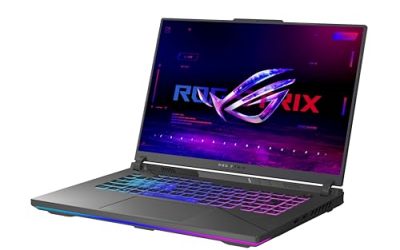
2. ASUS ROG Zephyrus G16 (2024) (GU605MI) — the slim OLED option, with one honest caveat

The Zephyrus G16 is the pick for anyone who wants Returnal to look as good as it plays and still carry the laptop in a normal bag. Its 16-inch OLED panel runs at 2560 x 1600 and 240Hz, and the RTX 4070 Laptop GPU is rated by ASUS at up to 105W with ROG Boost — a strong figure for a machine this thin, and enough to push past the 1080p tiers toward 1440p play with DLSS helping. The Core Ultra 9 185H clears the recommended CPU line comfortably, storage is a 1TB PCIe 4.0 NVMe SSD, and the whole machine weighs about 4.1 pounds per the listing data. ASUS backs it with a 1-year ASUS USA warranty.
The caveat is memory, and it is structural: the 16GB of LPDDR5X-7467 is soldered onboard, so it cannot be upgraded to 32GB later. That leaves this configuration at the game’s minimum-to-medium RAM tier rather than the recommended one. In practice that means targeting the 1080p High and 1440p tiers rather than the 4K Epic settings the detailed chart reserves for 32GB systems. Buy it for the screen, the GPU and the portability with your eyes open about the RAM ceiling — or pick one of the 32GB machines here instead.
Specs
- ASIN: B0DLHG956B
- CPU: Intel Core Ultra 9 185H (16 cores, up to 5.1 GHz)
- GPU: NVIDIA GeForce RTX 4070 Laptop GPU, 8GB GDDR6, ROG Boost up to 2105MHz at 105W (85W + 20W Dynamic Boost)
- RAM: 16GB LPDDR5X-7467, onboard and not upgradeable
- Storage: 1TB PCIe 4.0 NVMe SSD
- Display: 16-inch OLED, 2560 x 1600, 240Hz
- Ports: HDMI, USB-C with DisplayPort (USB4), USB-A (per ASUS listing materials)
- Weight: approx. 4.1 lbs
- OS: Windows 11 Pro
- Warranty: 1-year ASUS USA warranty
3. GIGABYTE AORUS 17H (BXF-74US554SH) — RTX 4080 power, once you feed it RAM

The AORUS 17H inverts the usual compromise: the graphics hardware is flagship-class while the memory is the part you finish yourself. Its RTX 4080 Laptop GPU carries 12GB of GDDR6 — matching the VRAM of the RX 6700 XT in the recommended spec and the RTX 3080 class in the Epic tier — and GIGABYTE runs it at up to 175W, the full power envelope for this chip. Paired with the Core i7-13700H and a big 17.3-inch 360Hz FHD panel, this is a machine built to hold high frame rates at 1080p and reach into 1440p with DLSS, with the screen speed to show every frame.
Out of the box it ships with 16GB of DDR5 as two 8GB sticks, which only meets the minimum tier. The fix is built into the design: GIGABYTE fits two DDR5 SO-DIMM slots rated for up to 64GB, so swapping in a 32GB kit puts the machine squarely on the recommended spec, and a second M.2 slot (two Gen4 slots total) sits ready for more storage beside the 1TB SSD. If you are comfortable with a five-minute memory swap, this is the cheapest route on this page to Epic-tier graphics hardware — just count the RAM upgrade as part of the purchase, not an optional extra.
Specs
- ASIN: B0BSR8959Z
- CPU: Intel Core i7-13700H
- GPU: NVIDIA GeForce RTX 4080 Laptop GPU, 12GB GDDR6, up to 175W
- RAM: 16GB DDR5-4800 (2 x 8GB), 2 SO-DIMM slots, up to 64GB
- Storage: 1TB NVMe PCIe Gen4 SSD, 2 M.2 slots
- Display: 17.3-inch FHD (1920 x 1080), 360Hz
- Ports: Thunderbolt 4 (USB-C), 2 x USB 3.2 Type-A, HDMI 2.1, Mini DP 1.4, RJ-45 Ethernet, audio combo jack
- Wireless: Wi-Fi 6E
- OS: Windows 11 Home
4. Lenovo Legion Pro 7i Gen 9 (16IRX9H) — the Epic-tier flagship

If the goal is to run Returnal the way the top rows of Housemarque’s chart describe — high resolutions, epic settings, ray tracing on the table — this is the configuration that lines up with it. The Core i9-14900HX brings 24 cores, far beyond the i9-11900K named in the ray-tracing tier, and the RTX 4080 Laptop GPU runs at a 175W TGP with 12GB of GDDR6, putting it in the same class as the desktop RTX 3080 Ti that tier specifies, with DLSS available to close the remaining distance. Memory is the full 32GB of DDR5-5600 across two SO-DIMM slots, and storage is 2TB from a pair of 1TB NVMe drives in the machine’s two M.2 slots.
The 16-inch QHD+ IPS panel (2560 x 1600, 240Hz, 500 nits per the listing) is the right native resolution for this hardware: demanding enough to show off the GPU, sensible enough to hold 60 fps at high settings with upscaling in reserve. Lenovo’s spec sheet lists a full port set — Thunderbolt 4, a second USB-C with 140W power delivery and DisplayPort 1.4, four USB-A ports, HDMI 2.1 and Ethernet — and US listings for this configuration carry a 1-year on-site warranty. Nothing here needs upgrading to meet any published Returnal tier; it is the no-asterisk option.
Specs
- ASIN: B0D3D86PHS
- CPU: Intel Core i9-14900HX (24 cores)
- GPU: NVIDIA GeForce RTX 4080 Laptop GPU, 12GB GDDR6, 175W TGP
- RAM: 32GB DDR5-5600, 2 SO-DIMM slots
- Storage: 2TB (2 x 1TB M.2 2280 PCIe 4.0 NVMe SSD), 2 M.2 slots
- Display: 16-inch IPS QHD+ (2560 x 1600), 240Hz, 500 nits
- Ports: Thunderbolt 4, USB-C (10Gbps, PD 140W, DP 1.4), 4 x USB-A (5Gbps), HDMI 2.1, RJ-45 Ethernet, 3.5mm combo jack (Lenovo PSREF)
- Wireless: Wi-Fi 6E, Bluetooth 5.3
- OS: Windows 11 Pro
- Warranty: 1-year on-site warranty
How to Choose a Laptop for Returnal
Start with RAM, not the GPU badge. Returnal is unusual: its recommended spec doubles the memory of its minimum. A 32GB machine (the Katana A15 AI or the Legion Pro 7i) matches the published recommended and Epic tiers as shipped. A 16GB machine is a reasonable buy only when its memory is socketed — the AORUS 17H’s two SO-DIMM slots make the upgrade trivial — and a poor one when it is soldered, as on the Zephyrus G16, where 16GB is the permanent ceiling.
Check the GPU’s wattage, not just its name. Two laptops with RTX 4070 badges can be built to very different power limits, and the published figure decides which settings tier is realistic. The picks here run their cards at 105W (Katana, Zephyrus) or the full 175W (AORUS, Legion), all disclosed by their makers. If a listing hides the wattage, treat that as a reason to keep looking.
Match the screen to the tier you will actually play. A 1080p panel with a high refresh rate suits the Recommended tier and leaves GPU headroom for high settings. A 1440p-class panel (the Zephyrus’s OLED, the Legion’s QHD+) is worth it with an RTX 4070 or 4080 behind it, using DLSS — which Returnal supports — to hold frame rates. Chasing a 4K internal panel for this game buys little; the published Epic and Ray Tracing tiers target 4K output, and these laptops reach it more sensibly through upscaling or an external display over HDMI 2.1 or DisplayPort.
Mind the CPU side if you lean AMD. Returnal’s minimum and recommended lines pair Intel and AMD equivalents, and any current Ryzen 7 or Ryzen 9 laptop chip clears them; if you are comparing AMD-based machines specifically, our guide to the best gaming laptop AMD Ryzen models lays out the current lineup.
Confirm storage headroom. The install needs 60GB, but shader caches, updates and a second game add up fast. Every pick here starts at 1TB, and the three socketed designs can add a second drive later; only the Zephyrus asks you to live with what it ships with.
Verdict
For most Returnal players, the MSI Katana A15 AI is the right buy: it is the one configuration here that satisfies the entire recommended spec — 32GB of RAM included — at the 1080p tier the game was charted around, with slots left over for later upgrades. Step up to the Lenovo Legion Pro 7i Gen 9 if you want the Epic and ray-tracing tiers in play; it matches the top of Housemarque’s chart on every line. The GIGABYTE AORUS 17H delivers the same RTX 4080 class for less commitment up front, provided you budget the simple RAM swap to 32GB as part of the deal. And the ASUS ROG Zephyrus G16 earns its place for its OLED screen and portability — just choose it knowing its soldered 16GB of memory caps it below the recommended tier for this specific game.