Disclosure: As an Amazon Associate we earn from qualifying purchases.
Remnant 2 is a third-person shooter built on Unreal Engine 5, and it is heavier on hardware than its published minimum specification suggests. Gunfire Games designed the game with image upscaling in mind, so the graphics card, its power limit, and DLSS or FSR support matter more here than in most shooters. Laptop GPUs also trail their desktop namesakes, which means the sensible way to shop is to anchor on the game’s published system requirements, then pick a laptop tier for the resolution and settings you actually want: 1080p, 1200p high-refresh, or a native 1440p-class panel. The laptops below are all currently sold on Amazon US, and each one clears the recommended specification with room to spare.
What Remnant 2 Actually Needs
The official system requirements published for Remnant 2 on its Steam store page are:
- Minimum: Windows 10, Intel Core i5-7600 or AMD Ryzen 5 2600, 16 GB RAM, GeForce GTX 1650 or AMD Radeon RX 590, 80 GB available storage.
- Recommended: Windows 10, Intel Core i5-10600K or AMD Ryzen 5 3600, 16 GB RAM, GeForce RTX 2060 or AMD Radeon RX 5700, 80 GB available storage.
Three things follow from that list. First, 16 GB of RAM is both the minimum and the recommended figure, so it is the floor for any laptop bought for this game, not an upgrade target. Second, the recommended graphics cards are desktop parts; a laptop RTX 4060 or better is the realistic equivalent once lower laptop power limits are accounted for. Third, the game supports DLSS (including Frame Generation on RTX 40 and 50 series cards), AMD FSR and Intel XeSS upscaling, and published guidance for the game treats upscaling as the intended way to hold high frame rates at higher settings. A laptop whose GPU supports DLSS Frame Generation has a genuine advantage in this specific title.
Other checks that matter for this game:
- GPU power limit (TGP). The same RTX 4060 or 4070 can be configured at very different wattages. A full-power implementation holds up far better in Unreal Engine 5 than a low-wattage one, so the listings below state the figure where the maker publishes it.
- Storage. The install needs about 80 GB. A 512 GB SSD works, but 1 TB is the comfortable choice once updates and other games are added.
- Display. There is little benefit in a 1440p-class GPU tier if the built-in panel is 1080p and you never use an external monitor, and the reverse is also true. Match the panel to the tier.
The Picks
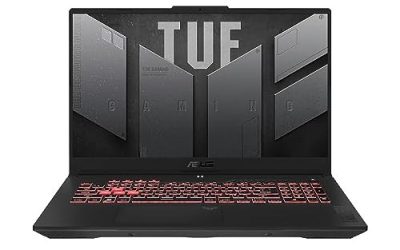
1. ASUS TUF Gaming A15 (2023) — FA507NV-EH74

The TUF Gaming A15 is the 1080p pick. Its GeForce RTX 4060 Laptop GPU runs at 140W Max TGP per ASUS’s Amazon listing, which is the full-power end of that chip’s range, and it supports DLSS 3 with Frame Generation — the combination that suits Remnant 2’s upscaling-first design at 1920 x 1080. The AMD Ryzen 7 7735HS (8 cores, up to 4.7 GHz) is comfortably beyond the recommended Ryzen 5 3600, and a MUX switch lets the discrete GPU drive the 15.6-inch FHD 144Hz panel directly. Upgradeability is a strength of this exact model: the 16 GB of DDR5-4800 sits in two SO-DIMM slots, and ASUS’s product copy for the A15 notes a second, empty M.2 NVMe slot for adding storage later. Listing data for this model shows a 1-year warranty term.
Specs
- CPU: AMD Ryzen 7 7735HS (8 cores, up to 4.7 GHz)
- GPU: NVIDIA GeForce RTX 4060 Laptop GPU, 8 GB GDDR6, 140W Max TGP
- Display: 15.6″ FHD 1920 x 1080, 144Hz, 100% sRGB
- RAM: 16 GB DDR5-4800 (2x 8 GB, two SO-DIMM slots)
- Storage: 1 TB PCIe Gen 4 SSD (second M.2 slot available)
- Ports: HDMI 2.1, USB4 Type-C, Gigabit Ethernet
- Wireless: Wi-Fi 6, Bluetooth 5.3
- Battery: 90 Wh
- Weight: approx. 2.2 kg
2. ASUS ROG Strix G16 (2023) — G614JI-AS94

The Strix G16 AS94 steps up to an RTX 4070 Laptop GPU, also at 140W Max TGP per the listing, paired with Intel’s Core i9-13980HX (24 cores, up to 5.6 GHz). That pairing is aimed at the laptop’s own 16-inch FHD+ (1920 x 1200) 165Hz panel: at 1200p, Remnant 2 at high settings with DLSS upscaling and Frame Generation is exactly the workload this configuration is built for, and the extra CPU headroom helps in the game’s busier co-op fights. The listing’s technical details confirm two memory slots, so the fitted 16 GB of DDR5 can be expanded later, and the 90 Wh battery is large for this class. If your priority is a convertible form factor rather than outright GPU power, our guide to the best gaming laptop 2-in-1 models covers that different trade-off instead.
Specs
- CPU: Intel Core i9-13980HX (24 cores, up to 5.6 GHz)
- GPU: NVIDIA GeForce RTX 4070 Laptop GPU, 8 GB GDDR6, 140W Max TGP
- Display: 16″ FHD+ 1920 x 1200, 165Hz
- RAM: 16 GB DDR5-4800 (two memory slots per the listing)
- Storage: 1 TB PCIe SSD
- Wireless: Wi-Fi 6E
- Battery: 90 Wh
- OS: Windows 11 Home
3. ASUS ROG Strix G16 (2023) — G614JI-XS96
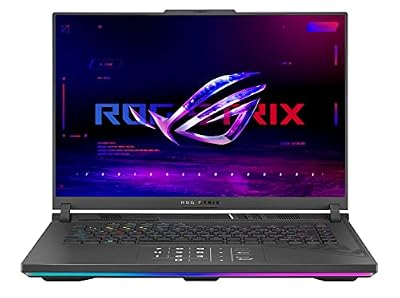
The XS96 configuration of the same Strix G16 chassis is the pick for playing on a native high-resolution panel. Its 16-inch ROG Nebula display runs at QHD+ (2560 x 1600) and 240Hz, which is the tier where Remnant 2 needs DLSS upscaling working hardest — and where the RTX 4070 (ASUS lists up to 140W Max TGP for the G614JI line) earns its place over the 4060. This configuration doubles the memory to 32 GB of DDR5, ships with Windows 11 Pro, and keeps the same Core i9-13980HX processor. Because it already doubles the game’s 16 GB memory requirement, it is the configuration here that needs the least after-purchase attention.
Specs
- CPU: Intel Core i9-13980HX
- GPU: NVIDIA GeForce RTX 4070 Laptop GPU, 8 GB GDDR6
- Display: 16″ QHD+ 2560 x 1600 ROG Nebula, 240Hz
- RAM: 32 GB DDR5
- Storage: 1 TB PCIe SSD
- Wireless: Wi-Fi 6E
- OS: Windows 11 Pro
4. ASUS ROG Strix G16 (2025) — G614FP-OS94

The 2025 Strix G16 is the current-generation pick, built around the GeForce RTX 5070 Laptop GPU with 8 GB of GDDR7 and DLSS 4 support per ASUS — which adds Multi Frame Generation for titles that support it and gives this machine the longest relevant feature life for Unreal Engine 5 games. The AMD Ryzen 9 9955HX (16 cores, 32 threads, up to 5.4 GHz) is the strongest processor in this guide. The built-in panel is a 16-inch FHD+ (1920 x 1200) screen at 165Hz with a 3 ms response time, so this configuration is framed for high settings at 1200p on the internal display, with the GPU headroom to drive a 1440p external monitor as well. ASUS’s store specifications for the G614FP list two USB4 Type-C ports, two USB 3.2 Gen 2 Type-A ports, RJ45 Ethernet and a 3.5 mm audio jack, and the G614 family spec sheet lists two SO-DIMM slots supporting up to 64 GB of memory.
Specs
- CPU: AMD Ryzen 9 9955HX (16 cores, 32 threads, up to 5.4 GHz)
- GPU: NVIDIA GeForce RTX 5070 Laptop GPU, 8 GB GDDR7, DLSS 4
- Display: 16″ FHD+ 1920 x 1200, 165Hz, 3 ms
- RAM: 16 GB DDR5-5600
- Storage: 1 TB PCIe Gen 4 SSD
- Ports: 2x USB4 Type-C, 2x USB 3.2 Gen 2 Type-A, RJ45 Ethernet, 3.5 mm audio jack
- Wireless: Wi-Fi 6E
- OS: Windows 11 Home
How to Choose a Laptop for Remnant 2
Start from the published requirements, then add a laptop margin. The recommended specification (RTX 2060 desktop class, 16 GB RAM) is the floor. Because laptop GPUs run at lower power than desktop cards with similar names, an RTX 4060 Laptop GPU at a high power limit is the sensible entry point, and an RTX 4070 or 5070 is the step up for 1440p-class play.
Use upscaling; it is how the game is meant to run. Remnant 2 supports DLSS, FSR and XeSS, and its system requirements were published with upscaling in mind. On RTX 40 series laptops, DLSS Frame Generation adds generated frames on top of upscaling; RTX 50 series models add DLSS 4. Every pick above supports at least DLSS 3 Frame Generation.
Check the GPU power limit, not just the GPU name. A 140W RTX 4060 and a low-wattage RTX 4060 are different products in practice. Where a maker publishes the TGP, compare it; where a listing does not publish one, treat performance as an unknown rather than assuming the maximum.
Keep 16 GB of RAM as the minimum and prefer 1 TB of storage. The game needs 16 GB and about 80 GB of disk space. Configurations with two SO-DIMM slots and a spare M.2 slot, like the TUF Gaming A15 above, let you correct a tight specification later; confirm the slot layout for the exact model before relying on an upgrade.
Match the panel to the tier. A 240Hz QHD+ panel only pays off with a GPU tier that can feed it through upscaling. Conversely, the 2025 Strix G16 pairs its RTX 5070 with a 1200p panel, which suits high settings on the built-in screen and leaves headroom for an external 1440p monitor.
Confirm warranty terms on the exact listing. Coverage varies by seller and configuration, and seller-upgraded units can be handled differently from factory configurations. Check the warranty line on the specific listing before ordering.
Verdict
For 1080p, the ASUS TUF Gaming A15 is the balanced pick: a full-power RTX 4060 with DLSS Frame Generation, a 144Hz panel, and confirmed memory and storage upgrade paths in the FA507NV-EH74 model. The ROG Strix G16 AS94 is the high-refresh 1200p step up, with a 140W RTX 4070 and a Core i9 processor. The Strix G16 XS96 is the one to choose for its native 2560 x 1600 240Hz Nebula display and 32 GB of memory. The 2025 Strix G16 with the RTX 5070 is the current-generation option, adding DLSS 4 and the strongest CPU here for players who also plan to run future Unreal Engine 5 titles. All four sit well above Remnant 2’s published recommended specification; the real decision is which resolution you want to play at.