

- Top Pick: Apple iPad Magic Keyboard Case for iPad Pro 13-inch (M4 and M5), Great Typing Experience, Built-in Trackpad, Function Row, US English – Black
- Best Value: Apple iPad Magic Keyboard Case for iPad Pro 11-inch (M4 and M5), Great Typing Experience, Built-in Trackpad, Function Row, US English – Black
- Premium Choice: Hamile for iPad Air 13-inch & Pro 12.9 Case with Keyboard – 7-Color Backlit | Multi-Touch Trackpad, Magnetic Wireless Keyboard, Stain Proof Folio Cover, for Air 13 Pro 12.9 6/5/4th 3rd Generation, Black
Choosing a keyboard for an iPad Pro starts with a question that has nothing to do with typing: which iPad Pro do you actually own? The 11-inch and 13-inch M4 and M5 models, plus the older 12.9-inch generations, are different shapes with different camera layouts, and a case that fits one will not close around another. Several keyboards on the market are labeled “for iPad Pro” while being cut for a specific size and generation, so a careless pick leaves you with a gadget that does not snap on.
This 2026 guide is for students taking lecture notes, remote workers turning a tablet into a laptop, and artists who want a keyboard that still allows Pencil use. The eight options below range from Apple’s own cases to third-party folios and a stand-alone Bluetooth board, and each is judged only on the compatibility, trackpad, backlight, and layout details stated in its listing.
Quick Picks
As an Amazon Associate we earn from qualifying purchases at no extra cost to you.


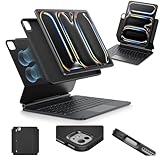


| Product | Best for | Key spec from the title |
|---|---|---|
| Apple Magic Keyboard 13-inch | M4 and M5 13-inch owners wanting the native option | Trackpad, function row, US English |
| Apple Magic Keyboard 11-inch | M4 and M5 11-inch owners | Trackpad, function row, US English |
| Hamile Keyboard Case | Older 12.9-inch Pro and Air 13 owners | 7-color backlight, multi-touch trackpad |
| ESR Rebound 360 Keyboard Case | Protection from every side | Magnetic lock, detachable back case, 13-inch |
| BABG Keyboard Case | Owners with mixed or older generations | 360 rotatable, Pencil charging, backlit |
| OMOTON Bluetooth Keyboard | Lightweight, case-free typing | Ultra-slim, 12 multimedia keys |
| Harvopu Keyboard Case | Colorful folio buyers | Detachable, 7-color backlit, trackpad |
| Logitech Combo Touch 13-inch | Flexible multi-use modes | Backlit keyboard, adjustable kickstand |
How to Choose
Match the exact generation and size
Read the compatibility line before anything else. The 13-inch M4 and M5 models share one body, the 11-inch has its own, and older 12.9-inch generations fit a different group of cases. A case listed for 12.9-inch sixth through third generation will not suit a new 13-inch Pro, even though both are large iPads.
Decide between a case and a board
A keyboard case adds protection and a stand but also adds thickness and weight to the tablet. A separate Bluetooth keyboard stays slim and works with several devices, but you will need your own stand. If the tablet moves between desk and couch, a detachable keyboard case gives both options. Weight matters here: once a case is attached, the tablet starts to feel like a small laptop, and long handheld reading sessions become tiring.
Trackpad, backlight, and function row
Look for a multi-touch trackpad if you want to use iPadOS gestures. A backlight with several brightness levels is useful in dim lecture halls, and a function row speeds up brightness and volume changes. Budget cases often skip the function row or offer only a basic trackpad.
Pencil support and small details
Check whether the case leaves the magnetic Pencil attachment edge usable, or whether the listing mentions Pencil charging. Also confirm key layout language, since a US English layout is not guaranteed on every third-party option.
The 8 Best Options
Apple Magic Keyboard 13-inch
This is the native case for the 13-inch iPad Pro with M4 and M5 chips, listed with a built-in trackpad, function row, and US English layout in black. It suits professionals who want a keyboard sized exactly to the tablet and who value a consistent fit over variety. Anyone who types long documents on the tablet, such as writers, analysts, or students drafting essays, will find that a full-size layout with a function row cuts down on reaching for the touchscreen.
- Strength: purpose-built for the 13-inch M4 and M5 models.
- Strength: includes a function row and built-in trackpad.
- Trade-off: it is a premium-tier accessory that adds weight to the tablet.
Skip it if you want a detachable keyboard or a lower tier.
Apple Magic Keyboard 11-inch
The 11-inch version mirrors the 13-inch case in features: trackpad, function row, US English layout, and a black finish. It is built for the smaller M4 and M5 body, which makes it the more portable of the two Apple cases. It fits commuters who work on trains or in cramped seating, where a smaller tablet and a compact keyboard base are easier to balance on a lap or a narrow tray table.
- Strength: tailored to the 11-inch M4 and M5 models.
- Strength: portable size with a full-feature layout.
- Trade-off: the smaller footprint means a tighter key area.
Skip it if you own the 13-inch or an older generation.
Hamile Keyboard Case for iPad Air 13 and Pro 12.9
This folio targets the iPad Air 13-inch and older 12.9-inch Pro models from third through sixth generation. It lists a seven-color backlight, a multi-touch trackpad, a magnetic wireless keyboard, and a stain-proof cover. The backlight palette and wipe-clean finish speak to students who carry the tablet in a crowded bag and want something that looks personal rather than corporate.
- Strength: seven backlight colors add visual flexibility.
- Strength: serves owners of older 12.9-inch iPad Pro models.
- Trade-off: it does not list the M4 or M5 13-inch Pro, so fit there is not stated.
Skip it if you own the newest 13-inch Pro.
ESR Rebound 360 Keyboard Case for iPad Pro 13-inch
Aimed squarely at the 13-inch M4 and M5 Pro, this case combines a multi-mode magnetic stand, a secure magnetic lock, and a detachable back case. A precision multi-touch trackpad is included in the description. It makes sense for owners who hand the tablet around, prop it up for video calls, and then pull the back case off to use it as a plain slate.
- Strength: magnetic lock keeps the tablet secure in the case.
- Strength: detachable back and multiple stand modes.
- Trade-off: a 360-style protective build is thicker than a minimalist cover.
Skip it if you want the thinnest possible profile.
BABG Keyboard Case for iPad Air 13 and Pro 13
This is the broadest-compatibility case in the group: iPad Air 13-inch (M3 and M2), iPad Pro 13 (M5 and M4), and Pro 12.9 from the third through sixth generations. It lists 360-degree rotation, a trackpad, backlight, and Pencil charging. A family that shares one keyboard between an older Pro and a newer Air, or a user planning to upgrade soon, is the audience that benefits from such a wide list.
- Strength: wide device coverage helps households with multiple iPads.
- Strength: backlight and Pencil charging are listed.
- Trade-off: wide compatibility makes it vital to confirm your exact model before ordering.
Skip it if you want a case designed around one specific model.
OMOTON Ultra-Slim Bluetooth Keyboard
This is a stand-alone wireless keyboard rather than a case. The listing names iPad, iPad Pro, Air, Mini, and iPhone compatibility, along with twelve multimedia keys and a portable body in white. It suits people who already own a folio cover or stand and only need a keyboard they can toss into a bag, or who want to pair one board with a phone and a tablet.
- Strength: works across multiple Apple devices.
- Strength: slim and travel-friendly.
- Trade-off: no case, trackpad, or built-in stand is listed.
Skip it if you want one combined unit that protects the screen.
Harvopu Keyboard Case for iPad Air 13 and Pro 12.9
Another detachable folio, the Harvopu is offered in a purple finish and covers the Air 13 (M4, M3, M2) plus Pro 12.9 sixth through third generations. It lists a multi-touch trackpad and a seven-color backlight. Because the keyboard detaches, it works for readers who want a plain tablet on the couch and a laptop-style setup at the desk, all within one accessory.
- Strength: detachable keyboard with colorful lighting.
- Strength: distinct finish for buyers who dislike plain black.
- Trade-off: it is not listed for the newest 13-inch Pro.
Skip it if you own an M4 or M5 iPad Pro.
Logitech Combo Touch for iPad Pro 13-inch
Described for the 13-inch M4 and M5 in Midnight Black, this combo case lists a detachable backlit keyboard, an adjustable kickstand, comfortable typing, and multi-use modes. It is the choice for people who switch between typing, sketching, and reading. The kickstand means the angle can be tuned for a desk, a lap, or a drawing posture, and detaching the keyboard turns the case into a protective shell for handheld use.
- Strength: detachable keyboard with an adjustable kickstand.
- Strength: multiple use modes suit varied tasks.
- Trade-off: the kickstand design makes it a bulkier package than a plain cover.
Skip it if you want a floating, laptop-like angle.
Which One Fits Your Situation
You own a 13-inch M4 or M5 iPad Pro
The Apple Magic Keyboard 13-inch is the straightforward answer, since it is cut for that exact body and lists a function row. The ESR Rebound 360 and Logitech Combo Touch are the alternatives when you want a detachable back case, a secure magnetic lock, or an adjustable kickstand.
You own an older 12.9-inch Pro
The Hamile, Harvopu, and BABG cases list sixth through third generation fit for the 12.9-inch Pro. Check the generation line before choosing, and lean toward BABG if you also own an Air 13 that might share the keyboard.
You carry the tablet in a backpack all day
The ESR and Logitech cases add protection around the tablet, while the OMOTON keeps weight low if you already use a separate cover.
You own the 11-inch Pro
The Apple Magic Keyboard 11-inch is the only option on this list matched to that size, so the decision is simple: if you own the smaller Pro and want a case, this is the entry to pick. The OMOTON Bluetooth board is the size-agnostic fallback.
Common Mistakes
- Choosing a case without confirming the exact iPad Pro generation.
- Assuming every 12.9-inch case will close on a new 13-inch Pro.
- Ignoring Pencil placement, then discovering the case blocks it or leaves no safe spot to park the stylus during a meeting.
- Selecting a Bluetooth board and forgetting a stand for the tablet.
- Overlooking layout language when ordering from third-party sellers, which can leave you with punctuation keys in unexpected places.
Related guides
- Aio Liquid Coolers For High Performance Gaming
- How To Lower Input Delay In Competitive Shooters
- Wireless Gaming Headsets Under 100 For Pc
Frequently Asked Questions
Can I use an 11-inch case on a 13-inch iPad Pro?
No. The sizes are different, so you need a case matched to your model. The listing should name both the size and the chip generation.
Do keyboard cases drain the iPad battery?
Backlit keyboards draw some power, and a bright backlight left on all day will be noticeable. Bluetooth boards run on their own battery, so they need charging separately; check the listing for the power method before buying.
Is a trackpad necessary?
iPadOS supports pointer input, so a trackpad speeds up text selection and navigation. If you mostly type, a simple keyboard may be enough.
Will these work with Apple Pencil?
Most cases leave the Pencil attachment edge accessible, but only some state it in the listing. Confirm before buying if charging matters.
















