- Top Pick: Skytech Gaming Archangel 5 Gaming PC, AMD Ryzen 7 7700 3.8GHz, NVIDIA RTX 5060, 1TB NVMe SSD, 32GB DDR5 RAM 6000, 750W Gold PSU, Wi-Fi, Win 11, Desktop
- Best Value: Skytech Gaming Storm Gaming PC, AMD Ryzen 5 5500 3.6GHz, NVIDIA RTX 3050 6GB VRAM, 1TB NVMe SSD, 16GB DDR4 RAM 3200, 650W Gold PSU, Wi-Fi 5, Windows 11, Desktop
- Premium Choice: Silkland Certified HDMI 2.1 Cable Ultra High Speed 48Gbps Braided HDR 6.6FT
Affiliate disclosure: As an Amazon Associate we earn from qualifying purchases. This post contains affiliate links — if you buy through them we may earn a small commission at no extra cost to you. This never affects our recommendations.
- Minimum Gaming PC Requirements in 2026: The Short Answer
- Quick Answer: Current-Generation Gaming PC Requirements (Late 2026)
- Quick Picks — Recommended Gaming PC Requirements
- Minimum vs Recommended — Understanding the Difference
- 1080p Gaming Requirements (60-240 FPS)
- 1440p Gaming Requirements (60-144 FPS)
- 4K Gaming Requirements (30-60 FPS)
- Prebuilt Gaming PCs That Match Each Requirement Tier
- CPU Requirements by Game Type
- GPU Requirements by Resolution & Refresh Rate
- VRAM Requirements by Resolution
- Upscaling and Frame Generation: How They Change Requirements
- RAM Requirements by Workload
- Storage Requirements for Gaming
- Power Supply Sizing
- CPU Cooling Requirements
- Operating System and Security Requirements in 2026
- How to Read a Game’s System Requirements
- How to Check Your Own PC Specs
- How We Built These Recommendations
- Minimum Processor, GPU and RAM for Gaming: Quick Answers
- Frequently Asked Questions
- Final Verdict
- Related Articles
- Related Articles
- Related Articles
Understanding PC requirements is the foundation of smart hardware spending. Too weak a build and you’re staring at 40 FPS in Baldur’s Gate 3. Too powerful and you’re overspending on overkill components. This guide breaks down exactly what hardware you need for 1080p, 1440p, and 4K gaming in 2026, accounting for the latest Ryzen 9000, Core Ultra 200S, RTX 50-series, RTX 40-series, and RX 9000-series components.
The key insight: PC requirements scale with resolution and refresh rate, not just GPU power. A Ryzen 5 9600X can deliver perfectly smooth 1080p 240 Hz gameplay with an RTX 4070, but would bottleneck at 4K 60 FPS. Similarly, an RTX 4060 handles 1440p medium settings but needs a strong CPU behind it to avoid stuttering. We’ll map out the exact component combinations that work for every use case.
Updated October 2026 – Minimum and recommended tiers below reflect current-generation hardware and recent game requirement charts.
Minimum Gaming PC Requirements in 2026: The Short Answer
The minimum requirements for a gaming PC in 2026 are a 6-core processor, 16GB of RAM, a graphics card with 8GB of VRAM, a 500GB NVMe SSD and Windows 11. That tier plays most new games at 1080p with low to medium settings and upscaling. Treat it as a floor, not a target.
| Component | Minimum (1080p, low-medium) | Recommended (1080p high to 1440p) |
|---|---|---|
| Processor | 6 cores: Ryzen 5 5600 or Core i5-12400F class | Ryzen 5 9600X, Ryzen 7 7700 or Core Ultra 5 245K |
| Graphics card | 8GB VRAM: RTX 5060, RX 9060 XT 8GB or Arc B580 class (older RTX 3060 Ti or RX 6700 XT also work) | 12-16GB VRAM: RTX 5070, RTX 5060 Ti 16GB or RX 9070 |
| RAM | 16GB dual-channel | 32GB DDR5 |
| Storage | 500GB NVMe SSD | 1-2TB NVMe SSD |
| Power supply | 550-650W, 80+ Bronze | 750W, 80+ Gold |
| Operating system | Windows 11 (64-bit) | Windows 11 with TPM 2.0 and Secure Boot enabled |
These tiers match the published minimum and recommended charts for recent releases such as Battlefield 6 and Monster Hunter Wilds, which are covered later in this guide. Below this floor, expect long load times, texture pop-in and frame rates under 40 FPS in current AAA games.
Quick Answer: Current-Generation Gaming PC Requirements (Late 2026)
If you are buying new parts or a prebuilt today, most shelves now carry NVIDIA RTX 50-series and AMD Radeon RX 9000-series graphics cards. The table below maps each target to current-generation hardware, so you can compare it with the build tiers further down. Frame-rate targets are estimates based on each spec tier and typical 2025-2026 AAA games at sensible settings. They are not measurements.
| Target | CPU (minimum class) | GPU (current gen) | VRAM | RAM | Storage | Price tier |
|---|---|---|---|---|---|---|
| 1080p 60fps, medium-high | 6-core: Ryzen 5 5600 / Core i5-12400F or newer | RTX 5060, RX 9060 XT 8GB, Arc B580 | 8GB minimum | 16GB dual-channel | 1TB NVMe | Budget |
| 1080p 144fps / 1440p 60fps | Ryzen 5 9600X / Ryzen 7 7700 / Core Ultra 5 245K | RTX 5060 Ti 16GB, RX 9060 XT 16GB | 12-16GB | 32GB | 1TB NVMe | Mid-range |
| 1440p 100-144fps, high | Ryzen 7 9700X / 7800X3D / Core Ultra 7 265K | RTX 5070, RX 9070 | 12-16GB | 32GB | 1-2TB NVMe | Upper-mid |
| 1440p 165-240fps / 4K 60fps with upscaling | Ryzen 7 9800X3D / 9850X3D | RTX 5070 Ti, RX 9070 XT | 16GB | 32GB | 2TB NVMe | Upper-mid to premium |
| 4K 60-120fps, ultra and ray tracing | Ryzen 7 9800X3D / Ryzen 9 9950X3D | RTX 5080, RTX 5090 | 16-32GB | 32-64GB | 2TB+ NVMe | Premium / flagship |
Rule of thumb for 2026: treat 8GB of VRAM as the floor for 1080p only, 12GB as the practical target for 1440p, and 16GB as the safe choice for 4K or for a PC you plan to keep past 2027. Upscaling (DLSS 4, FSR 4, XeSS) now appears in most published requirements, so a card that “meets” a game’s recommended spec may only hit the stated frame rate with upscaling switched on.
The RTX 40-series combinations listed later in this guide still perform as described if you already own them or find them at a good price. For new purchases, the current-generation equivalents above usually offer better features for similar money, including newer upscaling and frame generation support.
🛒 Best Price Today on Amazon
Prime members get fast, free shipping on everything above, plus member-only deals. New members get a 30-day free trial — cancel anytime.
Start 30-Day Prime Free Trial →See Today’s Amazon DealsQuick Picks — Recommended Gaming PC Requirements
| Target | CPU | GPU | RAM | Storage | Monitor |
|---|---|---|---|---|---|
| 1080p 144 Hz | Ryzen 5 9600X | RTX 4070 Super | 32GB DDR5 | 1TB NVMe | 1080p 144Hz |
| 1440p 144 Hz | Ryzen 7 9800X3D | RTX 4080 Super | 32GB DDR5 | 1TB NVMe | 1440p 144Hz |
| 4K 60 Hz | Ryzen 9 9950X3D | RTX 4090 | 48GB DDR5 | 2TB NVMe | 4K 60Hz OLED |
| Streaming 1080p | Ryzen 9 9900X | RTX 4070 | 48GB DDR5 | 2TB NVMe | 1080p 240Hz |
| Budget entry | Ryzen 5 9600X | RTX 4060 | 32GB DDR5 | 500GB NVMe | 1080p 60Hz |
Minimum vs Recommended — Understanding the Difference
Minimum requirements = 30-40 FPS at low settings. Playable, but not smooth. Recommended requirements = 60 FPS at medium-high settings. Smooth, stable gameplay. Optimal (our standard) = 100+ FPS at high-ultra settings. Exceeds monitor refresh rate for headroom.
For 2026, we focus on recommended specs because minimum specs are genuinely unpleasant for gaming. At 40 FPS, reaction times matter in competitive games, and AAA story games feel sluggish.
1080p Gaming Requirements (60-240 FPS)
1080p 60 FPS — Budget Entry Point
As an Amazon Associate we earn from qualifying purchases at no extra cost to you.


Target: Smooth, high-detail gaming at 1080p
- CPU: Ryzen 5 9600X — 6 cores, handles 1080p without bottleneck
- GPU: RTX 4070 — Handles 1080p ultra settings, 85-110 FPS average
- RAM: 16GB DDR5-6000 — Sufficient for gaming-only workflows
- Storage: 500GB NVMe — One AAA game + OS
- PSU: 650W Bronze — Adequate headroom
- Cooling: Stock cooler
1080p 144 FPS — Competitive Sweet Spot
Target: Smooth competitive gaming + high frame rates
- CPU: Ryzen 5 9600X or 9700X
- GPU: RTX 4070 Super — 1080p ultra, 100-150 FPS
- RAM: 32GB DDR5-6000
- Storage: 1TB NVMe
- PSU: 750W Gold
- Cooling: 240mm AIO
1080p 240 FPS — High-Refresh Competitive

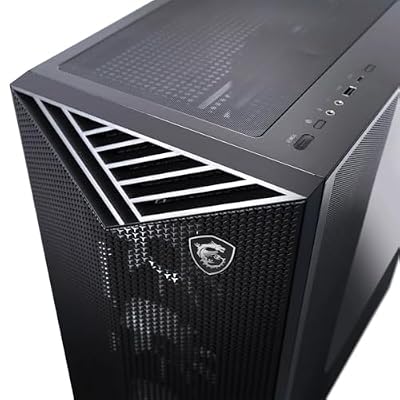
msi Aegis ZS Gaming Desktop, AMD Ryzen 9 9900X, GeForce RTX 5080, 32GB RAM, 2TB SSD, Liquid Cooling, Wi-Fi 7, Keyboard & Mouse Included, DIY Friendly, Windows 11 Pro



As an Amazon Associate we earn from qualifying purchases. Product prices and availability are accurate as of the date/time indicated.
Target: Maximum FPS for 240Hz monitors + esports dominance
- CPU: Ryzen 7 9800X3D — Best gaming CPU, enables 240+ FPS
- GPU: RTX 4080 Super — 240 FPS at high settings even in demanding titles
- RAM: 32GB DDR5-6000
- Storage: 1TB NVMe
- PSU: 850W Gold
- Cooling: 240mm AIO

1440p Gaming Requirements (60-144 FPS)
1440p 60 FPS — 4K Quality, Console Parity
Target: Beautiful visuals, smooth 60 FPS, console-equivalent experience
- CPU: Ryzen 5 9600X
- GPU: RTX 4080 Super OR RX 7900 XTX — 60-70 FPS at 1440p ultra
- RAM: 32GB DDR5-6000
- Storage: 1TB NVMe
- PSU: 850W Gold
- Cooling: 240mm AIO
1440p 144 FPS — Esports + AAA Precision
As an Amazon Associate we earn from qualifying purchases at no extra cost to you.


Target: 144Hz monitor = butter-smooth competitive + AAA gaming
- CPU: Ryzen 7 9800X3D — Gaming champion, no CPU bottleneck
- GPU: RTX 4080 Super — 1440p ultra 120-160 FPS
- RAM: 32GB DDR5-6000
- Storage: 1TB NVMe
- PSU: 850W Gold
- Cooling: 240mm AIO
1440p 240 FPS — Extreme High-Refresh
Target: 240Hz esports monitor, maximum competitive edge
- CPU: Ryzen 7 9800X3D or Ryzen 9 9950X3D
- GPU: RTX 4090 — Only GPU capable of 240+ FPS at 1440p
- RAM: 32GB DDR5-6000
- Storage: 1TB NVMe
- PSU: 1000W Platinum
- Cooling: 280mm AIO

4K Gaming Requirements (30-60 FPS)
4K 30 FPS — GPU-Limited, Story Game Focus
Target: Cinema-quality visuals, 30 FPS smooth-enough for story games
- CPU: Ryzen 5 9600X — 4K is GPU-bound, weaker CPU sufficient
- GPU: RTX 4080 Super — 4K medium settings 30-45 FPS
- RAM: 32GB DDR5-6000
- Storage: 2TB NVMe
- PSU: 850W Gold
4K 60 FPS — True High-End 4K Gaming

Target: 4K ultra settings, smooth 60 FPS (genuine high-end experience)
- CPU: Ryzen 9 9950X3D — Multicore ensures CPU isn’t bottleneck
- GPU: RTX 4090 — 4K high settings 50-70 FPS
- RAM: 48GB DDR5-6000 — Room for background apps
- Storage: 2TB NVMe
- PSU: 1000W Platinum
- Cooling: 280mm AIO
Prebuilt Gaming PCs That Match Each Requirement Tier
If you would rather not build your own, these current-generation prebuilts line up with the requirement tiers above. We picked them from listing specs and manufacturer configurations, aiming for balanced CPU and GPU pairings with no obvious bottleneck. Configurations change often, so confirm the exact CPU, GPU, RAM and storage on the listing before buying.
| System | Best for | CPU | GPU | RAM / storage | Watch for | Price tier |
|---|---|---|---|---|---|---|
| CyberPowerPC Gamer (i5-14400F / RTX 5060) | 1080p 60-144fps | Core i5-14400F | RTX 5060 8GB | See listing | 8GB VRAM limits high textures | Budget |
| KOTIN (Ryzen 5 9600X / RX 9060 XT 16GB) | 1080p high refresh, entry 1440p | Ryzen 5 9600X | RX 9060 XT 16GB | 16GB DDR5 / 1TB | 16GB RAM; plan an upgrade to 32GB | Mid-range |
| MSI Codex Z2 (R7 8700F / RTX 5070) | 1440p 100-144fps | Ryzen 7 8700F | RTX 5070 12GB | 32GB DDR5 / 2TB | 12GB VRAM for 4K is tight | Upper-mid |
| STORMCRAFT Valkyrie (Ryzen 7 9800X3D / RTX 5070 Ti) | 1440p high refresh, 4K with upscaling | Ryzen 7 9800X3D | RTX 5070 Ti 16GB | 32GB DDR5 / 1TB | 1TB fills quickly with AAA games | Upper-mid to premium |
| STORMCRAFT Phantom (9800X3D / RTX 5080) | 4K 60fps+ and ray tracing | Ryzen 7 9800X3D | RTX 5080 16GB | 32GB DDR5 / 2TB | High power draw and heat | Premium |
Budget 1080p: CyberPowerPC Gamer with Core i5-14400F and RTX 5060

Key specs: Intel Core i5-14400F (10 cores), GeForce RTX 5060 8GB, DLSS 4 with Multi Frame Generation support. Check the listing for the RAM and SSD configuration.
Best for: esports titles at high frame rates and AAA games at 1080p medium to high. Skip if: you want to play at 1440p with high textures, because 8GB of VRAM will become the limit first.
This lines up with the 1080p 60fps and 1080p 144fps esports targets in this guide. Based on its spec tier, expect comfortable 144fps-plus in games like Valorant and CS2, and around 60fps in demanding AAA releases with upscaling.
Mid-Range 1080p High Refresh: KOTIN with Ryzen 5 9600X and RX 9060 XT 16GB

Key specs: Ryzen 5 9600X (6 cores, Zen 5), Radeon RX 9060 XT 16GB, 16GB DDR5, 1TB SSD, FSR 4 support.
Best for: 1080p high-refresh gaming with headroom for entry 1440p. Skip if: you stream or keep many apps open while gaming and do not want to add RAM yourself.
The 16GB VRAM version of the RX 9060 XT is what makes this build age well, since texture-heavy games will not run out of video memory at 1080p or 1440p. Upgrading to 32GB of RAM later is simple and matches our RAM table for gaming plus Discord and a browser.
Upper-Mid 1440p: MSI Codex Z2 with Ryzen 7 8700F and RTX 5070

Key specs: Ryzen 7 8700F (8 cores), GeForce RTX 5070 12GB, 32GB DDR5, 2TB SSD.
Best for: the 1440p 144Hz sweet spot this guide recommends for most gamers. Skip if: 4K is your main target. The RTX 5070 Ti tier is a better fit there.
Its 32GB of RAM and 2TB of storage already meet our recommended memory and storage tiers, so there is nothing to upgrade on day one. The RTX 5070 handles 1440p high settings well, and DLSS 4 extends its life as games get heavier.
High-Refresh 1440p: STORMCRAFT Valkyrie with Ryzen 7 9800X3D and RTX 5070 Ti

Key specs: Ryzen 7 9800X3D (8 cores, 3D V-Cache), GeForce RTX 5070 Ti 16GB, 32GB DDR5, 1TB SSD.
Best for: 165-240Hz 1440p monitors and 4K with upscaling. Skip if: you only play at 1080p, where most of this power goes unused.
The 9800X3D is the CPU this guide names for competitive and CPU-heavy simulation games, and the RTX 5070 Ti adds the 16GB of VRAM recommended for 4K. Plan to add a second SSD, as 1TB holds only a handful of large modern games.
Premium 4K: STORMCRAFT Phantom with Ryzen 7 9800X3D and RTX 5080

Key specs: Ryzen 7 9800X3D, GeForce RTX 5080 16GB, 32GB DDR5, 2TB SSD.
Best for: 4K 60fps-plus at high to ultra settings with ray tracing. Skip if: your monitor is 1440p at 144Hz, where an RTX 5070 Ti system delivers similar results for much less.
This meets the 4K 60fps tier in this guide with current-generation parts. Pair it with a quality power supply and good case airflow, and check that the listing names the PSU wattage and brand.
Upgrading Instead? A 16GB Graphics Card Is the Biggest Single Fix

Key specs: ASUS Dual Radeon RX 9060 XT 16GB GDDR6, RDNA 4, PCIe 5.0 interface (works in PCIe 4.0 slots), dual-fan cooler.
Best for: owners of older 6-core systems with a 4GB-8GB card who want to meet 2026 recommended specs at 1080p and 1440p. Skip if: your CPU is older than Ryzen 3000 or Intel 10th gen, which may bottleneck newer GPUs.
As our FAQ notes, upgrading the GPU first usually brings the biggest visible improvement. A 16GB mid-range card removes the most common modern bottleneck, VRAM, without a full rebuild. Check that your power supply has the required connectors and enough wattage.
CPU Requirements by Game Type
Competitive/Esports (Valorant, CS2, Fortnite)
These games are CPU-bound. A weak GPU limits FPS, but a weak CPU causes stuttering and inconsistent frame times.
- Minimum: Ryzen 5 7600 (6 cores, 3.8 GHz base)
- Recommended: Ryzen 5 9600X or Core Ultra 5 245K (6+ cores, 5+ GHz boost)
- Best: Ryzen 7 9800X3D (gaming cache = rock-solid 1% lows)
AAA Story Games (Baldur’s Gate 3, Starfield, Cyberpunk)
These games scale heavily with GPU, moderately with CPU. A balanced CPU-GPU pairing is critical.
- Minimum: Ryzen 5 5600X / i5-12400 (6 cores, moderate clocks)
- Recommended: Ryzen 5 9600X / Core i5-13600K (6-8 cores, high clocks)
- Best: Ryzen 7 9800X3D (10+ core equivalents worth of cache)
Simulation Games (Microsoft Flight Sim, Cities: Skylines, Farming Sim)
These games are notoriously CPU-bound. Simulation logic runs on CPU; GPU handles rendering.
- Minimum: Ryzen 5 5600X / i5-12400 (adequate for medium settings)
- Recommended: Ryzen 7 9700X / Core i7-14700K (8+ cores, high single-thread)
- Best: Ryzen 9 9950X3D (16 cores = immense headroom for NPC/vehicle logic)
GPU Requirements by Resolution & Refresh Rate
| Target | Budget Option | Mid-Range | High-End |
|---|---|---|---|
| 1080p 60fps | RTX 4060 | RTX 4070 | RTX 4080 |
| 1080p 144fps | RTX 4070 | RTX 4080 Super | RTX 4090 |
| 1440p 60fps | RTX 4080 | RTX 4080 Super | RTX 4090 |
| 1440p 144fps | RTX 4080 Super | RTX 4090 | RTX 5090 |
| 4K 60fps | RTX 4090 | RTX 5090 | RTX 5090 |
Note: Ray tracing requires 10-15% more GPU power. Subtract one tier if disabling ray tracing. For new purchases, read these RTX 40-series rows as approximate class equivalents in the RTX 50-series: RTX 4060 as RTX 5060, RTX 4070 as RTX 5070, RTX 4080 as RTX 5070 Ti or RTX 5080, and RTX 4090 as RTX 5090.
VRAM Requirements by Resolution
Video memory has become the most common reason a graphics card falls short before its raw speed does. When a game runs out of VRAM, textures load late, frame times spike and stutter appears even when the average frame rate looks fine. High texture settings, ray tracing and frame generation all add to VRAM use.
| Resolution | Minimum VRAM | Recommended | With ray tracing / frame generation | Example current cards |
|---|---|---|---|---|
| 1080p | 8GB | 12GB | 12-16GB | RTX 5060, RX 9060 XT, Arc B580 |
| 1440p | 12GB | 16GB | 16GB+ | RTX 5070, RTX 5060 Ti 16GB, RX 9070 |
| 4K | 16GB | 16-24GB | 20GB+ | RTX 5070 Ti, RTX 5080, RX 9070 XT, RTX 5090 |
Practical advice: when a card is sold in both 8GB and 16GB versions, such as the RTX 5060 Ti or RX 9060 XT, the 16GB model is the better long-term buy for anyone gaming above 1080p. Cards with 4GB or 6GB of VRAM already struggle to load textures properly in some recent releases and should be considered below minimum spec in 2026.
Upscaling and Frame Generation: How They Change Requirements
Most 2025-2026 system requirement charts assume some form of upscaling. The game renders at a lower internal resolution and the GPU reconstructs a sharper image. This is why a mid-range card can reach 4K output, and why “recommended” specs can look surprisingly modest.
- NVIDIA DLSS 4: upscaling works on every RTX card. Multi Frame Generation, which inserts several AI-generated frames per rendered frame, is limited to RTX 50-series cards.
- AMD FSR: FSR 4 uses machine-learning upscaling on RDNA 4 cards (RX 9000 series). Older FSR versions run on almost any GPU, with lower image quality.
- Intel XeSS: runs best on Arc GPUs but also works on other vendors.
The catch with frame generation: generated frames make motion look smoother but do not lower input latency the way real frames do. GPU makers generally advise reaching around 60fps before enabling frame generation. If a game lists “60fps with frame generation” as its recommended target, the base frame rate may be close to 30fps, which feels sluggish in fast games. For competitive shooters, size your hardware for the frame rate you want without frame generation.
RAM Requirements by Workload
| Workload | Minimum | Recommended |
|---|---|---|
| Pure Gaming | 16GB | 32GB |
| Gaming + Discord/Browser | 32GB | 32GB |
| Gaming + Streaming (OBS) | 32GB | 48GB |
| Gaming + Video Editing Background | 48GB | 64GB |
Type matters: DDR5-6000 > DDR5-4800 > DDR4-3600. Faster RAM = higher FPS.
Storage Requirements for Gaming
- 1 AAA Game: 80-150GB
- 5 AAA Games: 400-750GB
- Recommended Minimum: 1TB NVMe (covers OS + 3-4 games + headroom)
- Comfortable Sweet Spot: 2TB NVMe
Load times matter: NVMe M.2 (3000+ MB/s read) is now essential. SATA SSDs are too slow for modern game streaming.
Power Supply Sizing
Oversize your PSU by 20-30% for efficiency headroom:
- RTX 4060 system: 550-650W
- RTX 4070/4080 system: 750W
- RTX 4090 system: 1000W
- Dual-GPU system: 1200W+
Certification matters: 80+ Bronze = baseline.
CPU Cooling Requirements
- Ryzen 7 9800X3D (104W TDP): 240mm AIO or Noctua air cooler recommended
- Ryzen 9 9950X3D (162W TDP): 360mm AIO or quality air cooler
- Core Ultra 9 285K (165W TDP): 360mm AIO or equivalent air cooler
Temps matter for gaming: CPUs at 90°C+ throttle and reduce boost clocks, capping FPS.
Operating System and Security Requirements in 2026
Hardware is not the only requirement any more. Several big multiplayer games now check your firmware and operating system settings before they launch.
- Windows 11: Windows 10 reached end of support in October 2025, and its paid Extended Security Updates program for consumers ends in October 2026. Most new games now list Windows 11 as recommended.
- TPM 2.0 and Secure Boot: Battlefield 6 requires both to be enabled for its anti-cheat, and other competitive shooters have adopted similar checks. Most PCs from 2018 onward support TPM 2.0 (shown as fTPM on AMD or PTT on Intel in the BIOS), but it may be turned off by default on DIY builds.
- UEFI mode: Secure Boot needs the system to boot in UEFI mode from a GPT disk, not legacy BIOS with an MBR disk.
- DirectX 12: effectively required by modern AAA games, and supported by every current GPU.
How to Read a Game’s System Requirements
Published requirements are useful, but the fine print matters. Two recent examples show why.
| Game | Recommended GPU | Recommended CPU | RAM | Fine print |
|---|---|---|---|---|
| Battlefield 6 | RTX 3060 Ti / RX 6700 XT / Arc B580 (8GB VRAM) | Ryzen 7 3700X / Core i7-10700 | 16GB | TPM 2.0 and Secure Boot must be enabled; SSD recommended |
| Monster Hunter Wilds (revised) | RTX 2060 Super / RX 6600 (8GB VRAM) | Core i5-10400 / Ryzen 5 3600 | 16GB | Target is 1080p medium with upscaling and frame generation enabled |
What to check every time:
- Resolution and preset. “Recommended” often means 1080p at medium settings, not your monitor’s native resolution.
- Frame rate target. Some charts aim for 30fps at minimum spec, which feels poor on a 144Hz monitor.
- Upscaling and frame generation. If the chart assumes them, your native-resolution frame rate will be lower.
- Storage type. Many games now require an SSD, and some use DirectStorage to stream assets from fast NVMe drives.
- Security and OS notes. TPM, Secure Boot and Windows version requirements can block a launch even on fast hardware.
A simple habit: treat a game’s recommended tier as your floor, not your goal, if you want high settings or high refresh rates.
How to Check Your Own PC Specs
- CPU and RAM: open Settings, then System, then About. Task Manager’s Performance tab also shows RAM speed and whether memory runs in dual channel.
- GPU and VRAM: Task Manager, Performance tab, GPU (look for Dedicated GPU memory), or run dxdiag and open the Display tab.
- Storage: Task Manager lists each drive as SSD or HDD. NVMe drives appear as NVMe in Device Manager.
- TPM and Secure Boot: run tpm.msc to see the TPM version, and msinfo32 to see Secure Boot State and BIOS Mode (UEFI or Legacy).
How We Built These Recommendations
These requirement tiers are research-based. We did not benchmark the systems ourselves. We combined official publisher system requirements for current releases, GPU and CPU maker specifications, and independent benchmark coverage from established hardware publications. We then grouped components into tiers that avoid obvious CPU or GPU bottlenecks. Frame-rate figures are estimates for each tier, and real results vary by game, settings, drivers and background software.
Minimum Processor, GPU and RAM for Gaming: Quick Answers
What is the minimum processor for gaming?
A 6-core processor such as the Ryzen 5 5600 or Core i5-12400F is the practical minimum processor for gaming in 2026. Four-core chips can still run older and esports titles, but they cause stutter in recent open-world and simulation games. For high refresh rates, step up to a Ryzen 5 9600X or a Ryzen 7 X3D chip.
What are the GPU requirements for gaming?
For 1080p, aim for 8GB of VRAM at minimum (RTX 5060, RX 9060 XT 8GB or Arc B580 class). For 1440p, choose 12-16GB (RTX 5070 or RTX 5060 Ti 16GB). For 4K, choose 16GB or more (RTX 5070 Ti, RTX 5080 or RX 9070 XT). See the VRAM table earlier in this guide for details.
Is 8GB of RAM enough for gaming?
No. 8GB of RAM is only enough for older games and light esports titles. Modern AAA games list 16GB as the minimum, and 32GB gives headroom for Discord, a browser and background apps.
What are the minimum requirements for a gaming PC if I only play esports games?
Valorant, CS2 and Fortnite run on much less than AAA games. A 6-core CPU, 16GB of RAM and an entry-level card with 6-8GB of VRAM are enough for high frame rates at 1080p. A faster CPU matters more than a faster GPU in these titles.
Frequently Asked Questions
Can I game on 16GB RAM in 2026?
Yes, technically. Buy 32GB.
Does my CPU need to match my GPU performance?
Not exactly. A mid-range GPU can pair with a high-end CPU (wastes CPU power), or vice versa (GPU bottleneck). The best pairings balance both. Check reviews for CPU-GPU benchmarks in your target game.
What refresh rate should I target?
- Casual gaming: 60 Hz
- AAA story games: 100-144 Hz
- Competitive gaming: 144+ Hz (240 Hz if esports-focused)
Higher refresh rates are clearly visible in motion: 144 Hz looks noticeably smoother than 60 Hz, and fast 144+ Hz panels also reduce input lag in competitive games. Your GPU must be able to deliver those frame rates to benefit.
Is 1440p the new 1080p?
Yes. In 2026, 1440p is the “default” target for PC gaming. 1080p is budget, 4K is luxury. Most new monitors are 1440p.
Should I upgrade CPU or GPU first?
Upgrade GPU first. GPU improvements show immediately in every game (higher FPS). CPU improvements are less visible unless your CPU is bottlenecking (low GPU utilization).
How much VRAM do I need for gaming in 2026?
Plan on 8GB as the minimum for 1080p, 12GB for 1440p and 16GB for 4K or ray tracing. If a card comes in 8GB and 16GB versions, choose 16GB for anything above 1080p. Running out of VRAM causes stutter and late-loading textures, even when the GPU itself is fast enough.
Is 8GB of VRAM still enough?
For 1080p at medium to high settings, mostly yes. At 1440p, or with ultra textures and ray tracing, 8GB cards increasingly need settings turned down. If you are buying new and keeping the card for several years, 12GB to 16GB is the safer choice.
Do I need Windows 11 to play new games?
Not always, but it is increasingly recommended. Windows 10 support ended in October 2025, and many new releases list Windows 11 as recommended. Some anti-cheat systems also require TPM 2.0 and Secure Boot, which Windows 11 PCs support by design.
What does “recommended specs” actually mean?
It is the hardware a publisher expects to run the game well at a stated resolution, preset and frame rate, often 1080p medium at 60fps. Many recent charts also assume upscaling or frame generation, so read the fine print before assuming the spec covers your monitor and preferred settings.
Is a gaming PC with an RTX 5060 good enough?
Yes, for 1080p. An RTX 5060 system handles esports titles at high frame rates and most AAA games at 1080p with medium-high settings and upscaling. For 1440p high settings, step up to an RTX 5060 Ti 16GB, RTX 5070 or RX 9070-class card.
Does frame generation lower the hardware I need?
It raises the displayed frame rate but not responsiveness. Frame generation works best when the game already runs near 60fps. Below that, motion looks smoother but controls still feel like the lower base frame rate, so it does not replace real GPU performance for competitive games.
Final Verdict
For most gamers in 2026: aim for 1440p 144 Hz with Ryzen 7 9800X3D + RTX 5070 Ti (or an RTX 4080 Super if you already own one).
If budget is tight, 1080p 144 Hz with Ryzen 5 9600X + RTX 4070 SuperAnd if you want absolute dominance, 1440p 240 FPS with RTX 4090
Check our guides to the best gaming CPUs, the best gaming GPUs, and how to choose a gaming monitor to finalize your build. Smart spec selection is half the battle.
Last updated: October 2026. Prices and availability may change. Recommendations are based on published specifications and benchmark coverage; we do not run our own lab tests. When you buy through our links, we may earn a commission at no extra cost to you.
In a hurry? See the top-rated Gaming PC Requirements deals available right now:
🛒 Check Gaming Pc Requirements Prices on Amazon →Related Articles
- Best Budget Gaming Computer in 2026: Prebuilts and DIY Builds Under 00
- Best Budget Gaming PC in 2026: Affordable Pre-Built Systems Under 0
- Best Buy Gaming Computer & Laptop 2026: Complete Buyer's Guide
- Best Buy Gaming Desktop
- Best Buy Gaming Desktops
Related Articles
Looking for more on this topic? Browse the hand-picked guides below — each one applies the same scoring rubric used in this review.