Updated November 2026 – Yes, the Intel Core Ultra 9 285K is good for gaming and very strong for mixed gaming and creator work, but reviewers report that it does not beat the Ryzen 7 9800X3D in games, so it suits buyers who value cores, efficiency and a new LGA1851 platform over the last few frames per second.
Is Intel Core Ultra 9 Good for Gaming?
Yes, it plays every current game well, with the caveat that it is not the fastest gaming chip you can buy. The maker lists the Core Ultra 9 285K as a 24-core processor with 8 performance cores and 16 efficiency cores, a boost clock of up to 5.7GHz, a 125W base power and a 250W maximum turbo power. It uses the LGA1851 socket and DDR5 memory only. It belongs to the Core Ultra 200S family, known as Arrow Lake, which removed hyper-threading and focused on efficiency and lower power use compared with the previous generation.
Outlets such as Tom’s Hardware, TechPowerUp and Gamers Nexus reported at launch that the 285K gave gaming results similar to or a little behind the Core i9-14900K, and clearly behind AMD’s X3D chips, while using noticeably less power. Later BIOS and Windows updates improved some results. For productivity, reviewers praised its multi-threaded performance.
Quick reference: Core Ultra 9 for gaming
| Use case | Verdict | What to pair it with |
|---|---|---|
| 1080p high refresh, competitive | Very good, X3D leads | RTX 5070 Ti and up |
| 1440p high settings | Excellent | RTX 5070 Ti, RTX 5080 |
| 4K gaming | Excellent, GPU decides | RTX 5080, RTX 5090 |
| Gaming plus rendering or streaming | Excellent | Fast NVMe storage, DDR5 memory |
| Pure gaming on a budget | Poor value | Choose an i5, Ultra 5 or Ryzen X3D |
Core Ultra 9 285K vs Ultra 7 265K vs Ultra 5 245K
All three belong to the same family and use the LGA1851 socket. For games, the differences between them are modest. The extra cores matter more for creator tasks. Reviewers frequently describe the Core Ultra 7 265K as the better value for gamers, since it gets close to the 285K in games while costing less.
| Chip | Cores | Max boost | Best for |
|---|---|---|---|
| Core Ultra 9 285K | 24 (8P + 16E) | Up to 5.7GHz | Gaming plus heavy creator work |
| Core Ultra 7 265K | 20 (8P + 12E) | Up to 5.5GHz | Gaming value, streaming |
| Core Ultra 5 245K | 14 (6P + 8E) | Up to 5.2GHz | Budget to mid-range gaming |
Best Intel i9 14th Gen and the i9-14900K
The Core i9-14900K is the best 14th generation i9 for gaming. The maker lists it with 24 cores (8 performance and 16 efficiency), 32 threads, up to 6.0GHz boost and 253W maximum turbo power, on the LGA1700 socket with either DDR4 or DDR5 depending on the board. Reviewers report it is slightly faster than the 285K in many games, but it uses far more power and runs hotter. It also belongs to the family affected by the voltage instability issue. Intel released microcode updates and extended the warranty for affected 13th and 14th generation desktop chips. If you buy or own one, update the motherboard BIOS to the latest version and contact Intel support if you see crashes. The KF variant is the same without integrated graphics, and the 14900 non-K runs at lower power and cooler.
The main drawback of buying it today is that LGA1700 has no further upgrades, whereas LGA1851 is newer but, according to reports, also has a limited upgrade path.
Is the i9 12th Gen Good for Gaming?
Yes, the Core i9-12900K is still a capable gaming processor. It has 16 cores (8 performance and 8 efficiency), up to 5.2GHz boost and uses LGA1700. With a mid-range graphics card it plays modern games well. With a top-end card, newer chips will deliver higher frame rates at 1080p. Owners generally do not need to upgrade unless they want a new graphics card that exposes the processor limit.
Is the i5 14th Gen Good for Gaming? Is Intel i7 14th Gen?
Yes to both. The Core i5-14600K and the Core i7-14700K are both good gaming processors. The 14700K has 20 cores (8 performance and 12 efficiency) with up to 5.6GHz boost, according to Intel, and it is often a better value than the i9 for gamers. The i5 14600K gives most of the gaming performance at a lower price. As with the i9, apply the latest BIOS updates because of the instability issue on 13th and 14th generation chips.
Is Intel Xeon Good for Gaming? Best Gaming Computer Intel Xeon?
Usually no, Xeon processors are designed for workstations and servers, not gaming. They often have lower clock speeds, support error-correcting memory, and use different sockets and chipsets. Gaming depends on high clock speed per core, which is where consumer Core chips do better. Some older Xeon chips appear in cheap used systems and can run games at low settings, but they usually lack modern features and the platform is hard to upgrade. If a seller markets a gaming PC around a Xeon, compare it with a modern Core i5 or Ryzen 5 build, which will generally be faster and more compatible.
Newer Xeon W workstation chips exist for professional use. They are powerful, but their price and platform cost make them a poor choice for a gaming build.
HP Omen 16 With RTX 4080 and i9 14th Gen: Laptop Notes
People searching for an HP Omen 16 with an RTX 4080 and a 14th generation i9 are looking at a gaming laptop. In a laptop, the mobile graphics card and its power limit matter more than the processor. A 14th generation mobile i9 gives plenty of CPU power, but cooling and the GPU wattage set the performance. Compare thermals, fan noise, display type and memory configuration in independent reviews of the exact model. The RTX 4080 Laptop GPU is a previous-generation part, since RTX 50-series laptop GPUs are now available, so check the generation before buying.
Arrow Lake vs Raptor Lake vs Ryzen X3D
- Arrow Lake (Core Ultra 200S): newer socket, lower power, DDR5 only, good productivity, decent gaming.
- Raptor Lake (13th and 14th gen): mature, widely available, can use DDR4 or DDR5, higher power, needs BIOS updates for stability.
- Ryzen X3D: best gaming results, lower power in games, AM5 upgrade path.
If gaming is your priority, reviewers advise AMD X3D. If you want a balance of gaming and multi-threaded work, the Core Ultra 9 and 7 are strong.
Cooling, Memory and Power Notes
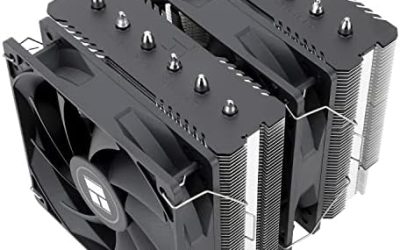
The Core Ultra 9 285K needs a strong cooler. A 280mm or 360mm liquid cooler or a premium dual-tower air cooler is the common advice from reviewers. The socket is LGA1851, so make sure the cooler supports it, because mounting kits for LGA1700 and LGA1851 are largely compatible but not always. Use a quality power supply sized for the graphics card. DDR5 memory is required, and Arrow Lake supports faster DDR5 modules, including CUDIMM modules on supported boards. Intel’s default power limits are safest. Overclocking can cause instability and may affect the warranty, so keep BIOS changes conservative and follow the board manual.
Upgrade Path and Platform Considerations
LGA1851 is newer than LGA1700, which has reached the end of the line with no new chips planned. However, the LGA1851 upgrade path looks short: reports indicate Intel’s next desktop generation, Nova Lake, moves to a different socket (LGA1954), so LGA1851 is expected to cover Arrow Lake and its refresh rather than several generations. AMD has said it will support AM5 across multiple generations. If a long upgrade path matters to you, check what the board maker and chip maker currently state before buying.
| Item | What the maker lists or reviewers report |
|---|---|
| Socket | LGA1851, Intel 800-series boards such as Z890 and B860 |
| Memory | DDR5 only, faster kits supported on suitable boards |
| PCIe | PCIe 5.0 for the graphics slot and an NVMe drive on supported boards |
| Power | 125W base, 250W maximum turbo for the 285K |
| Hyper-threading | Not present on Core Ultra 200S |
| Cooling | 280mm or 360mm liquid or premium air cooler |
Pair the Core Ultra 9 with these graphics cards
The processor is not the limit for any current graphics card. It is a natural partner for an RTX 5080, RTX 5090 or Radeon RX 9070 XT. Pairing it with an entry-level card wastes its strength, so a Core Ultra 5 245K or Core i5-14600K is the more balanced choice in that case. Gamers who also edit video, render 3D scenes or run virtual machines are the ones who get the most from the extra efficiency cores in the 285K.
Reviewers’ overall view
Coverage from Tom’s Hardware, TechPowerUp and Gamers Nexus described Arrow Lake as a more efficient but not faster gaming generation, with strong productivity performance. Many suggested that the 265K was the sweet spot of the lineup and that the 285K is for people who need every core. That framing is useful: treat the Ultra 9 as a workstation-capable gaming chip, not a pure gaming chip.
Frequently Asked Questions
Is Intel Core Ultra 9 good for gaming?
Yes, it plays all games well. It is not faster than the Ryzen 7 9800X3D in most games. It suits mixed gaming and creator use.
Is the Core Ultra 9 285K better than the i9-14900K for gaming?
Results are similar, with the 14900K sometimes slightly ahead. The 285K uses less power and has a newer socket. The choice depends on platform and price.
Is Intel Xeon good for gaming?
Usually not. Xeon chips favor server features over clock speed. A consumer Core i5 or Ryzen 5 is normally faster for games.
Is the i9 12th gen good for gaming?
Yes, the i9-12900K remains capable. It may limit very fast graphics cards at 1080p. It is a fine chip to keep.
Is the i9 14th gen worth buying now?
It is fast but power-hungry and on an end-of-line socket. Apply the latest BIOS update for stability. LGA1851 or AMD AM5 offers a better upgrade path.
Should I choose Core Ultra 9 or Ryzen X3D for gaming?
Choose Ryzen X3D if gaming is the main use. Choose Core Ultra 9 if you also do heavy creator work. Both work with top graphics cards.