A gaming PC cooler is not a race for the lowest temperature number on a chart. The real decision is a three-way trade: how much heat your processor actually makes during a long gaming session, how much fan noise you will tolerate while wearing a headset or sitting in a quiet room, and whether the cooler physically fits your case, your memory sticks and your motherboard. A cooler that wins on paper but hums all evening or blocks a memory slot is a bad buy, and a quiet cooler that lets a hot chip throttle is worse.


This guide is for three groups: first-time builders picking a first cooler, upgraders replacing a loud stock cooler, and owners of hot mid-range or high-end chips who want steady frame rates without a jet engine beside them. Every product below was chosen from the name and specifications stated on its Amazon product page, so you can check each claim against the listing before you buy.
Quick Picks
As an Amazon Associate we earn from qualifying purchases
| Product | Best for | Key spec from title |
|---|---|---|
| Noctua NH-D15 | Near-silent flagship air cooling for a hot chip in a roomy case | Dual 140 mm fans, 1500 RPM max |
| Thermalright Peerless Assassin 120 SE | Strong dual-tower cooling on a tight budget | Dual 120 mm fans, 1550 RPM, 155 mm tall |
| ARCTIC Liquid Freezer III Pro 360 | A 360 mm liquid loop for sustained heavy loads | 360 mm radiator, 38 mm thick |
| Cooler Master Hyper 212 Black | A first cooler for a modest gaming build | 4 copper heat pipes, 152 mm tall |
| ARCTIC P12 PWM PST 5 Pack | Filling a case with matched, daisy-chained airflow | Five 120 mm fans, 200–1800 RPM |
How to Choose
Measure height, clearance and memory first
Cooler height is the first number to check, because a tower that is too tall simply does not fit. The Noctua NH-D15 needs about 165 mm of case clearance, the Peerless Assassin 120 SE stands 155 mm tall and the Hyper 212 Black stands 152 mm tall, so three of the five picks in this guide need different amounts of room. Memory is the second trap: a front fan can overhang the memory slots, and tall heat spreaders clash with a wide dual-tower cooler. Measure the case limit from the case manual, measure the gap above your memory sticks, and confirm the socket on your motherboard matches the cooler box before you order anything.
Match TDP headroom to your actual processor
TDP is a maker figure for heat output, not a temperature promise, so treat it as a guide and leave headroom above it. A 65-watt chip under a single-tower cooler is a comfortable pairing, while a chip that boosts past 125 watts for minutes at a time deserves a dual tower or a 360 mm liquid loop. Sustained gaming loads matter more than a short burst in a benchmark, because a cooler that copes for two minutes and then lets the chip slow down will cost you frame rate in the third hour of play. Pick a cooler rated clearly above your chip, not one that only just matches it.
Noise and fan control matter every evening
A cooler lives beside you for years, so its sound matters as much as cooling. Maker noise figures are measured at full fan speed, which is not how you will run the cooler most of the time, so look at the fan size and the control options instead. Larger fans move the same air at lower speeds, which is why the 140 mm fans on the NH-D15 run quieter than small high-speed fans. A 4-pin PWM connector slows the fan when the chip is idle, and a fan curve in the BIOS keeps the cooler calm during light work and lets it ramp up only when a game demands it.
Radiator size and mount points decide liquid cooling
A liquid cooler is only as good as the place it mounts. A 360 mm radiator needs three adjacent 120 mm mounts, usually at the top or the front of the case, and many compact cases have no such spot at all. Thickness matters too: the Liquid Freezer III Pro 360 uses a 38 mm radiator, which is thicker than the common 27 mm size, so the radiator plus its fans need more depth than a thin loop. Check the case manual for mount positions and clearance, and read our guide to the best PC cooling system for the whole-system view before you commit to a loop.
The 5 Best Options
Noctua NH-D15
The NH-D15 is the reference dual-tower air cooler for builders who want flagship cooling without a pump, tubes or coolant. Two large 140 mm fans push air through a wide fin stack, so it moves a lot of air at modest speeds and keeps noise down during long sessions. It suits a hot processor in a roomy mid-tower or full-tower case, and the six-year warranty shows how long Noctua expects it to last. This is the pick for a quiet build where the case has room to spare and the owner would rather fit a cooler once and forget about it.
Specs
- Dual-tower air cooler with two NF-A15 PWM 140 mm fans
- Maximum fan speed of 1500 RPM
- Maximum noise level of 24.6 dB, as stated on the listing
- Airflow capacity of 140.2 cubic metres per hour
- Copper base and heat pipes with aluminium cooling fins
- 4-pin PWM connector, 12 volts, 1.56 watts
- 6-year manufacturer warranty
- Fits Intel LGA2066, LGA2011, LGA115x and LGA1200 sockets and AMD AM4 and AM5
Best for: A quiet flagship build with a tall case and a hot processor.
Watch out for: Confirm about 165 mm of case clearance and check tall memory against the front fan; LGA1700 and LGA1851 need a separate mounting kit.
Thermalright Peerless Assassin 120 SE
The Peerless Assassin 120 SE packs two towers, six heat pipes and two 120 mm fans into a cooler that costs far less than the flagship dual towers. It suits a mid-range gaming chip that runs hot under load, and its 155 mm height fits more cases than the tallest flagships. The dual-fan layout gives it headroom for sustained gaming sessions, while the plain black finish suits builds without lighting. For builders who want dual-tower cooling and would rather put the saving toward a better graphics card, this is the sensible middle ground.
Specs
- Dual-tower air cooler with 6 heat pipes
- Two 120 mm PWM fans running at 1550 RPM, plus or minus 10 percent
- Cooler dimensions of 125 x 135 x 155 mm
- AGHP heat-pipe technology, as stated on the listing
- Fits AMD AM4 and AM5 and Intel LGA1700, LGA1200, LGA115x and LGA1851
- 4-pin PWM connector
Best for: A mid-range gaming PC that needs dual-tower cooling without a flagship budget.
Watch out for: At 155 mm tall it still needs a case with room to spare, and the two fans sit close to tall memory sticks.
ARCTIC Liquid Freezer III Pro 360
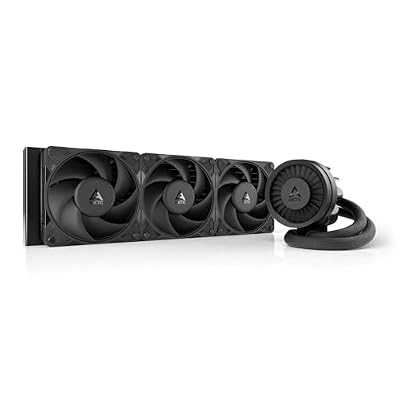
The Liquid Freezer III Pro 360 is the liquid pick for a high-end chip that stays under load for hours. A 360 mm radiator with three 120 mm fans gives it a large surface for shedding heat, and the 38 mm radiator is thicker than the usual size, which adds cooling area. A small VRM fan on the pump block blows air over the motherboard power area, which helps boards that run warm. It suits a powerful gaming rig in a case with three 120 mm mounts, and the included contact frame covers current Intel and AMD sockets.
Specs
- All-in-one liquid cooler with a 360 mm radiator
- Radiator thickness of 38 mm
- Three 120 mm fans
- PWM-controlled pump with a VRM fan
- Fits AMD AM5 and AM4 and Intel LGA1851 and LGA1700, with a contact frame included
Best for: A high-end chip under sustained load in a case with three 120 mm mounts.
Watch out for: Measure the mount area first, because a 38 mm radiator plus fans is thicker than most 27 mm radiators, and the pump needs a free fan header.
Cooler Master Hyper 212 Black

The Hyper 212 Black is the long-running single-tower cooler that many first builds begin with. Four copper heat pipes carry heat from the processor into a compact fin stack, and a single SickleFlow 120 Edge PWM fan keeps the whole unit at 152 mm tall. It suits a modest gaming chip, a first build, or a compact case where a dual tower would not fit. The all-black finish blends into a windowed build without drawing attention, and the included brackets cover current AMD and Intel sockets.
Specs
- Single-tower air cooler with 4 copper heat pipes
- SickleFlow 120 Edge PWM fan
- Height of 152 mm
- Aluminium top cover
- Fits AMD AM5 and AM4 and Intel LGA1851, LGA1700 and LGA1200, with brackets included
Best for: A first build or a modest chip where a single tower is enough.
Watch out for: Check the 152 mm height against your case limit and confirm your socket bracket is in the box.
ARCTIC P12 PWM PST 5 Pack

The P12 PWM PST 5 Pack is not a CPU cooler at all, and that is exactly why it belongs here: many gaming PCs run hot because the case itself has no airflow, not because the CPU cooler is weak. Five matched 120 mm fans fill the intake and exhaust mounts of a typical case, and the PWM Sharing Technology daisy-chains them from a single motherboard header. The blades are pressure-optimised for radiators and restricted intakes, and the fans can stop entirely below 5 percent PWM for silent idle time.
Specs
- Five 120 mm case fans in one pack
- Fan speed of 200–1800 RPM, with 0 RPM below 5 percent PWM
- PWM Sharing Technology daisy-chains fans from one header
- Pressure-optimised blades for radiators and restricted intakes
- 4-pin PWM connector
Best for: Filling every mount in a case with one matched set of fans.
Watch out for: Count your mounts and headers first; five fans still need somewhere to plug in, even with daisy-chaining.
Which One Fits Your Situation
You want the quietest possible gaming PC
Pick the Noctua NH-D15. Its two 140 mm fans move a large volume of air at low speeds, and the dual-tower fin stack gives it the surface area to cool a hot chip without spinning hard. Pair it with the ARCTIC P12 fans running slowly as case fans, and the whole system stays calm during long evening sessions.
You want strong cooling on a tight budget
Pick the Thermalright Peerless Assassin 120 SE. It gives you two towers, six heat pipes and two fans for far less than a flagship cooler, and its 155 mm height fits more cases than the tallest options. It is the best value route to dual-tower cooling for a mid-range gaming chip.
You run a hot chip for hours at a time
Pick the ARCTIC Liquid Freezer III Pro 360. A 360 mm radiator with three fans sheds heat steadily over long sessions, and the VRM fan helps the motherboard power area too. Just confirm your case has three adjacent 120 mm mounts and room for the thicker 38 mm radiator before you order.
Your case airflow is the weak point
Pick the ARCTIC P12 PWM PST 5 Pack, and keep your current CPU cooler. Five matched fans turn a stuffy case into a wind tunnel, and the daisy-chain wiring keeps the build tidy. If the processor itself still runs hot after the case breathes properly, add the Hyper 212 Black as a cheap single-tower upgrade.
Common Mistakes
- Buying a tall dual-tower cooler without measuring case clearance or memory height first.
- Matching a cooler to a chip’s base TDP instead of its sustained boost heat, then wondering why it slows down in long sessions.
- Fitting a 360 mm radiator into a case with no three-fan mount, or forgetting the extra depth of a thick radiator.
- Running all fans at full speed and blaming the cooler for noise, instead of setting a fan curve in the BIOS.
- Ignoring case airflow and expecting a CPU cooler alone to fix a case with no intake or exhaust fans.
Frequently Asked Questions
Is liquid cooling always better than air cooling for gaming?
No. A good dual-tower air cooler like the NH-D15 cools as well as many liquid loops, with no pump to fail and no coolant to age. Liquid cooling wins when the chip runs at high sustained loads for hours, or when the case has radiator mounts but little room above the motherboard for a tall tower.
How do I know if a cooler fits my case?
Check three numbers: the case limit for cooler height, the cooler height on its listing, and the clearance above your memory sticks. The NH-D15 needs about 165 mm, the Peerless Assassin 120 SE needs 155 mm and the Hyper 212 Black needs 152 mm. If any number is short, pick a shorter cooler.
Do I need to replace the thermal paste that comes with a cooler?
Usually not. The paste included with the coolers is fine for normal gaming use, and a fresh tube only helps if the included paste is old, dried out or missing. What matters more is a thin, even layer and a firm, level mount, so follow the cooler instructions and tighten the screws in the order shown.
How many case fans does a gaming PC need?
Most gaming PCs do well with three to five fans: two or three intakes and one or two exhausts at the rear or top. The ARCTIC P12 five-pack covers that layout in one matched set. Add more only if temperatures stay high after the basic layout is set, because extra fans past that point add noise faster than they add cooling.