- Top Pick: Thermalright Peerless Assassin 120 Vision MAX ARGB White CPU Air Cooler, Twin Tower Radiator 2150RPM,480×854 Resolving Power IPS Screen with 5’’,Computer Cooler for Intel lga1851/1700/115x,AM4/AM5
- Best Value: Thermalright Peerless Assassin 120 Vision MAX ARGB Black CPU Air Cooler, Twin Tower Radiator 2150RPM,480×854 Resolving Power IPS Screen with 5’’,Computer Cooler for Intel lga1851/1700/115x,AM4/AM5
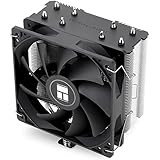
- Premium Choice: Thermalright Peerless Assassin 120 SE CPU Cooler, 6 Heat Pipes AGHP Technology, Dual 120mm PWM Fans, 1550RPM Speed, for AMD:AM4 AM5/Intel LGA 1700/1150/1151/1200/1851,PC Cooler
The best computer air coolers for gaming are the Thermalright Peerless Assassin 120 SE for most builds, the Thermalright Phantom Spirit 120 SE for hotter CPUs, the Noctua NH-D15 G2 for flagship chips and the lowest noise, and the DeepCool AK620 as a mid-range dual tower; a single-tower DeepCool AK400 covers budget and small cases. A good air cooler has no pump to fail, no coolant to leak, and keeps a 65 to 150 W gaming CPU in check at quiet fan speeds.
Air still makes sense for most gaming PCs. A gaming CPU rarely sits at full power for long, because games load a few cores heavily and the graphics card does the rest. That means a well-chosen dual-tower cooler handles even high-end chips in games, and the fan can stay slow. The choice mostly comes down to three things: how much heat your CPU makes, whether the cooler fits your case and memory, and how much noise you accept.
As an Amazon Associate we earn from qualifying purchases at no extra cost to you.


As an Amazon Associate we earn from qualifying purchases at no extra cost to you.


Quick answer
| Cooler | Type | Heat pipes | Fans | Height class | Best for |
|---|---|---|---|---|---|
| Thermalright Peerless Assassin 120 SE | Dual tower | 6 | 2 x 120 mm | About 155 mm | Value for most gaming CPUs |
| Thermalright Phantom Spirit 120 SE | Dual tower | 7 | 2 x 120 mm | About 155 mm | Hot Ryzen 9 and Core i7/i9 |
| Noctua NH-D15 G2 | Dual tower | 8 | 2 x 140 mm | About 168 mm | Flagship CPUs, lowest noise |
| DeepCool AK620 | Dual tower | 6 | 2 x 120 mm | About 160 mm | Mid-range dual tower |
| be quiet! Dark Rock Pro 5 | Dual tower | 7 | 135 mm and 120 mm class | Tall, check case | Quiet premium option |
| Noctua NH-U12A | Single tower | 7 | 2 x 120 mm | About 158 mm | Strong single tower |
| DeepCool AK400 | Single tower | 4 | 1 x 120 mm | About 155 mm | Budget and small cases |
| Thermalright Assassin X 120 R SE | Single tower | 5 | 1 x 120 mm | About 148 mm | Low-cost upgrade over stock |
How we chose
This guide is research-based, drawn from manufacturer specification sheets and published cooler comparisons, not from our own testing. We included coolers that are current, widely stocked, and common in gaming builds, then compared them on cooling headroom, noise behavior, height and width, memory clearance, socket support, mounting difficulty and cost class. Published comparisons agree that the Noctua NH-D15 G2 leads on raw performance, that the Peerless Assassin 120 SE delivers most of that performance for a small fraction of the cost, and that the Phantom Spirit 120 SE sits between them. Heights and ratings vary between sources by a few millimeters or watts, so we use approximate values and ask you to confirm against your case and board.
What to check before choosing
How much heat does your CPU make?
Gaming does not load a CPU like a render does. Typical gaming draw for a modern desktop chip lands around 60 to 120 W, while all-core workloads on high-end chips can reach 200 W or more. Match the cooler to your worst case if you also stream, encode or compile, and to your gaming case if you do not. A sensible rule is a cooler rated well above the CPU’s maximum power.
Cooler height versus case
Dual towers are tall. Check the case’s maximum CPU cooler height and leave a few millimeters spare. Many mid-tower cases allow 160 to 185 mm, but compact cases can allow far less. A solid door on a quiet case can also limit cooler height.
Memory and graphics card clearance
A dual tower can overhang the first memory slot. Check the maker’s guidance for tall memory modules. Some coolers let you move the front fan up to clear them. Also check that the cooler does not touch the top of the graphics card or the motherboard heatsinks.
Socket and mounting
Current coolers support AMD AM5 and Intel LGA1700, and most also cover LGA1851 because it uses the same hole pattern. Confirm your socket on the cooler’s support list, and confirm that the mounting kit includes the right backplate.
Noise
Large 140 mm fans at low RPM are quieter than 120 mm fans at the same airflow. Look for PWM control and the ability to set a gentle curve. Many gaming builds do well with the CPU fan at 40 to 60 percent speed until load rises.
Worked example: temperature headroom
A cooler’s performance can be estimated with thermal resistance, which is how many degrees Celsius the CPU rises above the surrounding air per watt of heat. Suppose a dual-tower cooler has an effective resistance of 0.15 degrees per watt at a slow, quiet fan speed. That value is an illustration, not a published rating.
- Gaming load at 90 W: 90 x 0.15 = 13.5 degrees above the air entering the cooler.
- With room air at 25 degrees and a few degrees of case warm-up, the cooler’s contribution puts the CPU near 45 degrees. Add the thermal gap between the chip and the cooler’s contact plate for the sensor reading.
- Heavy load at 200 W: 200 x 0.15 = 30 degrees above the air, so about 58 to 60 degrees with the same assumptions. A cooler with lower resistance, such as a larger dual tower, brings this down.
Now compare two coolers at 200 W. If the better cooler has 0.12 degrees per watt, it gives 24 degrees above the air, which is 6 degrees lower. That is why published comparisons show small gaps between a top dual tower and a budget dual tower at moderate power but larger gaps at 250 W and above. It also shows why a gaming-only user can choose the cheaper cooler: at 90 W the gap between 0.12 and 0.15 degrees per watt is only 2.7 degrees.
The best computer air coolers
1. Thermalright Peerless Assassin 120 SE
Spec line: Dual tower · 6 heat pipes · 2 x 120 mm PWM fans · about 155 mm tall · AM5, LGA1700 and LGA1851 support · budget cost class
Best for: Most gaming builds from midrange Ryzen and Core chips up to strong gaming CPUs.
Skip if: You run a 250 W class chip all day or need to clear tall memory.
- Pro: Cooling close to far costlier coolers at moderate power, and quiet at low speeds.
- Pro: Very low cost for a dual tower.
- Con: Wide body can crowd memory slots.
- Con: Mounting takes patience.
2. Thermalright Phantom Spirit 120 SE
Spec line: Dual tower · 7 heat pipes · 2 x 120 mm PWM fans · about 155 to 157 mm tall · sustained headroom in the 200 W class · ARGB version available at a higher cost
Best for: Hot CPUs that need more headroom than the Peerless Assassin without a flagship cooler’s cost.
Skip if: Your chip is a cool-running gaming part, where the cheaper model is enough.
- Pro: Extra heat pipe and design improvements add headroom.
- Pro: Still low in cost class for its performance.
- Con: Cost varies by version and region.
- Con: Same wide body and clearance checks apply.
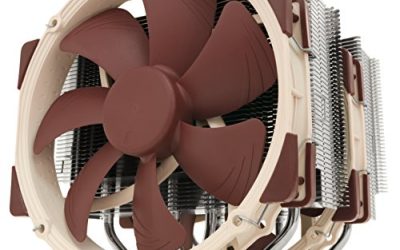
3. Noctua NH-D15 G2
Spec line: Dual tower · 8 heat pipes · 2 x 140 mm PWM fans · about 168 mm tall · designed for 250 W and higher class chips · long warranty · premium cost class
Best for: Flagship CPUs, lowest noise at high load and a long-term build.
Skip if: You are budget-minded or have a compact case.
- Pro: Top air-cooling performance in published comparisons.
- Pro: Very quiet and a complete, durable mounting kit.
- Con: Premium cost class and large size.
- Con: Can crowd the first memory slot and the top of the graphics card.
4. DeepCool AK620
Spec line: Dual tower · 6 heat pipes · 2 x 120 mm fans · about 160 mm tall · roughly 260 W class rating by one source · mid-range cost class
Best for: A balanced dual tower in a case that allows about 160 mm.
Skip if: The price has risen to near the Peerless Assassin or Phantom Spirit, where those are the better value.
- Pro: Solid cooling and good build quality.
- Pro: Easy mounting and widely available.
- Con: Cost varies a lot between listings.
- Con: Trails the Thermalright duo on value.
5. be quiet! Dark Rock Pro 5
Spec line: Dual tower · 7 heat pipes · dual fan design with a large center fan · premium cost class · tall build, check case clearance
Best for: A quiet-first premium build that suits dark, styled cases.
Skip if: Your case limits cooler height or your memory is tall.
- Pro: Quiet operation and good cooling with a refined finish.
- Pro: Strong mounting hardware.
- Con: Premium cost class, large and heavy.
- Con: Clearance checks are essential.
6. Noctua NH-U12A
Spec line: Single tower · 7 heat pipes · 2 x 120 mm PWM fans · about 158 mm tall · slimmer than a dual tower · premium cost class
Best for: A strong cooler with more memory clearance than a wide dual tower.
Skip if: A cheaper dual tower gives similar performance for less.
- Pro: Narrow body leaves memory slots free.
- Pro: Quiet and well built.
- Con: Cost class is high for a single tower.
- Con: Not as strong as the NH-D15 G2 at the top end.
7. DeepCool AK400
Spec line: Single tower · 4 heat pipes · 1 x 120 mm PWM fan · about 155 mm tall · budget cost class · roughly 220 W class rating by the maker
Best for: Budget gaming builds with 65 to 105 W CPUs and smaller cases.
Skip if: You plan to upgrade to a hot chip.
- Pro: Low cost and simple mounting.
- Pro: Good clearance with memory.
- Con: Limited headroom for hot chips.
- Con: A single fan is louder to match a dual tower.
8. Thermalright Assassin X 120 R SE
Spec line: Single tower · 5 heat pipes · 1 x 120 mm PWM fan · about 148 mm tall · very low cost class
Best for: The cheapest meaningful upgrade over a stock cooler.
Skip if: You run a hot CPU, or want ultra-quiet operation.
- Pro: Very low cost, compact height.
- Pro: Fits many smaller cases.
- Con: Limited headroom beyond mid-range gaming chips.
- Con: Fewer premium touches.
Decision matrix
| Your CPU and case | Choose | Reason |
|---|---|---|
| Midrange gaming chip, standard case | Thermalright Peerless Assassin 120 SE | Best value |
| Hot Core i7/i9 or Ryzen 9 | Thermalright Phantom Spirit 120 SE or Noctua NH-D15 G2 | More headroom |
| Quiet streaming PC | Noctua NH-D15 G2 or be quiet! Dark Rock Pro 5 | Low noise at load |
| Tall memory | Noctua NH-U12A | Narrow body |
| Small case or tight budget | DeepCool AK400 or Thermalright Assassin X 120 R SE | Compact and low cost |
Air versus liquid for a gaming PC
Air coolers are simpler, quieter at idle and have no pump, so there is nothing to leak or to wear out. A liquid cooler can win in tight cases that cannot fit a tall tower, and can cool very hot chips with a large radiator, but costs more and adds pump noise. For most gaming builds, a strong dual-tower air cooler is the sensible pick, and the money saved is better spent on the graphics card.
Gaming room heat and noise
Everything your PC draws becomes heat in the room. A gaming PC with a 100 W CPU and a 300 W graphics card puts out roughly 450 W, about the same as a small space heater on low. A cooler does not remove that heat, it only moves it from the chip to the air. In a small gaming room, long sessions raise the room temperature, which raises CPU temperature a degree for every degree of ambient air. Keep the case exhaust clear, give the room some ventilation, and place the PC so that fan noise does not reach the microphone. Dust also matters: a clogged heatsink acts as a thicker blanket, so clean it every few months.
Installation tips
- Apply a pea-sized dot of paste, or use the pre-applied paste when the kit includes it.
- Tighten the screws in a cross pattern, a little at a time, to keep pressure even.
- Connect the fan to the CPU fan header so the board can control it.
- Check that the fan clips are firmly on the tower before the first power-on.
- Watch temperatures with a monitor for the first few runs and adjust the curve.
FAQ
Is an air cooler good enough for a gaming CPU?
Yes. A good dual-tower air cooler handles nearly every gaming CPU at quiet fan speeds.
Only the hottest chips under all-core loads need a large liquid cooler.
Do I need to replace the stock cooler?
Not always. Some stock coolers are fine for low-power chips, but they are loud under load.
An aftermarket cooler lowers noise and temperature, which matters more on a hot chip.
How tall of a cooler can my case take?
Check the case’s maximum cooler height, listed in its specifications. Leave a few millimeters of margin.
Side panels, especially on damped cases, can limit tower height.
Will a dual-tower cooler block my RAM?
It can. The front tower may overhang the first memory slot, so check tall memory modules against the cooler guide.
Most coolers let you raise the front fan, and low-profile memory avoids the issue.
Single fan or dual fan?
Two fans move more air at lower speed, so they are usually quieter at the same cooling level.
A single fan works on lower-power chips and in smaller cases.
How often should I replace thermal paste?
Every few years or when you remove the cooler. Fresh paste helps if temperatures creep up.
Clean dust from the heatsink first; it is a more common cause of rising temperatures.
Do I need to worry about LGA1851 or AM5 mounting?
Confirm the socket on the cooler’s support list. Most current coolers support AM5 and the Intel LGA1700 pattern.
LGA1851 uses the same hole pattern as LGA1700, so those mounts generally carry over.
Are RGB air coolers worth it?
Only for looks. Lighting does not change cooling, and ARGB versions can cost more.
Choose the plain version of a cooler and spend the difference on fans or a better graphics card.