- Top Pick: GE Window Air Conditioner 5,000 BTU AC Unit for Small Spaces up to 150 sq ft with Manual Controls & 2 Cooling Modes, Easy Install Kit, White
- Best Value: BLACK+DECKER Portable Air Conditioner, 10,000 BTU, BPACT10WT, White | 5,500 BTU SACC for Rooms up to 450 Sq. Ft., 3-in-1 Portable AC, Fan and Dehum with Follow Me Remote Control
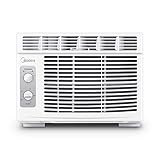
- Premium Choice: Midea 5,000 BTU EasyCool Small Window Air Conditioner – Cool up to 150 Sq. Ft. with Easy-to-Use Mechanical Controls and Reusable Filter, Perfect for Small Bedroom, Living Room, Home Office
The best air conditioners for a gaming room in November 2026 are the Midea U-shaped window units (8,000 and 12,000 BTU) for quiet, efficient cooling, the LG LW1022IVSM dual-inverter window unit when noise near a microphone matters most, and the Midea Duo MAP14HS1TBL when a window unit will not fit and you need a portable. Pick the BTU size from your room area plus the heat your PC and console add, not from the room area alone.
This guide is research-based. It compares manufacturer specifications and the noise and efficiency figures that reviewers have published, and it is written for gamers: a gaming PC and console can add as much heat as several people, a fan near a microphone ruins streams and voice chat, and humidity affects electronics. Where sources disagree, the text says so.
As an Amazon Associate we earn from qualifying purchases at no extra cost to you.



Quick picks by room and setup
- Best overall window unit: Midea U-shaped 12,000 BTU. Quiet, efficient and leaves the window usable.
- Best for small rooms: Midea U-shaped 8,000 BTU. Same design for rooms up to about 350 square feet.
- Quietest for streaming: LG LW1022IVSM dual-inverter. Inverter compressors vary speed instead of cycling on and off, which avoids sudden noise changes.
- Best premium inverter: GE Profile ClearView 12,200 BTU inverter. High capacity with inverter efficiency and a clear window view.
- Best Wi-Fi U-shaped alternative: Frigidaire Gallery U-shaped 12,000 BTU. App control for scheduling cooling before a session.
- Best portable overall: Midea Duo MAP14HS1TBL. Dual-hose design with a 14,000 DOE BTU class rating.
- Best mid-size portable: Midea Duo 12,000 BTU inverter portable. A lower tier with the same dual-hose idea.
- Best portable for humid rooms: Frigidaire FHPW142AC1. A 10,000 DOE BTU class portable with strong dehumidifying.
Why a gaming room needs a different sizing rule
Standard BTU charts assume a room with a couple of people and ordinary lighting. A gaming room breaks that assumption. A mid-range gaming PC under load pulls roughly 400 to 700 watts at the wall, a high-end build can exceed 800 watts, a console draws about 150 to 250 watts, and a large monitor or TV adds another 100 to 200 watts. Every watt becomes heat in the room. Because one watt equals about 3.412 BTU per hour, a setup that draws 1,000 watts adds about 3,400 BTU per hour of heat on top of what the room’s size and sunlight demand.
That is why a 150 square foot bedroom that would normally need 6,000 BTU needs a unit near 8,000 BTU when a gaming rig runs for hours. Undersized units run continuously, never reach the set temperature and, in a window or portable unit, get louder as the compressor and fan run at full speed.
How we chose
This is a desk-research comparison, not a measurement session. We built the shortlist in five steps.
- We collected current window, U-shaped and portable air conditioners that appear in 2026 roundups and that come in 8,000 to 14,000 BTU classes suited to bedrooms and small rooms.
- We compared published noise ratings, noting that manufacturer best-case figures are lower than figures reviewers report on the low and high fan settings.
- We checked efficiency and design: inverter compressors, dual-hose portables, U-shaped window designs and humidity control.
- We converted the heat of a gaming setup from watts to BTU and built a sizing method that adds equipment heat to the room-size baseline.
- We grouped picks by buyer criteria with concrete thresholds so you can match a unit to your room, your microphone and your electrical outlet.
Specs vary by model revision. Confirm the exact model code and its BTU rating type (DOE or ASHRAE) before buying.
Criteria that matter in a gaming room
| Criterion | Threshold to look for | Why it matters |
|---|---|---|
| BTU capacity | Room baseline plus gaming heat (see the worked example) | An undersized unit runs nonstop and gets louder |
| Noise rating | Under 50 dBA on low; under 45 dBA for streaming | Fan and compressor noise leaks into microphones |
| Compressor type | Inverter for steady, quieter operation | Fixed-speed units cycle on and off, causing sudden noise |
| Type | Window or U-shaped preferred; portable when windows block installation | Single-hose portables pull warm air into the room and cool less effectively |
| Dehumidifying | Humidity control that keeps the room near 40 to 60 percent | High humidity risks condensation on cold components and speeds corrosion |
| Power and circuit | Dedicated 15 amp outlet, no extension cords | A 12,000 BTU unit draws about 1,000 watts, and your PC draws more |
The picks, grouped by buyer criteria
Group 1: Window and U-shaped units (best for most gaming rooms)
1. Midea U-shaped 12,000 BTU
Spec line: U-shaped window design · 12,000 BTU class · cools rooms up to about 550 square feet · Wi-Fi and remote control · quiet operation (manufacturer rating about 32 dBA at best, and reviewers report higher on higher fan speeds)
Best for: A larger gaming room or a room with a hot PC. The U-shaped design leaves the window usable and keeps compressor noise outside.
Skip if: Your window will not accept a window unit, or the manufacturer noise rating is the deciding factor, because the 32 dBA number is a best-case figure.
- Pros: Quiet for a window unit, efficient inverter operation, keeps part of the window usable, app control for scheduling.
- Cons: Heavier to install than a standard window unit, and the quietest figure applies to the lowest setting only.
2. Midea U-shaped 8,000 BTU
Spec line: U-shaped window design · 8,000 BTU class · rooms up to about 350 square feet · Wi-Fi and remote · low-noise design (one source lists about 42 dBA on low)
Best for: A bedroom gaming setup up to about 200 square feet with a mid-range PC and a console.
Skip if: Your PC pulls above 600 watts under load or the room gets direct afternoon sun. Size up to 10,000 BTU in that case.
- Pros: Compact for its class, quiet, efficient.
- Cons: Noise figures vary by source, and capacity runs short in a hot room with high-end hardware.
3. LG LW1022IVSM dual-inverter
Spec line: Window unit · about 10,000 BTU class · dual-inverter compressor · quiet operation · remote and app control
Best for: Streamers and voice-chat players who want steady, low noise. An inverter varies its speed instead of cycling on and off.
Skip if: You need more than about 10,000 BTU of capacity or want a U-shaped design that keeps the window open.
- Pros: Praised by reviewers for quiet operation, steady temperature, efficient.
- Cons: Conventional window installation blocks the lower part of the window, and the capacity class limits it to medium rooms.
4. GE Profile ClearView 12,200 BTU inverter
Spec line: Window unit · 12,200 BTU class · inverter compressor · clear-view front panel · Wi-Fi control
Best for: A larger gaming room that needs high capacity and steady inverter operation without a loud on-off cycle.
Skip if: You want the lowest cost. Reviewers name it an upgrade pick, which implies a premium tier cost.
- Pros: High capacity, inverter efficiency, smart control.
- Cons: Premium tier cost and a larger body that needs a sturdy window.
5. Frigidaire Gallery U-shaped 12,000 BTU
Spec line: U-shaped window design · 12,000 BTU class · Wi-Fi control · window stays usable
Best for: Gamers who want a Midea-style U-shaped design with app scheduling to pre-cool the room before a session.
Skip if: Noise is your top concern. Standard Frigidaire window units are listed near 54 to 55 dBA, and you should confirm the Gallery U-shaped rating before buying.
- Pros: U-shaped design, high capacity, smart scheduling.
- Cons: Noise rating is not confirmed as low as the Midea, so check before using near a microphone.
Group 2: Portable air conditioners (when a window unit will not fit)
6. Midea Duo MAP14HS1TBL
Spec line: Dual-hose inverter portable · 14,000 DOE BTU class · CEER about 11.2 · noise about 49 dB on low and 55 dB on high
Best for: Rooms with sliding or casement windows where a window unit will not fit, and large gaming rooms that need strong cooling.
Skip if: You stream with an open microphone close to the unit. Portables put the compressor inside the room, so the noise is much closer to you.
- Pros: Dual-hose design cools more effectively than single-hose units, inverter efficiency, strong capacity.
- Cons: Noise of about 49 to 55 dB inside the room, floor space and two hoses to route.
7. Midea Duo 12,000 BTU inverter portable
Spec line: Dual-hose inverter portable · 12,000 BTU class · noise about 48 dB listed for one inverter model
Best for: Mid-size rooms that need a portable with a lower capacity tier than the 14,000 BTU model.
Skip if: You need maximum cooling or the quietest possible operation. Portable units are louder than window units, and a quoted 48 dB is a best-case figure.
- Pros: Dual-hose cooling, inverter efficiency, mid-tier cost.
- Cons: Noise and floor space, and ratings differ between listings.
8. Frigidaire FHPW142AC1
Spec line: Portable · 10,000 DOE BTU class · noise about 52 dB low and 58 dB high · strong dehumidifying
Best for: Humid rooms where the unit also needs to pull moisture from the air.
Skip if: You need quiet operation near a microphone. It is louder than the Midea models on high.
- Pros: Strong dehumidifying, a familiar brand, flexible placement.
- Cons: Louder, and the DOE rating of 10,000 BTU is lower than the label size suggests.
Worked example: size an air conditioner for a gaming room
Use this step-by-step method instead of picking a unit from room area alone.
- Find the room baseline. A common guide: about 150 to 250 square feet needs about 6,000 BTU, 250 to 300 needs about 7,000, 300 to 350 needs about 8,000, 350 to 400 needs about 9,000, 400 to 450 needs about 10,000, and 450 to 550 needs about 12,000. Say your room is 160 square feet, so the baseline is 6,000 BTU.
- Add the equipment heat. Add the watts that stay on during play: a gaming PC at 600 watts, a console or second PC at 0 to 200 watts, a monitor at 100 watts and lamps at 50 watts. A PC-only setup is about 750 watts.
- Convert watts to BTU. Multiply by 3.412. So 750 watts equals about 2,560 BTU per hour.
- Add people. The guide adds about 600 BTU for each person beyond two. If a friend joins, add 600 BTU.
- Add sun exposure. If the room gets direct sun, add about 10 percent to the baseline. Here, 600 BTU.
- Total. 6,000 plus 2,560 plus 600 plus 600 equals about 9,760 BTU. Round up to a 10,000 or 12,000 BTU class unit.
For a portable, check the DOE rating, not the label size. A portable sold as 14,000 BTU often has a DOE rating of about 8,000 to 10,000 BTU, which is the figure that matters for real cooling.
Comparison table
| Model | Type | Capacity class | Noise (reported) | Best for |
|---|---|---|---|---|
| Midea U-shaped 12,000 BTU | U-shaped window | 12,000 BTU, up to about 550 sq ft | About 32 dBA best case | Large room, quiet |
| Midea U-shaped 8,000 BTU | U-shaped window | 8,000 BTU, up to about 350 sq ft | About 32 to 42 dBA | Bedroom setup |
| LG LW1022IVSM | Window, dual inverter | About 10,000 BTU | Quiet, praised by reviewers | Streaming |
| GE Profile ClearView 12,200 BTU | Window, inverter | 12,200 BTU | Check datasheet | Premium, large room |
| Frigidaire Gallery U-shaped 12,000 BTU | U-shaped window | 12,000 BTU | Check datasheet | App scheduling |
| Midea Duo MAP14HS1TBL | Dual-hose portable | 14,000 DOE BTU class | About 49 to 55 dB | No window option |
| Midea Duo 12,000 BTU | Dual-hose portable | 12,000 BTU | About 48 dB | Mid-size portable |
| Frigidaire FHPW142AC1 | Portable | 10,000 DOE BTU class | About 52 to 58 dB | Humid rooms |
Noise near a microphone: how to keep chat clean
A decibel figure on the box is a best-case number measured at a fixed distance on the lowest speed. In a small room the noise reflects off walls and is louder at your head. These steps keep voice chat and streams clean:
- Prefer a window or U-shaped unit. The compressor and condenser fan sit outside, so only the indoor fan is heard.
- Choose an inverter. It runs steadily at low speed instead of switching on and off, so the noise does not change suddenly during a call.
- Pre-cool the room. Cool the room before you start and use a low fan setting during streams.
- Place the unit away from the microphone. Put it on the opposite wall and aim the airflow away from your desk. A cardioid or dynamic microphone rejects far-away noise better than a condenser microphone.
- Use noise suppression as a backup. Software suppression helps with steady fan noise but should not be the main fix.
Humidity, condensation and your hardware
Air conditioners remove moisture as they cool, which helps electronics. Very high humidity risks condensation on cold components when a PC starts in a cold room after a warm period, and very low humidity increases static discharge. A relative humidity of about 40 to 60 percent is a safe target for a gaming room. A cheap hygrometer shows the number. Do not point cold airflow straight at the PC case, and do not place a portable unit’s drain hose or water tray where a spill could reach the desk. If your room stays above 60 percent humidity even with cooling, a dehumidifier is the better tool for the job, and the Frigidaire FHPW142AC1’s dehumidifying strength helps in that case.
Electrical safety
- Use a dedicated outlet. A 12,000 BTU unit draws about 1,000 watts, and a gaming PC adds hundreds more. Do not share a circuit with the unit and a space heater.
- Never use a thin extension cord or an ordinary power strip. Plug the air conditioner directly into a grounded wall outlet that matches the plug.
- Check the cord and plug. If the plug feels warm or the cord is damaged, stop using the unit and have it checked.
- Support the unit. A window unit must be secured with the supplied brackets, and a heavy unit needs a strong frame. Follow the installation manual, and ask for help lifting.
- Keep water away from the PC. Route the drain so no moisture can reach cables or the case.
FAQ
What size air conditioner do I need for a gaming room?
Start with the room-size baseline, then add about 3.4 BTU per watt of equipment and about 600 BTU for each extra person. A 160 square foot room with a 750-watt setup needs about 9,000 to 10,000 BTU.
Round up to the next common size. An undersized unit runs nonstop and gets louder.
Does a gaming PC really heat a room?
Yes. Every watt the PC draws becomes heat. A rig drawing 600 watts adds about 2,000 BTU per hour, similar to several people in the room.
The heat is highest during demanding games. Idle and desktop use draw far less.
Is a window unit quieter than a portable?
Generally yes. A window or U-shaped unit keeps the compressor outside, while a portable puts it in the room. Reviewers list portables at about 48 to 58 dB and quiet window units lower.
For streaming, choose a window or U-shaped inverter unit if your room allows it.
What does the DOE BTU rating mean for portables?
DOE BTU is the standardised rating that accounts for heat the unit’s own hose and body add to the room. It is lower than the older ASHRAE label number.
Size a portable by its DOE figure. A unit labelled 14,000 BTU can have a DOE rating near 8,000 to 10,000 BTU.
Is an inverter air conditioner worth it?
For a gaming room, yes. An inverter runs steadily at variable speed, so noise stays constant and the temperature stays even.
It also uses less power than a fixed-speed compressor that cycles on and off, which saves energy over long sessions.
Can an air conditioner damage my PC?
Not directly. Cool air helps components. The risks are condensation from sudden temperature changes, water leaks and static in very dry air.
Keep humidity near 40 to 60 percent, do not aim cold airflow at the case and route drain hoses away from the desk.
Can I plug an air conditioner into a power strip?
No. Plug it directly into a grounded wall outlet. Power strips and thin extension cords can overheat under a load of about 1,000 watts.
Keep your PC on a separate outlet or a rated surge protector when the circuit allows it.
Should I get an air conditioner or a fan for my gaming PC?
A fan moves air but does not remove heat from the room. When the room is warm, a fan only moves warm air. An air conditioner removes heat and humidity.
Use case fans for component cooling and an air conditioner for room temperature.
Final checklist before you buy
- Size the unit with the worked example: room baseline plus equipment heat plus people plus sun.
- Choose a window or U-shaped inverter unit for streaming, and a dual-hose portable only when windows block installation.
- Check the noise rating at your fan setting, and place the unit away from your microphone.
- Confirm the outlet, use a dedicated circuit and avoid extension cords.
- Keep humidity near 40 to 60 percent and route water away from the PC.