For meeting-heavy work, the deciding question is not how the screen looks to you, but how you look and sound to everyone else. A monitor can carry a sharp webcam, a clean microphone, and speakers in one frame, or it can leave you stacking a separate camera on top and hoping the audio behaves. That difference shows up in the first call of every single day.
This guide suits remote workers in back-to-back calls, managers who present to clients on screen, and home office users tired of loose webcams and cables. Every model was selected from the name and specifications on its Amazon product page. Three picks integrate a camera; the fourth is included honestly as a strong screen with speakers but no webcam, for buyers who already own a camera they like.
Quick Picks
As an Amazon Associate we earn from qualifying purchases
| Product | Best for | Key spec from title |
|---|---|---|
| ViewSonic VG2741V | Sign-in security plus a sharp camera | 27-inch 1080p IPS, Windows Hello IR 5MP webcam, USB-C |
| ASUS BE279QSK | A complete meeting kit in one frame | 2MP adjustable webcam, mic array, speakers, height adjustable |
| LG Libero 27MQ70QC | A camera you can take off the screen | QHD IPS, HDR10, detachable Full HD webcam |
| Dell S2725DS | Speakers and QHD, camera not included | 27-inch QHD, 100Hz, integrated dual 5W speakers |
How to Choose
Decide whether the webcam must live inside the monitor
An integrated camera removes the loose webcam, its cable, and the daily ritual of clipping it straight. The better designs add a privacy shutter and a slight tilt range, and one pick here signs you in with facial recognition. The trade-off is flexibility: a built-in camera stays at the top of that screen forever, while a separate camera can move to a tripod or a second monitor. If your meetings are desk-bound, integrated wins on tidiness. If you present, teach, or record from different angles, a separate camera on a good screen may serve you better.
Judge the microphone and speakers, not just the camera
Call quality fails on audio far more often than on video. A microphone array inside the monitor picks up a voice from a normal seated distance, and built-in speakers keep the other side of the conversation off your laptop’s small drivers. Check the title for both items, because some screens include a camera but leave audio to you. Room matters too: a hard-walled spare room will echo through any microphone, so soft furnishings near the desk improve every pick in this roundup more than a specification change would.
Match resolution and brightness to faces and windows
Meeting software compresses your outgoing video, so the camera specification matters more than panel resolution for how you appear. The panel still decides how clearly you see everyone else, plus the documents shared beside them. QHD gives shared spreadsheets room next to a grid of faces, while 1080p at 27 inches is adequate when calls dominate the day. An anti-glare or matte surface and enough brightness for a bright room keep your own view comfortable, and an IPS panel keeps faces natural when you lean back or shift in your chair during long sessions.
Find where meeting monitors cut corners
The savings on cheaper meeting screens hide in the camera and the stand. A basic 2MP camera is fine for standard call quality, but some listings bury an even weaker camera or skip the microphone entirely. Tilt-only stands force the camera angle too low, which is the unflattering view nobody wants, so height adjustment doubles as a camera feature. Also check the port list: a webcam inside the monitor needs a USB connection back to the computer, and a USB-C input usually carries picture, camera, and data together in the cleanest setup.
The 4 Best Options
ViewSonic VG2741V

ViewSonic treats the camera as the main event. The integrated 5MP webcam is certified for Windows Hello with an infrared sensor, so signing in becomes a glance instead of a password, and the product page adds a privacy shutter and a built-in microphone and speakers for the full meeting kit. The 27-inch Full HD IPS panel runs at 120Hz according to the page, which keeps shared screens and scrolling smooth, while USB-C, HDMI, and DisplayPort inputs cover laptops and desktops. Advanced ergonomics handle height and angle, which also aims the camera properly at your face.
Specs
- Screen size: 27 inches
- Resolution: 1080p Full HD
- Panel: IPS
- Camera: integrated Windows Hello certified IR 5MP webcam
- Audio: built-in microphone and speakers as listed on the product page
- Ports: USB-C, HDMI, DisplayPort, USB
- Stand: advanced ergonomics
- Privacy: camera privacy shutter as listed on the product page
Best for: Remote workers who want secure facial sign-in and a complete camera, microphone, and speaker kit in one screen.
Watch out for: The panel is 1080p, so document-heavy workers who read dense spreadsheets between calls may prefer a QHD pick.
ASUS BE279QSK

ASUS packs the whole meeting checklist into one frameless frame. The built-in webcam adjusts and rotates to frame you properly and carries a sliding shutter for privacy, a microphone array listens from the bezel, and speakers handle the incoming side of the call. The 27-inch Full HD IPS panel includes Eye Care features for long days, and the stand adjusts for height with tilt, swivel, and pivot, which matters because camera angle follows stand angle. HDMI, DisplayPort, and VGA inputs keep older office desktops in play, and the wall mountable design suits fixed meeting corners.
Specs
- Screen size: 27 inches
- Resolution: Full HD 1080p
- Panel: IPS, frameless
- Camera: built-in adjustable 2MP webcam
- Audio: mic array and speakers
- Comfort: Eye Care
- Ports: HDMI, DisplayPort, VGA
- Stand: height adjustable, wall mountable
Best for: Home office users who want camera, microphone, speakers, and a height-adjustable stand without buying any extras.
Watch out for: The title lists no USB-C input, so the webcam’s USB connection and your video cable are separate runs to the computer.
LG Libero 27MQ70QC
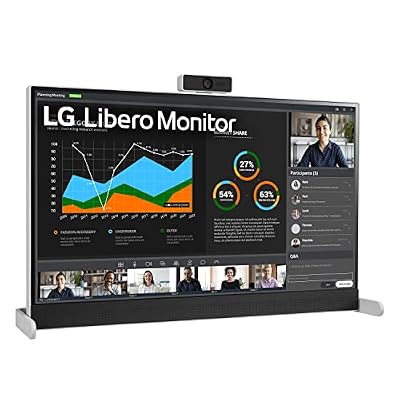
LG answers the privacy question with a camera that comes off. The detachable Full HD webcam mounts when you need it and leaves the screen when you do not, and the product page pairs it with an integrated microphone, a privacy cover, and built-in stereo speakers for call audio. The panel itself is a step up from the other camera picks: a 27-inch QHD IPS screen with HDR10, so shared documents and design work look sharper between meetings. Connectivity on the page includes HDMI and USB Type-C, keeping a laptop desk to a short cable list.
Specs
- Screen size: 27 inches
- Resolution: QHD
- Panel: IPS
- HDR: HDR10
- Camera: detachable Full HD webcam
- Audio: built-in speakers as listed on the product page
- Ports: HDMI, USB Type-C as listed on the product page
- Model: 27MQ70QC-S.AUS
Best for: Workers who want QHD sharpness for documents and a webcam that can be removed from the desk entirely after calls.
Watch out for: A detachable camera is one more small item to store safely, and it must be mounted and connected before the first call of the day.
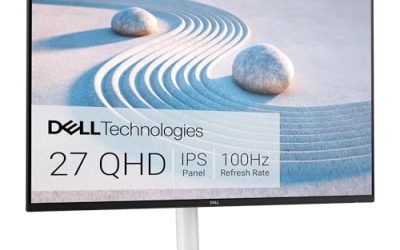
Dell S2725DS

This Dell is the honest exception in the roundup, so read its title carefully: it has no webcam. What it offers instead is a strong meeting-room screen for buyers who already own a camera, with integrated dual 5W speakers that are louder than the small drivers in most rivals, a QHD panel at 100Hz for shared documents, and full height, tilt, swivel, and pivot adjustment to frame whatever camera you mount on top. IPS colour coverage and an eye comfort rating suit long days, and the ash white finish suits bright home offices.
Specs
- Screen size: 27 inches
- Resolution: QHD 2560 x 1440
- Refresh rate: 100Hz
- Contrast ratio: 1500:1
- Eye comfort: TÜV Rheinland Eye Comfort 4 Star
- Audio: integrated dual 5W speakers
- Stand: height, tilt, swivel, pivot
- Camera: none listed in the title
Best for: Call-heavy workers who already own a separate webcam and want QHD clarity plus the strongest built-in speakers here.
Watch out for: There is no camera or microphone in this monitor, so budget and desk space for your existing or a new webcam before relying on it for meetings.
Which One Fits Your Situation
Your calendar is back-to-back client calls
Choose the ASUS BE279QSK. The adjustable webcam, microphone array, and speakers arrive in one box, the height-adjustable stand frames your face properly, and VGA support keeps an older work desktop connected. It is the pick that needs the fewest extra purchases before your first call, which is exactly what a busy meeting schedule demands.
Security sign-in matters at your company
The ViewSonic VG2741V is built for this desk. Its Windows Hello certified infrared camera signs you in by face, the 5MP sensor is the sharpest camera here, and the privacy shutter closes the lens when the day ends. USB-C keeps the laptop connection to one cable for picture and camera data together.
You share documents as much as you talk
Take the LG Libero. QHD resolution keeps a spreadsheet readable beside a wall of faces, the detachable webcam covers calls, and removing the camera afterwards returns a clean screen for focused work. It suits analysts, designers, and editors whose meetings revolve around shared files rather than talking heads alone.
You already own a webcam you like
Keep it, and buy the Dell S2725DS for its screen and speakers. Mount your camera on top, enjoy QHD documents and the loudest built-in audio in this group, and use the full stand adjustment to line the camera up at eye level. Just remember the monitor adds no microphone, so your camera or headset must cover that side.
Common Mistakes
- Assuming every monitor with speakers also includes a webcam and microphone.
- Setting the camera too low on a tilt-only stand, then blaming the camera for the angle.
- Buying a USB-C laptop setup without checking how the monitor’s webcam connects back to the computer.
- Ignoring room echo and lighting, which shape call quality more than a small camera specification gap.
- Leaving a camera shutter open out of habit on a screen that provides one for privacy.
Frequently Asked Questions
Is a built-in webcam as good as a separate one?
For standard meeting quality, yes. Integrated cameras in this roundup range from 2MP to 5MP, which covers the resolution meeting platforms actually transmit, and they add shutters, microphones, and tidy cabling. A separate camera still wins when you need unusual angles, a tripod position, or one camera shared between two screens. Most desk-bound workers are better served by the integrated picks here, especially the ViewSonic and ASUS models.
Why does one pick here have no webcam at all?
Because many meeting workers own a camera they trust, and for them a monitor’s job is the picture they see plus the voices they hear. The Dell S2725DS covers that role with a QHD panel and speakers, and its title makes the omission clear rather than hiding it. If you need a camera in the box, choose the ViewSonic, ASUS, or LG picks instead of adding one by surprise.
Does panel resolution change how I look on calls?
Not directly. Your outgoing image is set by the camera and then compressed by the meeting platform, so a 4K panel would not make a 2MP camera sharper. Panel resolution changes your side of the experience: how clearly you see faces, chat, and shared documents. That is why the QHD LG and Dell picks suit document-heavy meetings, while the 1080p camera models remain perfectly sensible for talk-focused days.
What else improves meeting quality besides the monitor?
Light in front of your face, a quiet room, and a camera at eye level do more than any single specification. Height adjustment on the ASUS and Dell picks helps that angle, and a shutter or detachable design on the ViewSonic and LG protects privacy between calls. Test your setup with a colleague before an important presentation, and keep a headset nearby as a backup for noisy days at home.