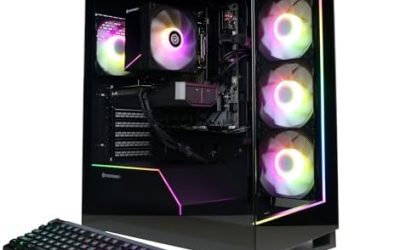
A good gaming PC for simulation games prioritizes the processor and memory over raw graphics power: a fast modern CPU, 32 GB of RAM for large city builders and flight simulators, a fast SSD and a mid-range to upper mid-range graphics card. Simulation titles keep tracking thousands of objects, citizens or aircraft systems, and that work lands on the CPU and RAM.
Why Simulation Games Are Different
Shooters mostly ask the graphics card to draw frames. Simulations ask the processor to calculate a world. A city builder tracks traffic, jobs and services for every citizen, a farming or factory game manages long chains of machines, and a flight simulator streams scenery, weather and aircraft physics. As a save grows, the load grows with it, so a PC that handles the first hour smoothly can slow down in the fiftieth. Reviewers of Cities: Skylines II, for instance, widely noted that performance depended on both CPU and graphics hardware at launch, and the studio’s own requirements list a stronger tier than many expect.
| Sim type | Examples | Main bottleneck | Memory advice |
|---|---|---|---|
| City builders | Cities: Skylines II | CPU, then graphics | 16 GB minimum, 32 GB for large cities |
| Flight sims | Microsoft Flight Simulator, X-Plane | CPU, graphics and storage together | 32 GB is common advice |
| Factory and automation | Factorio, Satisfactory | CPU single-core speed | 16 GB |
| Life and farming sims | The Sims 4, farming titles | Light; modest hardware works | 8 to 16 GB |
| Management and tycoon | Planet Zoo, Planet Coaster | CPU and RAM with large parks | 16 GB, more for big saves |
What the Makers Actually List
Paradox Interactive lists Cities: Skylines II with minimum requirements of an Intel Core i7-6700K or Ryzen 5 2600X, 8 GB of RAM and a GTX 970 or RX 480, and recommended requirements of a Core i5-12600K or Ryzen 7 5800X, 16 GB of RAM and an RTX 3080 or RX 6800 XT, according to its store listing. That recommended tier is considerably higher than most casual builders expect for a management game. Other simulation makers publish minimum and recommended lists as well, and the recommended column is the better planning figure. Real play with large saves, mods and extra assets goes beyond it.
CPU Choice
A modern six to eight core processor with strong single-core speed is the right target. Many simulation engines run their core logic on one or two main threads, so frequency and architecture matter as much as core count. Reviewers regularly report that large-cache chips such as the Ryzen 7 9800X3D perform well in simulation and strategy workloads, where data reuse is high. They are a premium choice and not mandatory. Midrange Ryzen 5 and Core i5 processors from the current generations are a sensible budget option, and older chips are a risk for large saves.
RAM and Storage
For simulation games, memory is where many PCs are caught short. Sixteen gigabytes is enough for many titles, but 32 GB gives headroom for big cities, modded installs and flight sims that cache scenery. Use dual-channel kits; fast DDR5 can help processor-bound games. Storage matters, too. Flight simulators stream large amounts of data and many titles ship in the tens of gigabytes, so use an SSD, preferably NVMe, and leave space for mods and save backups. Hard drives lead to long loads and stutter when scenery streams in.
Graphics Card Class
- Light sims (farming, life, tycoon on small maps): An entry-level card is plenty.
- Heavier visuals (city builders, flight sims): A mid-range to upper mid-range card, such as the current RTX 50-series or Radeon RX 9000 classes or older equivalents, gives comfortable 1080p to 1440p performance.
- 4K or VR flight simulation: A high-end card with plenty of video memory is advisable.
Upscaling features such as DLSS, FSR and XeSS are supported in some simulation titles and help when the card is the limit, but they do not help if the CPU is the bottleneck.
Peripherals Worth Planning For
Flight sim fans often add a joystick, throttle or yoke and rudder pedals, all of which connect over USB, so check motherboard ports. A large or ultrawide monitor suits city builders because of the amount of information on screen. Many simulation players leave the PC running while they build, so a quiet cooler and case airflow make long sessions more comfortable.
Pick This If
| If you play… | Choose | Skip |
|---|---|---|
| Large city builders | Strong CPU, 32 GB RAM, mid-range graphics card | Entry-level CPU |
| Flight sims | CPU, 32 GB RAM, NVMe, strong card | Hard drive installs |
| Factory games | Fast single-core CPU | Top-tier graphics card |
| Relaxed life or farming sims | Modest build with SSD | Flagship components |
Common Mistakes
- Spending most of the budget on the graphics card. Simulations stress the CPU more than expected.
- Stopping at 16 GB when you plan to play huge saves or modded games. Memory pressure causes slowdowns.
- Using a hard drive. Load times and scenery streaming suffer.
- Reading only minimum requirements. The recommended list is the better benchmark.
- Ignoring the save size. Performance declines as worlds grow.
Alternatives
If you mainly play lighter simulation titles, a compact desktop or capable laptop is enough. Players who love one specific heavy game can build around its published requirements and add upgrades later. Cloud streaming services offer some flight and building simulators too, though controller and joystick support varies.
Frequently Asked Questions
Do simulation games need a good graphics card?
Some do, but many need a strong processor and plenty of memory more. Match the card to the game’s visual ambition and your resolution.
How much RAM should a simulation PC have?
Sixteen gigabytes covers many titles, and 32 GB is the safer choice for big cities, flight simulators and mods.
What does Cities: Skylines II need?
The maker lists an Intel Core i5-12600K or Ryzen 7 5800X, 16 GB of RAM and an RTX 3080 or RX 6800 XT as recommended. Its minimum is much lower, but performance in large cities depends on both CPU and graphics hardware.
Is an X3D processor worth it for simulations?
Reviewers report strong results in strategy and simulation games from large-cache chips. They are a worthwhile upgrade for heavy saves but not necessary for lighter play.
Should I use an SSD?
Yes. Simulation installs are large and often stream data, so NVMe or SATA solid-state storage improves loading.
Can a laptop handle simulation games?
A gaming laptop with a modern processor and discrete graphics works for many sims. Sustained loads need good cooling, and very large saves may favor a desktop.
Planning for Upgrades
Build around a platform with an upgrade path. A motherboard with free memory slots, an M.2 slot for a second drive and a current processor socket lets you add RAM or storage later without replacing the whole PC. Choose a power supply from a reputable maker with headroom above the graphics card’s stated requirement, since the supply is the part most often replaced when a card is upgraded. Keep the case airflow simple, with clear intake and exhaust paths, because sustained long sessions heat components more than short bursts do.
Read the maker’s current requirements page for any game you care about before buying, and compare the recommended column with your plans for resolution, refresh rate and mods. Reviewers also publish benchmark results for new processors and graphics cards, and comparing several outlets gives a better picture than any single chart. If a prebuilt system tempts you, compare the exact CPU model, memory configuration, storage type and power supply, because those are the parts that vary most between similar-looking machines.