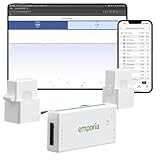
- Top Pick: Emporia Vue 3 Home Energy Monitor – Smart Home Automation Module and Real Time Electricity Usage Monitor, Power Consumption Meter, Solar and Net Metering for UL Certified Safe Energy Monitoring
- Best Value: Refoss Smart Home Energy Monitor with Open API, Home Assistant, No Cloud
- Premium Choice: Emporia Vue 3 Home Energy Monitor – Smart Home Automation Module and Real Time Electricity Usage Monitor, Power Consumption Meter, Solar and Net Metering for UL Certified Safe Energy Monitoring
As gaming rigs grow more powerful and electricity prices climb, knowing exactly how much energy your setup draws has shifted from a curiosity to a genuinely useful metric. A system power consumption monitor reveals what your PC, monitors, and peripherals actually cost to run, helping you size a UPS, budget your bills, or simply satisfy the urge to optimize. The tools range from whole-home energy monitors to simple plug-in meters.
This review and buyer’s guide covers the best ways to measure power consumption, from smart panel-level monitors to pocket-friendly outlet meters. Here is how to pick the right one for tracking your gaming and home energy use.
As an Amazon Associate we earn from qualifying purchases at no extra cost to you.







🎮 Get More From Your Setup — Free
Prime Gaming gives you free PC games every month, in-game loot, and a free Twitch channel sub — plus fast free shipping on all the gear above. New members get a 30-day free trial.
Watch: System Power Consumption Monitor: Review & Buyer’s Guide — Video Review
Design & Build
Power monitors fall into two camps. Whole-home units like the Emporia Vue 3 and Refoss smart energy monitors install in your electrical panel with clamp-on current sensors, offering real-time, circuit-level insight across the entire house, including solar and net metering. These require comfort with your breaker box or an electrician for setup. At the simpler end, plug-in meters such as the upgraded watt power meter sit between the wall outlet and your device, displaying voltage, amps, and consumption on a backlit screen with no wiring involved. Build quality is solid across both types, with the panel monitors feeling appropriately robust and the plug meters compact and easy to read.
Performance
For measuring a specific gaming rig, a plug-in meter is the fast, foolproof choice: plug in your PC, read the wattage, and calculate running costs instantly, complete with overload protection and multiple display modes. Whole-home monitors like the Emporia Vue 3 go far deeper, tracking real-time usage across circuits and integrating with smart-home automation for granular analysis. Privacy-focused users will appreciate the Refoss monitor’s open API, Home Assistant support, and no-cloud local control, ideal for those who want data without relying on a manufacturer’s servers. The Meross smart monitor adds real-time cost tracking in a friendly app. Accuracy across these devices is dependable enough for informed decisions.
Pros & Cons
- Clear, actionable data on exactly what your setup costs to run.
- Whole-home options with circuit-level and solar monitoring.
- Simple plug-in meters that need no wiring and read instantly.
- Privacy-friendly choices with local control and open APIs.
- Panel monitors require electrical work or a professional install.
- Plug meters only measure one device at a time.
- Smart features sometimes depend on app ecosystems and cloud accounts.
Alternatives to Consider
If you only want a rough estimate, PC software like HWiNFO reports component-level power draw for free, though it misses monitor and peripheral consumption. Buyers wanting battery-backup protection alongside monitoring should consider a UPS with a built-in wattage display. For comprehensive home tracking without panel work, a smart plug with energy monitoring covers individual outlets more simply than a full breaker-box install.
Frequently Asked Questions
What is the easiest way to measure my PC’s power draw?
A plug-in watt meter is the simplest method. Just plug your PC into it and the wall, and it displays real-time wattage and estimated running costs with no setup.
Do I need a whole-home energy monitor?
Only if you want circuit-level insight across your entire house, including solar. For measuring a single gaming rig, a plug-in meter is far simpler and cheaper.
Which monitor is best for privacy?
The Refoss monitor stands out with local control, Home Assistant support, and an open API, letting you track usage without sending data to the cloud.
Are these monitors accurate?
Yes, both plug meters and panel monitors are accurate enough for informed decisions about energy use and costs, though panel units offer more comprehensive data.
Verdict
For most gamers wanting to measure their rig, a plug-in watt meter is the fast, affordable pick that delivers instant, actionable numbers. Those seeking whole-home insight should choose the Emporia Vue 3, while privacy-minded users will love the local-control Refoss monitor for cloud-free tracking.