
Steam Deck vs ROG Ally X vs Legion Go 2 Comparison
Handheld gaming PCs have moved from niche curiosity to a serious option for players who want PC games away from the desk. Three names come up most often: the Steam Deck, the ASUS ROG Ally X and the Lenovo Legion Go 2. They share a similar idea, a portable controller-style device that runs full PC games, but they differ in operating system, screen size, processor, battery behaviour and price. This guide compares the three handheld classes side by side, explains what each design does well, and shows which checks matter before you buy. It is a buying guide built around the product class, and it does not claim hands-on benchmark results for any single model.
The hero listing was selected for the query “gaming handheld Steam Deck” and may be a close match rather than the exact device you choose. Check the card for the exact model, storage size, operating system and current price. The alternatives in the list show other handhelds in the same category for comparison.


The Three Handheld Philosophies
The Steam Deck is built around SteamOS, Valve’s Linux-based system that is designed for controller use and Steam’s library. It has a smaller screen than the other two, a fixed controller layout and a strong focus on simplicity. Players who mostly buy games on Steam often find it the least fussy option, because the interface is consistent and the device is tuned for portable play.
The ROG Ally X runs Windows 11, which means access to almost any PC storefront and tool without workarounds. Its larger screen and Windows base suit players who use launchers beyond Steam or who want to run a wider range of software. The trade-off is that Windows is not designed for handheld use, so players often adjust settings and power profiles more manually.
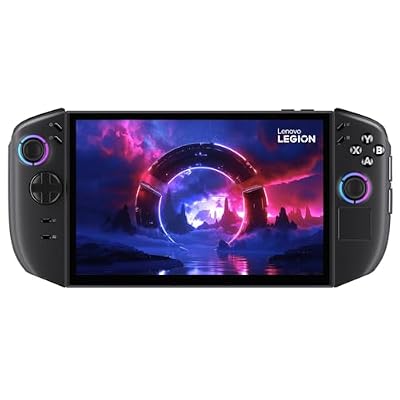
The Legion Go 2 also runs Windows 11 and uses a larger screen than the Steam Deck, with detachable controllers that can be used in different configurations. It suits players who value screen size and controller flexibility, and who are comfortable with Windows-based setup. As with any device of this class, the exact hardware depends on the model you choose.
Comparison Table: Handheld Gaming PCs
The table compares the three classes across the criteria that matter most in daily use. Prices are broad ranges, and the exact figure should be checked on the card before you buy.
| Device class | Operating system | Best for | Main trade-off | Typical price range |
|---|---|---|---|---|
| Steam Deck class | SteamOS (Linux-based) | Steam-focused players who want simplicity | Smaller screen and some Windows-only titles need work-arounds | Check current price |
| ROG Ally X class | Windows 11 | Players who use multiple storefronts | More manual tuning and battery management | Check current price |
| Legion Go 2 class | Windows 11 | Players who want a large screen and detachable controllers | Bulkier body and higher price tier | Check current price |
| Budget handheld PC | Windows 11 or Linux | Casual players and light titles | Lower performance ceiling | Check current price |
If you are still deciding whether a handheld is the right category, our best gaming handheld guide covers the wider market. For a more focused look at the handheld PC class, the best handheld gaming PC roundup explains the differences between Windows and console-style systems.
Screen Size, Resolution and Comfort
Screen size changes how a handheld feels in the hand and how much detail you see in games. Smaller screens are lighter and easier to hold for long sessions, but text and menus can look cramped. Larger screens improve immersion and readability, but they add weight and bulk. Resolution and refresh rate matter too. A high-refresh display can make motion look smoother, but it is only useful if the game can run at those frame rates. Check the listing for the exact panel specification, and compare it with the games you play most.
Grip shape and button placement are personal. Hold any device you can before buying, if possible, and pay attention to how the triggers and thumbsticks sit under your fingers. Our best gaming PC controller guide covers controller options that pair well with handheld PCs, and the best gaming handhelds roundup compares several more devices in the category.

Lenovo Legion Go 2 Gaming Handheld Gaming PC - AMD Ryzen Z2 8C, 32GB RAM, 1TB NVMe SSD, 8.8 WUXGA OLED 144Hz, Windows 11 Home + Carrying Case


As an Amazon Associate we earn from qualifying purchases. Product prices and availability are accurate as of the date/time indicated.
Battery Life and Performance Expectations
Battery life on handheld PCs varies widely with the game, the screen brightness and the power profile. A demanding modern title can drain the battery much faster than a simple indie game or a retro emulator. Windows-based handhelds often need manual power management, while SteamOS provides simpler profiles that many players find easier. Treat any battery figure on a listing as a best-case scenario and plan for shorter play sessions in demanding games.
Performance depends on the processor, the integrated graphics and the thermal design. Some devices hold steady frame rates in lighter games but throttle under sustained load. Reading reviews that test the games you play is more useful than relying on a single headline number. Our best gaming laptop battery life guide covers the same battery considerations for laptops, which are useful context for handheld buyers as well.
Software, Storefronts and Compatibility
The operating system often matters more than the hardware. SteamOS handles Steam games with minimal setup, and it supports many Windows titles through compatibility layers. Windows 11 runs nearly all PC games and launchers natively, including anti-cheat systems that are not always supported on Linux. If your library includes competitive multiplayer games with strict anti-cheat, check compatibility before choosing a Linux-based device.
For players who want to understand the Linux option in more depth, our Bazzite review explains a gaming-focused Linux distribution, and the best Linux for gaming guide covers the wider landscape. For a desktop-focused comparison of operating systems, see the best gaming PC operating system article.
Price, Value and Upgrade Path
Handheld PCs range from budget devices to premium models, and the price gap often reflects screen quality, build materials and processor tier. A higher price does not automatically mean better play for your games. Compare what each device delivers in the titles you care about, and factor in storage size, because game installs can fill small drives quickly. Some players also add an external SSD or a microSD card, so check the expansion options on each listing.
Unlike a desktop, a handheld is hard to upgrade. The graphics, processor and memory are fixed at purchase, so choose the performance level you need for the next two or three years. If you already own a capable desktop, a handheld works best as a companion for travel and lighter sessions, and the best gaming PC for streaming guide covers desktop options if you want to stream from a main system.
Frequently Asked Questions
Which handheld is best for Steam games?
A Steam Deck class device is usually the simplest choice for Steam-focused players because SteamOS is built around the Steam library and controller use. Check the compatibility of any non-Steam or anti-cheat titles you play before buying.
Is a Windows handheld better than SteamOS?
It depends on your library. Windows handhelds run almost any PC game and launcher natively, but they often need more manual tuning for battery life and controls. SteamOS is simpler but may need workarounds for some titles.
Does the Legion Go 2 have a larger screen than the ROG Ally X?
Generally yes, and the Legion Go class is designed around a larger display. Check the listing for the exact screen size and resolution of the model you are considering, because specifications vary between versions.
Can handheld PCs replace a gaming desktop?
For many players they cover portable and lighter play, but they rarely match a desktop’s performance or upgrade path. A handheld is best viewed as a companion device for travel and flexible play.
Final Recommendation
For most players who mainly buy from Steam and want the simplest experience, a Steam Deck class device is the best starting point. It is focused, consistent and easy to use on the go. A Windows-based handheld such as the ROG Ally X class suits players who use several storefronts or want the broadest compatibility, and a Legion Go 2 class device makes sense for those who prioritise a larger screen and flexible controllers. Before buying, check the exact model on the card, confirm that your key games run on the operating system you choose, check battery expectations in demanding titles and compare storage and price for your budget. The right handheld is the one that runs your library well and feels comfortable in your hands.


