
Baldur’s Gate 3 Vulkan vs DirectX 12 Performance Guide
Baldur’s Gate 3 gives players a choice of rendering path, and that choice can change how smoothly the game runs on a given system. Many players ask whether Vulkan or DirectX 12 is faster, and the honest answer is that it depends on the graphics driver, the card, the processor and the settings you use. This guide explains how to think about the comparison, how to run a fair test on your own machine, and which hardware choices matter more than the API choice.
This is a comparison and buying guide, not a benchmark report. We have not published measured frame rates for either path, and no figures in this article come from our own testing. Rendering options and their labels can change between game builds, so check the options your version exposes. The hero listing above is the closest match to the graphics hardware this guide has in mind. Confirm the exact model, memory size and price on the card before buying, because the listing may be a substitute for the component you searched for.

What the Rendering Path Actually Changes
A rendering API is the layer between the game and the graphics driver. It decides how the game sends work to the graphics card, how it manages memory and how much processor time that work costs. A newer API can reduce driver overhead on some systems, which helps when the processor is the limit. On other systems, the driver’s own implementation matters more than the API name. This is why one player sees a clear gain from switching and another sees no difference at all.
The practical question is not which API is theoretically better. It is which path gives you steadier frame times on your hardware in the scenes you play. Baldur’s Gate 3 is a turn-based game in many moments, but it has heavy scenes in dense cities and large battles with many effects. Those are the places to test.
How to Run a Fair Comparison
A fair test changes one thing at a time. Keep the resolution, the upscaling mode, the graphics preset and the driver the same, then switch only the rendering path. Pick a fixed save file and a fixed scene, and play through the same few minutes each time. Record the average frame rate and the lowest frames, and watch for long frames that cause visible hitches. Restart the game between runs so that one run does not inherit the shader cache state of the last. Run each setting at least twice, and treat small differences as noise.
If you do not record numbers, judge by feel. Note whether the camera pans smoothly and whether the game hitches when it loads a new area. Those are the cues players actually notice.
Hardware That Matters More Than the API
Several factors often outweigh the choice of rendering path. The graphics card sets the ceiling for rendering work, so a faster card gives more room to change the API without a drop. The processor matters in cities and in battles with many characters. Memory capacity affects how smoothly the game streams textures and effects. Storage speed matters for loading and for streaming in some scenes. If one of these is the limit, switching the rendering path will not change much.
For a balanced view of the parts, see our guide on the best build for Baldur’s Gate 3, which explains how to match the parts to a target frame rate. Processor choice is covered in the best CPU for Baldur’s Gate 3 guide, and graphics card options in the best GPU for Baldur’s Gate 3 list.

GIGABYTE GeForce RTX 5080 Gaming OC 16G Graphics Card, WINDFORCE Cooling System, 16GB 256-bit GDDR7, GV-N5080GAMING OC-16GD Video Card


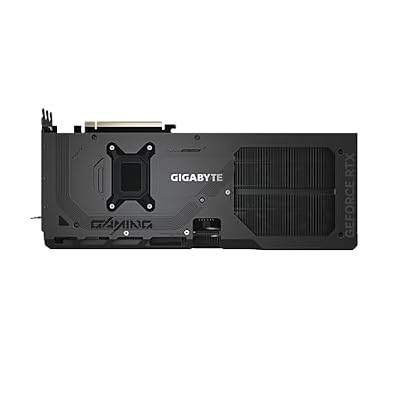


As an Amazon Associate we earn from qualifying purchases. Product prices and availability are accurate as of the date/time indicated.
Graphics Hardware Comparison Table
The table below compares the hero listing with the four alternatives by role. It is meant to help you shortlist parts that suit a given budget and goal. It is not a ranking, and it does not predict how a card will perform with either rendering path.
| Option | Role in this guide | Best for | What to confirm | Price range |
|---|---|---|---|---|
| Hero listing | Closest match to the card discussed | Players who want headroom at high settings | Exact model, memory size and power needs | Check current price |
| Alternative 1 | Second listing in the same set | Players who want a similar class at a lower spend | Driver support and cooler design | Check current price |
| Alternative 2 | Third listing in the same set | Balanced play at 1440p | Video memory and warranty | Check current price |
| Alternative 3 | Fourth listing in the same set | Quieter, cooler operation | Fan design and case clearance | Check current price |
| Alternative 4 | Fifth listing in the same set | Compact cases and smaller power supplies | Card length and power connectors | Check current price |
Use the table to build a shortlist, then check each listing against your case and power supply before buying.

MSI NVIDIA GeForce RTX 5070 Ti 16G Gaming Trio OC Plus Graphics Card - 16 GB GDDR7 (28 GB/s, 256-bit), PCIe 5.0 - TRI FROZR 4 (3 x STORMFORCE Fans) - RGB - HDMI 2.1b, DisplayPort 2.1b


As an Amazon Associate we earn from qualifying purchases. Product prices and availability are accurate as of the date/time indicated.
Settings That Matter Alongside the API
Whichever path you choose, a few settings have a bigger effect than the API switch. Resolution and upscaling are the strongest levers. Shadow quality and effects in dense scenes are the next most important. View distance and the number of visible characters also shape the cost of big scenes. If you want to keep the image crisp, lower the expensive effects first and keep the textures as high as your memory allows.
Frequently Asked Questions
Is Vulkan always faster than DirectX 12 in Baldur’s Gate 3?
No. The difference depends on the driver, the card and the processor. Some systems see a small gain on one path, and others see none. Test on your own hardware.
Should I switch rendering paths if the game stutters?
It can help, but first check the shader cache, the driver version and the memory budget. A stutter caused by a full video memory or a slow processor will not go away by changing the API.
Does a faster graphics card make the API choice irrelevant?
Not entirely, but a faster card gives more room, so the API difference is usually smaller at high settings. In a CPU-bound city, the processor often matters more than either path.
How do I compare the two paths fairly?
Change only the rendering path between runs. Use the same save file, scene, resolution and presets, restart the game between runs, and repeat each test at least twice.
Next Steps
Start with the hardware basics, then tune the game. If you are trying to decide between two brands before a purchase, the AMD vs NVIDIA buyers guide explains how driver support and features differ. For a processor that suits a heavy RPG, the Intel vs AMD gaming comparison sets out the trade-offs. If you are comparing mid-range cards for the same game, the RTX 5070 vs RX 9070 comparison is a useful reference, and the best GPU for gaming list covers the wider field. Memory planning is covered in the best RAM for gaming guide, and the best CPU for gaming list helps when the processor is the real limit in a busy city.


