
Mid-Tower vs Full-Tower Gaming Case Comparison
Choosing between a mid-tower and a full-tower gaming case shapes every other decision in a PC build, from the motherboard you can use to the number of drives you can add later. Mid-tower chassis are the default for most gaming PCs, while full-tower models give more space for large graphics cards, extended motherboards and water cooling. This guide compares the two form factors across size, airflow, expansion and cost, so you can see which one fits your build. It is a buying guide built around the product classes, not a lab review, and it avoids claims about specific models you have not verified on the card.
The hero listing was selected for the query “gaming PC case mid tower” and may be a close match rather than the exact chassis you end up choosing. Check the card for the exact dimensions, supported motherboard sizes and current price. The alternatives in the list give you other options in the same category.


What Separates the Two Form Factors
The names refer to the size of the chassis and the motherboard it supports. A mid-tower case is designed for standard ATX boards and usually supports micro-ATX and mini-ITX as well. A full-tower case is built for larger layouts, including E-ATX boards, and typically offers more internal space, more drive bays and more clearance around the graphics card. The gap between them is not only physical size. It also affects how easy the build is to assemble, how well it cools and how much room you have to grow.
Most gaming systems do not need the extra space of a full tower. A current mid-tower with good airflow can hold a high-end graphics card, a large air cooler or a 360mm radiator, and it fits on most desks. The question is whether your build has specific needs that a mid-tower cannot meet.
Size, Footprint and Desk Fit
Mid-Tower Footprint
A mid-tower takes up less floor and desk space and is easier to move. It also fits well under most desks and on shelves, which matters in shared rooms or small apartments. The smaller interior does require more careful planning, especially for cable routing and component clearance, but the trade-off is convenience. For most players, a mid-tower gives everything they need without taking over the room.
Full-Tower Footprint
A full tower is taller, wider and heavier, and it needs floor space or a sturdy spot on the desk. That size is justified when you run an extended motherboard, a very long graphics card, or a custom loop with several radiators. It is less suitable for compact desks, and carrying it into a new room is a real task. Measure your intended spot before buying, including room for the front panel to open and for air to reach the intake.
Comparison Table: Mid-Tower vs Full-Tower
The table below summarises the typical differences across the criteria that matter most. Prices are broad ranges, and the exact figure should be checked on the card before you buy.
| Option | Key feature | Best for | Main trade-off | Typical price range |
|---|---|---|---|---|
| Compact mid-tower | ATX support and smaller footprint | Most gaming builds and small rooms | Tighter cable routing and clearance | Check current price |
| Airflow mid-tower | Mesh front panel and multiple fan mounts | High-heat builds with strong GPUs | Can be louder if fans run fast | Check current price |
| Full-tower chassis | E-ATX support and large interior | Extended boards and custom loops | Large footprint and higher cost | Check current price |
| Workstation-style full tower | Many drive bays and wide layout | Storage-heavy and multi-GPU projects | Overkill for standard gaming builds | Check current price |
If you are still deciding on the size class, our best gaming PC case guide covers the main options side by side. For smaller footprints, the best ITX and mini gaming cases roundup shows what compact chassis can offer.

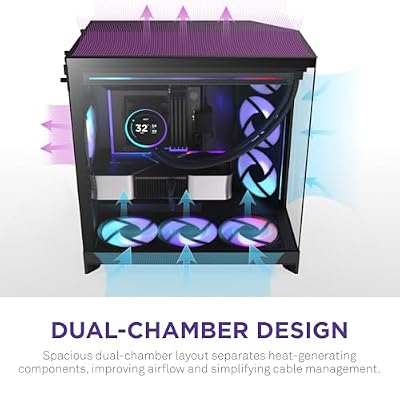
NZXT H9 Flow RGB+ - Dual-Chamber ATX PC Case - Black | Flagship dual-chamber case with 7 RGB fans and NZXT Control Hub pre-installed. Fully synced RGB from day one via CAM.




As an Amazon Associate we earn from qualifying purchases. Product prices and availability are accurate as of the date/time indicated.
Airflow and Cooling Differences
Airflow is where form factor and case design interact most. A larger case gives air more room to move, and a full tower can hold more fans and radiators without choking the intake. A mid-tower can cool very well too, but only if its front panel and fan mounts allow strong intake. A solid front panel with a narrow mesh can restrict airflow, and that matters more for a hot graphics card than for the processor.
If you plan to use a large air cooler or a 360mm radiator, check the case’s CPU cooler height limit and radiator support list. Our best CPU cooler for gaming guide helps match coolers to case size, and the air vs AIO cooling comparison explains which design suits tight chassis better.
Fan Count and Intake Balance
More fan mounts do not guarantee better cooling. Balance intake and exhaust, keep the case under slight positive pressure if you want less dust, and avoid blocking the GPU’s path with a cable tangle. A well-planned mid-tower often outperforms a poorly planned full tower, so layout matters as much as size.
Expansion, Storage and Upgrade Room
A full tower usually offers more drive bays, more PCIe clearance and more space for future upgrades. If you plan to run several SSDs and hard drives, or want to fit a water-cooling loop later, the extra room can save time and frustration. A mid-tower still supports most current storage layouts, especially when it has M.2 slots on the motherboard and a few 2.5-inch or 3.5-inch bays.
Think about your upgrade path honestly. If you expect to change the graphics card every generation and keep the same case, check that your chosen chassis has room for the longest card you might buy. Our best gaming PC SSD guide covers storage choices that fit most cases, and the best gaming PC power supply article covers the supply needed for a big graphics card.

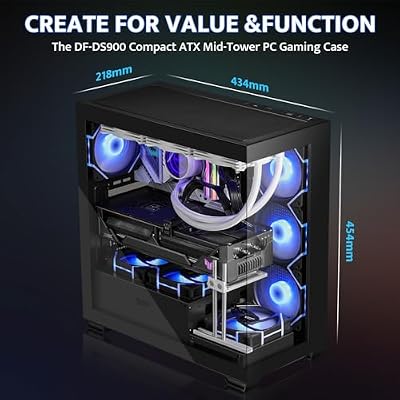
darkFlash ATX Mid-Tower PC Case, Pre-Install 4 PWM ARGB Fans Computer Case, Full View Dual Tempered Glass Gaming PC Case, Type C Port, Supports up to 360mm Water Cooling Radiator, Black(DS900)



As an Amazon Associate we earn from qualifying purchases. Product prices and availability are accurate as of the date/time indicated.
Build Experience and Cable Management
Full towers are generally easier to build in because the interior has more room for hands, tools and cable routing. A mid-tower can be just as clean, but it rewards careful planning. Route the main power and fan cables before you install the largest components, and use the back-panel cable channel where it is provided. Good cable management improves airflow and makes future upgrades less painful.
If this is your first build, a mid-tower with clear instructions and a tool-free layout is often the easier choice. For a full walkthrough, our step-by-step gaming PC build guide explains the install order, and the complete gaming PC buying guide helps plan the rest of the parts list.
Which Form Factor Fits Your Build
Choose a mid-tower if you want a balanced, affordable build that fits most desks and supports a high-end graphics card, a large air cooler and a 360mm radiator. Choose a full tower if you need E-ATX support, several large radiators, many drive bays or a long-term plan for multi-GPU or workstation work. Pairing the case with the right board also matters. Our best AM5 motherboard for gaming guide covers boards that fit common mid-tower layouts, and the gaming PC case buying guide helps you check dimensions before ordering.
Frequently Asked Questions
Is a full-tower case necessary for gaming?
No. Most gaming systems work well in a mid-tower. A full tower is useful for extended motherboards, large custom loops and builds that need many drive bays. If your parts fit comfortably in a mid-tower, the extra size adds cost and footprint without much benefit.
Can a mid-tower hold a large graphics card?
Many can, but card length limits vary widely. Check the case’s maximum GPU length before buying, and remember that front radiators or drive cages can reduce the available space. Measure your card and the case’s specification together.
Which case runs cooler, mid-tower or full tower?
Cooling depends on the design more than the size. A full tower has more room for fans, but a well-designed mid-tower with strong intake can cool just as well. Compare the front panel, fan mounts and radiator support rather than the category alone.
Is a full tower harder to build in?
Often it is easier, because there is more room for tools and cable routing. A mid-tower can still produce a clean build if you plan the layout and route the cables before installing the largest parts.
Final Recommendation
For most gaming builds, a well-designed mid-tower is the better choice. It fits on more desks, costs less, supports ATX boards and handles high-end graphics cards and large coolers without trouble. Choose a full tower only when you need E-ATX compatibility, several radiators, many drive bays or unusual layouts that a mid-tower cannot accommodate. Before buying, measure your GPU, cooler height and radiator support, check the exact model on the card and confirm that the case fits your room. Once those checks pass, the right form factor is usually the one that matches your build’s actual needs, not the largest chassis on the shelf.


