
Best Gaming DNS Server 2026 Guide
DNS is the system that turns a name like a game server’s domain into the address your PC connects to. Many players change their DNS server hoping it will cut lag, and some guides promise faster matches as a result. The honest picture is narrower. A better DNS server can make name lookups quicker, can add useful filtering and can improve reliability, but it does not change the path your game packets take after the lookup. This guide explains what DNS does for gamers and how to choose a resolver sensibly.
We have not benchmarked DNS resolvers on our own network, so we do not quote response times. The points below describe how DNS works and the choices that matter for a gaming household. Public resolver services change their features over time, so check each provider’s current documentation before you configure your network.
The listings below were returned for this search. The first is the primary pick and the others are close alternatives. The listing above is a closest-match product rather than a DNS service, so use it as a reference for the hardware or router side, and confirm the details on the card before buying.


What DNS Does and Does Not Change
When you launch a game or open a store page, your PC asks a DNS resolver for the address behind a name. The answer is cached for a time, so the lookup happens less often than you might expect. Once your game has the server address, it connects directly to that address. The resolver is no longer involved in the game traffic itself.
Why Ping Usually Stays the Same
Ping is the round trip time to the game server. A DNS change does not change the distance to that server or the route your packets take. You may see a small difference on the first lookup of a session, but you will not see a steady drop in in-game ping from a resolver change. Anyone promising lower ping from DNS alone is overselling the change.
Where DNS Helps Gamers
DNS does matter for everything around the game. Launchers, store pages, patch downloads and voice services all depend on lookups. A reliable and fast resolver can make those steps feel quicker. Some resolvers also block known malicious or phishing domains, which is useful for a household with children or for players who download mods and tools from many sites.

GL.iNet GL-BE6500 Flint 3e Wi-Fi 7 Router with VPN for Home and Gaming | Wi-Fi 7 BE6500 up to 6.5 Gbps with MLO and 4K-QAM for 4K streaming, gaming, and video calls


As an Amazon Associate we earn from qualifying purchases. Product prices and availability are accurate as of the date/time indicated.
Choosing a Gaming DNS Resolver
Pick a resolver for reliability, privacy and filtering rather than for a promised speed gain. Check whether the provider offers encrypted DNS options, whether it logs queries and whether it has a clear policy on what it stores. Read the documentation, not just the marketing.
Reliability and Response Time
Test the resolver on your own connection. Use a tool that measures response time for a set of domains you visit, and run it at different times of day. Choose the resolver that gives consistent answers, not the one with the best single result. A resolver that fails at peak times will cause more pain than a slightly slower one that stays up.
Filtering and Privacy
Filtering resolvers block domains that host malware or phishing. That is valuable, but it can also block something you need, so check the category settings. Privacy depends on the provider’s policy and whether it supports encrypted DNS. Choose a resolver whose policy you have read and understood.
Setting It Up
You can set DNS on the PC, on the console or on the router. Setting it on the router covers every device, which is convenient. Setting it on the PC is easier to test and reverse. If you change the router, keep a note of the old settings so you can roll back quickly.

GL.iNet GL-BE9300 Flint 3 Tri-Band Wi-Fi 7 Router 5 x 2.5G VPN Router | Tri-Band Wi-Fi 7 with 6GHz, 9 Gbps wireless speed for smooth 8K streaming, low-latency gaming, and video calls

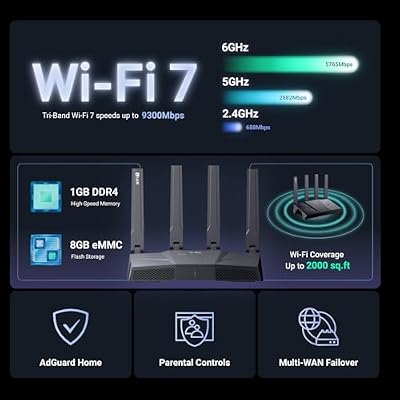


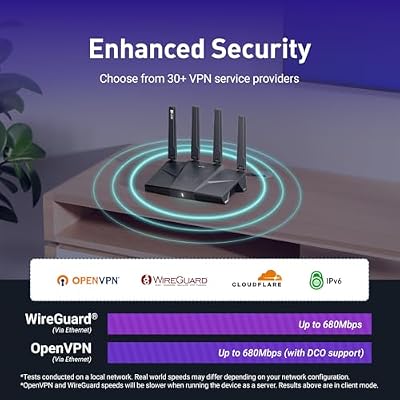

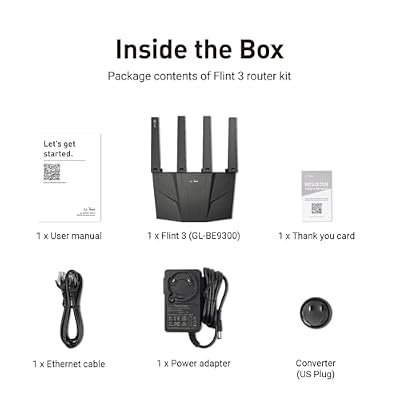
As an Amazon Associate we earn from qualifying purchases. Product prices and availability are accurate as of the date/time indicated.
Comparison Table: Gaming Network Options
The table compares the five listings by the role each one plays in a gaming network that uses DNS as part of the setup. It does not rank them. Use it to match the hardware or software to your needs, then choose the resolver separately.
| Option | ASIN | Best for | Price guidance | Check before buying |
|---|---|---|---|---|
| Primary pick (hero) | B0FX9C5QVJ | Households that want a managed, simple setup | Check current price | DNS control options and privacy policy |
| Alternative 1 | B0FB8X43KJ | Players who want DNS set at the router | Check current price | Router DNS settings and firmware support |
| Alternative 2 | B0DVV9KJSN | Single-floor homes with a basic network | Check current price | Admin interface and update policy |
| Alternative 3 | B0CPQYSXCW | Homes with many devices on one network | Check current price | Device controls and filtering options |
| Alternative 4 | B0FTP4PMYX | Users who want manual control of settings | Check current price | Manual DNS fields and port rule options |
Common Resolvers and What to Check
Several large public resolvers are widely used, including the ones run by Cloudflare, Google and Quad9. Each offers its own mix of speed, privacy and filtering, and each publishes its own documentation. Check that documentation for the current addresses and features, because providers update their services. Quad9, for example, is known for blocking malicious domains, while other services focus on speed and privacy without filtering. Pick based on what you need, and test the one you choose.
If you want a deeper comparison of two common options, the Cloudflare vs Quad9 DNS article covers their differences. For a filtering service with more controls, the NextDNS review explains how profile-based filtering works. If you prefer a service with category controls, the Control D review covers its approach.
For a broader list of options aimed at gamers, the best gaming DNS guide compares the main providers. The best DNS for gaming article takes a similar look at the options for different household needs, and the best gaming DNS server roundup covers configuration steps in more detail.
Testing After You Change DNS
After you change the resolver, flush the DNS cache on your PC and restart the launcher. Test a few store pages and a patch download to check that lookups work. Then play a game session and compare in-game ping with your earlier numbers. If ping has not changed, that is expected. If lookups fail, return to the old settings and check the configuration.
If you want to widen the picture, these related guides cover neighbouring parts of the setup: gaming DNS servers roundup gaming VPN guide.
Frequently Asked Questions
Will a gaming DNS server lower my ping?
Usually not. Ping depends on the route to the game server, not on the lookup that found the address. A DNS change can make lookups faster and can add filtering, but it will not reduce in-game ping in a steady way.
Which DNS server is the fastest for gaming?
There is no single fastest resolver for every home. Results depend on your location, your ISP and the time of day. Test the options on your own connection and choose the one with the most consistent results, not the single best reading.
Is changing DNS safe?
Changing DNS to a reputable resolver is safe. Check the provider’s privacy policy, keep your old settings in case you need to revert, and avoid unknown resolver addresses from forums or cheap apps. Use encrypted DNS if the provider and your device support it.
Final Verdict
Choose a gaming DNS resolver for reliability, privacy and filtering, not for a promised ping cut. Test the options on your own network at different times, check the provider’s documentation and set DNS at the router if you want every device covered. For the biggest gains in match quality, focus on the wired connection, the server region and the background traffic on your line.


