

- Top Pick: NIMO 15.6" AI-Creator-Laptop, 6-Core AMD R5-6600H 16GB RAM 1TB SSD FHD IPS
- Best Value: HP Workstation PC Desktop Computer | Editing and Design | NVIDIA Quadro K1200 4GB GPU | Intel Core i5 | 32GB DDR4 RAM, 1TB SSD + 4TB HDD | Wi-Fi 5G + Bluetooth | Windows 11 Pro (Renewed)
- Premium Choice: ASRock Radeon RX 7700 XT Challenger 12GB OC Graphics Card, AMD RDNA 3 Architecture, 12GB GDDR6, 2584 MHz Boost Clock, 3X DisplayPort 2.1, 1x HDMI 2.1, Dual Fan Cooling
For video editing, the GPU does far more than draw the desktop — it accelerates timeline playback, powers effects and color work, and handles the heavy lifting of exporting your finished cut. Modern editors like Premiere Pro, DaVinci Resolve and Final Cut lean hard on the graphics card, and the right one turns a stuttering, slow-to-export project into a smooth, responsive edit. The factors that matter are not the same as pure gaming either: VRAM capacity for high resolutions, hardware encoders like NVIDIA’s NVENC, and acceleration frameworks such as CUDA and OpenCL all shape how well a card edits. This guide rounds up the best video editing GPUs in 2026 across budgets, from value cards to a flagship.
- Best Video Editing GPUs at a Glance
- 1. XFX Radeon RX 580 GTS XXX Edition 8GB GDDR5
- 2. MSI Gaming GeForce RTX 3060 12GB GDDR6
- 3. GIGABYTE GeForce RTX 3060 Gaming OC 12G (REV 2.0) Triple-Fan
- 4. ZOTAC GAMING GeForce RTX 3060 Ti Twin Edge OC 8GB GDDR6
- 5. maxsun AMD Radeon RX 550 4GB GDDR5 ITX Graphics Card
- 6. ASUS Prime GeForce RTX 5080 OC Edition 16GB GDDR7 Triple-Fan
- How to Choose a GPU for Video Editing
- Frequently Asked Questions
- Related Guides
- Related Articles
- Related Guides
Our picks were chosen on what genuinely drives editing performance: VRAM capacity, the quality and presence of a hardware video encoder, support for CUDA and OpenCL acceleration, and value. We have avoided quoting invented benchmark numbers — instead we explain where each card fits and who it is for, with prices from around $110 up to around $1,500. The list spans budget cards for light 1080p editing, well-rounded 12GB and 8GB mid-range options, and a flagship for demanding 4K and effects-heavy work. Below is an at-a-glance comparison of all six, then a closer look at each and a buyer’s guide built around VRAM, NVENC, CUDA and OpenCL — the criteria that actually matter for editing.
As an Amazon Associate we earn from qualifying purchases at no extra cost to you.




🛒 Best Price Today on Amazon
Prime members get fast, free shipping on everything above, plus member-only deals. New members get a 30-day free trial — cancel anytime.
Best Video Editing GPUs at a Glance
| Graphics Card | Best For | Standout Spec | Approx Price |
|---|---|---|---|
| XFX Radeon RX 580 GTS 8GB | Budget OpenCL editing | 8GB GDDR5, OpenCL | around $230 |
| MSI GeForce RTX 3060 12GB | Value 12GB editing | 12GB VRAM, NVENC, CUDA | around $399 |
| GIGABYTE RTX 3060 Gaming OC 12G | Cool, quiet 12GB card | 12GB, triple-fan, NVENC | around $479 |
| ZOTAC RTX 3060 Ti 8GB | Faster 8GB CUDA card | RTX 3060 Ti, NVENC, CUDA | around $313 |
| maxsun Radeon RX 550 4GB | Light-duty / entry display | 4GB GDDR5, compact ITX | around $110 |
| ASUS Prime RTX 5080 16GB OC | Flagship 4K editing | 16GB GDDR7, latest NVENC | around $1,500 |
1. XFX Radeon RX 580 GTS XXX Edition 8GB GDDR5
The XFX Radeon RX 580 8GB is the budget OpenCL editing pick. It is an older but still-capable AMD card with a useful 8GB of GDDR5 VRAM, and because editors like DaVinci Resolve lean heavily on OpenCL acceleration, an affordable Radeon with a healthy VRAM buffer remains a sensible value choice. At around $230 it is a wallet-friendly route into GPU-accelerated editing.
This is the card to choose for light-to-moderate 1080p editing on a budget, especially in OpenCL-friendly applications. The 8GB of VRAM is generous for the price and helps with higher-resolution timelines and effects, the OpenCL support accelerates playback and exports in apps that use it, and the RX 580 has a long, proven track record. It lacks NVIDIA’s NVENC encoder and CUDA, so it suits AMD-leaning or OpenCL workflows best. For affordable, VRAM-rich editing acceleration, the RX 580 still earns consideration.
Pros: 8GB VRAM at a budget price, strong OpenCL acceleration, long proven track record.
Cons: Older architecture; no NVENC encoder or CUDA support.
2. MSI Gaming GeForce RTX 3060 12GB GDDR6

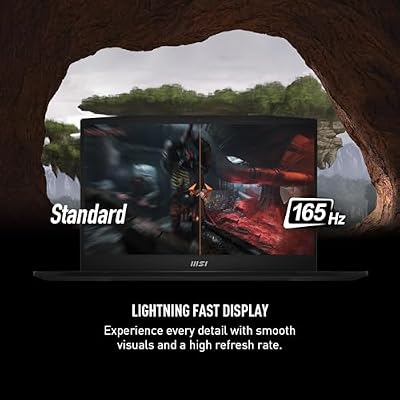
msi Katana 15 15.6” 165Hz QHD Gaming Laptop: Intel Core i7-13620H, NVIDIA Geforce RTX 4070, 16GB DDR5, 1TB NVMe SSD, Cooler Boost 5, Win 11: Black B13VGK-2000US



As an Amazon Associate we earn from qualifying purchases. Product prices and availability are accurate as of the date/time indicated.
The MSI GeForce RTX 3060 12GB is the value editing pick and a superb all-rounder for creators. Its standout feature is a generous 12GB of VRAM — more than many pricier cards — which is a real asset for editing at higher resolutions and with demanding effects, and it brings NVIDIA’s NVENC hardware encoder and CUDA acceleration. At around $399 it hits the sweet spot of capability and cost.
This is the card to choose for serious 1080p and capable 4K editing without spending flagship money. The 12GB VRAM buffer comfortably handles high-resolution timelines, layered effects and color work, NVENC dramatically speeds up exports and is excellent for streaming too, and CUDA acceleration is widely supported across Premiere Pro, Resolve and more. It is the most broadly recommendable editing GPU here for typical creators. For a 12GB, NVENC-equipped card at a fair price, the RTX 3060 is the standout value.
Pros: Generous 12GB VRAM, NVENC hardware encoder, CUDA acceleration, excellent all-round value.
Cons: Mid-range raw speed; not built for the heaviest 4K/8K effects workloads.
3. GIGABYTE GeForce RTX 3060 Gaming OC 12G (REV 2.0) Triple-Fan

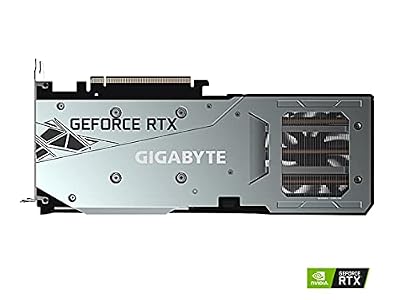
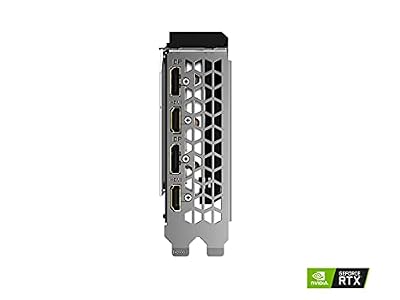
GIGABYTE GeForce RTX 3060 Gaming OC 12G (REV2.0) Graphics Card, 3X WINDFORCE Fans, 12GB 192-bit GDDR6, GV-N3060 Video Card




As an Amazon Associate we earn from qualifying purchases. Product prices and availability are accurate as of the date/time indicated.
The GIGABYTE RTX 3060 Gaming OC 12G is the cool-and-quiet 12GB pick. It offers the same editing-friendly recipe as the MSI card — 12GB of VRAM, NVENC and CUDA — but pairs it with GIGABYTE’s triple-fan WINDFORCE cooler and a factory overclock for lower temperatures and noise under sustained load. At around $479 it is the option for editors who value a robust cooling solution.
This is the card for the creator who runs long renders and effects-heavy timelines and wants the GPU to stay cool and quiet while doing it. The 12GB VRAM handles high-resolution editing comfortably, NVENC accelerates exports and CUDA speeds up supported applications, and the larger triple-fan cooler keeps clocks stable during extended workloads where a smaller card might throttle. For the same core editing capability as the MSI but with premium cooling for sustained work, the GIGABYTE Gaming OC is the comfortable choice.
Pros: 12GB VRAM, NVENC and CUDA, triple-fan cooling for sustained renders, factory overclock.
Cons: Costs more than the standard 3060 for similar core editing performance.
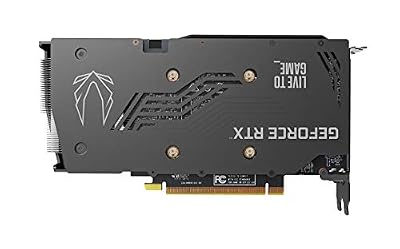
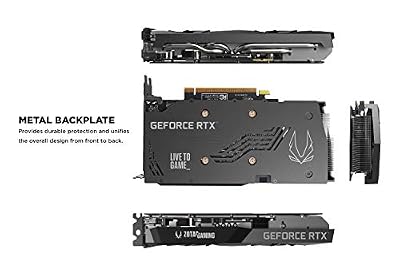
4. ZOTAC GAMING GeForce RTX 3060 Ti Twin Edge OC 8GB GDDR6

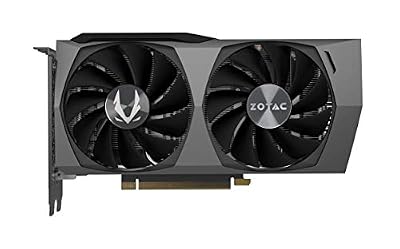
ZOTAC Gaming GeForce RTX 3060 Twin Edge OC 12GB GDDR6 192-bit 15 Gbps PCIE 4.0 Gaming Graphics Card, IceStorm 2.0 Cooling, Active Fan Control, Freeze Fan Stop ZT-A30600H-10M



As an Amazon Associate we earn from qualifying purchases. Product prices and availability are accurate as of the date/time indicated.
The ZOTAC RTX 3060 Ti 8GB is the faster-silicon CUDA pick. The 3060 Ti is a meaningfully quicker GPU than the standard 3060, with more shading power for effects and faster timeline performance, and it brings the same NVENC encoder and CUDA support editors rely on. The trade-off is 8GB of VRAM rather than 12GB. At around $313 it is a strong-value way to get more raw speed.
This is the card to choose when editing performance and effects throughput matter more to you than a maximum VRAM buffer — for instance, a lot of 1080p and lighter 4K work with heavy effects. The extra horsepower of the 3060 Ti accelerates playback and renders, NVENC keeps exports and streaming fast, and CUDA is broadly supported. Just be mindful that 8GB can be a limit for very high-resolution or heavily layered projects. For faster CUDA-accelerated editing at a keen price, the 3060 Ti is a compelling pick.
Pros: Faster than a standard 3060, NVENC encoder, CUDA acceleration, strong price-to-performance.
Cons: 8GB VRAM is less future-proof than 12GB for high-resolution timelines.
5. maxsun AMD Radeon RX 550 4GB GDDR5 ITX Graphics Card

MAXSUN AMD Radeon RX 550 4GB GDDR5 ITX Computer PC Gaming Video Graphics Card GPU 128-Bit DirectX 12 PCI Express X16 3.0 DVI-D Dual Link, HDMI, DisplayPort


As an Amazon Associate we earn from qualifying purchases. Product prices and availability are accurate as of the date/time indicated.
The maxsun Radeon RX 550 4GB is the light-duty and entry-display pick. It is a compact, low-power ITX-sized card with 4GB of GDDR5, suited to basic editing tasks, multi-monitor display output, and breathing GPU acceleration into a small or budget build. At around $110 it is the cheapest card on this list and an inexpensive way to add a discrete GPU.
This is the card to choose for very light editing — simple 1080p cuts, basic color and titles — or as a display adapter for a productivity workstation where heavy effects are not on the menu. The 4GB of VRAM and modest power draw keep it cool and compact enough for small cases, and it provides basic OpenCL acceleration in supported apps. It is not built for demanding 4K or effects-heavy editing, but as an affordable, small GPU for light tasks and multi-display setups, it does its job.
Pros: Very affordable, compact ITX size, low power draw, fine for light editing and displays.
Cons: Only 4GB VRAM and entry-level performance; not for demanding 4K editing.
6. ASUS Prime GeForce RTX 5080 OC Edition 16GB GDDR7 Triple-Fan

Rounding out the list is the ASUS Prime RTX 5080 16GB, the flagship pick for demanding editors. It is a current-generation powerhouse with 16GB of fast GDDR7 VRAM, the latest NVENC encoder and abundant CUDA cores, built for serious 4K editing, effects-heavy timelines and the quickest exports. At around $1,500 it is the premium option here, and the performance and modern feature set justify it for professionals.
This is the card for the creator whose work demands the best: high-resolution 4K (and beyond) editing, complex layered effects, fast color grading and rapid renders. The 16GB of GDDR7 gives ample headroom for large timelines, the newest-generation NVENC accelerates and improves encode quality, and the deep CUDA core count crushes accelerated tasks in Premiere Pro and Resolve, with the ASUS triple-fan cooler keeping it stable under load. If editing is your profession or your projects are genuinely demanding, the RTX 5080 is the flagship that delivers.
Pros: 16GB fast GDDR7, latest-generation NVENC, abundant CUDA cores, flagship 4K editing power.
Cons: By far the most expensive here; overkill for light or 1080p-only editing.
How to Choose a GPU for Video Editing
Choosing a GPU for video editing starts with VRAM — the dedicated memory on the card — because it directly limits the resolution and complexity you can edit smoothly. Higher-resolution timelines, multiple video layers and demanding effects all consume VRAM, and running short causes stutter and slowdowns. For 1080p and entry 4K work, 8GB like the RTX 3060 Ti or RX 580 is workable; for comfortable 4K and effects-heavy projects, 12GB like the RTX 3060 cards is a safer buffer; and for professional, demanding work the 16GB on the RTX 5080 gives real headroom. Buy the VRAM your resolution and effects actually demand.
The hardware video encoder is the next thing to check, and for editors it is a big deal. NVIDIA’s NVENC, found on every GeForce card here, offloads video encoding from the CPU to dedicated silicon on the GPU, dramatically speeding up exports and making the card excellent for streaming too. Newer generations, like the encoder on the RTX 5080, improve both speed and quality. AMD cards such as the RX 580 and RX 550 have their own encoders but lack NVENC specifically; if fast, high-quality exports matter to you, a card with a strong, current NVENC is a meaningful advantage.
Acceleration frameworks — CUDA and OpenCL — determine how well your editing software can tap the GPU. CUDA is NVIDIA’s proprietary platform and is widely and deeply supported across Premiere Pro, DaVinci Resolve and many plugins, which is a key reason GeForce cards like the RTX 3060 and 3060 Ti are popular with editors. OpenCL is the open, cross-vendor alternative that AMD cards like the RX 580 rely on and that Resolve in particular uses well. Check which framework your preferred application favours, then choose a card whose strengths line up with it.
Finally, weigh raw performance, cooling and budget against your actual workload. A faster GPU like the RTX 3060 Ti speeds playback and renders, while a robust triple-fan cooler like the GIGABYTE 3060’s keeps clocks stable through long exports where a smaller card might throttle. Match the spend to the job: a value 12GB card such as the RTX 3060 covers most creators superbly, a budget card like the RX 580 or RX 550 suits light or OpenCL work, and a flagship like the RTX 5080 is for demanding 4K professionals. Prioritise enough VRAM, a strong encoder and the right acceleration framework, then pick the editing GPU on this list that fits your projects and your budget.
Frequently Asked Questions
How much VRAM do I need for video editing?
It depends on your resolution and effects. For 1080p and entry 4K editing, 8GB — as on the RTX 3060 Ti or RX 580 — is workable. For comfortable 4K and effects-heavy timelines, 12GB like the RTX 3060 cards gives a safer buffer, and for professional or very high-resolution work the 16GB on the RTX 5080 provides real headroom. Higher resolutions, more video layers and heavier effects all consume VRAM, so buy for the projects you actually edit.
What is NVENC and why does it matter for editing?
NVENC is NVIDIA’s dedicated hardware video encoder, built into every GeForce card here, including the RTX 3060, 3060 Ti and 5080. It offloads video encoding from the CPU to dedicated silicon on the GPU, which dramatically speeds up exports and makes the card excellent for live streaming as well. Newer generations improve speed and quality further. For editors who export often, a strong, current NVENC is a major time-saver.
Is CUDA or OpenCL better for video editing?
It depends on your software. CUDA is NVIDIA’s proprietary acceleration platform and is widely, deeply supported across Premiere Pro, DaVinci Resolve and many plugins, which is why GeForce cards like the RTX 3060 are popular with editors. OpenCL is the open, cross-vendor alternative that AMD cards such as the RX 580 use, and that Resolve handles well. Check which your preferred app favours and choose a card to match.
Do I need an expensive GPU for video editing?
Not for most work. A value 12GB card like the RTX 3060, with NVENC and CUDA, handles serious 1080p and capable 4K editing superbly for a fair price, and budget cards like the RX 580 or RX 550 cover light or OpenCL-based editing. A flagship like the RTX 5080 is worth it only if you do demanding professional 4K, effects-heavy or high-resolution work where its speed and 16GB of VRAM genuinely pay off.
Related Guides
- Best GPUs for Your Build
- Best Budget GPUs
- Best Monitors for Content Creation
- Best CPUs for Video Editing
- Best RAM for Gaming and Editing
- Best Budget Gaming Setup
Affiliate Disclosure: As an Amazon Associate, we earn from qualifying purchases. If you click a link and make a purchase, we may earn a small commission at no extra cost to you. Prices and availability are accurate as of publication and may change.










