

🛒 Best Price Today on Amazon
Prime members get fast, free shipping on everything above, plus member-only deals. New members get a 30-day free trial — cancel anytime.
- Top Cases Video Editing Picks for 2026
- Best PC Cases for Video Editing at a Glance
- 1. CORSAIR 7000D Airflow Full-Tower ATX PC Case, High-Airflow Front Panel
- 2. Corsair Crystal Series 680X RGB High Airflow Tempered Glass ATX Smart Case
- 3. NZXT H6 Flow Compact Dual-Chamber Mid-Tower Airflow Case, Panoramic Glass
- 4. Corsair iCUE 220T RGB Airflow Tempered Glass Mid-Tower Smart ATX Case
- 5. HYTE Y70 Touch Infinite Modern Aesthetic Gaming PC Case, 2.5K LCD Touchscreen
- 6. Cooler Master MasterBox Q300L Micro-ATX PC Case, Compact mATX
- How to Choose a PC Case for Video Editing
- Frequently Asked Questions
- Related Guides
- Related Articles
- Related Guides
Top Cases Video Editing Picks for 2026
Here are our current top cases video editing picks, compared on real Amazon owner reviews, price, and features. Live prices update below.
As an Amazon Associate we earn from qualifying purchases at no extra cost to you.


A video-editing PC asks different things of its case than a pure gaming rig. Editing and rendering hammer the CPU and GPU for long stretches, generating sustained heat that needs strong airflow to clear, and the workflow tends to demand serious storage — fast working drives plus high-capacity archives — which means drive bays matter again in a way they often do not for gamers. On top of that, a workstation usually packs powerful, physically large components that need real internal space and clearance. This guide rounds up the best PC cases for video editing in 2026, judged on the trio that counts for creators: airflow, drive capacity, and room to build.
Our picks were chosen on what a video-editing build actually needs: genuine high-airflow design to keep a hard-working CPU and GPU cool, the storage flexibility to mount multiple drives for media and scratch disks, and enough internal volume and clearance for large coolers, long graphics cards and tidy cable routing. We have spanned compact to full-tower, with prices from around $40 to around $350, and we are honest where a case leans more toward looks than maximum storage. The list runs from spacious full-towers down to a value compact option. Below is an at-a-glance comparison, then a closer look at each and a buyer’s guide built around airflow, drive bays and space.
Best PC Cases for Video Editing at a Glance
| PC Case | Best For | Standout Spec | Approx Price |
|---|---|---|---|
| CORSAIR 7000D Airflow (Full-Tower) | Maximum storage + airflow | Full-tower, many drive mounts, high airflow | around $269 |
| Corsair Crystal 680X RGB Airflow | Dual-chamber editing build | Dual-chamber, high airflow, roomy | around $275 |
| NZXT H6 Flow (Dual-Chamber Mid-Tower) | Compact high-airflow workstation | Dual-chamber, panoramic glass, airflow | around $90 |
| Corsair iCUE 220T RGB Airflow | Value airflow mid-tower | High-airflow front, tempered glass | around $180 |
| HYTE Y70 Touch (Aesthetic Mid-Tower) | Showpiece editing rig | Integrated 2.5K touchscreen, roomy | around $350 |
| Cooler Master MasterBox Q300L (mATX) | Budget compact build | Compact mATX, ventilated, low cost | around $40 |
1. CORSAIR 7000D Airflow Full-Tower ATX PC Case, High-Airflow Front Panel

CORSAIR 7000D Airflow Full-Tower ATX PC Case – High-Airflow Front Panel – Spacious Interior – Easy Cable Management – 3X 140mm AirGuide Fans with PWM Repeater Included – Black


As an Amazon Associate we earn from qualifying purchases. Product prices and availability are accurate as of the date/time indicated.
The CORSAIR 7000D Airflow is our top pick for a serious video-editing workstation, and it earns the spot by excelling at all three creator priorities at once. It is a spacious full-tower with a high-airflow front panel, generous drive-mounting options, and enormous internal volume for large components and extensive cooling. At around $269 it is an investment, but for a no-compromise build it is hard to beat.
Editing builds love this case because the full-tower footprint translates directly into capability: room for multiple storage drives to hold media libraries and scratch disks, clearance for the longest graphics cards and tallest air coolers or large radiators, and easy cable routing for a clean, serviceable interior. The high-airflow front feeds cool air to a CPU and GPU working flat-out through long renders. If your priority is maximum storage, maximum cooling and maximum space for a powerful workstation, the 7000D Airflow is the standout choice.
Pros: Full-tower space, abundant drive mounts, excellent high-airflow front, fits the largest components, easy cable management.
Cons: Large desktop footprint; premium price.
2. Corsair Crystal Series 680X RGB High Airflow Tempered Glass ATX Smart Case

CORSAIR iCUE Link 3500X RGB Mid-Tower ATX PC Case – Panoramic Tempered Glass – Reverse Connection Motherboard Compatible – 3X CORSAIR iCUE Link RX120 RGB Fans Included – Black


As an Amazon Associate we earn from qualifying purchases. Product prices and availability are accurate as of the date/time indicated.
The Corsair Crystal 680X RGB is the dual-chamber editing pick, pairing strong airflow with a roomy, organised interior and a striking tempered-glass look. Its dual-chamber layout separates the power supply and drives from the main component area, which improves both airflow and cable tidiness. At around $275 it is a premium chassis that suits a workstation you also want to show off.
For a video-editing build, the dual-chamber design is genuinely useful: it keeps drive cages and the PSU out of the main airflow path, so cool air reaches the CPU and GPU more directly during sustained loads, while still providing space to mount the storage an editor needs. The case has plenty of room for large coolers and long cards, and the high-airflow design keeps temperatures in check through long renders. If you want excellent cooling, good storage flexibility and a clean, glass-fronted aesthetic, the 680X is an excellent fit.

Pros: Dual-chamber layout for airflow and tidy storage, roomy interior, high airflow, premium glass aesthetic.
Cons: Wide footprint due to dual-chamber design; premium price.
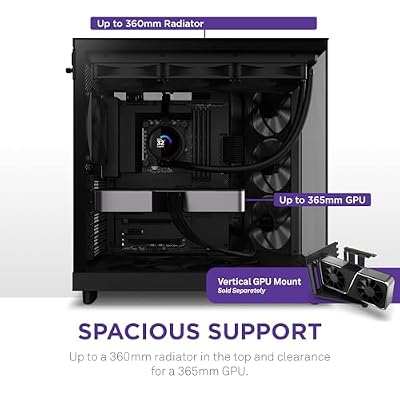
3. NZXT H6 Flow Compact Dual-Chamber Mid-Tower Airflow Case, Panoramic Glass

NZXT H6 Flow | CC-H61FB-01 | Compact Dual-Chamber Mid-Tower Airflow Case | Panoramic Glass Panels | High-Performance Airflow Panels | Includes 3 x 120mm Fans | Cable Management | Black




As an Amazon Associate we earn from qualifying purchases. Product prices and availability are accurate as of the date/time indicated.
The NZXT H6 Flow is the compact high-airflow pick and the standout value among the airflow-focused cases here. It is a dual-chamber mid-tower with a panoramic glass front-and-side panel and a genuinely strong airflow design, fitting a lot of cooling capability and modern style into a tidier footprint. At around $90 it is excellent value for a workstation that does not need a full tower.
This is the case to choose when you want serious airflow and a clean, modern build without the bulk of a full-tower. The dual-chamber layout routes the PSU and cables behind the scenes for better airflow to the components and a tidy interior, the panoramic glass shows off the build, and there is room for a capable cooler and a long graphics card. Storage is more modest than a full-tower, so very drive-heavy editors should size up, but for a compact, great-cooling editing rig at a sensible price, the H6 Flow is a smart pick.
Pros: Strong airflow, dual-chamber tidiness, panoramic glass, compact footprint, outstanding value.
Cons: Fewer drive bays than a full-tower; less room for very large multi-drive media libraries.
4. Corsair iCUE 220T RGB Airflow Tempered Glass Mid-Tower Smart ATX Case
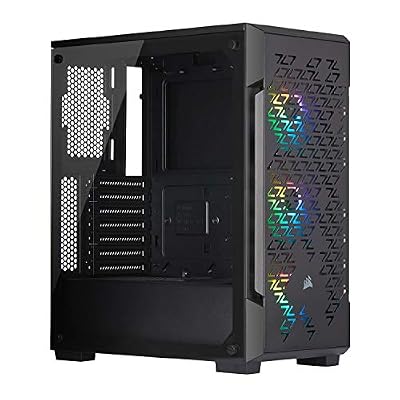
Corsair iCUE 220T RGB Airflow Tempered Glass Mid-Tower Smart ATX Case - High Airflow - Three Included SP120 RGB PRO Fans - Black


As an Amazon Associate we earn from qualifying purchases. Product prices and availability are accurate as of the date/time indicated.
The Corsair iCUE 220T RGB Airflow is the value airflow mid-tower pick. It centres on a high-airflow front panel designed to feed cool air straight to the components, comes with included RGB fans, and wraps it in a tempered-glass ATX mid-tower body. At around $180 it is a well-rounded chassis for a capable editing build that wants good cooling and some style.
For a video-editing PC, the iCUE 220T’s high-airflow front is the headline feature: it keeps a hard-working CPU and GPU supplied with cool air during long encodes and renders, and the bundled fans mean cooling out of the box. The mid-tower interior has room for a solid cooler and a long graphics card, and the iCUE-compatible RGB ties into Corsair’s software for a coordinated look. Storage is mid-tower-typical rather than cavernous, so plan accordingly if you run many drives, but as a balanced airflow case at a fair price it serves editors well.

Pros: High-airflow front panel, included RGB fans, tempered glass, room for capable components.
Cons: Mid-tower storage is moderate; drive-heavy editors may want a larger case.
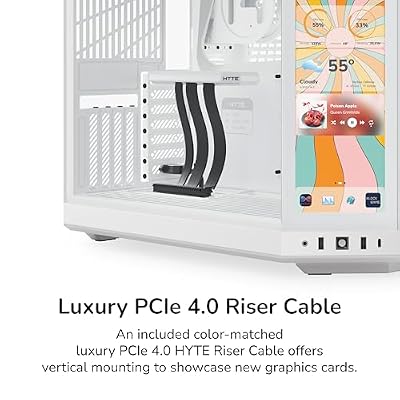
5. HYTE Y70 Touch Infinite Modern Aesthetic Gaming PC Case, 2.5K LCD Touchscreen

HYTE Y70 Touch Infinite Modern Aesthetic Gaming PC Case - Integrated 2.5K LCD Touchscreen Screen Display - Dual Chamber ATX Desktop Chassis - 10 Fan Capacity - Luxury PCIe 4.0 Riser Cable - Snow White




As an Amazon Associate we earn from qualifying purchases. Product prices and availability are accurate as of the date/time indicated.
The HYTE Y70 Touch is the showpiece pick — the case for an editing rig you want to be a centrepiece of the desk. Its headline feature is a large, integrated 2.5K LCD touchscreen built into the chassis, paired with a roomy, modern dual-chamber-style interior and expansive glass. At around $350 it is the most expensive and most distinctive case here.
For a creator, the value proposition is part practical, part personal. The integrated touchscreen can display system stats, media controls or a custom dashboard right on the case, which is a genuinely useful and eye-catching touch on a desk you sit at all day. The interior is spacious enough for a powerful editing build with a large GPU and substantial cooling. Be aware this case leads with aesthetics and that screen rather than maximising raw airflow or drive bays — so if a striking, feature-rich showpiece appeals more than stripped-back cooling efficiency, the Y70 Touch delivers.
Pros: Integrated 2.5K touchscreen, roomy modern interior, fits powerful components, real desk presence.
Cons: Highest price here; prioritises aesthetics and the screen over maximum airflow and drive capacity.
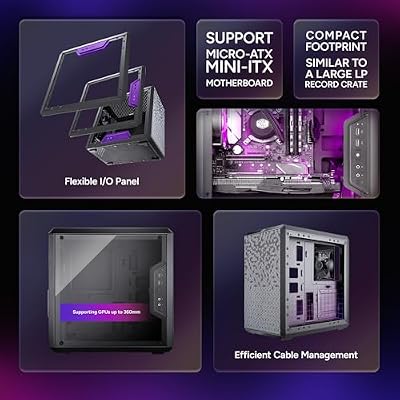
6. Cooler Master MasterBox Q300L Micro-ATX PC Case, Compact mATX

Cooler Master Q300L V1 Micro-ATX PC Case, High Airflow, Transparent Panel







As an Amazon Associate we earn from qualifying purchases. Product prices and availability are accurate as of the date/time indicated.
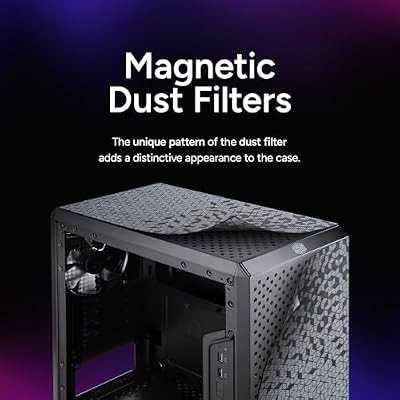
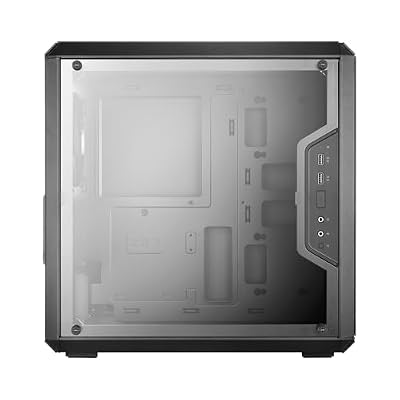
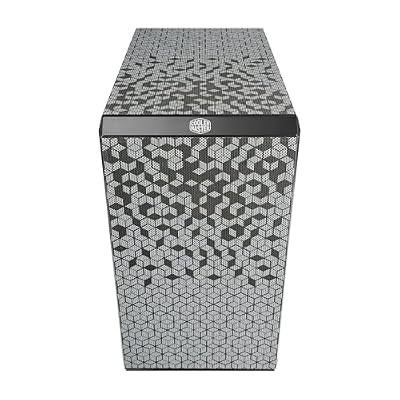
Rounding out the list is the Cooler Master MasterBox Q300L, the budget compact pick. It is a small Micro-ATX case with a ventilated, magnetic dust-filter design and a transparent acrylic side panel, built to keep a modest build cool and tidy in a minimal footprint. At around $40 it is by far the most affordable case here.
Be clear about its role: this is a compact mATX chassis, not a spacious workstation tower, so it suits a smaller, more affordable editing build or a secondary machine rather than a maxed-out rig. Within that scope it does well — the ventilated panels promote reasonable airflow for the size, the magnetic dust filters keep dust down, and the compact body fits where a tower will not. Storage and clearance are limited by the small format, so it is best for editors with a tidy parts list and space constraints. As an inexpensive, compact starting point, the Q300L is a sensible value option.

Pros: Very affordable, compact mATX footprint, ventilated panels with dust filters, tidy and practical.
Cons: Limited drive bays and clearance; the small format does not suit a large, drive-heavy workstation.
How to Choose a PC Case for Video Editing
Airflow is the first thing to prioritise for an editing build, because rendering and exporting push the CPU and GPU hard for long periods and that heat has to go somewhere. Look for a case with a genuinely high-airflow design — a mesh or ventilated front rather than a sealed glass panel that chokes intake — and room for several intake and exhaust fans. The Corsair 7000D, iCUE 220T, Crystal 680X and NZXT H6 Flow are all built around airflow, which keeps temperatures and noise down through sustained creative workloads.
Storage capacity is where editing diverges most from gaming. Video work eats drive space — fast working drives for active projects, plus high-capacity disks for media libraries and archives — so the number of drive bays matters again. A full-tower like the 7000D offers the most mounting points for multiple drives, while compact cases like the NZXT H6 Flow and the mATX Q300L are more limited. Count the drives your workflow needs, including room to grow, and make sure the case can hold them before you fall for its looks.
Space and clearance come next, since workstation components tend to be large. Check the case supports your motherboard size and, crucially, that it has clearance for your graphics card length, CPU cooler height, and any radiator you plan to fit. Larger cases like the full-tower 7000D and the dual-chamber 680X give the most room to build, cool and route cables cleanly; compact cases save desk space but constrain component choice. Measure your key parts against the case’s stated clearances to avoid an unpleasant surprise on build day.
Finally, balance practicality against aesthetics and budget. Some cases, like the HYTE Y70 Touch, lead with striking looks and features such as an integrated screen rather than maximum airflow or drive capacity — a fine choice if desk presence matters to you, as long as you go in with eyes open. For a pure performance workstation, prioritise airflow, drive bays and clearance, then pick the size that fits your space and your storage needs. Match the case on this list to how heavy your editing build really is, and it will keep your machine cool, capacious and easy to live with for years.
Frequently Asked Questions
Why does airflow matter so much for a video-editing PC?
Because rendering and exporting load the CPU and GPU heavily for extended periods, producing sustained heat that a case must clear to keep performance and component life intact. A high-airflow chassis — with a mesh or ventilated front and room for several fans, like the Corsair 7000D or NZXT H6 Flow — lets cool air reach the hard-working parts and keeps temperatures and noise down through long creative sessions, which a sealed, airflow-restricted case cannot.
How many drive bays do I need for video editing?
More than a typical gamer, because video work needs fast working drives for active projects plus high-capacity disks for media and archives. Count the drives your current workflow uses and add room to grow. A full-tower like the CORSAIR 7000D offers the most mounting points, while compact cases such as the NZXT H6 Flow or the mATX Q300L are more limited — so confirm a case can hold your storage before buying.
Is a full-tower necessary for an editing workstation?
Not always, but it helps for heavy builds. A full-tower like the 7000D gives the most drive bays, the best clearance for large components, and the easiest cable routing, which suits a powerful, drive-heavy workstation. If your parts list is more modest, a well-designed mid-tower such as the NZXT H6 Flow or iCUE 220T offers strong airflow in a smaller footprint. Match the case size to your component count and storage needs.
Are aesthetic cases like the HYTE Y70 Touch good for editing?
They can be, with realistic expectations. The HYTE Y70 Touch has a roomy interior that fits a powerful editing build and adds a genuinely useful integrated touchscreen for stats or controls, but it leads with aesthetics rather than maximising raw airflow or drive capacity. If a striking desk centrepiece matters to you and your storage needs are moderate, it is a fine choice; for a pure performance workstation, an airflow-first case is more focused.
Related Guides
- Best PC Cases
- Best High-Airflow PC Cases
- Best Case Fans for Airflow
- Best NVMe SSDs for Fast Storage
- Best CPU Coolers
- Best Workstation PC Builds
Affiliate Disclosure: As an Amazon Associate, we earn from qualifying purchases. If you click a link and make a purchase, we may earn a small commission at no extra cost to you. Prices and availability are accurate as of publication and may change.
Ready to decide? Our #1 pick for 2026 is the CORSAIR 7000D Airflow (Full-Tower).
Live price & availability on Amazon.


