

- Top Pick: Asus ROG Strix B550-F Gaming WiFi II AMD AM4 (3rd Gen Ryzen) ATX DDR4 Gaming Motherboard (PCIe 4.0,WiFi 6E, 2.5Gb LAN, BIOS Flashback, HDMI 2.1, Addressable Gen 2 RGB Header and Aura Sync)
- Best Value: GIGABYTE B850 AORUS Elite WIFI7 AMD AM5 ATX Motherboard, Support AMD Ryzen 9000/8000/7000 Series, DDR5, 14+2+2 Power Phase, 3X M.2, PCIe 5.0, USB-C, WIFI7, 2.5GbE LAN, EZ-Latch, 5-Year Warranty
- Premium Choice: Timetec Pinnacle Konduit 16GB KIT(2x8GB) DDR4 3200MHz PC4-25600 CL16-18-18-38 XMP2.0 Overclocking 1.35V Compatible for AMD and Intel Desktop Gaming PC Memory Module RAM – White
Buying memory that your motherboard actually accepts and runs at full speed is the single most overlooked step in a build. RAM is not universally interchangeable: a kit must match your board’s memory generation (DDR4 or DDR5), sit within the speeds your board and CPU support, and ideally appear on the board maker’s tested compatibility list. Get it wrong and the system either will not boot or quietly runs the memory slower than you paid for. This guide rounds up the best motherboard compatible RAM in 2026, focused on broadly compatible DDR4 kits that drop into the huge installed base of DDR4 boards.
- Best Motherboard Compatible RAM at a Glance
- 1. Corsair Vengeance LPX DDR4 16GB (2x8GB) 3200MHz CL16
- 2. Corsair Vengeance RGB PRO DDR4 16GB (2x8GB) 3200MHz CL16
- 3. Corsair Vengeance LPX DDR4 16GB (2x8GB) 3000MHz CL15
- 4. Corsair Vengeance LPX DDR4 32GB (2x16GB) up to 3200MHz CL16
- 5. Corsair Vengeance LPX DDR4 16GB (2x8GB) 3600MHz CL18
- 6. Corsair Vengeance RGB PRO SL DDR4 32GB (2x16GB) 3600MHz CL18
- How to Choose Motherboard Compatible RAM
- Frequently Asked Questions
- Related Guides
- Related Articles
Every kit on this list is DDR4, so before anything else: confirm your motherboard is a DDR4 board, not DDR5 — the two use different physical slots and are not cross-compatible. From there our picks were chosen on what makes memory genuinely fit-and-forget: a widely supported speed grade, sensible capacity, dual-channel matched kits, and a track record on motherboard QVLs. Prices run from around $119 up to around $259, spanning value 16GB kits at common 3000-3200MHz speeds through to 32GB performance kits at 3600MHz. Below is an at-a-glance comparison of all six, then a closer look at each and a buyer’s guide built around DDR generation, your board’s QVL and supported speeds — the things that decide whether RAM is truly compatible.
As an Amazon Associate we earn from qualifying purchases at no extra cost to you.


🛒 Best Price Today on Amazon
Prime members get fast, free shipping on everything above, plus member-only deals. New members get a 30-day free trial — cancel anytime.
Best Motherboard Compatible RAM at a Glance
| Memory Kit | Best For | Standout Spec | Approx Price |
|---|---|---|---|
| Corsair Vengeance LPX 16GB 3200 CL16 | Safe DDR4 default fit | 2x8GB, low profile, JEDEC/XMP | around $119 |
| Corsair Vengeance RGB PRO 16GB 3200 CL16 | Compatible RGB build | 2x8GB, CL16, RGB | around $119 |
| Corsair Vengeance LPX 16GB 3000 CL15 | Older-board friendly speed | 2x8GB, 3000MHz, low profile | around $115 |
| Corsair Vengeance LPX 32GB 3200 CL16 | Capacity with broad support | 2x16GB, up to 3200MHz, low profile | around $243 |
| Corsair Vengeance LPX 16GB 3600 CL18 | Higher-speed compatible kit | 2x8GB, 3600MHz, low profile | around $130 |
| Corsair Vengeance RGB PRO SL 32GB 3600 CL18 | High-end compatible RGB | 2x16GB, 3600MHz, slim RGB | around $259 |
1. Corsair Vengeance LPX DDR4 16GB (2x8GB) 3200MHz CL16

CORSAIR Vengeance DDR5 32GB (2 x 16GB) Up to 6000MHz AMD Intel RAM | Desktop Gaming Memory, AMD EXPO & Intel XMP 3.0 Compatible, CL30, Grey, CMK32GX5M2B6000Z30


As an Amazon Associate we earn from qualifying purchases. Product prices and availability are accurate as of the date/time indicated.
The Corsair Vengeance LPX 16GB at 3200MHz CL16 is the safe default for motherboard compatibility, and the kit to reach for if you just want memory that works. 3200MHz is the most widely supported DDR4 speed across both Intel and AMD boards, the low-profile LPX heat spreader clears tall coolers and tight cases, and Corsair’s modules appear on a vast number of motherboard QVLs. At around $119 it is a dependable foundation for a mainstream build.
This is the kit to choose when broad compatibility matters more than chasing the highest frequency. 16GB in a matched 2x8GB dual-channel pair is the standard for a gaming PC, the 3200MHz speed is almost universally supported so the kit is very likely to run at its rating after enabling XMP, and the plain low-profile design avoids clearance headaches. Even so, check your board’s QVL or supported-speed list before buying — it is the single best way to guarantee a clean boot at full speed.
Pros: Widely supported 3200MHz speed, low-profile fit, appears on countless board QVLs.
Cons: No RGB; still confirm the kit against your specific board’s QVL.
2. Corsair Vengeance RGB PRO DDR4 16GB (2x8GB) 3200MHz CL16

CORSAIR Vengeance RGB DDR5 RAM 32GB (2x16GB) 6400MHz CL36-48-48-104 1.35V AMD EXPO Intel XMP 3.0 Desktop Computer Memory – Gray (CMH32GX5M2B6400Z36)


As an Amazon Associate we earn from qualifying purchases. Product prices and availability are accurate as of the date/time indicated.
The Corsair Vengeance RGB PRO 16GB is the compatible-build pick for anyone who wants the same fit-and-forget 3200MHz CL16 specification with RGB lighting on top. It runs the widely supported 3200MHz speed in a matched 2x8GB dual-channel kit, ties its lighting into Corsair’s iCUE software, and shares the broad QVL presence that makes Vengeance memory an easy compatibility bet. It is the glow-friendly sibling of the plain LPX kit above.
This is the kit for a build that wants coordinated lighting without rolling the dice on compatibility. The 3200MHz CL16 timing keeps performance snappy and, just as importantly, sits at a speed nearly every DDR4 board supports, so it is very likely to hit its rating once XMP is enabled. The taller RGB heat spreader is the one thing to watch — measure cooler clearance before buying — and as always, confirm the kit against your motherboard’s QVL for total peace of mind.
Pros: Widely supported 3200MHz CL16, iCUE RGB, strong QVL track record.
Cons: Taller RGB heat spreader; check cooler clearance and your board QVL.
3. Corsair Vengeance LPX DDR4 16GB (2x8GB) 3000MHz CL15
CORSAIR Vengeance RGB DDR5 RAM 32GB (2x16GB) 6400MHz CL36-48-48-104 1.35V AMD EXPO Intel XMP 3.0 Desktop Computer Memory – Gray (CMH32GX5M2B6400Z36)
As an Amazon Associate we earn from qualifying purchases. Product prices and availability are accurate as of the date/time indicated.
The Corsair Vengeance LPX 16GB at 3000MHz CL15 is the older-board-friendly pick. 3000MHz was the mainstream DDR4 speed for several generations of motherboards, so this kit is an excellent match for slightly older boards that officially support up to 3000MHz, or for anyone who wants a near-certain clean boot. The tight CL15 timing partly offsets the lower frequency, and the low-profile LPX design keeps clearance simple. At around $115 it is sensible value.
This is the kit to choose when your board’s documented support tops out around 3000MHz, or when you simply prefer the most conservative, broadly compatible speed grade. 16GB in dual channel is plenty for gaming, the CL15 latency keeps the memory responsive, and running at a speed your board explicitly lists minimises the chance of boot or stability surprises. Check your board’s supported speeds — if 3000MHz is on the list, this kit is a particularly safe choice.
Pros: Conservative 3000MHz speed ideal for older boards, tight CL15, low-profile fit.
Cons: Lower frequency than 3200/3600 kits; verify 3000MHz on your board’s list.
4. Corsair Vengeance LPX DDR4 32GB (2x16GB) up to 3200MHz CL16

CORSAIR Vengeance LPX DDR4 RAM 32GB (2x16GB) Up to 3200MHz CL16-20-20-38 1.35V Intel XMP AMD EXPO Computer Memory – Black (CMK32GX4M2E3200C16)


As an Amazon Associate we earn from qualifying purchases. Product prices and availability are accurate as of the date/time indicated.
The Corsair Vengeance LPX 32GB kit brings capacity to the compatibility conversation. It delivers 32GB across two 16GB modules at up to 3200MHz with a CL16 timing, pairing the most widely supported DDR4 speed with double the memory in Corsair’s clearance-friendly low-profile LPX spreaders. At around $243 it is the dependable choice for a build that wants headroom without risking compatibility.
This is the kit for the gamer or creator who wants 32GB and values a near-certain fit. The 3200MHz speed is almost universally supported, so the kit is very likely to run at its rating after XMP, the 32GB capacity comfortably handles modern games alongside background apps, and the low-profile design fits where taller modules will not. One practical note for larger kits: populating all four slots or using high-density modules can lower the speed a board will stably run, so check your motherboard’s QVL for your exact configuration.
Pros: 32GB at widely supported 3200MHz, low-profile fit, broad QVL presence.
Cons: High-capacity kits can clock lower in some boards; confirm your QVL.
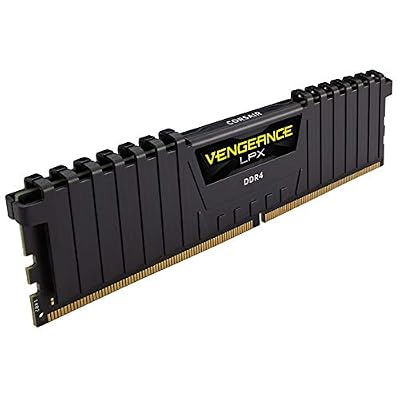
5. Corsair Vengeance LPX DDR4 16GB (2x8GB) 3600MHz CL18

CORSAIR VENGEANCE LPX DDR4 RAM 16GB (2x8GB) 3600MHz CL18-22-22-42 1.35V Intel AMD Desktop Computer Memory - Black (CMK16GX4M2D3600C18)

As an Amazon Associate we earn from qualifying purchases. Product prices and availability are accurate as of the date/time indicated.
The Corsair Vengeance LPX 16GB at 3600MHz CL18 is the higher-speed pick for boards that support it. 3600MHz is a popular enthusiast speed — particularly sweet on AMD Ryzen platforms — and this kit delivers it in a matched 2x8GB pair with Corsair’s low-profile heat spreader. At around $130 it offers a step up in frequency for a small premium over a 3200MHz kit.
This is the kit to choose when your motherboard and CPU support 3600MHz and you want the extra bandwidth, especially on a Ryzen build where memory speed ties into the infinity fabric. The CL18 timing remains responsive at this frequency, the 16GB dual-channel capacity suits gaming, and the low-profile design keeps clearance easy. The important caveat is compatibility: 3600MHz is not guaranteed on every board, so confirm your motherboard’s QVL lists 3600MHz (or that your CPU memory controller handles it) before counting on the full rating.
Pros: Higher 3600MHz speed, great on Ryzen, low-profile fit, modest premium.
Cons: 3600MHz not supported by all boards; check QVL and CPU memory support.
6. Corsair Vengeance RGB PRO SL DDR4 32GB (2x16GB) 3600MHz CL18

CORSAIR Vengeance DDR5 64GB (2x32GB) DDR5 6000MHz CL30 AMD EXPO Intel XMP iCUE Compatible Computer Memory – Gray (CMK64GX5M2B6000Z30)


As an Amazon Associate we earn from qualifying purchases. Product prices and availability are accurate as of the date/time indicated.
Rounding out the list is the Corsair Vengeance RGB PRO SL 32GB at 3600MHz CL18, the high-end compatible RGB pick. It combines a generous 32GB capacity, an enthusiast 3600MHz speed and vivid iCUE-controlled lighting, all in a slimmer ‘SL’ heat spreader designed to clear more coolers than the original RGB PRO. At around $259 it is the premium kit here for a showpiece build that still needs to slot in cleanly.
This is the kit for the enthusiast who wants 32GB, higher frequency and lighting in one package and is building on a board that supports 3600MHz. The extra bandwidth suits demanding multitasking and Ryzen platforms, the CL18 timing stays responsive at speed, and the slimmer SL profile improves cooler clearance over taller RGB modules. As with any 3600MHz 32GB kit, compatibility is the thing to verify: check your motherboard’s QVL for both the speed and a two-stick 32GB configuration so you are confident it will run as rated.
Pros: 32GB at 3600MHz, slim SL RGB, iCUE lighting, premium compatible showpiece.
Cons: Highest price here; verify 3600MHz and 32GB config on your board’s QVL.
How to Choose Motherboard Compatible RAM
Compatibility starts with the memory generation, and this is non-negotiable: DDR4 and DDR5 use physically different slots and are not interchangeable. Every kit in this guide is DDR4, so they suit the enormous installed base of DDR4 motherboards — but if your board is DDR5, none of these will fit, and vice versa. Check your motherboard’s specification (or the markings on the board) and buy the matching generation first. No amount of speed or capacity matters if the modules cannot physically seat.
Next comes the supported speed, and this is where the board maker’s QVL (Qualified Vendor List) earns its keep. The QVL is the list of memory kits the manufacturer has actually tested on that board, and a kit on the list is the safest possible bet for a clean boot at full rated speed. Even off the list, matching a widely supported speed grade — 3200MHz like the Vengeance LPX and RGB PRO kits here, or a conservative 3000MHz like the CL15 kit — dramatically improves your odds. Higher speeds such as 3600MHz are excellent but not universal, so confirm your board and CPU support them.
Capacity and kit configuration affect compatibility more than people expect. A matched dual-channel kit (two modules sold together, like every kit here) is tested to run as a pair and delivers more bandwidth than a single stick of the same size. But high-capacity 32GB kits, and especially filling all four DIMM slots, can force a board to run memory at a lower stable speed than a two-module setup — this is normal behaviour governed by the CPU’s memory controller. If you want 32GB, a two-stick kit like the Vengeance LPX 32GB is generally easier on compatibility than four smaller sticks.
Finally, remember the practical steps that turn a compatible kit into a working one. Almost all kits ship at a slow JEDEC default and only reach their rated speed once you enable the XMP profile in the BIOS, so do not skip that step. Watch physical clearance too — tall RGB heat spreaders can collide with large air coolers, which is why low-profile LPX kits are a safe pick for tight builds. Confirm DDR4 vs DDR5, cross-check the QVL, pick a supported speed and a sensible capacity, enable XMP, and the RAM on this list will drop in and run as it should.
Frequently Asked Questions
How do I know if RAM is compatible with my motherboard?
Start with the memory generation — your board is either DDR4 or DDR5, and the two are not interchangeable; every kit in this guide is DDR4. Then check the board maker’s QVL (Qualified Vendor List), the list of memory tested on that specific board, and confirm the kit’s speed is one your board and CPU support. A kit on the QVL running a widely supported speed like 3200MHz is the safest bet for a clean boot at full rating.
What is a motherboard QVL and should I follow it?
A QVL is the Qualified Vendor List — the memory kits a motherboard maker has actually tested and validated on that board. Buying a kit from the QVL is the surest way to guarantee it boots and runs at its rated speed. You can often run kits that are not listed, especially common speeds like 3200MHz, but checking the QVL first removes the guesswork, which is why we recommend it for every kit here.
Will any DDR4 kit run at its advertised speed automatically?
Not by default. Most DDR4 kits, including the Corsair Vengeance kits here, boot at a slower JEDEC speed until you enable the XMP profile in your motherboard’s BIOS, which applies the rated frequency and timings. Even then, the speed must be supported by your board and CPU — a 3200MHz kit is almost always fine, while a 3600MHz kit needs a board and CPU that support 3600MHz to hit its full rating.
Does adding more RAM or filling all slots affect compatibility?
It can. High-capacity 32GB kits, and particularly populating all four DIMM slots, can lead a board to run memory at a lower stable speed than a two-module setup — this is normal and governed by the CPU’s memory controller. For 32GB, a matched two-stick kit like the Vengeance LPX 32GB is usually easier on compatibility than four smaller sticks. Check your board’s QVL for your exact configuration.
Related Guides
- Best RAM for Gaming
- Best DDR4 RAM Kits
- Best RGB RAM
- Best Motherboards for Your Build
- Best CPU Coolers
- Best Gaming PC Builds
Affiliate Disclosure: As an Amazon Associate, we earn from qualifying purchases. If you click a link and make a purchase, we may earn a small commission at no extra cost to you. Prices and availability are accurate as of publication and may change.










