

- Top Pick: Rosewill Helium NAS Max | ATX Mid Tower Computer Case | Mesh Panel | 4 x 140mm PWM Fan | Support 11 x 3.5 HDD | BTF Motherboard Compatible | USB 3.2 Type-C | Ideal for DIY NAS, AI
- Best Value: JONSBO N5 NAS Pc Case, E-ATX,12HDD+4SSD Drive Bay GPU HP Host, Supports Max. 4 GPU,E-A.TX(330mm) MB/ATX PSU Supports, with 3 Fans Built-in, 8 Slots PCI, Solid Wood Veneer Computer Case,Home Server
- Premium Choice: Rosewill Helium NAS Duo | ATX Mid Tower Computer Case | Mesh Panel | 4 x 140mm PWM Fan | Support 8 x 3.5 HDD | ATX, Micro ATX, Mini-ITX Motherboard Compatible | 360mm AIO Supported | USB 3.2 Type-C |
Building a NAS around a PC case is a different exercise from building a gaming rig. Drive bays come first, then airflow around those drives, then the motherboard and power supply formats the chassis will accept. A case that looks sleek but offers four bays can run out of room the first time you add a second pool of disks, while one with a dozen bays may be larger than the shelf you planned for it.
This guide is for people assembling a home server, media vault, or small-office storage box in 2026. It compares eight NAS-oriented cases using only the specs printed in each listing title: bay counts, hot-swap support, motherboard and power supply formats, cooler and radiator room, and fan layouts. Start with the thresholds below, decide how many drives you want now and in two years, and then match one of the chassis to that plan.
Quick Picks
As an Amazon Associate we earn from qualifying purchases at no extra cost to you.




| Product | Best for | Key spec from the title |
|---|---|---|
| Rosewill Helium NAS Max | Big DIY arrays | 11 x 3.5 inch HDD, 4 x 140mm PWM fan |
| JONSBO N5 | Maximum capacity | 12 HDD plus 4 SSD bays, E-ATX |
| Rosewill Helium NAS Duo | Mid-size builds | 8 x 3.5 inch HDD, 360mm AIO support |
| 8 Bay NAS Case (Hot-Swap) | Easy drive swaps | 8 x 3.5 hot-swap plus 2 x 2.5 SSD |
| JONSBO N6 | Compact Micro ATX | 9 hot-swap bays, 240 AIO support |
| Rosewill Thor NAS Pro | Rack-style full tower | 8 hot-swap SATA/SAS bays, E-ATX |
| DARKROCK Classico Max | Storage plus cooling | 10 x 3.5 HDD plus 3 x 2.5 SSD, 360mm radiator |
| 4 Bay Mini ITX NAS Case | Small footprints | 4 x 3.5 hot-swap plus 1 x 2.5, SFX PSU |
How to Choose
Plan the bay count for growth
Count the drives you will install now, then add at least two spare slots. Four bays suit a small family archive with mirrored pairs. Eight to ten bays work for a media library, a backup target, and a few virtual machines. Twelve or more bays serve people who run large parity arrays. Remember that a bay count in the title may include both 3.5 inch and 2.5 inch positions, so read the breakdown carefully. Large-capacity drives are also heavier and draw more power at spin-up, which is another reason to leave bays free. Staggering drive purchases over time is common, and spare bays let you add a disk or swap a smaller one for a larger model without rebuilding the whole chassis.
Hot-swap bays versus fixed mounts
Hot-swap bays let you slide a failed drive out without opening the case, which is a real convenience during a rebuild. Fixed mounts and tray-based systems leave you pulling screws. For SATA and SAS compatibility, check whether the backplane is listed, because a case that says SATA and SAS supports a wider range of drives than one that says SATA only. If you rarely touch the drives, simple fixed mounts are fine. Hot-swap makes the most difference in a RAID or parity setup, where a failed disk needs replacing quickly and the array stays online while you do it. It also saves cable fiddling, because each bay connects to a backplane rather than a loose power lead.
Motherboard, PSU, and cooler room
Mini ITX, Micro ATX, ATX, and E-ATX describe motherboard sizes, and each case supports a limited set. SFX and ATX describe power supply formats, and a tight chassis may accept only the smaller one. Cooler clearance matters too: a title that lists a 70mm CPU cooler height limit means a low-profile cooler, while a 360mm radiator listing means an all-in-one liquid cooler can mount. Add-in cards, such as a graphics or storage controller, need slot space and length. The JONSBO N6 lists a 305mm GPU allowance and the N5 lists eight PCI slots, which hints at how different their expansion plans are. If you only want a plain file server, a motherboard with enough SATA ports and a small case may be all you need.
Airflow for stacked drives
Drives packed side by side run warmer than a single disk on a desk. Look for mesh panels, multiple front or side fans, and PWM-controlled fan headers so speed follows temperature. Cases listing four fans, such as the Rosewill Helium models, give airflow where drive cages sit. Quiet operation matters if the NAS lives in a living room, so favor larger fans over many small ones. A 140mm fan moves the same air at lower speed than a 120mm unit, and lower speed usually means less noise. Also leave a little clearance behind the case for cables and ventilation, since a box pushed against a wall breathes poorly.
The 8 Best Options
Rosewill Helium NAS Max
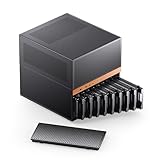
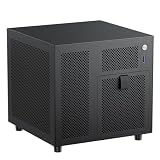
An ATX mid tower with a mesh panel, four 140mm PWM fans, space for 11 3.5 inch drives, BTF motherboard compatibility, and a USB 3.2 Type-C front port. The title calls it ideal for DIY NAS and AI builds, which points to a case meant for heavy storage paired with a capable motherboard and add-in cards.
- Eleven 3.5 inch positions give room for a sizeable array without a second chassis.
- Four large PWM fans and a mesh panel favor cooling around the drive cages.
- Trade-off: it is a mid tower, so it takes more shelf or floor space than compact options.
Skip it if your space is tight or four bays would be enough.
JONSBO N5
An E-ATX NAS case with 12 HDD bays and 4 SSD positions, support for ATX power supplies, three built-in fans, and eight PCI slots. The title lists GPU support up to four cards and a solid wood veneer finish, aimed at home server builds that live in a visible room.
- Twelve HDD plus four SSD positions is the largest capacity in this group.
- Wood veneer styling suits a living room better than a bare steel shell.
- Trade-off: a high-capacity chassis demands a larger power supply and a big footprint.
Skip it if you want a compact case or a modest build with just a few drives.
Rosewill Helium NAS Duo
An ATX mid tower with a mesh panel, four 140mm PWM fans, support for eight 3.5 inch drives, and compatibility with ATX, Micro ATX, and Mini-ITX boards. The title adds 360mm AIO support and a USB 3.2 Type-C port, so it fits a build with a hotter processor and a modern front panel.
- Supports a 360mm AIO, which gives cooling choices beyond a tower air cooler.
- Flexible motherboard compatibility across three sizes keeps upgrades open.
- Trade-off: eight bays is fewer than the Max version in the same family.
Skip it if you expect to grow into a large drive array.
8 Bay NAS Case (Hot-Swap)
An unbranded eight-bay case for Micro ATX and Mini ITX boards with an ATX power supply. The title lists 8 x 3.5 hot-swap bays plus 2 x 2.5 SSD positions, SATA and SAS drive compatibility, and a dual-chamber layout with four fan mounts.
- Hot-swap bays make drive replacement simpler during a rebuild.
- The dual-chamber design separates storage from the motherboard side.
- Trade-off: no brand name appears in the title, so support details are unclear.
Skip it if you need ATX or E-ATX motherboard support or a named manufacturer.
JONSBO N6
A Micro ATX NAS case with nine hot-swap HDD or SSD bays, three power supply positions, ATX and SFX PSU support, two pre-installed fans, GPU room up to 305mm, and 240 AIO support. It is a compact take on a nine-bay layout.
- Nine hot-swap bays in a Micro ATX frame save desk and shelf space.
- Three PSU positions and two PSU formats make tight builds easier.
- Trade-off: Micro ATX limits the number of expansion slots compared to ATX.
Skip it if you need several add-in cards, such as storage controllers and a graphics card.
Rosewill Thor NAS Pro
A full tower workstation and server chassis supporting up to eight hot-swap 3.5 or 2.5 inch SATA and SAS drives plus two 2.5 inch SSDs, with E-ATX compatibility, one 140mm PWM fan, and a USB 3.2 Type-C port. It leans toward server-style use.
- Hot-swap SATA and SAS bays suit server-style maintenance.
- E-ATX compatibility supports larger boards with more slots.
- Trade-off: only one fan is listed, so extra airflow may be needed.
Skip it if you want strong cooling straight out of the box or a small chassis.
DARKROCK Classico Max
An E-ATX case with four 120mm black fans, space for ten 3.5 inch drives and three 2.5 inch SSDs, USB 3.0, 360mm radiator support, and vertical GPU slots. It mixes a large drive count with room for liquid cooling and a showpiece graphics card.
- Four included fans cover airflow for stacked drives from day one.
- Radiator support suits liquid-cooled builds and warm processors.
- Trade-off: the title does not mention hot-swap bays, so drive changes likely need tools.
Skip it if you want tool-free drive swaps or a plain, quiet server look.
4 Bay Mini ITX NAS Case
A compact Mini ITX case with four hot-swap 3.5 inch bays and one 2.5 inch position, supporting SFX, SFX-L, and Flex PSUs, a 70mm CPU cooler, and a 120mm fan. It targets small homes and desks.
- Small footprint fits a shelf, a desk, or a media cabinet.
- Hot-swap bays keep drive replacement simple.
- Trade-off: a 70mm cooler limit restricts which CPU coolers fit.
Skip it if you need to grow past four drives or use a standard ATX power supply.
Which One Fits Your Situation
You want a large archive in one box
The JONSBO N5 or the Rosewill Helium NAS Max leads on drive counts. Pick the N5 for 12 HDD bays and the Helium Max for big PWM fans.
You need a small server for a shelf
The 4 Bay Mini ITX NAS Case fits tight spaces, and the JONSBO N6 gives nine hot-swap bays in a Micro ATX frame. Choose the 4 Bay case if a quiet, small box matters more than capacity, and the N6 if you expect your storage needs to double.
You want strong cooling for a hot CPU
The Rosewill Helium NAS Duo supports a 360mm AIO and four 140mm PWM fans. The DARKROCK Classico Max also supports a 360mm radiator.
You want rack-style hot-swap bays
The Rosewill Thor NAS Pro lists eight SATA and SAS hot-swap bays. Add fans for the drive area, since only one is listed in the title. The unbranded 8 Bay NAS Case offers a similar hot-swap count for Micro ATX and Mini ITX boards.
Common Mistakes
- Buying a case sized for today’s drive count with no spare bays.
- Ignoring CPU cooler height limits in small cases.
- Overlooking power supply format, such as SFX versus ATX.
- Skipping airflow planning for stacked drives.
- Assuming every bay is hot-swap when the title does not say so.
Related guides
- Combination Smoke And Carbon Monoxide Detectors
- Aio Liquid Coolers For High Performance Gaming
- Graphics Cards For Low Wattage Power Supplies
Frequently Asked Questions
How many bays do I need?
Plan for the drives you will install now plus two spares. Four bays suit simple archives, while eight or more suit media libraries and backups.
Are hot-swap bays necessary?
No, but they speed up drive replacement. If you rarely change drives, fixed mounts are fine.
Can I use a normal ATX power supply?
Only in cases that list ATX PSU support. Compact cases may require SFX or Flex units.
Do NAS cases need extra fans?
Often yes. Packed drives run warm, so add fans if the case lists only one or two.

















