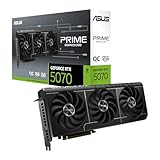
- Top Pick: ASUS Dual NVIDIA GeForce RTX 5060 8GB GDDR7 OC Edition (PCIe 5.0, 8GB GDDR7, DLSS 4, HDMI 2.1b, DisplayPort 2.1b, 2.5-Slot Design, Axial-tech Fan Design, 0dB Technology), 3 Year Warranty
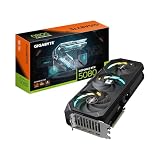
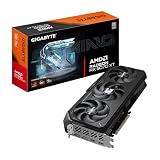
- Best Value: GIGABYTE GeForce RTX 5060 WINDFORCE OC 8G Graphics Card, Cooling System, 8GB 128-bit GDDR7, PCIe 5.0, Manufactured by NVIDIA, DisplayPort & HDMI – Video Output Interface, GV-N5060WF2OC-8GD Video Card
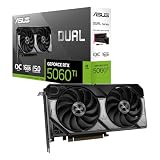
- Premium Choice: ASUS Dual NVIDIA GeForce RTX 5060 Ti 16GB GDDR7 OC Edition Graphics Card, (PCIe 5.0, DLSS 4, HDMI 2.1b, DisplayPort 2.1b, 2.5-Slot, Axial-tech Fan, 0dB Technology), 3 Year Warranty
Shopping for a graphics card under $500 in 2026 means navigating a market that has finally stabilized after years of inflated pricing, but that stability has come with a catch: the sub-$500 tier is now crowded with cards that look similar on paper yet behave very differently in real games. An 8GB card and a 16GB card can carry nearly identical model numbers, and the gap between them only shows up when you turn on ray tracing at 1440p or load a texture-heavy open world. Add competing upscaling technologies, PCIe 5.0 marketing, and cooler designs that range from genuinely quiet to merely adequate, and it’s easy to overspend on the wrong feature set.
This guide cuts through that noise. We’ve focused on cards that deliver the most frames, the most usable VRAM, and the longest practical lifespan for the money, with an emphasis on 1080p and 1440p gaming — the resolutions that actually matter at this budget. Below you’ll find our top picks, a buyer’s checklist covering the specs that genuinely affect performance, honest reviews of each recommendation, and answers to the questions we see asked most often.
As an Amazon Associate we earn from qualifying purchases at no extra cost to you.




Check Price on Amazon →

⚡ Save on Your Next PC — Amazon Prime
Prime members get fast free shipping on the systems above, plus early access to Prime Day & Black Friday PC deals. New members get a 30-day free trial.
Watch: Best Graphics Card Under $500 — Video Review
How to Choose Graphics Card Under $500
- VRAM capacity: 8GB is workable at 1080p but increasingly tight in 2026 titles with high textures or ray tracing. If you game at 1440p or plan to keep the card for three-plus years, prioritize a 16GB model — it’s the single most future-proofing decision at this budget.
- Target resolution and refresh rate: Match the card to your monitor, not your ambitions. A 1080p 144Hz panel is well served by an RTX 5060 or RX 9060 XT; a 1440p display benefits meaningfully from the extra memory and bandwidth of the 5060 Ti or 9060 XT 16GB.
- Upscaling and frame generation: NVIDIA’s DLSS 4 remains the more mature implementation with broader game support, while AMD’s FSR has closed much of the gap. If you rely heavily on upscaling to hit your frame targets, this is a real differentiator worth weighing.
- Physical fit and cooling: Measure your case before you buy. Compact 2 to 2.5-slot dual-fan designs suit mid-tower and small builds, while triple-fan cards run cooler and quieter but demand more clearance. Zero-RPM idle modes are a genuine quality-of-life win for desktop use.
- Power supply headroom: Cards in this class are relatively efficient, but check the manufacturer’s recommended PSU wattage and confirm you have the correct connectors. A quality 550W to 650W unit covers most builds here; skimping on the PSU is a false economy.
The Best Picks Reviewed
ASUS Dual RTX 5060 Ti 16GB OC
This is the sweet spot of the entire sub-$500 category — 16GB of GDDR7 paired with a genuinely capable GPU makes it the only card here we’d confidently recommend for 1440p with ray tracing enabled. The Dual cooler is compact enough for mid-tower builds while staying quiet under load, and DLSS 4 support gives it real staying power as games get more demanding.
XFX Swift RX 9060 XT 16GB
AMD’s RDNA 4 architecture delivers excellent raster performance per dollar, and 16GB of GDDR6 means you’ll never see a texture pop or stutter from memory pressure at 1080p or 1440p. The triple-fan Swift cooler is one of the better thermal solutions in this price bracket, running cool and quiet even during extended sessions.
GIGABYTE RX 9060 XT Gaming OC ICE 16G
Functionally similar to the XFX card but in a slimmer two-slot form factor with a white colorway, this is the pick for compact or aesthetically-driven builds. The Hawk fan design and server-grade thermal gel keep temperatures respectable despite the reduced footprint, though it runs marginally warmer than triple-fan alternatives under sustained load.
ASUS Dual RTX 5060 8GB OC
A solid 1080p performer with the newest GDDR7 memory and full DLSS 4 support, this card handles high-refresh esports and most AAA titles at high settings without complaint. The 8GB buffer is its clear limitation — fine today at 1080p, but it’s the reason we’d steer 1440p players toward the 16GB options above.
GIGABYTE RTX 5060 WINDFORCE OC 8G
The value entry point of this roundup, offering the same core RTX 5060 silicon with a competent WINDFORCE cooler and a typically lower street price than its ASUS counterpart. It’s the right choice if you’re building to a strict budget at 1080p and want NVIDIA’s feature set without stretching your spend.
Frequently Asked Questions
Is 8GB of VRAM still enough for gaming in 2026?
At 1080p with sensible settings, yes — 8GB cards remain perfectly playable in the vast majority of titles. The problems appear at 1440p, with ultra texture presets, or with ray tracing enabled, where 8GB can cause frame time hitches and forced texture downgrades. If your budget allows, 16GB is the safer long-term buy.
Should I choose NVIDIA or AMD at this price point?
AMD generally offers more raw rasterization performance and VRAM per dollar, making it the value pick for traditional gaming. NVIDIA holds an edge in ray tracing, upscaling maturity with DLSS 4, and creative or AI workloads. Decide based on which of those matters more to you rather than brand loyalty.
Do I need PCIe 5.0 to use these cards?
No. All of these cards are backwards compatible with PCIe 4.0 and even 3.0 slots, and the real-world performance difference is negligible at this performance tier. Don’t upgrade your motherboard purely for PCIe 5.0 support.
What power supply do I need?
A quality 550W unit is sufficient for the RTX 5060 and most RX 9060 XT builds, while 600W to 650W provides comfortable headroom for the RTX 5060 Ti or systems with higher-end CPUs. Prioritize a reputable brand and 80 Plus Bronze certification or better over raw wattage numbers.
Final Thoughts
If you want the best all-round card under $500, the ASUS Dual RTX 5060 Ti 16GB is the clear winner — it’s the only option here that handles 1440p with ray tracing comfortably while offering the VRAM capacity to stay relevant for years. Value-focused buyers should look hard at the XFX Swift RX 9060 XT 16GB, which delivers outstanding raster performance and equal memory for noticeably less, while anyone building a tight-budget 1080p rig will be well served by the GIGABYTE RTX 5060 WINDFORCE OC 8G. Whichever you choose, buying 16GB where your budget permits is the decision you’re least likely to regret.