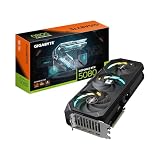
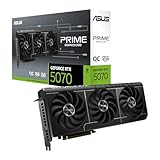
The best Nvidia GPU for video editing in this group is the ASUS ProArt GeForce RTX 5080 16GB, because it combines 16GB of fast GDDR7 memory with the newest NVENC and NVDEC video engines and a creator-oriented design that includes a USB-C display output. “Nvidia GPU” here means a graphics card whose CUDA cores, memory and hardware video encoders accelerate effects, color work, playback and exports in editors like Premiere Pro and DaVinci Resolve. The other RTX 5080 on the list, the Founders Edition, is nearly as capable. The remaining four are older or entry-level workstation parts, and one is a complete PC, so they are labeled plainly.
Quick List
- PNY RTX A400 4GB – best for a low-profile, low-power upgrade in a small workstation
- NVIDIA GeForce RTX 5080 Founders Edition – best for the reference RTX 5080 design with 16GB GDDR7
- PNY Quadro P5000 16GB – best for a legacy 16GB workstation card in an older system
- HP Workstation PC with Quadro K1200 – best for a basic ready-made editing desktop (complete PC, not a graphics card)
- PNY Quadro P2200 – best for a single-slot, slot-powered card in an older workstation
- ASUS ProArt GeForce RTX 5080 16GB OC – best for creators who want the strongest card in this list
Which One Is Right for You?
| If you… | Choose |
|---|---|
| edit 4K or heavier timelines and want the most capable card here | ASUS ProArt GeForce RTX 5080 |
| prefer the original reference design of the same GPU | GeForce RTX 5080 Founders Edition |
| have a small case or low-profile workstation and light editing needs | PNY RTX A400 |
| need a single-slot card that draws power from the slot only | PNY Quadro P2200 |
| maintain an older workstation and want 16GB of VRAM | PNY Quadro P5000 |
| want a complete basic editing PC, not just a card | HP Workstation PC with Quadro K1200 |
For anything beyond light 1080p work, the two RTX 5080 cards are the only options here that match current editing software. The workstation cards suit niche cases: a small build, an older machine you cannot rebuild, or work that is mostly stills and 1080p cuts. Match the card to your timeline resolution, codec, and available power before anything else.
All 6 Picks in Detail
1. PNY RTX A400 4GB – Best Low-Profile, Low-Power Upgrade
As an Amazon Associate we earn from qualifying purchases at no extra cost to you.

The PNY RTX A400 is a professional entry-level graphics card with 4GB of GDDR6, 768 CUDA cores, a single-slot low-profile cooler and four mini DisplayPort outputs. It runs on PCI Express 4.0 and is rated at around 50W, which means it can sit in compact workstations and small-form-factor office PCs that have no spare power connectors. For editors with modest needs, it is a practical way to add hardware acceleration and multi-monitor outputs.
The limit is memory and raw speed. With 4GB of VRAM, a 4K timeline with several effect layers, noise reduction or heavy color grading can exhaust memory quickly, and then the application slows or falls back to the processor. It is best suited to 1080p projects, light 4K proxy workflows, photo and design work, and general multi-monitor use. Because it is an Ampere-generation part, it does not carry the newest encoder features, so check NVIDIA’s support matrix for the codecs you need.
- Architecture: Ampere workstation card
- Memory: 4GB GDDR6
- CUDA cores: 768
- Form factor: single slot, low profile
- Outputs: four mini DisplayPort
- Power: about 50W; confirm connector needs on the listing
Pros:
- Fits compact and low-profile systems
- Low power draw and four display outputs
Cons:
- 4GB of VRAM limits 4K effects work
- No modern AV1 or 4:2:2 hardware features expected
Compared with the Quadro P2200, it is newer and more efficient, while the P2200 offers slightly more memory.
2. NVIDIA GeForce RTX 5080 Founders Edition – Best Reference RTX 5080

The Founders Edition is NVIDIA’s own RTX 5080, built on the Blackwell GB203 chip with 10,752 CUDA cores and 16GB of GDDR7 on a 256-bit bus, giving about 960GB/s of memory bandwidth. The card is rated at 360W total graphics power, uses a 16-pin 12V-2×6 connector, and NVIDIA recommends an 850W system power supply. For editors, the headline is the video hardware: two ninth-generation NVENC encoders and two sixth-generation NVDEC decoders.
NVIDIA and Puget Systems report that RTX 50 series cards add hardware decode and encode for 10-bit 4:2:2 H.264 and HEVC footage, which matters for many mirrorless and cinema cameras. Dual encoders can also speed up exports in supporting software. In practice, 16GB of VRAM gives comfortable room for 4K and high-resolution timelines with several effects. The listing name is short, so confirm the exact cooler design and dimensions on the product page, and make sure your case and power supply can handle a high-power card.
- GPU: GeForce RTX 5080, Blackwell GB203
- Memory: 16GB GDDR7, 256-bit
- CUDA cores: 10,752
- Video engines: two NVENC (9th gen), two NVDEC (6th gen)
- Power: about 360W total graphics power; 850W PSU recommended
Pros:
- 16GB of fast memory and the latest video engines
- AV1 encode and 4:2:2 hardware support on the 50 series
Cons:
- High power draw needs a strong power supply
- Large and demanding to install
Next to the ASUS ProArt, it offers the same GPU, so choose by cooler design, size and extra ports.
3. PNY Quadro P5000 16GB – Best Legacy 16GB Workstation Card

The Quadro P5000 is a Pascal-generation workstation card from several years ago, with 2,560 CUDA cores and 16GB of GDDR5X on a 256-bit bus. It is a dual-slot, full-height design rated at around 180W with four DisplayPort outputs and a DVI connector. Its main appeal is that rare combination of a lot of VRAM and wide compatibility with older professional software, which suits someone maintaining a workstation they cannot easily replace.
Because it is an older architecture, it lacks the newer encoder generations, AV1 support and the 4:2:2 hardware decoding on RTX 50 cards. It will still accelerate many effects and viewport tasks, and its 16GB of memory can hold large projects. Its raw speed is far behind the RTX 5080, and it needs an external power connector, so check the power supply. Treat it as a legacy-upgrade option and check the driver support status for your operating system before you buy.
- Architecture: Pascal workstation card
- Memory: 16GB GDDR5X, 256-bit
- CUDA cores: 2,560
- Form factor: dual slot, full height
- Outputs: four DisplayPort plus DVI-D
- Power: about 180W; external connector needed (confirm on listing)
Pros:
- 16GB of VRAM at the older-card level
- Multiple display outputs for a multi-monitor desk
Cons:
- Old architecture with no AV1 or modern codec hardware
- Much slower than current RTX cards
Against the RTX 5080 cards, it offers the same VRAM amount at a small fraction of the performance.
4. HP Workstation PC with Quadro K1200 – Basic Editing Desktop (Complete PC, Not a Graphics Card)

This listing is a complete HP workstation desktop rather than a graphics card. The title lists an NVIDIA Quadro K1200 4GB GPU, an Intel Core i5 processor, 32GB of DDR4 memory and 1TB SSD plus 4TB hard drive storage. It is the one entry here that does not strictly belong to a list of Nvidia graphics cards, so we treat it as a runner-up for readers who want a ready-to-use machine.
The Quadro K1200 is an older entry-level card with 4GB of memory and four mini DisplayPort outputs. It is fine for 2D design, light 1080p editing and driving several monitors, but it is not a strong choice for modern 4K editing, color grading or GPU-heavy effects. The ample memory and storage are the best part of this system, since 32GB of RAM and a mix of SSD and hard drive space suit a basic editing workflow. Check the processor generation, the operating system and the exact model before you commit.
- Type: complete workstation desktop
- Graphics: NVIDIA Quadro K1200, 4GB
- Processor: Intel Core i5 (generation: confirm on listing)
- Memory: 32GB DDR4
- Storage: 1TB SSD plus 4TB HDD
Pros:
- Ready-to-use system with generous RAM and storage
- Multiple outputs for several monitors
Cons:
- The GPU is old and entry-level for modern editing
- Limited upgrade room compared with a custom build
It is the only complete PC in the list, so compare it against building around an RTX card instead.
5. PNY Quadro P2200 – Best Single-Slot Card for an Older Workstation

Think of this card as a practical fix, not a performance buy. It earns a place on this list because plenty of editors still run older Dell, HP and Lenovo towers whose small power supplies and cramped cases rule out a modern high-power graphics card, and a slot-powered single-slot design is one of the few upgrades that works in those machines.
The Quadro P2200 is a Pascal-era workstation card with 1,280 CUDA cores, 5GB of GDDR5X on a 160-bit bus and four DisplayPort 1.4 outputs. NVIDIA rates it at about 75W, which is why it is usually described as a slot-powered, single-slot card. That makes it handy in older tower workstations and compact systems where a bigger card cannot fit.
For video editing, it offers more memory than the A400 and K1200 in this list but sits well behind current RTX hardware. It can handle 1080p timelines, light effects and general workstation use. Heavy 4K editing, noise reduction and GPU-intensive color work will stress its 5GB of VRAM and its Pascal video engine. It will not provide AV1 or 4:2:2 hardware acceleration. As with every older card, make sure current software versions still support it and that your operating system has a suitable driver.
- Architecture: Pascal workstation card
- Memory: 5GB GDDR5X, 160-bit
- CUDA cores: 1,280
- Form factor: single slot
- Outputs: four DisplayPort 1.4
- Power: about 75W; confirm no extra connector on the listing
Pros:
- Slim, low-power single-slot design
- Four DisplayPort outputs cover a multi-monitor desk
Cons:
- Old architecture and limited 5GB of memory
- No modern encode or decode features
Next to the RTX A400, it has more memory but an older design.
6. ASUS ProArt GeForce RTX 5080 16GB OC Edition – Best Overall for Video Editors

The ASUS ProArt RTX 5080 OC is the creator-focused version of the same Blackwell GPU: 16GB of GDDR7 on a 256-bit bus, PCIe 5.0, HDMI and DisplayPort 2.1 outputs and a USB Type-C display port. ASUS lists it as a 2.5-slot card of roughly 304 by 126 by 50mm, with a vapor chamber, axial-tech fans and a phase-change thermal pad. It uses a single 16-pin power connector, and ASUS recommends an 850W power supply.
It earns the top spot because it combines the best hardware here with a design aimed at content creators. The slimmer 2.5-slot size is easier to fit than the thicker gaming models, and the USB-C output is useful for certain monitors. The same video engines apply as on the Founders Edition: two ninth-generation encoders, AV1 support and 4:2:2 hardware decode. For long timelines, multi-cam sequences, effects and fast exports, it is the best fit on the page. Confirm case clearance and the power supply before ordering.
- GPU: GeForce RTX 5080, 16GB GDDR7, PCIe 5.0
- Outputs: HDMI 2.1, DisplayPort 2.1 and USB Type-C
- Size: 2.5 slot, about 304 x 126 x 50mm per ASUS
- Cooling: three axial-tech fans, vapor chamber, phase-change pad
- Power: one 16-pin connector; 850W PSU recommended
Pros:
- Strongest card in the list with a creator-friendly design
- Compact for an RTX 5080 and includes USB-C output
Cons:
- High power requirement
- Overkill for light 1080p editing
Compared with the Founders Edition, it offers the same silicon with a different cooler and extra port.
Specs Compared
| Listing | Type | GPU | Memory | CUDA cores | Form factor | Power |
|---|---|---|---|---|---|---|
| PNY RTX A400 | Graphics card | RTX A400 (Ampere) | 4GB GDDR6 | 768 | Single slot, low profile | About 50W |
| GeForce RTX 5080 Founders Edition | Graphics card | RTX 5080 (Blackwell) | 16GB GDDR7 | 10,752 | Confirm on listing | About 360W; 850W PSU recommended |
| PNY Quadro P5000 | Graphics card | Quadro P5000 (Pascal) | 16GB GDDR5X | 2,560 | Dual slot, full height | About 180W |
| HP Workstation PC | Complete PC | Quadro K1200 | 4GB (graphics) | 512 | Desktop tower | Confirm on listing |
| PNY Quadro P2200 | Graphics card | Quadro P2200 (Pascal) | 5GB GDDR5X | 1,280 | Single slot | About 75W |
| ASUS ProArt RTX 5080 OC | Graphics card | RTX 5080 (Blackwell) | 16GB GDDR7 | 10,752 | 2.5 slot | About 360W; 850W PSU recommended |
How We Chose These
We began with catalog listings associated with Nvidia graphics for editing, then separated true graphics cards from the one complete workstation PC that appeared in the same results. We compared memory capacity, CUDA core counts, form factor and power class as stated in the listing names and in published NVIDIA, PNY and ASUS specification details. We gave the most weight to VRAM and to the generation of the hardware video engines, because those drive timeline smoothness and export speed in current editors. Where a listing does not state a value, we say so. This is a research-based comparison, not a benchmark test.
What to Look For
VRAM is the first limit you hit
Video memory holds frames, effects, color pages and cached media. A rule of thumb many editors use is that 8GB is a practical floor for 4K timelines with effects, while 16GB gives comfortable room for 4K grading, heavy noise reduction and layered effects. With 4GB or 5GB, expect slowdowns or fallbacks once you stack effects. For 1080p cuts with simple color, the smaller cards are workable.
NVENC, NVDEC and codec support
NVENC is the hardware encoder that speeds up exports; NVDEC is the decoder that accelerates playback of compressed footage. The RTX 50 series uses ninth-generation NVENC and sixth-generation NVDEC, with hardware AV1 encode and 10-bit 4:2:2 H.264 and HEVC decode and encode, which matters for footage from many modern cameras. Older Pascal and Ampere workstation cards do not provide that. Note that NVDEC does not accelerate RAW formats, which rely on the GPU’s compute cores instead. Check your own camera format against NVIDIA’s support matrix before buying.
CUDA cores and real-time effects
CUDA cores power effects such as blurs, scaling, noise reduction and color transforms. More cores generally mean smoother playback of effect-heavy timelines. Compare cores within the same generation: the RTX 5080’s 10,752 cores are far beyond the 768 on the A400, but core counts across architectures are not directly comparable.
Power, size and driver planning
The RTX 5080 draws about 360W and uses a 16-pin connector, so budget for an 850W power supply and check case length and slot width. Workstation cards like the P2200 draw about 75W and can often run in a basic machine. For drivers, NVIDIA’s Studio Driver is tuned for creative applications on GeForce cards, while workstation cards use professional drivers. Confirm support for your operating system and editing software, especially on older Pascal and Maxwell-era parts.
Proxies, storage and the rest of the system
A graphics card is only one link in the editing chain. Fast storage keeps high-bitrate footage flowing, so an NVMe drive for the active project and cache matters nearly as much as the GPU. System memory also matters: 32GB is a sensible starting point for 4K work, and 64GB helps if you run After Effects alongside Premiere Pro. If you are stuck with a modest card, proxies are the standard workaround. Editing with lower-resolution proxy files keeps playback smooth on older hardware, and you relink to the full-resolution files only for the final export. That approach lets a card like the P2200 or A400 handle a project far above its natural level, though exports and final color work will still take longer than on a modern RTX card.
Multi-monitor and color-critical setups
Editors often run two or three displays, so the number and type of outputs matter. Workstation cards like the A400, P2200 and K1200 offer four DisplayPort-class outputs each, while the RTX 5080 cards provide a mix of DisplayPort 2.1 and HDMI 2.1, and the ProArt adds USB-C. For color-critical work, confirm that your card and software can send a 10-bit signal to the monitor, and use a monitor that accepts 10-bit input over DisplayPort. Calibrate with a hardware colorimeter, because the graphics card alone does not guarantee accurate color.
Worked example: matching card to project
Suppose you edit 4K 10-bit 4:2:2 footage from a mirrorless camera with color grading and noise reduction. You need hardware 4:2:2 decode, at least 12 to 16GB of VRAM and a strong compute engine, which points to an RTX 5080-class card. If you cut 1080p interviews with basic titles, a low-power workstation card can keep up.
Questions
Is the RTX 5080 good for video editing?
Yes. It offers 16GB of GDDR7, dual ninth-generation encoders and hardware support for 4:2:2 footage, which suits demanding 4K timelines and fast exports.
How much VRAM do I need for 4K editing?
Eight gigabytes is a practical minimum for 4K with effects, and 16GB is better for heavy color and noise reduction work.
Do workstation cards perform better than GeForce for editing?
Not necessarily. Modern GeForce cards with Studio drivers handle creative applications very well, while the older workstation cards here are far slower than current RTX models.
Does the Quadro K1200 handle 4K editing?
It is not well suited to it. The K1200 is an older entry-level card with 4GB of memory, better for 2D work and light 1080p editing.
What power supply does an RTX 5080 need?
NVIDIA and ASUS both recommend an 850W power supply, and the card uses a 16-pin connector. Check that your supply has the correct cable.
Can I use a low-profile card like the A400 in a small PC?
Yes, if the case has a low-profile bracket and a free PCIe slot. The A400’s roughly 50W rating also makes it easy on small power supplies.
Update History
- October 20, 2026 – Initial publication; product set drawn from current catalog listings.
- Check the product page for current specifications and availability before buying.
Sources
- Retailer listing titles and specification fields for each card and system
- NVIDIA and Puget Systems published information on RTX 50 series video engines and 4:2:2 support
- ASUS published specifications for the ProArt GeForce RTX 5080
- PNY and NVIDIA datasheet specifications for the RTX A400, Quadro P2200, P5000 and K1200