Choosing a gaming mouse that needs no software is really a decision about control: whether your DPI, button binds, and lighting stay on the mouse itself or live inside an app you have to install and keep running. On a locked-down work laptop, a shared family PC, or a fresh Windows install, a software-dependent mouse forgets its settings the moment you unplug it. A mouse with onboard memory keeps your settings in its own storage, so it behaves the same on any computer.


This guide is for gamers on locked-down computers, players who hate background apps, and anyone setting up a second PC. We picked five mice from their Amazon titles and specifications, and every one has onboard memory evidence on its listing or the maker’s spec page: two Logitech classics, a SteelSeries value pick, a featherweight HyperX, and Razer’s wireless flagship.
Quick Picks
As an Amazon Associate we earn from qualifying purchases
| Product | Best for | Key spec from title |
|---|---|---|
| Logitech G502 HERO | Everyday plug-and-play gaming | HERO 25K sensor, 25,600 DPI, 5 onboard profiles |
| SteelSeries Rival 3 | The strongest no-software proof | TrueMove Core sensor, 8,500 CPI, 5 CPI profiles onboard |
| Logitech G203 LIGHTSYNC | A small budget first gaming mouse | 8,000 DPI sensor, 6 buttons, 2 onboard profiles |
| HyperX Pulsefire Haste 2 | Featherweight plug-and-play play | HyperX 26K sensor, 26,000 DPI, 53 g |
| Razer Basilisk V3 Pro 30K | Wireless flagship without Synapse | Focus Pro 30K sensor, 5 onboard profiles, 110 hr battery |
How to Choose
Check what the onboard memory actually stores
Onboard memory is not one feature; it is a sliding scale, and the listing tells you where each mouse sits. The G502 HERO stores five profiles, so DPI, button binds, and lighting travel with the mouse. The Basilisk V3 Pro does the same with five profiles that work without Synapse running. The G203 stores two profiles, and the Pulsefire Haste 2 stores one. The Rival 3 is the odd one out: its onboard memory saves polling rate, keybinds, and five CPI profiles, which is generous for the money but not the same as five full profiles. Read the listing’s wording before you buy, because a mouse that only remembers DPI steps is a different product from one that remembers everything.
Make sure the DPI button works without software
A DPI button is the second thing that makes a mouse usable with no app installed, and it matters more than most buyers expect. Every mouse in this guide has one, so you can cycle sensitivity without opening anything. What changes is whether you can change the steps: on the G502 HERO and the Basilisk V3 Pro, the DPI steps live in onboard profiles, so a one-time setup in the companion app locks in your values and the button cycles them. On the Rival 3 and the G203, the button cycles the preset steps, which suit most players but leave less room to fine-tune. If your sensitivity is unusual, pick a mouse with profiles, not just a button.
Match weight and shape to your grip
Weight and shape decide whether a mouse feels right after two hours, and the spread in this guide is wide. The Pulsefire Haste 2 weighs 53 g, the pick for fingertip players and anyone who lifts the mouse to reposition. The Rival 3 sits at 77 g, a middle ground for most hands. The G203 is small and ambidextrous, which works for small hands and claw grips but leaves palms reaching for more mouse. The G502 HERO weighs 121 g before its tuning weights, and the Basilisk V3 Pro is a larger ergonomic shape built for palm grips. Try to match the shape to your grip first; weight is easier to adapt to than a shape that fights your hand.
Wired or wireless, without the app either way
Going wireless needs no software, but it does change what you give up. The Basilisk V3 Pro connects over HyperSpeed wireless, Bluetooth, or a wired USB-C cable, and its five onboard profiles work in every mode without Synapse running. Its battery is rated up to 110 hours on HyperSpeed, a figure for the 30K version that should not be confused with the newer 35K model’s longer rating. The other four mice in this guide are wired, which means no charging and no battery anxiety, at the cost of a cable on the desk. If your desk is crowded, the wireless pick earns its keep; if you never move the mouse far, wired is simpler and cheaper to live with.
The 5 Best Options
Logitech G502 HERO
The G502 HERO is the safest pick in this guide, and its age is part of the appeal: eleven programmable buttons, a dual-mode hyper-fast scroll wheel that tilts, and a HERO 25K sensor that tracks up to 25,600 DPI. Its onboard memory holds five full profiles, so DPI steps, button binds, and lighting travel with the mouse to any computer. The catch is honest: Logitech’s G HUB app is needed once to program those profiles, and after that the mouse runs them on its own. Five 3.6 g tuning weights let you adjust the 121 g body to taste.
Specs
- HERO 25K sensor, 100 to 25,600 DPI
- 11 programmable buttons
- Dual-mode hyper-fast scroll wheel with tilt
- Onboard memory for 5 profiles
- 121 g with five 3.6 g tuning weights
- Wired USB connection
Best for: Gamers who want maximum buttons and profiles on any PC without keeping software running.
Watch out for: G HUB is needed once to program profiles, and some owners report double-click switch issues over time. Check live availability before buying, as listings change.
SteelSeries Rival 3
The Rival 3 has the strongest no-software evidence in this guide: the Amazon listing itself says its onboard memory saves polling rate, keybinds, and five CPI profiles directly on the mouse, and a mirror copy of the listing says no software is needed. Its TrueMove Core optical sensor tracks up to 8,500 CPI, which is plenty for most games, and six programmable buttons with split triggers cover the essentials. At 77 g it sits in a comfortable middle ground, and Prism RGB lighting adds colour without an app. The main risk is availability, since one retailer lists this model as no longer available.
Specs
- TrueMove Core optical sensor, up to 8,500 CPI
- 6 programmable buttons with split triggers
- Onboard memory saves polling rate, keybinds, and 5 CPI profiles
- Prism RGB lighting
- 77 g, wired USB connection
Best for: Players who want the clearest plug-and-play proof at a light weight.
Watch out for: One retailer lists this model as no longer available, so confirm the Amazon listing is live and in stock before buying.
Logitech G203 LIGHTSYNC
The G203 LIGHTSYNC is the small, simple pick for a first gaming mouse or a second PC. Its 8,000 DPI sensor and six programmable buttons cover everyday play, and LIGHTSYNC RGB lighting adds colour that stays on the mouse once set. Onboard memory stores two profiles, and the hardware DPI button cycles sensitivity without any app open. The ambidextrous shape suits small hands and claw grips, though large palms will find it cramped. It is an older sensor generation, so competitive players chasing the highest DPI ceilings should look at the heavier hitters in this guide instead.
Specs
- 8,000 DPI sensor
- 6 programmable buttons
- LIGHTSYNC RGB lighting
- Onboard memory stores 2 profiles
- Hardware DPI button
- Small ambidextrous shape, wired USB
Best for: Small hands, first gaming mice, and second PCs.
Watch out for: Small for large hands, and some owners report scroll-wheel failures. Check live availability before buying.
HyperX Pulsefire Haste 2

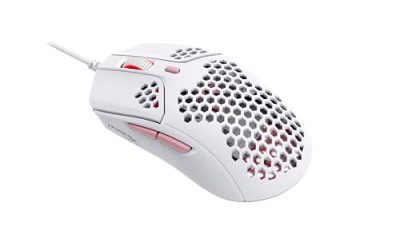
The Pulsefire Haste 2 is the featherweight of this guide at 53 g, built for players who lift and flick the mouse all game. Its HyperX 26K sensor tracks up to 26,000 DPI with 8,000 Hz polling, and the HyperFlex 2 cable stays out of the way. Six programmable buttons cover the essentials, and onboard memory holds one profile, so your DPI and binds survive a move to another computer. One profile is the trade-off: if you switch between games that need different layouts, you will reprogram more often. Note the solid shell, too; this is not a honeycomb mouse despite the Haste name.
Specs
- HyperX 26K sensor, up to 26,000 DPI
- 8,000 Hz polling rate
- 6 programmable buttons
- Onboard memory for 1 profile
- 53 g with HyperFlex 2 cable
- Solid shell, plug and play, wired USB
Best for: Fingertip players and fast lift-off flicks at the lightest weight here.
Watch out for: Only one onboard profile, so multi-game layouts need reprogramming. Check live availability before buying.
Razer Basilisk V3 Pro 30K
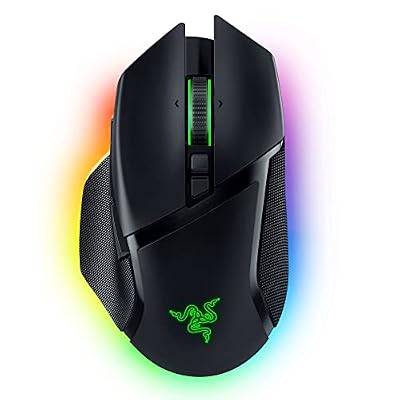
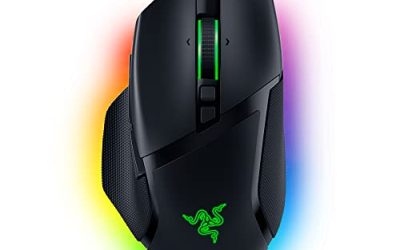
The Basilisk V3 Pro is the wireless flagship of this guide, and it earns the spot without asking you to run Synapse. Five onboard profiles work with no Razer software running, and the Focus Pro 30K optical sensor, eleven programmable buttons, and HyperScroll tilt wheel cover serious play. It connects over HyperSpeed wireless, Bluetooth, or wired USB-C, with battery rated up to 110 hours on HyperSpeed for this 30K version. Thirteen-zone Chroma RGB lighting rounds out a large ergonomic body built for palm grips. Do not confuse it with the newer 35K version, which is a different listing with different battery figures.
Specs
- Focus Pro 30K optical sensor
- 11 programmable buttons
- HyperScroll tilt wheel
- 13-zone Chroma RGB lighting
- 5 onboard memory profiles
- HyperSpeed wireless, Bluetooth, and wired USB-C
- Up to 110 hr battery on HyperSpeed
Best for: Palm-grip players who want a wireless flagship that works without Synapse.
Watch out for: The newer 35K version is a different listing with different battery figures, so confirm the 30K ASIN. Check live availability before buying.
Which One Fits Your Situation
You game on a locked-down work or school computer
You cannot install G HUB, Synapse, or SteelSeries GG on a locked-down machine, so the mouse has to carry its own settings. The Rival 3 is the cleanest fit, since its listing states outright that onboard memory saves your polling rate, keybinds, and CPI profiles. The G502 HERO works too, once its profiles are programmed on a computer where G HUB is allowed.
You want the lightest mouse that still works plug-and-play
At 53 g, the Pulsefire Haste 2 is less than half the weight of the G502 HERO, and every gram shows when you lift the mouse to reposition. Its 26K sensor and 8,000 Hz polling keep up with fast play, and the single onboard profile still saves your DPI and binds. The Rival 3 at 77 g is the fallback if you want more than one profile stored.
You want maximum buttons and profiles without installing anything
Pick the G502 HERO if you are wired, or the Basilisk V3 Pro if you want wireless. Both store five full profiles onboard, so DPI, binds, and lighting follow the mouse, and both give you eleven programmable buttons. The G502 HERO needs G HUB once to set profiles up; the Basilisk runs its profiles with no Synapse at all.
You want a cheap first gaming mouse for a kid or a second PC
The G203 LIGHTSYNC is the pick here: six buttons, an 8,000 DPI sensor, two onboard profiles, and a small ambidextrous shape that fits younger hands. It keeps its settings without software, so it works the same on a family PC, a laptop, or a console-side setup. Skip it only if the player has large hands, since the small body gets cramped fast.
Common Mistakes
- Assuming every mouse with onboard memory stores button binds; the Rival 3 stores CPI profiles and keybinds, so read the listing’s exact wording.
- Buying a mouse whose DPI steps can only be changed in software, then finding the button cycles presets you never wanted.
- Mixing up the Basilisk V3 Pro 30K with the newer 35K version; their battery figures belong to different listings.
- Thinking a wireless mouse needs its app to connect; the Basilisk pairs over its dongle or Bluetooth with no software installed.
- Forgetting the G502 HERO needs G HUB once to program its five profiles before they live onboard.
Frequently Asked Questions
Can a gaming mouse really work with no software at all?
Yes, if it has onboard memory and a hardware DPI button. The five mice in this guide store settings on the mouse itself, so DPI, button binds, and lighting work on any computer you plug them into. You lose access to deeper tools like macro editors and lighting studios, which only exist inside the companion app, but everyday gaming works fine without them.
Do I lose my DPI settings when I plug the mouse into another computer?
No, as long as the settings live in onboard memory. The G502 HERO, Basilisk V3 Pro, G203, and Pulsefire Haste 2 store profiles on the mouse, so your DPI and binds travel with it. The Rival 3 stores polling rate, keybinds, and five CPI profiles the same way. Settings made only inside a companion app, and never saved to the mouse, stay behind on the first computer.
What is the difference between onboard memory and onboard profiles?
Onboard memory is the storage chip inside the mouse; onboard profiles are the saved setting sets that live in it. A mouse can have onboard memory that only holds DPI steps, like the Rival 3’s five CPI profiles, or full profiles that hold DPI, button binds, and lighting, like the G502 HERO’s five. Always check the listing for the profile count and what each profile stores.
Do wireless gaming mice need software to connect?
No. The Basilisk V3 Pro pairs over its HyperSpeed dongle or Bluetooth straight out of the box, and its onboard profiles work with no Razer software running. Wireless mice only need their app for extras like firmware updates, battery tuning, and macro editing. For basic gaming, the dongle connection and the hardware DPI button are all you need.