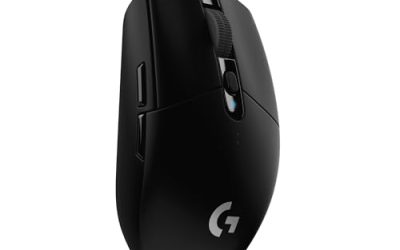
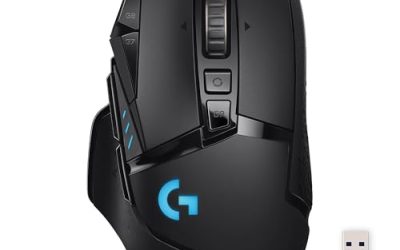
Precision in a gaming mouse is not the same thing as a high DPI number on the box. Precision is what happens in the last centimetre of a flick, when you stop the cursor on a head sized target, hold it steady while you track a strafing opponent, and make a two pixel correction without overshooting. That behaviour comes from a stack of things working together: a sensor that tracks without smoothing or jitter, a lift off distance that does not shift your aim when you reset the mouse, a shape your hand can stop reliably, and clicks that fire when you intend them to.


This guide compares three flagship wireless mice that approach precision from different directions. One is the symmetrical all rounder that professional FPS players made famous. One is the lightest symmetrical option with the highest polling ceiling. One is the ergonomic shape for players whose precision comes from a relaxed palm and a locked wrist. All three use top tier optical sensors with no acceleration, so the choice is about fit and feel rather than about which sensor is honest. They are all honest.
Disclosure: As an Amazon Associate, this site may earn from qualifying purchases made through links in this article, at no additional cost to you.
Quick picks
- Logitech G Pro X Superlight 2 Wireless Gaming Mouse, Black – ASIN: B09NBWL8J5 – the balanced precision pick: HERO 2 sensor, 60 gram symmetrical shell, hybrid optical mechanical clicks.
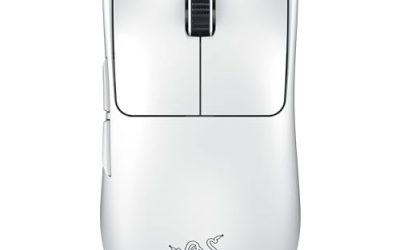
- Razer Viper V3 Pro Wireless Esports Gaming Mouse, Black – ASIN: B0CW25XR5R – the lightest pick at 54 grams, with true 8K wireless polling out of the box and a sensor tuned for consistent tracking.
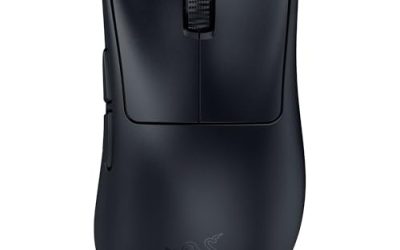
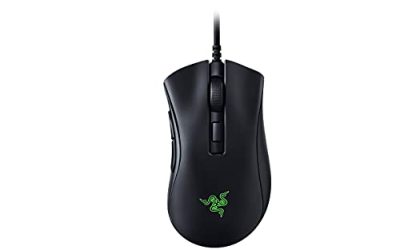
- Razer DeathAdder V3 Pro Wireless Gaming Mouse, Black – ASIN: B0B6XZLNHQ – the ergonomic pick: a right handed shape that keeps precision comfortable through long sessions.
Shortlist from the list, then read the notes. Each mouse is sold in more than one colour and edition under its listing family, and those variants carry different ASINs, so confirm the exact variant on the listing before you order.
Logitech G Pro X Superlight 2
Best for: players who want one precision mouse for every grip style and every shooter, with the safest, most proven shape in esports.
The Superlight 2 is built around Logitech’s HERO 2 sensor. The current listing rates it at up to 44,000 DPI with tracking beyond 800 inches per second, and the sensor’s behaviour is the point: no smoothing, no filtering and no acceleration across the range, so a slow drag and a fast flick report the same distance per centimetre of hand movement. Polling runs at up to 8K over the Lightspeed connection with the included receiver setup, which tightens the link between hand and cursor during micro corrections. The shell is a medium symmetrical shape at 60 grams, with five programmable buttons and a smooth, coating led design that works for fingertip, claw and relaxed palm grips.
The clicks use LIGHTFORCE hybrid switches, which pair an optical actuation path with a mechanical click feel. For precision work that matters in two ways: the click registers with optical speed, and the tactile break gives your finger a clear stop point, which helps when you are tapping single shots rather than spraying. Battery life is rated at up to 95 hours, and charging is USB-C. Onboard memory holds your DPI stages and settings, so the mouse behaves the same on a tournament PC as it does at home.
Strengths: The shape is the reference shape for a reason. It disappears under the hand, the sensor is beyond reproach, the weight sits in the middle of the modern range so it suits both low sensitivity arm aimers and higher sensitivity wrist aimers, and the hybrid clicks give precise, repeatable shot timing. Software through G Hub is mature, with per surface tuning and fine DPI steps.
Points to consider: The shape is safe rather than sculpted, so players with large hands or a strict palm grip may find the back of the shell too flat to lock onto. The side buttons are on the left only, which rules it out for left handed use. And while 8K polling is available, it shortens battery life and needs the right receiver arrangement, so many players will run 1K or 2K for daily play and raise it for matches.
View on Amazon – ASIN: B09NBWL8J5
Razer Viper V3 Pro
Best for: fingertip and claw grip players who aim with small, fast corrections and want the lightest mouse that still feels rigid.
At 54 grams in black, the Viper V3 Pro is the lightest mouse in this guide, and lightness is a precision feature when your style is built on stopping power: a lighter mouse is easier to stop exactly where you intend, with less overshoot at the end of a flick. The symmetrical shell is flatter and slightly longer than the Superlight’s, which suits fingertip and claw grips especially well. Under the shell is Razer’s Focus Pro 35K Optical Sensor Gen-2, rated to 35,000 DPI, with intelligent tracking features that keep behaviour consistent across pad surfaces and an adjustable lift off range, so the cursor does not wander when you lift and reset.
The Viper’s headline is true 8000 Hz wireless polling from the included HyperPolling dongle, with no separate purchase needed. Higher polling does not make a sensor more accurate, but it does deliver position updates more often, which smooths the micro steps of a slow tracking movement – the exact movement precision players make most. Clicks are Razer’s Gen-3 optical switches, rated for a 90 million click lifespan, with a crisp, slightly firmer break than the Logitech hybrid switches. Battery life is rated at up to 95 hours at 1K polling, dropping as polling rises. There are eight programmable controls, including the scroll click and the DPI button underneath.
Strengths: For pure aim mechanics, this is the sharpest tool here: the lowest inertia, the highest polling ceiling included in the box, a sensor with granular lift off control, and optical clicks with no debounce delay to tune. The feet are large and smooth, and the shape rewards a light touch.
Points to consider: The same lightness that helps fingertip players can feel nervous for palm grippers, and the flat sides give a relaxed hand little to hold onto during long sessions. Battery life at 8K polling is far shorter than at 1K, so the polling setting becomes a battery decision. It is also a right handed layout in practice despite the symmetrical shell, with side buttons only on the left.
View on Amazon – ASIN: B0CW25XR5R
Razer DeathAdder V3 Pro
Best for: palm and relaxed claw players with medium to large hands who find precision in a stable, supported grip rather than in the lightest shell.
The DeathAdder shape has been refined for two decades, and the V3 Pro version keeps the tall right handed hump, the flared front and the wide rear that lets a palm grip settle and stay settled. At 63 grams it is light for an ergonomic mouse, so it keeps most of the stopping control of the lighter picks while giving the hand far more support. A stable base matters for precision in a specific way: when the hand is relaxed, small tracking corrections come from the fingers and wrist without the whole grip tensing, and aim stays consistent deep into a session when a flatter mouse might start to fatigue your hand.
The sensor is Razer’s Focus Pro 30K Optical, rated to 30,000 DPI with tracking that the listing notes works even on glass, and the clicks are Gen-3 optical switches shared with the Viper line. HyperSpeed wireless is the connection, battery life is rated at up to 90 hours, and there are five programmable buttons plus the profile controls. This standard black listing, model RZ01-04630100-R3G1, polls at 1,000 Hz; Razer sells a separate bundle with the HyperPolling dongle for 8K, which is worth knowing if polling rate is a priority for you.
Strengths: The most comfortable precision mouse here for long play, with a shape that supports the hand instead of asking the hand to pinch a shell. The sensor and switches are flagship grade, the weight is well judged for an ergonomic design, and the wider grip suits players who found ultralight symmetrical mice cramp inducing.
Points to consider: It is right handed only, and the size that helps large hands can overwhelm small ones; fingertip players may find the hump pushes their grip back. The standard listing’s 1,000 Hz polling is fine for almost everyone, but players set on 8K need the dongle bundle variant instead. There is no tilt scroll or free spinning wheel, which some players miss for work hours.
View on Amazon – ASIN: B0B6XZLNHQ
How to choose a gaming mouse for precision
Sensor behaviour first, DPI ceiling last. Every flagship sensor here tracks far beyond any DPI a human uses. What separates them in practice is consistency: no smoothing at high DPI, no spin out at flick speeds, and a lift off distance you can set low enough that resetting the mouse does not drag your crosshair. If a listing does not discuss tracking behaviour, only a giant DPI figure, treat that as marketing rather than information.
Shape is a precision spec. Your grip decides which shape you can stop reliably. Fingertip and claw players usually aim best on flat symmetrical shells like the Viper. Palm players usually aim best on a supportive ergonomic shell like the DeathAdder. The Superlight 2 sits between the two, which is why it is the default recommendation for anyone unsure.
Weight changes your stopping distance. Lighter mice start and stop faster, which rewards high sensitivity and fingertip control. Slightly heavier mice feel steadier in slow tracking, which rewards low sensitivity and arm aiming. None of the three here is heavy, but the nine gram spread between the Viper and the DeathAdder is easy to feel in the last part of a flick.
Polling rate is a smoothness tool, not an accuracy tool. Moving from 1,000 Hz to 8,000 Hz makes cursor motion smoother and slightly more current, which some players feel in tracking. It costs battery and a little CPU. Treat it as a finishing touch once shape, weight and sensor are right.
Clicks are part of aim. Optical and hybrid switches remove the debounce delay of traditional mechanical clicks and resist the double click faults that plague ageing mechanical switches. A clear tactile break also helps you time single shots. If you play tap heavy rifles, click feel deserves the same attention as the sensor.
Settings and habits that add precision
Set your DPI in the mouse software and store it on the mouse, then leave Windows pointer speed at its middle, neutral setting and turn off the pointer acceleration option in Windows, so one centimetre of hand movement always means the same cursor distance. In game, use raw input where the option exists. Pick one DPI you will actually keep – most precision focused players live between 400 and 1,600 – and resist changing it weekly; consistency builds the muscle memory that precision is made of. Keep your pad clean and your mouse feet intact, because a worn foot changes glide and quietly changes your aim. Finally, calibrate lift off if your software offers it, especially if you play at low sensitivity and reset the mouse often.
FAQ
What DPI is best for precision aiming?
Most players aim most precisely between 400 and 1,600 DPI, paired with an in game sensitivity that lets them turn comfortably on their pad space. Lower DPI with a larger arm movement gives finer control per pixel; higher DPI with wrist movement is faster but harder to stop exactly. The right figure is the one that lets you make a one pixel correction without overshooting, and it is personal.
Does a higher polling rate improve accuracy?
It improves smoothness and currency of the cursor position, not the sensor’s underlying accuracy. Many players feel the difference in slow tracking between 1,000 Hz and higher rates, and many do not. It is worth using if your mouse includes it, but shape and sensor behaviour matter more.
Are optical mouse switches better for precision than mechanical ones?
For shot timing, generally yes. Optical and hybrid switches actuate without the debounce delay mechanical contacts need, and they do not develop double click faults as the contacts wear. The trade off is feel: some players prefer the softer break of a mechanical click. Both mice families here use optical or hybrid switches for the main buttons.
Is a lighter mouse always more precise?
No. A lighter mouse is easier to start and stop, which suits fingertip and claw grips and higher sensitivities. Players who aim from the arm at low sensitivity often track more steadily with a little more mass. Precision comes from the match between weight, grip and sensitivity, not from the lowest number.
Should I use the highest DPI my sensor offers?
No. Flagship sensors stay consistent across their range, but there is no aiming benefit to running 20,000 DPI with a tiny in game sensitivity, and very high DPI makes desktop use twitchy. Set a moderate DPI, adjust sensitivity in game, and keep the combination everywhere you play.
Conclusion
If you want the safest precision pick, the Logitech G Pro X Superlight 2 pairs a flawless sensor with the most versatile shape and hybrid clicks that time shots cleanly. If your aim is built on fingertip control and fast stops, the Razer Viper V3 Pro is lighter and adds true 8K polling in the box. If your precision depends on a supported, relaxed hand, the Razer DeathAdder V3 Pro gives you flagship tracking in the most comfortable shell here. Match the mouse to your grip first; the sensors in this group will not be the limit on your aim.