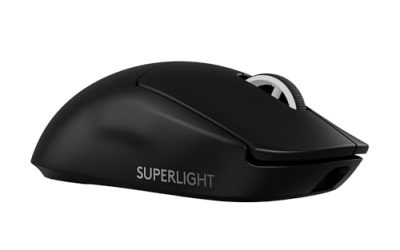
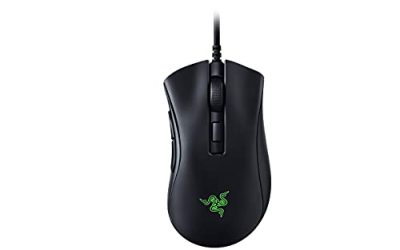
A heavy mouse drags on every flick, and a mouse that costs as much as a graphics card is not an option for most players. The best cheap lightweight gaming mouse solves both problems at once: it keeps the weight low enough for fast, low-effort aiming while staying within a modest budget. In this guide, every pick weighs under 80 grams, uses a proven optical sensor, and comes from a brand with a long track record in gaming peripherals.

Quick answer: For most players, the Razer Viper Mini is the best cheap lightweight gaming mouse. At 61 grams with optical switches and an 8,500 DPI sensor, it covers competitive FPS play in a compact, ambidextrous shell. If you want the lightest wired option here, the HyperX Pulsefire Haste at 59 grams is the one to look at first, while the Glorious Model O suits larger hands and the SteelSeries Rival 3 suits players who want a simple, durable all-rounder.
Quick Picks
| Product | Best For | Key Spec |
|---|---|---|
| Razer Viper Mini | Small hands, claw and fingertip FPS | 61g, 8,500 DPI optical sensor, optical switches |
| HyperX Pulsefire Haste | Lightest wired pick, fast flicks | 59g, Pixart PAW3335, up to 16,000 DPI |
| Glorious Model O | Medium and large hands, ambidextrous grip | 67g, Pixart 3360, 12,000 DPI, honeycomb shell |
| SteelSeries Rival 3 | Simple, durable all-round gaming | 77g, TrueMove Core, 8,500 CPI, 60M-click switches |
How to Choose the Best Cheap Lightweight Gaming Mouse
Weight: Aim for Under 80 Grams
Weight is the defining trait of a lightweight gaming mouse, and the number on the spec sheet matters more than the marketing label. A mouse under 80 grams feels noticeably easier to lift, reposition, and flick than a typical 95 to 110 gram office mouse, and the difference grows over long sessions. All four mice in this guide sit below that line, with three of them under 70 grams. Keep in mind that manufacturers usually list weight without the cable, so a wired mouse will feel slightly heavier in the hand once the cable is attached. If you play low-sensitivity FPS games and lift your mouse often, every gram counts, and the sub-65 gram options deserve a closer look. If you play at higher sensitivity and rarely lift, a 77 gram mouse can feel just as quick.
Sensor: DPI Headlines Matter Less Than Tracking Quality
Sensor specifications are easy to compare on paper and easy to misread. A high maximum DPI figure does not make a mouse more accurate, because most competitive players use settings between 400 and 1,600 DPI. What matters is clean, consistent tracking at those everyday settings: no acceleration, no angle snapping, and no jitter when you move fast. The sensors in this guide, including the Pixart 3360 in the Model O, the Pixart PAW3335 in the Pulsefire Haste, and the TrueMove Core in the Rival 3, are all optical sensors designed for 1:1 tracking. Check the maximum tracking speed and acceleration figures too, since those describe how the sensor behaves during the fastest flicks rather than during slow, careful aiming.
Shape and Size: Fit Beats Spec Sheets
A lightweight mouse with the wrong shape will slow you down more than a few extra grams ever could. Small, narrow mice such as the Viper Mini suit claw and fingertip grips and smaller hands, while longer, wider shells such as the Model O give palm grippers more surface to rest on. Ambidextrous shapes work for both left- and right-handed players in terms of grip, although side buttons are usually placed for right-handed thumbs only. Before choosing, compare the length and width figures against your current mouse and think about how you hold it. A mouse that forces your fingers to stretch or your palm to arch will cause fatigue long before its weight does.
Wired or Wireless: Weight, Latency, and Upkeep
Every mouse in this guide is wired, and that is no accident. Wired mice skip the battery entirely, which keeps weight down and removes charging from your routine. A good flexible cable, such as the paracord-style cables on the Model O and the Pulsefire Haste, stays out of the way during play and makes the wired experience feel close to wireless. The trade-off is a cable on your desk and one more thing to manage. Wireless lightweight mice exist, but they generally cost more once a battery and a wireless receiver are added, which is why wired models dominate the budget end of the lightweight category. If you value zero upkeep and the lowest weight for your money, wired is the practical choice.
Switches and Click Feel: Durability You Can Feel Every Match
Switches decide how each click feels and how long the mouse lasts. Optical switches, found in the Viper Mini, register clicks with a light beam instead of a metal contact, which removes debounce delay and reduces the risk of double-clicking over time. Mechanical switches from established makers, such as the TTC Golden switches in the Pulsefire Haste and the Omron switches in the Model O, are rated for tens of millions of clicks and give a crisp, tactile response. Look for a click rating of at least 20 million clicks on a budget mouse, and pay attention to whether the clicks feel light or stiff, since a stiff click can tire your index finger during long sessions.
Cable, Feet, and Extras: The Small Details That Add Up
The extras around the sensor and switches decide how a mouse feels day to day. Pure PTFE feet glide more smoothly than standard plastic feet and need less force to start moving, which matters when the mouse itself is already light. A flexible, lightweight cable matters just as much, because a stiff cable can drag a 59 gram mouse around like an anchor. Included grip tape, onboard memory for saving DPI settings, and software for remapping buttons are useful bonuses, but they should not decide the purchase on their own. Get the weight, shape, and sensor right first, then let the extras break a tie.
The Best Cheap Lightweight Gaming Mouse Reviewed
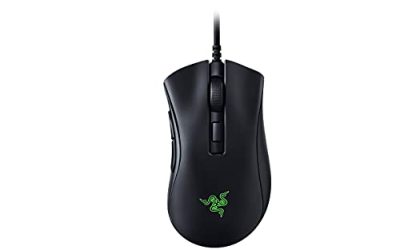
1. Razer Viper Mini (B084W6W9WB) — Best Overall
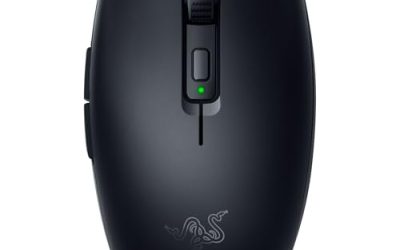
The Razer Viper Mini is the best cheap lightweight gaming mouse for most players because it pairs a genuinely light 61 gram body with a focused, no-waste feature set. Its compact ambidextrous shell measures 118.3 mm long, which suits claw and fingertip grips and smaller hands better than full-size mice. Under the shell sits an 8,500 DPI optical sensor with 300 IPS tracking speed and 35G acceleration, paired with Razer optical mouse switches rated for 50 million clicks. Six programmable buttons cover the essentials without cluttering the sides, and the Speedflex cable and PTFE feet keep drag to a minimum. Chroma RGB underglow adds a subtle accent without adding weight.
Who it suits: FPS players with small to medium hands who use a claw or fingertip grip and want a light, responsive wired mouse from a major brand.
Who should skip it: Palm grippers and players with large hands will likely find the short, narrow shell cramped, and anyone who needs a wireless connection should look at a wireless model instead.
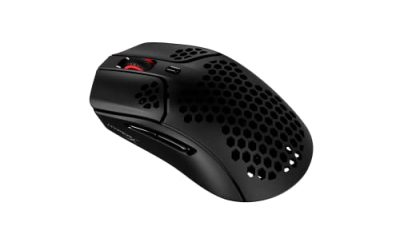
2. HyperX Pulsefire Haste (B09QXG3132) — Lightest Wired Pick
The HyperX Pulsefire Haste is the lightest wired mouse in this guide at 59 grams, and it gets there with a honeycomb hex shell that cuts weight without cutting features. The Pixart PAW3335 optical sensor reaches up to 16,000 DPI with 450 IPS tracking and 40G acceleration, and the 1,000 Hz polling rate keeps the connection responsive. TTC Golden micro switches rated for 60 million clicks give a firm, consistent click, and six programmable buttons can be set up through HyperX NGENUITY software, with one onboard profile for storing settings. The HyperFlex USB cable is light and flexible, pure PTFE skates help the mouse glide, and grip tape is included in the box for players who want extra traction on the honeycomb shell.
Who it suits: Competitive FPS players who want the lowest weight possible in a wired mouse and like a symmetrical shape with a light, flexible cable.
Who should skip it: Players who dislike honeycomb shells should look elsewhere, since the open design is the whole point of this mouse, and palm grippers may find the low, narrow shape less supportive than a taller ergonomic mouse.
3. Glorious Model O (B07LDH3TWM) — Best for Medium and Large Hands
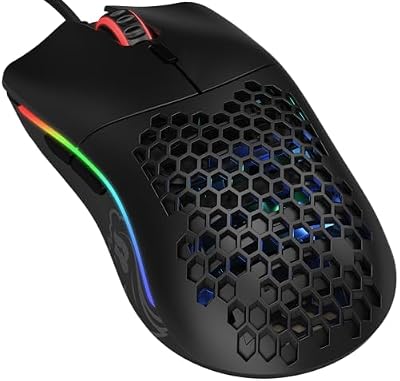
The Glorious Model O helped define the modern lightweight gaming mouse, and it remains a strong budget pick at 67 grams. Its honeycomb shell keeps the weight down while the ambidextrous shape stays long and wide enough for medium and large hands, which sets it apart from the smaller mice in this guide. The Pixart 3360 sensor delivers up to 12,000 DPI with a 1,000 Hz polling rate and a low lift-off distance, and Omron switches rated for 20 million clicks handle the primary buttons. The Ascended Paracord cable is one of the lightest and most flexible cables in this category, Glorious Skates made from pure PTFE keep movement smooth, and six buttons support macros through software. RGB lighting runs through the honeycomb shell for players who want a visible accent on the desk.
Who it suits: Players with medium or large hands who want an ambidextrous lightweight mouse with a proven sensor and a flexible cable.
Who should skip it: Players with small hands may find the full-size shell too long, and anyone who dislikes cleaning dust from honeycomb holes should consider a solid-shell mouse such as the Viper Mini instead.
4. SteelSeries Rival 3 (B08176SM7C) — Best Simple All-Rounder
The SteelSeries Rival 3 is the heaviest mouse in this guide at 77 grams, and that is worth stating plainly: it is lightweight compared with most gaming mice, but it is not an ultralight mouse. What it provides instead is a simple, durable package with no weak points. The TrueMove Core optical sensor, co-developed with PixArt, covers 100 to 8,500 CPI in 100 CPI steps with 1:1 tracking, 300 IPS, and 35G acceleration. Mechanical switches rated for 60 million clicks sit under a comfortable right-handed ergonomic shape, six programmable buttons include split-trigger main buttons, and Prism RGB lighting adds a single-zone accent. Onboard memory stores your settings, and the hyper-durable polymer shell is built to take daily use.
Who it suits: Players who want a straightforward, durable lightweight mouse for mixed gaming, including FPS, MOBA, and casual play, without a honeycomb shell.
Who should skip it: Players chasing the lowest possible weight should pick the Pulsefire Haste or Viper Mini instead, since the Rival 3 gives up roughly 16 to 18 grams to those two, and left-handed players should note the side buttons sit on the left side only.
What to Check Before You Buy
Before ordering, confirm the listing matches the exact model in this guide. Mouse names are reused across generations, so check the model number, weight, sensor, and connection type on the listing rather than trusting the title alone. The Viper Mini, for example, is a wired mouse with no wireless version in its original line, and the Rival 3 name also appears on a later Gen 2 model with different specifications. Next, measure your hand and compare it with the mouse dimensions, since a shape that fits is worth more than any sensor upgrade. Check that your grip style matches the shape: fingertip and claw grips suit short, low mice, while palm grips need length and height. Finally, confirm the cable length and connector suit your desk layout, and check whether the software you need runs on your operating system, since button remapping and DPI steps often depend on the companion app.
FAQ
What weight counts as a lightweight gaming mouse?
Most players draw the line at around 80 grams. Mice under 70 grams feel clearly light in the hand, mice between 70 and 80 grams feel light compared with standard gaming mice, and anything above 90 grams is generally considered a standard or heavy mouse. The mice in this guide range from 59 to 77 grams.
Is a cheap lightweight gaming mouse good enough for competitive FPS?
Yes, for most players. The sensors in budget lightweight mice now track cleanly at the DPI settings competitive players actually use, and the switches are rated for tens of millions of clicks. The main differences from flagship mice are a lower maximum DPI, fewer onboard profiles, and a wired-only connection, none of which affect aiming at common sensitivity settings.
Should I choose a wired or wireless lightweight gaming mouse?
Wired mice are lighter and simpler at a lower budget, since they skip the battery and wireless hardware entirely. Wireless mice remove the cable but add weight and charging, and they generally cost more. If your budget is tight and you want the lowest weight for your money, wired is the better value.
Does a honeycomb shell make a mouse weaker?
A honeycomb shell removes material to cut weight, and well-made honeycomb mice use rigid polymers that hold their shape under normal grip pressure. Some players dislike the feel of holes under their fingers or find the shell harder to keep clean, which is a matter of preference rather than a durability problem for everyday gaming use.
What grip style works best with a lightweight gaming mouse?
Claw and fingertip grips benefit most, because a light mouse rewards the fast lifting and repositioning those grips rely on. Palm grippers can still use a lightweight mouse, but they should choose a longer, taller shell such as the Model O or Rival 3 so the palm stays supported during long sessions.
Bottom Line
The best cheap lightweight gaming mouse is the Razer Viper Mini for most players: 61 grams, optical switches, a clean-tracking sensor, and a compact shape that suits the claw and fingertip grips competitive FPS play demands. The HyperX Pulsefire Haste is the better pick if you want the lightest wired mouse here at 59 grams, the Glorious Model O is the better pick for medium and large hands, and the SteelSeries Rival 3 is the better pick if you want a simple, durable all-rounder and can accept 77 grams. Pick by hand size and grip first, then by weight, and any of these four will feel like a clear step up from a standard-weight mouse.
Disclosure: As an Amazon Associate, we may earn from qualifying purchases.