Disclosure: As an Amazon Associate, we may earn from qualifying purchases made through links on this page, at no additional cost to you.


Best Gaming Mouse With RGB
RGB lighting on a gaming mouse is easy to dismiss as decoration, and on badly designed mice that is all it is. On a well designed one, the lighting does real work: it identifies which profile or DPI stage is active without opening software, it ties the mouse into the rest of a desk setup, and — when the zones are placed under the palm and along the sides — it simply makes a setup feel finished. The catch is that lighting should never be the reason a mouse tracks badly, weighs too much or hides mediocre switches under a light show. Every mouse in this guide is a capable gaming mouse first, with multi-zone or otherwise meaningful RGB built in.
This shortlist was assembled from the specifications on each product’s Amazon page: lighting system and zone count, sensor model and maximum sensitivity, switch type and click life, button layout, weight and connection. The five picks cover the main approaches to RGB. Razer wraps the Basilisk V3 in an underglow that spills onto the desk, Logitech keeps the G502 HERO’s LIGHTSYNC focused on the logo and indicators, SteelSeries spreads ten zones across the Rival 5, Glorious lets light shine through a honeycomb shell, and the Aerox 5 hides its zones inside a perforated body with water resistance. The sections after the product notes explain how to judge lighting quality, how to sync or tame it, and the mistakes that turn a good-looking desk into a distracting one.
Quick Picks
| Product | ASIN | Best For |
|---|---|---|
| Razer Basilisk V3 | B09C13PZX7 | Players who want the most expressive RGB, including a desk-wide underglow |
| Logitech G502 HERO | B07GBZ4Q68 | Players who want RGB that doubles as a DPI and profile indicator |
| SteelSeries Rival 5 | B093LSMKL3 | Multi-genre players who want ten lighting zones and a versatile button layout |
| Glorious Model O | B07LDH3TWM | Lightweight fans who want RGB shining through a honeycomb shell |
| SteelSeries Aerox 5 | B09VNTCZZN | Players who want RGB in an ultralight shell that shrugs off spills |
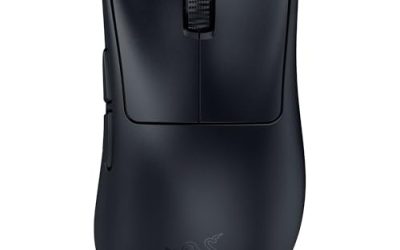
Razer Basilisk V3 (ASIN: B09C13PZX7)
The Basilisk V3 treats lighting as a headline feature without letting it compromise the hardware underneath. Razer Chroma RGB runs through eleven lighting zones, including an underglow strip that throws colour onto the desk surface around the mouse, and each zone can be addressed individually in Razer Synapse or set to react to supported games. The ergonomic right-handed shape, complete with a thumb rest and a removable multi-function trigger, suits palm and claw grips through long sessions.
Performance comes from the Razer Focus+ 26K optical sensor, tracking up to 26,000 DPI, and Razer Optical Mouse Switches Gen-2 rated for 70 million clicks with near-instant actuation and no debounce delay. Eleven buttons are programmable, and the HyperScroll tilt wheel switches between free-spinning and tactile modes and adds left and right tilt inputs that work well as extra binds. At about 101 grams it is a full-featured wired mouse rather than a lightweight esports tool, and the Speedflex cable keeps drag low for a wired design.
Highlights
- Eleven Chroma RGB zones with a distinctive underglow effect
- Focus+ 26K optical sensor and optical switches rated for 70 million clicks
- HyperScroll tilt wheel adds extra programmable inputs
Considerations
- Wired only, and heavier than esports-focused models
- Full lighting control requires Razer Synapse
- Right-handed shape only
Best for: Players who want the most expressive RGB, including a desk-wide underglow
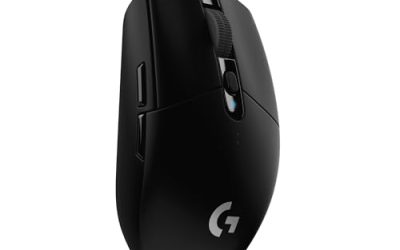
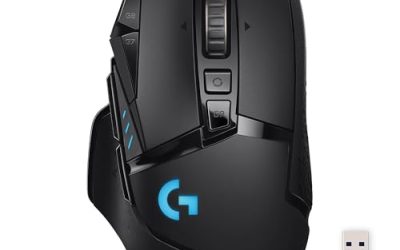
Logitech G502 HERO (ASIN: B07GBZ4Q68)
The G502 HERO is one of the most recognisable gaming mice ever made, and its LIGHTSYNC RGB is more restrained than Razer’s approach: the G logo and the DPI indicator lights carry the colour, and both can be set per profile in Logitech G HUB so the mouse itself tells you which sensitivity stage or game profile is live. That functional use of lighting suits players who want information from their RGB rather than a light show, and the lighting syncs with other LIGHTSYNC gear on the desk.
The hardware underneath is proven. The HERO 25K sensor tracks up to 25,600 DPI with no smoothing or acceleration, eleven buttons are programmable, and the dual-mode scroll wheel switches between a free-spinning mode for long documents and a notched mode for weapon selection. A tunable weight system lets you add included weights to shift the balance of the roughly 121 gram body, and onboard memory stores profiles on the mouse. It is a wired, feature-dense mouse that rewards players who actually use extra buttons and on-the-fly DPI changes.
Highlights
- LIGHTSYNC RGB doubles as profile and DPI indication
- HERO 25K sensor with zero smoothing or acceleration
- Tunable weights and eleven programmable buttons
Considerations
- Heavy by current standards, even before adding weights
- Busy shape will not suit fingertip grips or small hands
- Wired connection only
Best for: Players who want RGB that doubles as a DPI and profile indicator
SteelSeries Rival 5 (ASIN: B093LSMKL3)

The Rival 5 spreads PrismSync RGB across ten zones, more individually lit areas than most mice offer, and SteelSeries GG lets those zones react to in-game events in supported titles or simply run as part of a coordinated desk theme. The lighting sits on a versatile 85 gram body: nine programmable buttons include a five-button side panel with a thumb bar and a dedicated sniper button that drops sensitivity while held, covering FPS, MOBA and MMO needs in one layout.
Tracking comes from the TrueMove Air optical sensor, developed with PixArt and rated to 18,000 CPI with true one-to-one tracking. The main switches are Golden Micro IP54 units rated for 80 million clicks and sealed against dust and splashes, and the mouse connects by a lightweight micro-weave mesh cable that resists snagging. For players who move between game genres nightly, the Rival 5’s combination of lighting, button flexibility and mid-weight shell is unusually complete.
Highlights
- Ten PrismSync RGB zones with game-reactive effects
- TrueMove Air sensor with one-to-one tracking to 18,000 CPI
- Switches rated for 80 million clicks with IP54 sealing
Considerations
- Side panel layout takes time to memorise
- Wired only in a market moving to wireless
- Lighting effects depend on SteelSeries GG software
Best for: Multi-genre players who want ten lighting zones and a versatile button layout
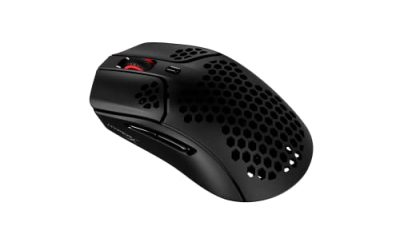
Glorious Model O (ASIN: B07LDH3TWM)
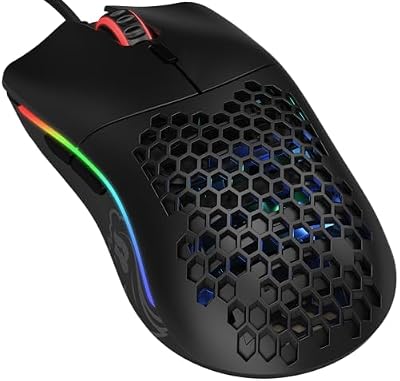
The Model O made RGB part of its structure: the honeycomb shell that keeps this wired mouse at 67 grams is also the window for its lighting, with LED strips along both sides glowing through the perforations. The effect is distinctive without adding a separate light diffuser or extra weight, and the colours and effects are adjustable on the mouse itself as well as through Glorious software, so you are not forced into another background application just to change a pattern.
Under the shell sits a PixArt PMW-3360 optical sensor adjustable to 12,000 DPI, Omron mechanical switches rated for 20 million clicks, and large PTFE feet that Glorious calls G-Skates. The shape is ambidextrous and medium sized, the flexible braided Ascended cord mimics a wireless feel better than most cables, and six buttons cover the essentials for FPS and general play. Players who want a light mouse but refuse to give up lighting entirely will find the Model O’s compromise — light shell, visible RGB, proven sensor — easy to live with.
Highlights
- RGB shines through the honeycomb shell with no weight penalty
- Only 67 grams with a PixArt 3360 sensor
- Ambidextrous shape suits either hand for aiming
Considerations
- Open shell lets dust reach the internals over time
- Switch click life is shorter than premium rivals
- Side buttons sit on the left side only
Best for: Lightweight fans who want RGB shining through a honeycomb shell
SteelSeries Aerox 5 (ASIN: B09VNTCZZN)

The Aerox 5 takes the perforated-shell idea and adds protection: its AquaBarrier design is rated IP54, shielding the internals from water, dust and dirt while three RGB zones glow through the shell. At 66 grams wired, it matches dedicated esports mice for weight while still offering the lighting that most ultralight models drop, and the lighting zones can be configured in SteelSeries GG alongside the nine programmable buttons.
The sensor is the TrueMove Air optical unit rated to 18,000 CPI, shared with the Rival 5, and the main switches are Golden Micro IP54 switches rated for 80 million clicks. The side panel includes an up-down flick switch alongside conventional buttons, a layout aimed at players who bind abilities in fast games. A lightweight mesh cable keeps drag down. For a desk that sees drinks, dust and long sessions, the Aerox 5 is the RGB pick that plans for real life rather than a showroom.
Highlights
- IP54 water and dust resistance is rare on any gaming mouse
- Three RGB zones inside a 66 gram perforated shell
- TrueMove Air sensor and 80 million click switches
Considerations
- Fewer lighting zones than the Rival 5 or Basilisk V3
- Perforated shell feel divides opinion
- Premium feature set in a wired-only design
Best for: Players who want RGB in an ultralight shell that shrugs off spills
How to Choose
Judge RGB by zones and placement, not by the phrase RGB itself, which can mean anything from a single lit logo to a dozen addressable areas. Count what the product page actually lists: the Basilisk V3 offers eleven zones including underglow, the Rival 5 offers ten, and the G502 HERO concentrates on the logo and indicators. More zones give smoother gradients and better game-reactive effects; fewer, well placed zones give cleaner information. Decide which job you want lighting to do — expression, information, or simple coordination with your keyboard — and buy accordingly.
Never let lighting outrank the fundamentals. Check the sensor model, switch type and weight before you look at a single lighting photo. A mouse with a last-generation sensor and a beautiful light show is still a last-generation mouse. The picks in this guide were chosen because the hardware stands on its own: optical sensors from PixArt and each brand’s flagship lines, switches rated from 20 million to 80 million clicks, and weights from 66 to about 121 grams covering both esports and feature-heavy preferences.
Software decides how much of the lighting you can actually use. Razer Synapse, Logitech G HUB, SteelSeries GG and Glorious software all handle per-zone colours, effects and per-game profiles, but they differ in how much system overhead they add and whether settings save to onboard memory. If you play on more than one computer, favour mice that store lighting and profiles on the device. If you dislike background software, look for models with on-device lighting controls, like the Model O, so basic changes never need an application at all.
Key Specifications Explained
Lighting zones are the individually controlled areas of the mouse. A single-zone mouse changes colour all at once; a ten-zone mouse can run gradients, waves and reactive effects that move across the shell. Addressable zones also enable practical tricks: assign a colour per profile and the mouse tells you which game layout is active before you touch a key. Underglow, as on the Basilisk V3, is a zone aimed at the desk rather than the mouse, which reads clearly in a dark room but washes out under bright light.
Sensor figures in this category range from 12,000 to 26,000 DPI, and all of them exceed what anyone uses in play, where 400 to 3,200 DPI is typical. What matters is the sensor family: flagship optical units like Razer’s Focus+, Logitech’s HERO and SteelSeries’ TrueMove Air track without acceleration or smoothing, so the cursor goes exactly where your hand sends it. Treat maximum DPI as a sign of sensor tier, not a setting to use.
Switch click-life figures tell you how the main buttons will age. Optical switches, used in the Basilisk V3, actuate with light and avoid the double-click faults that develop in mechanical switches. Quality mechanical switches in this guide are rated between 20 million and 80 million clicks — the difference between a two-year and a ten-year service life for a heavy clicker.
Setup and Settings Tips
Set your lighting per profile and make it earn its place. Assign each game profile a distinct colour, match the DPI indicator behaviour to the stages you actually use, and turn the brightness down: most RGB mice ship at full brightness, which looks harsh in a dark room. A moderate setting reads clearly and keeps the desk comfortable through long sessions.
Sync deliberately or not at all. If your keyboard and mouse share an ecosystem, one synchronised effect across both looks intentional; mixing two unsynchronised rainbow cycles looks accidental. With gear from several brands, pick a single static colour every device can hold, which always looks clean.
Map the extra buttons before you tune the lights. The G502 HERO’s DPI shift, the Rival 5’s sniper button and the Basilisk V3’s tilt wheel are performance features. Set sensitivity, binds and macros first, save the profile to onboard memory where supported, and only then spend time on effects — a mouse that plays well and glows plainly beats the reverse every session.
Common Mistakes to Avoid
The classic mistake is buying the brightest mouse rather than the right mouse. Lighting is the easiest feature to photograph and the least important to how a mouse performs at hour three of a session. Shape, weight and switch feel decide whether your hand is comfortable and your aim is consistent; check those figures on the product page first and treat RGB as the tiebreaker between mice you would happily use in the dark.
A second mistake is leaving every effect at full speed and brightness. Rapid rainbow cycles in your peripheral vision are distracting in dark rooms. Slow effects down, drop brightness, or use a static colour for competitive sessions.
Finally, do not ignore software weight. Four brand suites means four updaters and four background processes. Where possible, save lighting and profiles to the mouse and close the suite — several models here keep onboard profiles, the cleanest way to run an RGB setup long term.
FAQ
Does RGB lighting affect gaming performance?
On a wired mouse, effectively no: lighting draws a small amount of USB power. The questions that matter are sensor, switches and weight. On wireless mice lighting does reduce battery life, which is why several models dim it at low charge.
How many RGB zones is enough?
For a clean static colour or simple breathing effect, one zone is enough. For gradients, reactive effects or per-profile colour coding, look for three or more zones. Ten or more zones, as on the Rival 5 and Basilisk V3, mainly improve how smooth and elaborate the effects can look.
Can I sync mouse RGB with my keyboard from another brand?
Usually not through the brands’ own software, since each ecosystem is separate. The practical options are to match a static colour manually on each device, use your motherboard or case lighting hub where supported, or standardise on one brand for the devices you want perfectly synchronised.
Is RGB worth it on a lightweight mouse?
It can be, if the design integrates it without weight cost. The Model O and Aerox 5 both stay under 70 grams by lighting through a perforated shell instead of adding diffuser panels. If every gram matters to you, those are the patterns to look for; if not, a heavier feature mouse gives you more zones and buttons.
Can I turn the lighting off completely?
Yes. Every mouse in this guide can disable its lighting in software, and models with onboard memory keep it off without the software running. Turning lighting off is also the quickest way to make a gaming mouse look at home on a work desk.
Final Verdict
For the fullest RGB experience on a genuinely capable mouse, the Razer Basilisk V3 leads this guide: eleven Chroma zones, a desk-filling underglow, a strong 26K optical sensor and optical switches. The Logitech G502 HERO is the pick for players who want lighting with a job to do, using LIGHTSYNC as profile and DPI information on top of proven hardware. The SteelSeries Rival 5 spreads ten zones across the most genre-flexible layout here, the Glorious Model O proves RGB can live inside a 67 gram shell, and the Aerox 5 adds spill resistance that no other pick matches. Choose by shape and weight first, then by the lighting style you want to live with — every mouse here earns its place with the lights off as well as on.