The real decision when you shop for a lightweight gaming mouse in this range is not the headline sensitivity number. It is how the mouse feels after two hours of play. A shell that is too heavy drags on every flick, a shape that fights your grip makes your wrist work harder, and a stiff cable can undo the benefit of a good sensor. The three mice in this guide solve those problems in different ways, so the right choice comes down to your grip, your desk setup, and whether you want wireless freedom or a simple wired connection.


This guide is for first-time buyers building a first setup, competitive players who want quicker aim without a heavy shell, and anyone replacing a bulky office mouse with something built for games. Every pick below is named with its exact model, and the specifications come from its Amazon listing, so you can match the sensor, weight, button layout, and connection type to the way you actually play.
Quick Picks
As an Amazon Associate we earn from qualifying purchases
| Product | Best for | Key spec from title |
|---|---|---|
| Logitech G305 LIGHTSPEED | Wireless play without a cable | HERO sensor up to 12,000 DPI |
| Razer DeathAdder Essential | Large hands and palm grip comfort | 6,400 DPI optical sensor |
| SteelSeries Rival 3 | Fast flicks and long sessions | TrueMove Core sensor up to 8,500 CPI |
How to Choose
Weight and How It Changes Your Aim
Weight is the first thing your hand notices, and it matters more than the sensor number on the box. A mouse around 77 grams moves with less effort than one near 100 grams, which shows up in fast flicks, wide turns, and long sessions where your wrist does the work. Lighter mice also make it easier to lift and reset the mouse without losing your place on the pad. That said, very light mice can feel twitchy if you are used to a heavier shell, so the goal is the lightest weight that still feels planted in your hand. Check the listed weight before you commit, and remember that a wireless mouse includes its battery in that number.
Sensor and Sensitivity Range
The sensor decides how faithfully the mouse follows your hand, and the headline number is only part of the story. All three mice here track cleanly at the sensitivity levels most players actually use, which sit well below the maximum figure on the box. What separates them is the sensor family, the tracking speed, and how the mouse behaves during fast swipes. A higher maximum sensitivity gives you more room to experiment, but it does not make your aim better on its own. Pick a sensor that holds its tracking during quick flicks, then set a sensitivity that lets you turn comfortably without running out of desk space.
Shape, Grip, and Hand Size
Shape decides comfort more than any specification, because your hand rests on it for hours. A right-handed ergonomic shell supports the palm and thumb, which suits players who rest their whole hand on the mouse. A symmetrical shape works for claw and fingertip grips and for players who switch hands or grips between games. Length matters too: a mouse near 120 mm suits medium to large hands, while a shorter shell fits smaller hands and fingertip grips better. If you can, compare the listed length and width with the mouse you use now. A shape that fits your hand beats a stronger sensor in a shell that cramps your fingers.
Wired or Wireless, and What Each Demands
Wired mice draw power through the cable, so they never run out of charge in the middle of a match, and the cable itself is the main thing to manage. A flexible cable with a little slack stays out of the way, while a stiff cable can tug the mouse off line during fast moves. Wireless mice remove the cable entirely, but they need a charged battery and a receiver plugged into your computer, and you should keep a spare battery or a charging plan nearby. Both connection types in this guide respond at 1,000 Hz, so the choice is about your desk and your habits rather than raw speed. Pick the setup you will actually keep tidy.
The 3 Best Options
Logitech G305 LIGHTSPEED
The G305 is the only wireless mouse in this guide, and it is the pick for players who want a cable-free desk without giving up a proven sensor. Its HERO sensor tracks up to 12,000 DPI, and the LIGHTSPEED wireless link reports at 1,000 Hz, so movement feels immediate in fast games. One AA battery runs the mouse for up to 250 hours of play, and a low-power mode stretches that further when you are not gaming. At 99 grams with the battery fitted, it stays light enough for long sessions, and the receiver stores inside the body when you travel.
Specs
- HERO sensor with 200 to 12,000 DPI sensitivity
- LIGHTSPEED wireless with 1 ms report rate
- 250 hours of continuous play on one AA battery
- 99 grams with battery fitted
- 6 programmable buttons with on-board memory
- Built-in storage for the USB wireless receiver
- Max speed over 400 IPS
Best for: Players who want wireless freedom and long battery life in a light body.
Watch out for: It runs on a single AA battery, so keep a spare nearby, and check that the receiver has a free USB port close to your desk.
Razer DeathAdder Essential
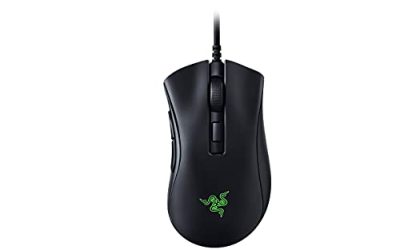
The DeathAdder Essential is the comfort pick of this guide, built around the right-handed ergonomic shape that has defined this line for years. The wide palm area and rubber side grips hold your hand steady through long sessions, and the 6,400 DPI optical sensor tracks smoothly for everyday play and competitive matches alike. Five programmable buttons cover the commands most players actually use, without crowding the shell with extras you will never press. It is a wired mouse, so it is always ready, and the single-color green lighting keeps the look simple. Pick this one when shape and comfort matter more than a higher sensitivity number.
Specs
- True 6,400 DPI optical sensor
- 5 programmable Hyperesponse buttons
- Mechanical switches built for up to 10 million clicks
- Rubber side grips and ergonomic right-handed shape
- Single-color green lighting
- 1.8 m wired connection
- 220 IPS tracking speed and 30G acceleration
Best for: Players with larger hands who want a comfortable palm grip for long sessions.
Watch out for: The lighting is a single green color, so it will not match a multi-color setup, and the ergonomic shape is right-handed only.
SteelSeries Rival 3
The Rival 3 is the lightest mouse in this guide at 77 grams, and it is built for players who flick fast and reset often. Its TrueMove Core sensor tracks with true one-to-one movement up to 8,500 CPI, so fast swipes stay accurate, and the mechanical switches are built for 60 million clicks. Six programmable buttons include split triggers that keep the main clicks crisp, and three zones of Prism RGB lighting let you set the look to match your setup. The soft mesh cable stays flexible during play. Pick this one when you want the quickest-feeling mouse here and a shell that suits claw and fingertip grips.
Specs
- TrueMove Core optical sensor with true 1-to-1 tracking up to 8,500 CPI
- 300 IPS tracking speed and 35G acceleration
- 60 million click mechanical switches
- 6 programmable buttons with split trigger design
- Prism RGB lighting with 3 zones and 16.8 million colors
- 77 grams
- Hyper durable high-grade polymer construction
Best for: Fast-paced shooters and players who want the lightest mouse in this guide.
Watch out for: The shell is on the smaller side, so players with very large hands should check the listed dimensions first.
Which One Fits Your Situation
You play fast shooters and flick a lot
Pick the SteelSeries Rival 3. Its 77-gram body and TrueMove Core sensor make fast flicks and quick resets feel effortless, and the split trigger buttons keep your clicks crisp when every shot counts. The G305 is the backup choice if you want the same quick feel without a cable, since its wireless link responds just as fast. Skip the DeathAdder Essential here, because its wider ergonomic shell is built for comfort rather than raw flick speed.
You want to cut the cable
Pick the Logitech G305 LIGHTSPEED. It is the only wireless mouse in this guide, and one AA battery runs it for up to 250 hours of play, so you will not be swapping cells every week. The receiver stores inside the body when you travel, and the 1 ms wireless link keeps movement immediate. If you sit far from your computer, keep the receiver close to the mouse for the steadiest connection.
You have larger hands or a palm grip
Pick the Razer DeathAdder Essential. Its wide right-handed shell supports the whole palm, and the rubber side grips keep your hand steady through long sessions without forcing a claw grip. The five-button layout covers the commands most players use, and the wired connection means it is always ready. If your hands are smaller, look at the Rival 3 instead, because its shorter shell suits claw and fingertip grips better.
You want one mouse for games and everyday work
Pick the Logitech G305 LIGHTSPEED. Its wireless design clears the cable from your desk, the 250-hour battery life means you can leave it running through the work week, and the six programmable buttons handle shortcuts as well as game commands. The DeathAdder Essential is the wired alternative if you prefer a larger ergonomic shell for long days at the desk. Either way, set a lower sensitivity for documents and a higher one for games.
Common Mistakes
- Buying on the maximum sensitivity number alone, when the sensor family and tracking speed matter more at the levels you will actually use.
- Picking a mouse by weight alone and ignoring shape, which decides whether your hand stays comfortable through a long session.
- Forgetting to check the listed length and width against the mouse you use now, then finding the new shell too small or too large.
- Choosing a wireless mouse without a plan for batteries or a receiver, then losing a match to a dead cell or a receiver left in a drawer.
- Setting one sensitivity for everything instead of using the software to save a lower setting for desktop work and a higher one for games.
Frequently Asked Questions
Is 6,400 DPI enough for competitive play?
Yes, for most players. Competitive settings usually sit between 400 and 3,200 DPI, which is well inside what the DeathAdder Essential offers. A higher maximum sensitivity gives you room to experiment, but it does not improve aim on its own. What matters more is clean tracking during fast swipes and a sensitivity that lets you turn without running out of desk space.
How light should a gaming mouse be?
Most players find the sweet spot between 70 and 100 grams. Below that range, a mouse can feel twitchy until your hand adjusts, and above it, fast flicks take more effort. The Rival 3 sits at 77 grams for the lightest feel in this guide, while the G305 weighs 99 grams with its battery fitted. Try the lightest weight that still feels planted and steady in your hand.
Do I need a wireless mouse for gaming?
No. A wired mouse never runs out of charge, and the wired picks in this guide respond at 1,000 Hz, the same as the wireless G305. Wireless is worth it when you want a clear desk, you travel with your mouse, or your cable keeps catching on the desk edge. If none of those apply, a wired mouse gives you the same response with one less thing to manage.
What should I check before I buy?
Check four things on the Amazon listing: the exact model name, the listed weight, the length and width, and the connection type. Compare the dimensions with the mouse you use now, confirm the shape suits your grip, and make sure you have a free USB port for the cable or receiver. If the listing shows a different model name or a different variant, stop and confirm before you order.