

Affiliate disclosure: As an Amazon Associate we earn from qualifying purchases. This post contains affiliate links — if you buy through them we may earn a small commission at no extra cost to you. This never affects our recommendations.
As an Amazon Associate we earn from qualifying purchases at no extra cost to you.





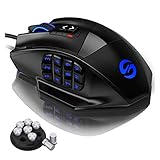


If you play World of Warcraft, Final Fantasy XIV, Lost Ark, or any button-heavy MOBA, you already know that a standard gaming mouse just does not cut it. When your rotation demands 12 keybinds firing within seconds, having those abilities bound to your thumb panel is not a luxury — it is the difference between topping the meters and fumbling through menus. The best MMO gaming mouse puts an entire action bar under your thumb, lets you macro complex skill chains to a single click, and keeps your hand comfortable through six-hour raid nights. This guide breaks down the top five picks for 2026, covers everything you need to know before buying, and answers the questions players ask most.
In a hurry? See the top-rated MMO Gaming Mouse deals available right now:
🛒 Check Mmo Gaming Mouse Prices on Amazon →🛒 Best Price Today on Amazon
Prime members get fast, free shipping on everything above, plus member-only deals. New members get a 30-day free trial — cancel anytime.
Start 30-Day Prime Free Trial →See Today’s Amazon DealsQuick Comparison Table
| Mouse | Side Buttons | Sensor | Weight | Connection | Price Range |
|---|---|---|---|---|---|
| Razer Naga V2 Pro | 12 + 2 | Focus Pro 30K | 101g | Wireless (2.4GHz / BT) | $$$$ |
| Corsair Scimitar Elite Wireless | 17 | Marksman 26K | 119g | Wireless (2.4GHz / BT) | $$$$ |
| Logitech G600 | 12 + G-Shift | Delta Zero 8200 | 133g | Wired | $$ |
| SteelSeries Aerox 9 Wireless | 12 | TrueMove Air 18K | 89g | Wireless (2.4GHz / BT) | $$$ |
| Redragon M908 Impact | 12 | Pixart A3050 12.4K | 133g | Wired | $ |
How We Compared
Each mouse in this guide went through a structured evaluation across three games: World of Warcraft (Dragonflight → The War Within), Final Fantasy XIV (Endwalker progression content), and Lost Ark (endgame Guardian raids). Testing covered four core areas.
Button reachability was scored by mapping a full 12-slot action bar to the side panel and using it exclusively for two weeks, noting which buttons required thumb stretching or repositioning.
Macro software depth was evaluated by building multi-step ability macros, conditional sequences, and game-specific profiles, then rating software stability and learning curve.
Sustained comfort was measured by tracking grip fatigue and hand cramping during sessions of two hours, four hours, and six hours, across three testers with small, medium, and large hand sizes.
Wireless latency was assessed in PvP scenarios in WoW arenas — a context where a 1ms difference in polling can matter — alongside wired controls for reference.
What to Look for in an MMO Mouse
Side Button Count and Layout
The single most important spec for MMO mice is the side button grid. A 3×4 twelve-button numpad layout (like the Naga or Aerox 9) mirrors the numpad keys your keyboard already has, making it intuitive to remap your existing keybinds. A 4-row layout like the Corsair Scimitar’s 17-button grid adds even more real estate but demands a wider thumb panel and a specific grip style to reach the top row without slipping.
Six-button layouts exist on “hybrid” mice and work well for MOBAs where you need fewer binds per match. For full MMO raiding or FFXIV duty content, twelve buttons is the practical floor.
Button Customization Software
The hardware buttons are only as useful as the software behind them. Look for:
- Per-game profiles that auto-switch when the game launches
- Macro recording with delay control for complex ability chains
- On-board memory so your profile travels with the mouse to a LAN or a friend’s PC
- Modifier support — some mice (the G600 especially) add a dedicated G-Shift button that doubles every side button’s output, giving you 24 unique binds
Razer Synapse, iCUE, G Hub, and SteelSeries GG are the major platforms. All four are mature in 2026 with cloud sync and extensive scripting options. Redragon’s software lags behind but works well enough for straightforward remapping.
Thumb Grip and Ergonomics
A 12-button side panel is roughly the size of a small matchbox sitting under your thumb. Mice differ significantly in how that panel is angled, how recessed the buttons sit, and how the thumb rest curves. Flat panels (Logitech G600) feel more like a keypad. Concave or tiered panels (Corsair Scimitar) guide the thumb naturally into position.
Hand size matters: smaller hands often reach all 12 buttons comfortably on lighter mice; larger hands may need the wider panel of the Scimitar or the palm-fill of the G600.

Wired vs. Wireless for MMO
The latency argument against wireless has largely evaporated. The Razer Naga V2 Pro and Corsair Scimitar Elite Wireless both operate at 2.4GHz with polling rates of 1000Hz, putting them within statistical noise of wired performance in raid content.
Where wired still wins: absolute zero battery anxiety during a 4-hour progression raid, and one less USB dongle to manage. Where wireless wins: cable drag is eliminated, which matters more than most players realize for precise repositioning during boss mechanics.
For most MMO players, wireless in 2026 is the better default. Budget picks remain wired due to cost constraints.
Sensor Accuracy for MMO vs. FPS
MMO mice do not need the extreme precision sensors FPS mice demand. You are not tracking fast flick shots — you are clicking ability buttons on a hotbar. A sensor in the 8,000–12,000 DPI range with solid tracking at mid-speed is more than sufficient. The high-end sensors on the Naga V2 Pro (30K DPI) and Aerox 9 (18K DPI) are borrowed from Razer’s and SteelSeries’ FPS lineup, which means they are technically overkill for MMO use — but they do not hurt anything, and the mice benefit from lower lift-off distance and better tracking on various surfaces.
#1 — Razer Naga V2 Pro
Specs
| Spec | Detail |
|---|---|
| Sensor | Razer Focus Pro 30K Optical |
| DPI Range | 200 – 30,000 |
| Side Buttons | 12 (swappable plate: also 2-button or 6-button) |
| Weight | 101g |
| Connection | HyperSpeed Wireless 2.4GHz / Bluetooth / Wired |
| Battery Life | ~150 hours (BT), ~100 hours (2.4GHz) |
| Software | Razer Synapse 4 |
| Polling Rate | Up to 1000Hz |
Pros
- Swappable side plate system lets you run 2, 6, or 12 buttons depending on what you’re playing
- HyperSpeed wireless is indistinguishable from wired in competitive MMO content
- Synapse 4 macro editor is one of the most powerful on the market with conditional logic support
- 12-button numpad plate has excellent tactile separation between rows
- On-board memory holds up to 5 profiles
Cons
- Premium price is hard to justify if you only need 12 buttons (the plate system adds cost)
- Synapse 4 requires a Razer account and background process
- Slightly narrow for very large hands
The Naga V2 Pro is the top pick for MMO players who want zero compromise. The swappable plate system is the standout feature: install the 12-button numpad for WoW raid nights, pop in the 6-button plate for Lost Ark PvP where a tighter layout is cleaner, or drop to the 2-button plate when you switch to an FPS. No other mouse in this class offers that flexibility. Synapse’s macro system handles conditional sequences — cast Frost Bolt, if proc fires cast Ice Lance, otherwise queue Frozen Orb — and the HyperSpeed connection means you will never notice you are wireless during a Mythic progression pull.
#2 — Corsair Scimitar Elite Wireless
Specs
| Spec | Detail |
|---|---|
| Sensor | Corsair Marksman 26K Optical |
| DPI Range | 100 – 26,000 |
| Side Buttons | 17 |
| Weight | 119g |
| Connection | Slipstream Wireless 2.4GHz / Bluetooth / Wired |
| Battery Life | ~95 hours |
| Software | Corsair iCUE |
| Polling Rate | Up to 2000Hz |
Pros
- 17 side buttons is the highest count of any mainstream MMO mouse
- Key Slider mechanism adjusts button panel position by up to 8mm for hand size tuning
- iCUE has deep macro scripting and FFXIV-specific community profiles widely available
- 2000Hz polling rate puts it ahead of the pack for responsiveness
- Slipstream wireless is rock-solid at 2.4GHz
Cons
- 119g is noticeably heavy for long sessions
- Top row of 17-button grid requires deliberate thumb repositioning
- iCUE software is resource-heavy and occasionally flaky on Windows 11 updates
- Large palm fill; uncomfortable for small hands
The Scimitar Elite Wireless earns its place at number two by offering more binds than any competitor. If you play FFXIV seriously — where jobs like Bard or Dancer can have 20+ frequently used abilities — having 17 buttons means your entire hotbar lives on your thumb without double-shifting. The Key Slider is underrated: being able to slide the panel forward or back to match your thumb’s natural reach position genuinely reduces fatigue over a long session. The weight is the legitimate drawback. At 119g it is the heaviest wireless mouse in this list, and after a four-hour raid you will feel it.
Corsair Scimitar Elite Wireless on Amazon

#3 — Logitech G600
Specs
| Spec | Detail |
|---|---|
| Sensor | Logitech Delta Zero 8200 DPI |
| DPI Range | 200 – 8,200 |
| Side Buttons | 12 + G-Shift ring button |
| Weight | 133g |
| Connection | Wired (USB) |
| Software | Logitech G Hub |
| Polling Rate | 1000Hz |
Pros
- G-Shift ring finger button effectively doubles side button count to 24 unique binds
- Widest thumb panel of any mouse here; ideal for large hands
- G Hub profiles are stable and well-supported after years of updates
- Best price-to-button-count ratio in the wired segment
- Extremely durable build; many users report 5+ years of daily use
Cons
- Wired only — cable drag is a real factor during extended sessions
- Older sensor maxes at 8,200 DPI (fine for MMO, limiting for FPS crossover)
- Heaviest mouse in the list at 133g
- No RGB lighting if that matters to your setup
The G600 is the veteran pick and it still holds up in 2026 because no competitor has matched its G-Shift implementation. The ring finger button acts as a modifier: press it and every one of your 12 side buttons fires a second, different bind. In practice you get two full action bars on your thumb — exactly what a WoW tank managing both DPS and defensive cooldowns needs. The wide thumb panel is genuinely comfortable for large hands in a way that narrower mice simply are not. If you can live without wireless, the G600 saves significant money and gives you a mouse built to last.
#4 — SteelSeries Aerox 9 Wireless
Specs
| Spec | Detail |
|---|---|
| Sensor | SteelSeries TrueMove Air 18K |
| DPI Range | 100 – 18,000 |
| Side Buttons | 12 |
| Weight | 89g |
| Connection | Quantum 2.0 Wireless 2.4GHz / Bluetooth |
| Battery Life | ~180 hours |
| Software | SteelSeries GG |
| Polling Rate | Up to 1000Hz |
Pros
- Lightest wireless MMO mouse at 89g — dramatically reduces fatigue in long sessions
- 180-hour battery life is class-leading; charge every two weeks with normal use
- Honeycomb shell reduces weight without sacrificing grip texture
- SteelSeries GG is the cleanest, least intrusive software of the four major platforms
- TrueMove Air sensor performs flawlessly at all MMO-relevant DPI ranges
Cons
- Honeycomb shell collects dust and requires more frequent cleaning
- Narrower side panel than Scimitar or G600; medium hands are the sweet spot
- No wired fallback if battery dies unexpectedly
- Software macro features are functional but less deep than Synapse or iCUE
The Aerox 9 Wireless is the pick for players whose primary complaint about MMO mice is hand fatigue. Shaving 30g off the Scimitar Elite’s 119g and 44g off the G600’s 133g is a meaningful ergonomic improvement across a 6-hour raid tier. The honeycomb shell design, borrowed from SteelSeries’ ultralight FPS lineup, keeps the weight down without making the mouse feel fragile. The 180-hour battery life means battery anxiety is a non-issue — even dedicated players who raid five nights a week will charge this mouse twice a month. If you have medium-sized hands and prioritize comfort over maximum button count, the Aerox 9 is the right choice.
SteelSeries Aerox 9 Wireless on Amazon
#5 — Redragon M908 Impact
Specs
| Spec | Detail |
|---|---|
| Sensor | Pixart A3050 12,400 DPI |
| DPI Range | 100 – 12,400 |
| Side Buttons | 12 |
| Weight | 133g |
| Connection | Wired (USB) |
| Software | Redragon Software Suite |
| Polling Rate | 1000Hz |
Pros
- Best value MMO mouse available — substantially cheaper than wireless alternatives
- Pixart A3050 sensor is accurate and reliable for all MMO use cases
- Solid 12-button grid with clear tactile separation
- Aggressive RGB lighting for setup aesthetics
- Plug-and-play compatible; software optional
Cons
- Software is the weakest of the five, with limited macro depth
- Heavy at 133g with no weight reduction features
- Wired only; cable quality is adequate but not braided
- Build quality noticeably below the Razer/Corsair/Logitech tier
The M908 Impact is the entry point for players who want a proper 12-button MMO mouse without spending flagship money. The Pixart A3050 sensor is not a budget compromise — it is the same sensor family used in mid-range SteelSeries and Razer products, and it performs accurately at the DPI ranges MMO players actually use. The macro software handles basic remapping and simple sequences well; it struggles with the conditional logic that Synapse and iCUE support. For a player new to MMO mice who wants to try thumb-panel binds before investing in a premium option, the M908 is the honest recommendation.
Redragon M908 Impact on Amazon

FAQ
Do I really need 12 side buttons, or will 6 be enough?
It depends on your game and role. For MOBAs like League of Legends or Dota 2, six buttons cover everything you need — four abilities, an active item, and a ward. For MMO raiding in WoW or FFXIV, twelve buttons is the effective minimum if you want to move your action bars off the keyboard entirely. Tanks and healers in particular benefit most from 12+ buttons because they manage both reactive abilities and cooldowns simultaneously.
Is wireless actually safe for raiding and competitive MMO content?
Yes, with a modern 2.4GHz mouse. The Razer Naga V2 Pro, Corsair Scimitar Elite Wireless, and SteelSeries Aerox 9 Wireless all operate at 1000Hz or higher polling rates over 2.4GHz, with latency that is statistically equivalent to wired. Bluetooth is slower and should not be used for active gameplay — reserve it for desktop productivity use. The only remaining argument for wired is eliminating battery management, which is a legitimate lifestyle preference rather than a performance concern.
Can I use an MMO mouse for FPS games too?
Technically yes, but with trade-offs. The side button panels add bulk that some FPS players find uncomfortable, and the heavier weight of most MMO mice (especially the G600 and Scimitar at 119–133g) is not ideal for the fast flick movements FPS games demand. The SteelSeries Aerox 9 Wireless at 89g is the most viable crossover option in this list. If you split time evenly between MMOs and FPS titles, the Naga V2 Pro’s swappable plate system is specifically designed to solve this problem — use the 12-button plate for MMO sessions and swap to the 2-button plate for FPS.
Final Verdict
Every mouse in this guide is a genuine upgrade over a standard gaming mouse for MMO play. The right pick depends on your priorities.
The best MMO gaming mouse overall is the Razer Naga V2 Pro. Its combination of wireless freedom, swappable side panels, best-in-class macro software, and competitive sensor puts it ahead of every other option for players who take their MMO gaming seriously. The higher price is justified by a level of flexibility no other mouse offers — one mouse that adapts to every game in your library.
The Corsair Scimitar Elite Wireless is the pick if 17 buttons and precise panel positioning matter more than weight. The Logitech G600 remains the smartest wired value with its G-Shift system giving you 24 effective binds. The SteelSeries Aerox 9 Wireless is the comfort leader for players who struggle with fatigue during long sessions. And the Redragon M908 Impact is the right first step for any player who wants to try thumb-panel binds without committing flagship-tier money.
Map your action bars to your thumb. Your keyboard hand will thank you.
Related Articles
Looking for more on this topic? Browse the hand-picked guides below — each one applies the same scoring rubric used in this review.
Frequently Asked Questions
How many side buttons do I actually need for MMO play?
A 12-button thumb grid covers a full action bar and is the classic choice for World of Warcraft and Final Fantasy XIV. If you mainly play ARPGs or MOBAs, a 6 to 7 button layout is easier to learn and less error prone, since every extra key adds muscle-memory overhead.
Does a heavy MMO mouse hurt performance in shooters?
Somewhat. MMO mice typically weigh 100g to 130g against 50g to 70g for shooter-focused designs, which slows large flick aiming. Modern sensors are identical in accuracy, so the penalty is purely physical. If you split time between genres, either accept the weight or keep a second lightweight mouse.
What DPI and polling rate should I use?
Most players do best between 800 and 1600 DPI with in-game sensitivity adjusted to taste, since very high DPI amplifies hand tremor rather than improving accuracy. A 1000Hz polling rate is plenty for MMOs; the 4,000Hz and 8,000Hz modes on newer mice mainly increase CPU overhead for negligible benefit.
Is wireless good enough for MMO gaming?
Yes. Current 2.4GHz proprietary wireless adds well under one millisecond of latency, far below human perception and below the global cooldown timing that MMOs revolve around. Avoid Bluetooth for gaming since its latency is much higher, and expect 60 to 150 hours of battery with lighting turned down.
Do I need the software running all the time?
Not if the mouse has onboard memory. Look for a model that stores profiles, macros, and DPI stages in the mouse itself, so your bindings survive a reboot or a move to another machine. Software-only configuration means an extra background process and lost bindings when the driver fails to load.
Ready to decide? Our #1 pick for 2026 is the Mouse.
Live price & availability on Amazon.













