

The Acer Nitro V 15 has quietly become one of the most recommended budget gaming laptops on the market, and for good reason. It delivers the core gaming experience, a fast display, a capable GPU, and a proper cooling setup, without the flagship price tag that scares off first-time buyers. Across its many configurations, the Nitro V 15 aims squarely at the player who wants real 1080p performance and does not want to remortgage the house to get it.
We spent time with the ANV15 line spanning Core i5, i7, and i9 variants with GPUs up to the new RTX 5050, to figure out where it shines and where its budget roots show. Here is our full assessment.
As an Amazon Associate we earn from qualifying purchases at no extra cost to you.



🎮 Get More From Your Setup — Free
Prime Gaming gives you free PC games every month, in-game loot, and a free Twitch channel sub — plus fast free shipping on all the gear above. New members get a 30-day free trial.
Watch: Acer Nitro V 15 Laptop: Review & Buyer’s Guide — Video Review
Design & Build
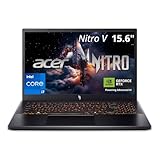
The Nitro V 15 wears a restrained, matte-black gaming aesthetic that looks at home in a dorm or an office. It is plastic-bodied, as expected at this price, but the chassis feels solid enough for daily commuting and there is minimal flex around the keyboard deck. The backlit keyboard, generous port selection including Thunderbolt on higher trims, and Wi-Fi 6 keep it feeling current. At 15.6 inches it strikes a sensible balance between screen real estate and portability.
Performance
This is where the Nitro V 15 earns its reputation. The RTX 5050 configurations with 8GB of GDDR7 push modern titles comfortably at 1080p on the 165Hz IPS panel, and DLSS 4 support stretches frame rates further in supported games. The Intel 8-core i5-13420H handles gaming and everyday multitasking without stumbling, while the i7-13620H and i9-13900H trims add headroom for streaming, editing, and heavier workloads. Fast SSDs up to 1TB and 16 to 32GB of RAM keep load times short and tab-heavy sessions smooth.
Pros & Cons
- Pro: Excellent price-to-performance, especially the RTX 5050 and 165Hz display pairing.
- Pro: Wide configuration range lets you match spec to budget precisely.
- Pro: Strong connectivity with Thunderbolt, Wi-Fi 6, and a backlit keyboard.
- Pro: Capable cooling keeps sustained gaming sessions stable.
- Con: Plastic build and average battery life reflect the budget positioning.
- Con: Base RAM on some trims benefits from an upgrade for heavier use.
Alternatives to Consider
If you want a slightly larger canvas, Acer’s own Nitro 16 line offers a 16-inch panel and roomier cooling for a small premium. Shoppers who prioritize battery and portability over raw frames might look at a thin-and-light with an RTX 4050, while those chasing maximum performance should step up to an RTX 5060 or 5070 machine. Within its class, though, the Nitro V 15 is hard to beat on value.
Frequently Asked Questions
Is the Acer Nitro V 15 good for gaming?
Yes. The RTX 5050 and 165Hz display combination delivers a genuinely enjoyable 1080p gaming experience across modern titles, and DLSS 4 helps in demanding games.
Which configuration should I buy?
For most players the i5-13420H with RTX 5050 and 16GB RAM hits the value sweet spot. Choose an i7 or i9 trim only if you also do content creation or heavy multitasking.
Can I upgrade the RAM and storage?
Generally yes. The Nitro V 15 typically allows RAM and SSD upgrades, which is a smart way to extend its useful life for a modest cost.
How is the battery life?
Battery life is average for a gaming laptop. Expect solid unplugged use for browsing and video, but keep the charger handy for gaming sessions.
Verdict
The Acer Nitro V 15 remains a benchmark budget gaming laptop in 2026. The RTX 5050 with 16GB RAM and a 165Hz screen is the configuration to target, offering smooth 1080p gaming and dependable everyday performance at a price that undercuts nearly everything with similar specs. It is an easy recommendation for first-time gaming laptop buyers.











