Our Short List of 3

- Display: 7.4-inch HDR OLED, 1280 by 800, up to 90 Hz
- Processor: AMD Zen 2 and RDNA 2 custom APU
- Memory: 16 GB LPDDR5
- Storage: 512 GB NVMe, plus a microSD slot

- Connectivity: Bluetooth wireless and USB-C wired
- Joysticks: TMR electromagnetic, anti-drift design
- Triggers: Hall effect, with mode switching
- Extras: two remappable back buttons, motion control

- Connectivity: Xbox Wireless and Bluetooth
- Port: USB-C for wired play
- Controls: hybrid D-pad, dedicated Share button
- Power: AA batteries or optional rechargeable pack
All 5 Picks at a Glance
| Product | Specs | Action |
|---|---|---|
| Valve Steam Deck OLED 512GB |
| Check price on Amazon |
| 8BitDo Ultimate 2 Bluetooth Controller |
| Check price on Amazon |
| Xbox Wireless Controller, Carbon Black |
| Check price on Amazon |
 Logitech G502 HERO |
| Check price on Amazon |
 Samsung T9 Portable SSD 2TB |
| Check price on Amazon |
Yu-Gi-Oh! Master Duel, KONAMI’s free-to-play digital card game, launched on Steam in January 2022 as a Windows-only release, and nothing in its record has changed since. The store flags Linux false, every depot is configured for Windows, and the Linux requirements field is an empty shell. No native build exists to install, and no second storefront sells one.
That is not the end of the story, because the Windows build travels unusually well. Valve has reviewed it on Steam Deck and awarded its strongest badge, and the community compatibility file behind it is deep and settled. This article reads the record layer by layer: flags, depots, anti-cheat paperwork, the Proton file and the Deck sheet.
As an Amazon Associate, we earn from qualifying purchases.
Quick answer
No. KONAMI publishes Yu-Gi-Oh! Master Duel for Windows only: the Steam record flags Linux false, ships only Windows depots, and leaves the Linux requirements field empty. The Windows build is the route — it is Steam Deck Verified, and ProtonDB rates it Platinum across 174 reports with strong confidence.
What the Steam record shows
Start with the flags: the platform field reads windows true, mac false, linux false. The Windows requirements are genuinely populated at both tiers — minimum Windows 11 Home 64-bit, an Intel Core i5-9400F, 8 GB of memory and a GeForce GTX 1650; recommended an i5-11400F, 16 GB and an RTX 3060. Beside it, the Mac and Linux requirements fields are empty shells — headings over blank lists, a template never filled in rather than a specification.
The depot census agrees. The sold package holds three depots, all configured for 64-bit Windows — content, production and a Japanese test depot, together a little over 1.1 GiB on disk. No Linux or Mac depot exists at any size, in any branch. No Linux client icon is registered, and the extended OS field is an empty string. Every delivery layer points the same way, so the ruling rests on no single field.
The family could not be smaller. The record carries no DLC array, and a store search on the game’s own title returns exactly one app: the game itself. With no soundtrack app, art book or demo sibling, the usual trap in this series — an album flagging Linux true and lending the base game a flag it does not have — cannot fire here. The family Linux-flag count is 0 of 1.
The listing shows no price overview and no package groups. For a paid game that shape can mean a delisting; here it is simply the free-to-play shape — the is_free field reads true, the store page offers the game free today, and the genre list leads with Free To Play. The game is live, supported by in-app purchases the categories name openly.
The anti-cheat question, layer by layer
For an online-first game, the question that decides whether Proton is a real route is usually the anti-cheat — and Master Duel is built around online play. The honest finding is that no public layer names an anti-cheat for this game at all.
The store record carries no DRM notice and no third-party account notice. SteamDB’s detected-technology list names the Unity engine and its Burst and IL2CPP tooling, and nothing else. AreWeAntiCheatYet, read in full, holds no entry for this game, matched neither by store ID nor by name. That is documentation silence on every layer — reported as exactly that: silence, not a guarantee in either direction.
What fills the gap is the practical record. An anti-cheat that rejected Proton outright would show up as a wall of failed reports; Master Duel’s file shows the opposite, as the next section details. The working answer is empirical: whatever integrity checks the game runs, they have not stopped the Windows build running under Proton at the highest reported tier.
The Proton file
ProtonDB’s summary for this app is as settled as the database gets. Settled tier: Platinum. Best-reported tier: Platinum. Trending tier: Platinum — all three readings agree. Behind them sit 174 reports, and ProtonDB grades its confidence as strong. Platinum is the tier reserved for games that run essentially as they do on Windows, and a triple-Platinum reading on a file this size leaves little room for a hidden fault line.
Two cautions keep the claim honest. First, a tier describes the Windows build running through Proton; it is not a native port wearing a badge. Second, this session could not complete the usual check of the ProtonDB game page’s own platform heading — the page would not render here — so no claim is made about that heading in either direction. The figures above come from ProtonDB’s summary data, which answered in full.
Steam Deck: Verified, on paperwork from 2023
Valve’s own compatibility endpoint resolves this game to category Verified, its strongest grade. All four checks pass: the default controller configuration is fully functional, the game shows Steam Deck controller icons, interface text is legible, and the default graphics configuration performs well. The single note is that first-time setup requires an active internet connection. SteamOS, graded separately, resolves to Compatible, and the test configuration names the recommended runtime as the stable Proton branch.
The paperwork has one soft spot. The verdict was read from Valve’s own endpoint, but the test date and build come from SteamDB’s republication of Valve’s sheet: tested 9 December 2023, against build 12886287. The current public build is 26285703, from late October 2026 — so the badge grades a build nearly three years old. Treat the 2023 grade as evidence about the game’s compatibility shape; the current Proton file carries today’s claim.
Input deserves one clarification. The store record carries no controller-support field and lists no controller category, so there is no publisher-stated tier to quote. What exists is Valve’s test sheet: its configuration records the supported input as “other”, passes the default controller configuration, and confirms the game displays Steam Deck controller glyphs. On desktop this is a pointer-driven interface, and pad play runs through Steam Input, not a native support tier.
The storefront ruling
Steam is the only PC storefront in this story. GOG’s catalogue, queried directly, returns only unrelated products for this title, and the natural GOG product address redirects to the general games catalogue — no GOG product record exists for Master Duel, in any edition, for any operating system. On Linux, the Steam copy under Proton is not the best route; it is the only route.
Gear that fits the record
The picks follow the record’s shape: the handheld the badge was written for, two pads for Steam Input play, a precise mouse for the desktop interface, and fast portable storage.
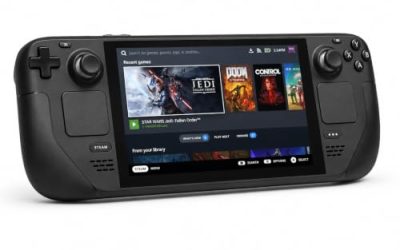
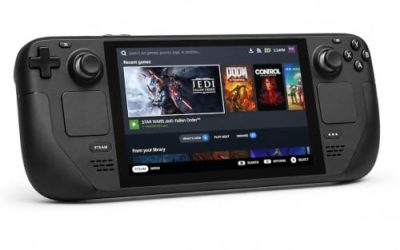
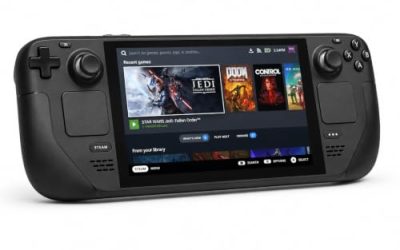
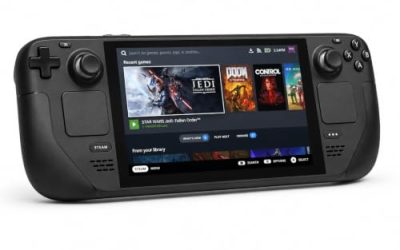
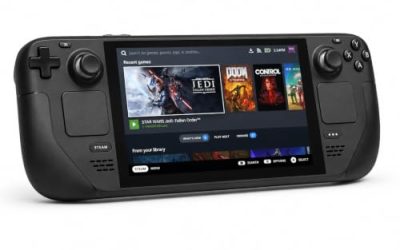
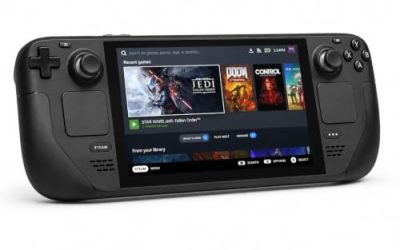
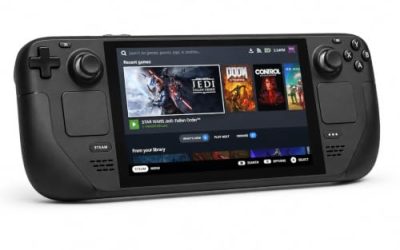
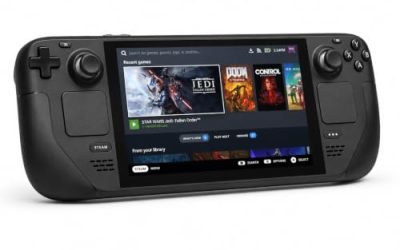
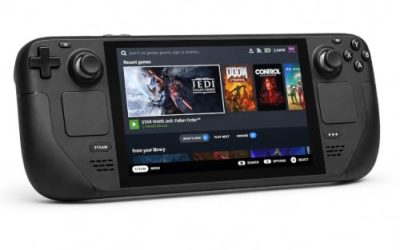
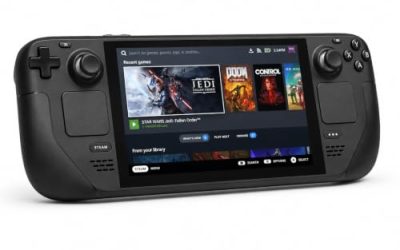
Valve Steam Deck OLED 512GB
- Display: 7.4-inch HDR OLED, 1280 by 800, up to 90 Hz
- Processor: AMD Zen 2 and RDNA 2 custom APU
- Memory: 16 GB LPDDR5
- Storage: 512 GB NVMe, plus a microSD slot
The handheld the Verified badge was written for. The install is barely over a gigabyte, and Valve’s sheet passes the game on every check — the only preparation asked for is an internet connection at first-time setup.
8BitDo Ultimate 2 Bluetooth Controller
- Connectivity: Bluetooth wireless and USB-C wired
- Joysticks: TMR electromagnetic, anti-drift design
- Triggers: Hall effect, with mode switching
- Extras: two remappable back buttons, motion control
The docked and desktop pad pick. The record names no native controller tier, so pad play runs through Steam Input — this pad covers that case with modern sticks, triggers and back buttons for menu shortcuts.
Xbox Wireless Controller, Carbon Black
- Connectivity: Xbox Wireless and Bluetooth
- Port: USB-C for wired play
- Controls: hybrid D-pad, dedicated Share button
- Power: AA batteries or optional rechargeable pack
The safest guest pad in PC gaming: Steam Input support is universal, the glyphs match what most games display, and it pairs over Bluetooth or its own wireless standard.
Logitech G502 HERO
- HERO optical sensor, up to 25,600 DPI
- 11 programmable buttons
- Adjustable weight system
- Wired USB connection
The record lists no controller category and Valve’s configuration names the supported input as “other” — on a desktop this is a pointer-driven interface, and a precise wired mouse is its natural instrument. Eleven programmable buttons cover the confirm, cancel and navigation inputs a long session repeats.
Samsung T9 Portable SSD 2TB
- Capacity: 2 TB portable SSD
- Interface: USB 3.2 Gen 2×2, USB-C connector
- Maker-rated speeds: up to 2,000 MB per second read, 1,950 MB per second write
- Features: Dynamic Thermal Guard, maker-rated drop resistance
Master Duel itself is tiny, but a Linux library rarely stops at one title; a fast portable drive is the easy way to carry it between machines or keep an offline backup. Top speed needs a USB 3.2 Gen 2×2 port; on anything slower it runs at that port’s ceiling.
How to choose
Choose the Steam copy, because it is the only PC edition that exists. On desktop or laptop, install under Proton and leave the tool on its default branch — Valve’s sheet names stable Proton as the recommended runtime, and the settled Platinum tier says defaults are the right starting point. On Steam Deck, the Verified badge means the expected workload is install, launch and play; have a connection ready for the first-time setup the sheet flags. Treat the desktop interface as pointer-first and let Steam Input handle pad mapping. Storage is a non-issue: at barely over a gigabyte, the game fits anywhere.
Who should skip
Skip this route if you want a native Linux client rather than a Windows build under Proton — none exists, and the empty shell says none was ever published. Skip it if you need a Mac version: the Mac flag is false, its field is the same empty shell, and Apple hardware sits where Linux sits, minus the Proton file. Skip it if you buy from GOG or another DRM-free shelf, since no second storefront carries the game. And skip it if your play is mostly offline: the game is built around online play, and even first-time setup requires an active connection.
FAQ
Is Yu-Gi-Oh! Master Duel native on Linux?
No. The record flags Linux false, all three depots are Windows-configured, the Linux requirements field is an empty shell, and no Linux client icon is registered. The only route is the Windows build under Proton.
Is Master Duel free to play on Steam?
Yes. The is_free field reads true and the store page offers the game free today; the missing price overview and package groups are the normal free-to-play shape, not a delisting. The categories name in-app purchases openly.
Does any anti-cheat block Master Duel under Proton?
No public layer names one. The record carries no DRM or account notice, SteamDB’s detected technologies are the Unity engine and its tooling alone, and the anti-cheat database holds no entry for the game. The practical evidence is the ProtonDB file: Platinum across 174 reports is not the shape of a game whose checks reject Proton.
Is Master Duel Steam Deck Verified?
Yes — Valve’s endpoint resolves it to Verified, all four checks passing, with one note that first-time setup needs an internet connection. Keep the date in view: the paperwork is from December 2023 and grades a far older build than today’s, so treat the badge as a compatibility shape and the current ProtonDB file as the present-day evidence.
Final verdict
Yu-Gi-Oh! Master Duel is not native on Linux: Windows-only flags, Windows-only depots, empty Linux and Mac paperwork, and a one-app family with no stray flag to borrow. What makes it an easy recommendation anyway is the layer below: a free, tiny, Steam Deck Verified Windows build backed by a triple-Platinum ProtonDB file of 174 reports at strong confidence. The caveats are the age of Valve’s test paperwork and the silence of the anti-cheat documentation; neither changes the practical answer. On Linux, install the Steam copy, leave Proton at its default, and play.
Product and ASIN Reference
| Product | ASIN |
|---|---|
| Valve Steam Deck OLED 512GB | B0CQ3RWQQZ |
| 8BitDo Ultimate 2 Bluetooth Controller | B0F194QFT2 |
| Xbox Wireless Controller, Carbon Black | B08DF248LD |
| Logitech G502 HERO | B07GBZ4Q68 |
| Samsung T9 Portable SSD 2TB | B0CHFS9K14 |