Black Myth: Wukong, Game Science’s 2024 action RPG built on Unreal Engine, never received a Linux build. Steam’s own record is unambiguous: the store flags the game for Windows alone, and its Linux requirements field is an empty shell with headings and no content. The one Linux flag anywhere near this game belongs to a soundtrack album.
So the useful question is the Proton one: how well does the one build that exists travel? The community file is deep and split, Valve has tested the game on Steam Deck and published the weakest badge it gives, and no second storefront sells a Linux copy at all. This piece reads each record separately: the flags, the add-on apps, the Proton file, the Deck test sheet and the storefront ruling.
As an Amazon Associate, we earn from qualifying purchases.
Quick answer
Black Myth: Wukong is not native on Linux: Steam flags it Windows only and its Linux requirements field is an empty shell. The route is desktop Proton: ProtonDB rates the Windows build Gold, Platinum on its best-reported tier, across 209 reports. Valve rates the game Unsupported on Steam Deck. Buy the Steam copy, the only PC edition sold.
What Steam’s own record says
Steam’s appdetails record for Black Myth: Wukong (app 2358720, established from Steam’s own store search) lists the platforms as Windows true, Mac false, Linux false. No Mac or Linux build hides beside the Windows one.
The Linux requirements field follows the emptiest pattern this series tracks. It is the empty shell: Minimum and Recommended headings sit over lists with nothing in them, which means no Linux tab exists in any real form. Nothing on the store page could be mistaken for a Linux requirements list.
The category record describes a single-player game with full controller support, DualSense controller support, Steam Cloud and Family Sharing. Steam’s record also carries a third-party DRM notice naming Denuvo, named here exactly as the record states it. No anti-cheat is named on the record, and no third-party launcher or account is listed.
The published Windows minimum is heavy for a 2024 release: Windows 10 64-bit, a Core i5-8400 or Ryzen 5 1600, 16 GB of RAM, a GTX 1060 6GB or RX 580 8GB, DirectX 11 and 130 GB of storage. Game Science’s own notes add that those figures were produced with DLSS, FSR or XeSS upscaling enabled, and that an SSD is recommended. Keep that upscaling note in mind when reading the Deck verdict below: the baseline assumes help from an upscaler even on desktop hardware.
The family sweep: one Linux flag, and it belongs to the soundtrack
The game app’s record lists exactly two add-on apps, and both were read individually.
The Deluxe Edition Upgrade (app 2672610) is ordinary downloadable content, and it flags Windows only. Nothing about it changes the platform picture.
The Black Myth: Wukong Soundtrack Selection (app 3288260) is where the trap fires. It is a type-music app, an album rather than a game build, and it flags all three platforms: Windows, Mac and Linux. Across the whole family, that album is the only app carrying a Linux flag at all. A scan that counts flags without reading types would report this game as Linux-supported, and it would be wrong: the flag belongs to audio files.
One more app deserves a line because store search surfaces it beside the game. The Black Myth: Wukong Benchmark Tool (app 3132990) is a separate app of game type, released a week before the game so players could test their hardware. It flags Windows only, it is not part of the game’s add-on list, and it is not the game. Counted together, four related apps were read for this piece, and exactly one of them, the soundtrack, flags Linux.
The ProtonDB file: a split Gold record on a deep pool
ProtonDB’s summary record for the Windows build reads Gold on the headline tier, Platinum on the best-reported tier and Gold on the trending tier, across 209 reports with strong confidence. The split is the honest shape of this file: the best current reports describe a game that runs well under Proton, while the headline carries the launch period, when a title this demanding gave early Proton builds a harder time.
Two hundred and nine reports is a deep pool for a single-player game, and strong confidence means the file has settled. What the record supports saying is narrow and useful: on desktop Linux, with current Proton builds, the Windows version is a well-trodden route. It says nothing about handheld hardware, which is a separate test with a separate answer.
The Steam Deck verdict: Unsupported
Valve’s compatibility record for this app, read through SteamDB’s republication of Valve’s compatibility data after Valve’s own endpoint returned unreadable data, gives the Steam Deck its lowest category: Unsupported. The stated reason is a performance one: this game’s graphics settings cannot be configured to run well on Steam Deck. The record adds one informational note, that first-time setup requires an active internet connection. A test date is published on this record: Valve tested the game on 25 September 2026, under proton-stable.
Two distinctions matter. First, Unsupported here is a performance verdict about one handheld’s hardware, not a launch failure: the same record rates the game Compatible on SteamOS as a platform, which is the desktop route the ProtonDB file describes. Second, the verdict belongs to the Deck alone; a desktop with a discrete graphics card is a different machine from the Deck’s APU.
The GOG ruling: no edition exists
GOG sells no copy of this game. GOG’s embed search returns zero products, its catalogue search returns zero products, and the title’s would-be product address redirects to the general catalogue. Because GOG’s search endpoints are known to miss titles the store demonstrably sells, the redirect is the deciding evidence: there is no live product page and no product record to read. The Steam copy is the only PC edition on sale, and it is the build both compatibility records describe.
Desktop gear for a Windows-only game
Valve’s Unsupported verdict takes the handheld off the table, so the gear below is built for a desktop. The keyboard leads, the pads cover couch and desk play, the mouse handles menus and inventory, and the drive covers a library that starts with a 130 GB install.
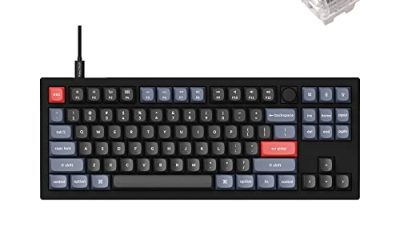
Keychron V3

The keyboard pick for desktop sessions: a tenkeyless board with QMK and VIA support lets you remap keys at the keyboard level, which keeps working across every Linux install you plug it into.
Specs
- Tenkeyless layout with rotary knob
- QMK and VIA remapping support
- Hot-swappable K Pro Brown switches
- Wired USB-C connection
- Maker-rated 1,000 Hz polling
8BitDo Ultimate 2 Bluetooth Controller

The desktop pad pick. Steam lists full controller support for the game, and this pad covers long boss sessions with modern sticks and triggers plus back buttons for the inputs a fight repeats.
Specs
- Connectivity: Bluetooth wireless and USB-C wired
- Joysticks: TMR electromagnetic, anti-drift design
- Triggers: Hall effect, with mode switching
- Extras: two remappable back buttons, motion control
- In the box: charging dock included
Xbox Wireless Controller, Carbon Black

The safest guest pad in PC gaming: Steam Input support is universal, the glyphs match what most games display, and it pairs over Bluetooth or its own wireless standard. Steam’s record lists DualSense support for this game too, so either pad family is a legitimate pick.
Specs
- Connectivity: Xbox Wireless and Bluetooth
- Port: USB-C for wired play
- Controls: hybrid D-pad, dedicated Share button
- Power: AA batteries or optional rechargeable pack
Logitech G502 HERO

Wukong’s menus, skill trees and inventory are pad-friendly, but at a desk a precise wired mouse turns long upgrade sessions into single clicks. Eleven programmable buttons cover the inputs a session repeats outside combat.
Specs
- HERO optical sensor, up to 25,600 DPI
- 11 programmable buttons
- Adjustable weight system
- Wired USB connection
- On-board memory profiles
Samsung T9 Portable SSD 2TB

A 130 GB install makes library space a real planning question, and for moving a Linux game library between machines, or keeping an offline backup, a fast USB-C drive is the simple answer. The headline figure needs a Gen 2×2 host port; on a lesser port the drive runs at that ceiling instead.
Specs
- Capacity: 2 TB portable SSD
- Interface: USB 3.2 Gen 2×2, USB-C connector
- Maker-rated speeds: up to 2,000 MB per second read, 1,950 MB per second write
- Features: Dynamic Thermal Guard, maker-rated drop resistance
How to choose
Choose the Steam copy, because it is the only PC edition on sale and the exact build both records describe. On desktop or laptop, install under Proton and leave the compatibility tool at its default; the Gold headline with a Platinum best-reported tier says current builds run the game well on hardware that clears the published minimum. Treat the Steam Deck as out of scope for this title: Valve’s test sheet is explicit that the graphics settings cannot be configured to run well on it. For input, a pad is the native shape of this game; a mouse earns its place only for long desktop menu sessions.
Who should skip
Skip this one if you are shopping for a native Linux game: this is not one, and the family’s only Linux flag belongs to a soundtrack album. Skip it if your only gaming machine is a Steam Deck, because Valve rates the game Unsupported there on performance grounds. Skip it if you want a DRM-free offline installer, because no GOG edition exists to buy, and note that Steam’s record names Denuvo as the game’s third-party DRM. And skip it if your desktop sits below the published minimum, since even that floor was measured with upscaling enabled.
FAQ
Is Black Myth: Wukong native on Linux?
No. Steam’s record for app 2358720 flags Windows only, and the Linux requirements field is an empty shell of headings with no content. The one Linux flag in the family belongs to the Soundtrack Selection, a music app, not to the game.
How well does Black Myth: Wukong run under Proton?
ProtonDB’s summary record reads Gold on the headline and trending tiers and Platinum on the best-reported tier, across 209 reports with strong confidence. The headline carries the launch period; the best current reports describe a game that runs well on desktop hardware under current Proton builds.
Is Black Myth: Wukong Steam Deck Verified?
No. Valve’s record gives the game its lowest category, Unsupported, because its graphics settings cannot be configured to run well on Steam Deck. The record was tested on 25 September 2026 and notes that first-time setup requires an active internet connection. The same record rates the game Compatible on SteamOS as a platform, which describes desktop play, not the handheld.
Can I buy Black Myth: Wukong on GOG instead?
No. GOG’s searches return no product for the game and its would-be product address redirects to the general catalogue. The Steam copy is the only PC edition on sale, and it is the build both compatibility records describe.
Final verdict
Black Myth: Wukong is a Windows-only release whose paper trail needs careful reading: an empty-shell requirements field, a soundtrack album carrying the family’s only Linux flag, and a benchmark tool that is not the game. Read properly, the records agree. Desktop Linux has a strong Proton route, with a Gold community file whose best reports reach Platinum across 209 reports. The Steam Deck does not, and Valve’s own test says so in plain terms. Buy the Steam copy, play it on a desktop under Proton, and do not let an album’s flag sell you a native build that does not exist.
Product and ASIN Reference
| Product | ASIN |
|---|---|
| Keychron V3 | B0B2DMMMG2 |
| 8BitDo Ultimate 2 Bluetooth Controller | B0F194QFT2 |
| Xbox Wireless Controller, Carbon Black | B08DF248LD |
| Logitech G502 HERO | B07GBZ4Q68 |
| Samsung T9 Portable SSD 2TB | B0CHFS9K14 |