Our Short List of 3

- Tenkeyless layout with rotary knob
- QMK and VIA remapping support
- Hot-swappable K Pro Brown switches
- Wired USB-C connection

- HERO optical sensor, up to 25,600 DPI
- 11 programmable buttons
- Adjustable weight system
- Wired USB connection

- Connectivity: Bluetooth wireless and USB-C wired
- Joysticks: TMR electromagnetic, anti-drift design
- Triggers: Hall effect, with mode switching
- Extras: two remappable back buttons, motion control
All 5 Picks at a Glance
| Product | Specs | Action |
|---|---|---|
| Keychron V3 |
| Check price on Amazon |
| Logitech G502 HERO |
| Check price on Amazon |
| 8BitDo Ultimate 2 Bluetooth Controller |
| Check price on Amazon |
 Xbox Wireless Controller, Carbon Black |
| Check price on Amazon |
 Samsung T9 Portable SSD 2TB |
| Check price on Amazon |
Stellar Monarch is the first of Silver Lemur Games’ two feudal space-empire builders: a turn-based grand strategy game from 5 December 2016 that puts you on the throne of a galactic empire and makes the court, not the shipyard, the main battlefield. Noble houses, admirals and assassins fill the turns, and the package is featherweight — the store record asks for a screen of at least 1024 by 768 and OpenGL 2.1. A decade on, the Linux question is the standard one: did a native build ever ship, and what carries the game today if it did not?
The delivery record answers the first half without ambiguity. Steam flags the game for Windows alone, ships it in a single Windows depot, registers only Windows launch entries and publishes an empty Linux requirements block. The second half is what makes the game worth a closer look: the Windows build has collected a small but spotless ProtonDB file, and the game is still receiving Windows builds in 2026.
As an Amazon Associate, we earn from qualifying purchases.
Quick answer
Stellar Monarch has no native Linux build. Steam flags Windows only, ships one Windows depot and registers only Windows launch entries, and GOG’s edition is Windows-only as well. Linux play runs through Proton, where a small four-report file sits at Platinum, and the Age of Technology expansion changes nothing.
What Steam actually ships
Start with the store flags, because every layer beneath them agrees. The game’s Steam record lists its platforms as Windows true, Mac false, Linux false, and the operating-system list in the delivery data is a single entry: windows. The Linux requirements block is an empty list — a heading with nothing under it. There is no Linux specification because there is no Linux build to specify.
The depot table tells the same story in bytes. SteamDB shows exactly one content depot for the base game, depot 446001, named Windows English Stellar Monarch Content at 31.74 MiB, travelling with the Windows VC 2022 redistributable, and its own configuration restricts it to Windows and English. There is no second depot for another operating system — in a game this small, one would be impossible to hide.
The launch configuration closes the question. The record holds two launch entries — the default, described as the game (latest build), and a safe-mode option carrying a -safemode argument — and both run StellarMonarch.exe with Windows named as their operating system. The asset registry completes the picture: a standard client icon is registered, but there is no Linux client icon entry, the small registration a native build normally leaves behind. Four independent layers, one answer.
One more detail speaks to maintenance rather than platforms. The public branch is not a fossil: its current build is dated 25 May 2026, alongside a compatibility branch from 2021 and a legacy branch preserving version 1.43. Silver Lemur still tends this game — it simply tends the Windows build, and every update lands on the same Windows-only record.
The expansion follows the same flag
The game’s DLC array holds exactly one entry, and it was read individually rather than assumed. Stellar Monarch: The Age of Technology, released 9 December 2019, has its own Steam record flagging Windows true, Mac false, Linux false, with the same empty Linux requirements list. Its depot is 1.05 MiB of add-on data riding on the base game’s files.
So there is no native edition hiding in the add-on and no split ruling to report: base game and expansion share one platform story, and on Linux the expansion inherits the base game’s Proton route exactly.
Proton carries the game, and the file is encouraging
With no native build anywhere, Linux play means Proton, and here the record turns friendly. ProtonDB’s summary API returns a full read: a headline tier of Platinum, a best-reported tier of Platinum and a trending tier of Platinum, across 4 reports, with confidence rated low and a score of 0.44. Unanimous top marks, honestly labelled as a thin file — four reports is a promising sample, not a settled verdict, and this article reports it as exactly that.
Two cautions belong beside the Platinum. First, the sample: a four-report file can be overturned by a handful of new reports, so the tier describes early experience rather than a guarantee. Second, a limit of this session’s research: ProtonDB’s game page rendered only as a script shell, so the classification heading the site attaches to the game could not be read and no claim about it is made here. The numbers above come from the API record, which answered in full.
What the file does establish is narrower and still useful: the Windows build installs and runs under Proton for every player who has reported it, in a game whose demands — OpenGL 2.1, a modest screen resolution, a 32 MiB footprint — sit far below what current Proton builds are asked to do. The store record’s categories add supporting colour: the game is tagged as playable without timed input and able to save anytime, the profile of a turn-based title that tolerates a translation layer gracefully.
The Deck question this session could not settle
A word of honesty about the Steam Deck. Valve’s compatibility endpoint returned an empty response on repeated reads in this session, and no republication of the test sheet could be read either, so this article claims no Deck verdict in either direction — not Verified, not Playable, not Unsupported.
What can be said from records that did answer is limited to fit. The game is a mouse-and-menus court simulation whose store record declares no controller-support level at all — the field is absent — so even a favourable future test sheet would be certifying a Windows build under Proton with pointer-style input, not a pad-native design. Treat the desktop as the reference platform, which is how the gear section below is framed.
GOG sells it too, for Windows
GOG does sell this game — ruled from GOG’s own records rather than its search. GOG’s catalogue holds Stellar Monarch as product 1621938862, and the product record’s content system compatibility reads Windows true, OSX false, Linux false. The Age of Technology expansion sits in the same catalogue with the same Windows-only listing. The DRM-free edition is a genuine second storefront, but it delivers the same Windows build; buying there changes the licence terms, not the operating system.
Anti-cheat is a non-issue here. The game is single-player only, and the AreWeAntiCheatYet database, read in full at 1,167 entries, holds no entry for Stellar Monarch — the only Monarch-named entry is an unrelated title. There is no multiplayer gate to clear because there is no multiplayer.
Gear that fits a desktop emperor
The gear below follows the record’s shape: keyboard and mouse first, because decrees and court screens are the game; pads framed honestly as library gear, since this title’s record declares no controller support; and fast storage for the library around it.
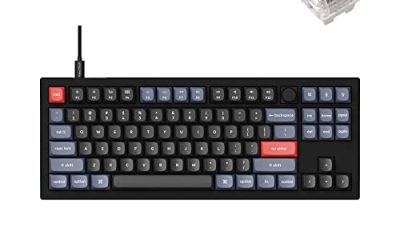
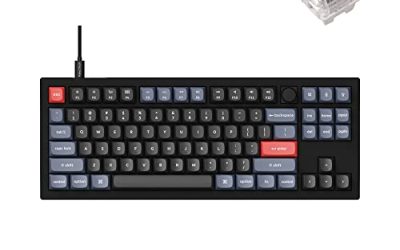
Keychron V3
- Tenkeyless layout with rotary knob
- QMK and VIA remapping support
- Hot-swappable K Pro Brown switches
- Wired USB-C connection
The keyboard pick for desktop sessions: a tenkeyless board with QMK and VIA support lets you remap keys at the keyboard level, which keeps working across every Linux install you plug it into.
Logitech G502 HERO
- HERO optical sensor, up to 25,600 DPI
- 11 programmable buttons
- Adjustable weight system
- Wired USB connection
Stellar Monarch is a mouse game at heart: audiences, edicts and star maps are menu work, and a precise wired mouse turns a reign into single clicks. Eleven programmable buttons cover the inputs a long session repeats.
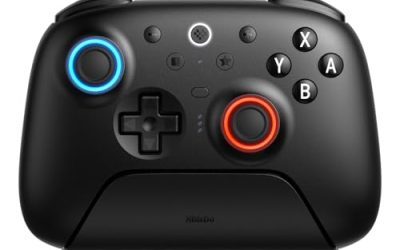
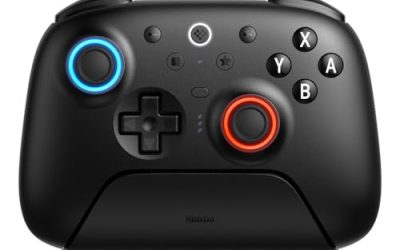
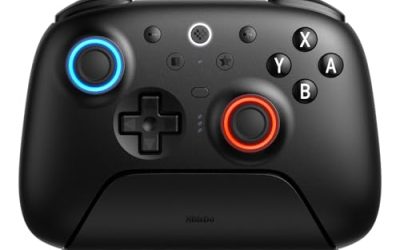
8BitDo Ultimate 2 Bluetooth Controller
- Connectivity: Bluetooth wireless and USB-C wired
- Joysticks: TMR electromagnetic, anti-drift design
- Triggers: Hall effect, with mode switching
- Extras: two remappable back buttons, motion control
The library pad pick, framed honestly: this game’s own record declares no controller support, so the pad earns its place across the rest of a Linux library rather than as this title’s input. Its modern sticks, triggers and back buttons cover the games that do speak gamepad.
Xbox Wireless Controller, Carbon Black
- Connectivity: Xbox Wireless and Bluetooth
- Port: USB-C for wired play
- Controls: hybrid D-pad, dedicated Share button
- Power: AA batteries or optional rechargeable pack
The safest guest pad in PC gaming: Steam Input support is universal, and it pairs over Bluetooth or its own wireless standard. As with the pad above, its role here is the wider library — Stellar Monarch itself asks for a pointer.
Samsung T9 Portable SSD 2TB
- Capacity: 2 TB portable SSD
- Interface: USB 3.2 Gen 2×2, USB-C connector
- Maker-rated speeds: up to 2,000 MB per second read, 1,950 MB per second write
- Features: Dynamic Thermal Guard, maker-rated drop resistance
For moving a Linux game library between machines, or keeping an offline backup of installers, a fast USB-C drive is the simple answer. The headline figure needs a Gen 2×2 host port; lesser ports run at their own ceiling instead.
How to choose
Choose either storefront on licence preference alone, because both sell the same Windows build: Steam for the ProtonDB trail and Steam Input tooling, GOG for the DRM-free desktop installer. On a Linux desktop, install the Windows build and let Proton take the default; the small Platinum file says the current route is a clean one, and the game’s OpenGL 2.1-era demands leave Proton with very little to do. Buy The Age of Technology on the same storefront as the base game, since it rides the same files and the same route.
Who should skip
Skip the search for a native edition entirely: there is none on Steam, none on GOG and none hidden in the expansion. Skip this game as a controller-first purchase — the record declares no controller support, and the design is a mouse-driven court simulation. Skip it, too, if a four-report ProtonDB file feels too thin to spend on: the Platinum is unanimous but the sample is small, and waiting for a deeper file costs nothing. And if your plan was to check a Steam Deck badge before buying, know that this session could not read one; the desktop record is the reliable evidence here.
FAQ
Is Stellar Monarch native on Linux?
No. Steam’s record flags Windows only, the game ships in a single Windows depot with only Windows launch entries, no Linux client icon is registered, and GOG’s edition is Windows-only too. Linux play runs through Proton.
How well does Stellar Monarch run under Proton?
The early file is as good as a small file gets: Platinum on the headline, best-reported and trending tiers across 4 reports, with confidence rated low. Treat it as a unanimous but thin sample rather than a settled verdict.
Does The Age of Technology expansion change the Linux picture?
No. The expansion’s own Steam record flags Windows only, its Linux requirements list is empty, its depot is a small add-on to the base game’s files, and GOG lists it as Windows-only too. It follows the base game through Proton.
Is Stellar Monarch Steam Deck Verified?
This session could not read Valve’s compatibility sheet — the endpoint returned empty on repeated attempts — so no verdict is claimed here in either direction. What the readable record does say is that the game declares no controller support and is built for mouse and menus, so the desktop is the safe assumption.
Final verdict
Stellar Monarch is a Windows game that Linux players can approach with unusual calm: no native build exists on Steam or GOG, the expansion changes nothing, and the maintenance the game still receives lands entirely on the Windows record. Against that, the Proton file is unanimously Platinum across its four reports, the game’s demands are two hardware generations old, and both storefronts sell the identical build, leaving licence preference as the only real choice. Buy it for the desktop Proton route, on whichever storefront you prefer.
Product and ASIN Reference
| Product | ASIN |
|---|---|
| Keychron V3 | B0B2DMMMG2 |
| Logitech G502 HERO | B07GBZ4Q68 |
| 8BitDo Ultimate 2 Bluetooth Controller | B0F194QFT2 |
| Xbox Wireless Controller, Carbon Black | B08DF248LD |
| Samsung T9 Portable SSD 2TB | B0CHFS9K14 |