Our Short List of 3

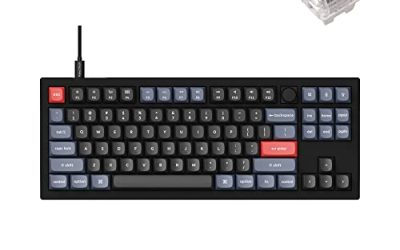
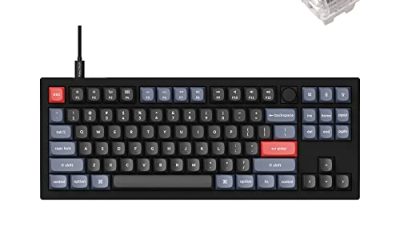
- Tenkeyless layout with rotary knob
- QMK and VIA remapping support
- Hot-swappable K Pro Brown switches
- Wired USB-C connection

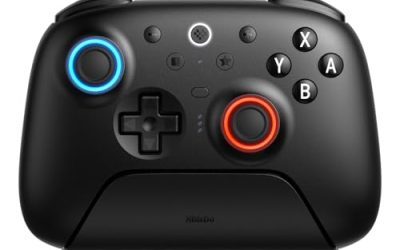
- Connectivity: Bluetooth wireless and USB-C wired
- Joysticks: TMR electromagnetic, anti-drift design
- Triggers: Hall effect, with mode switching
- Extras: two remappable back buttons, motion control

- Connectivity: Xbox Wireless and Bluetooth
- Port: USB-C for wired play
- Controls: hybrid D-pad, dedicated Share button
- Power: AA batteries or optional rechargeable pack
All 5 Picks at a Glance
| Product | Specs | Action |
|---|---|---|
| Keychron V3 |
| Check price on Amazon |
| 8BitDo Ultimate 2 Bluetooth Controller |
| Check price on Amazon |
| Xbox Wireless Controller, Carbon Black |
| Check price on Amazon |
 Logitech G502 HERO |
| Check price on Amazon |
 Samsung T9 Portable SSD 2TB |
| Check price on Amazon |
Interstellar Prime is Dreamcatcher Studio’s first-person science-fiction RPG set in Remnant City, where technician Silas Lane works beyond gravity inside a machine-conspiracy story. It launched into Early Access in January 2020, and Steam’s own browse record still flags it as an Early Access title. For Linux players the first question is simpler than the plot: does a native build exist, and if not, what do the compatibility records say?
The short answer is that there is no native Linux build, and the usual fallback evidence is unusually thin. Steam’s record flags Windows alone, ships a single Windows depot, and lists an empty Linux requirements field. ProtonDB holds no summary record for the game, and Valve has never published a Steam Deck verdict for it.
As an Amazon Associate, we earn from qualifying purchases.
Quick answer
Interstellar Prime is not native on Linux. Steam’s record for app 644000 flags Windows true and Linux false, its Linux requirements field is an empty list, and the only content depot is a Windows build launched by a Windows executable. ProtonDB has no record for the game and Valve lists the Deck category as untested, leaving a Windows-only Early Access chapter with no community file behind it.
What the Steam record actually ships
Start with the platform flags; everything else on the record agrees with them. The appdetails record for app 644000 reads windows true, mac false, linux false. The mac requirements and linux requirements fields are both empty lists, which means there is no Linux tab on the store page in any form — not a populated one, and not a hollow shell either. The only published requirements are the Windows minimum: Windows 10, a Core i7 processor, 16 GB of RAM and a GTX 1060-class graphics card with DirectX 11.
The delivery layer matches. SteamDB’s depot table for the app holds exactly one content depot, 644001, labelled Windows INTERSTELLAR PRIME Content, at 8.03 GiB. There is no Linux depot and no macOS depot either. The launch configuration holds a single entry, an executable named INTERSTELLAR PRIME.exe whose operating system is recorded as windows. The asset list carries a standard client icon but no Linux client icon. The app record exposes no DLC array at all, so there is no add-on family — and no soundtrack app — whose flags could muddy the reading.
One detail is worth naming because it cuts the other way in weaker cases: SteamDB detects Unity Engine and Mono SDK technology in the build. Engine detection is sometimes treated as a hint that a port exists. It is not evidence of one. The depots and launch entries are what Steam delivers, and both are Windows-only here, so the engine changes nothing about the ruling.
The Early Access wrinkle
Interstellar Prime is not a finished game that skipped Linux; it is an unfinished one. Steam’s browse service returns is_early_access as true, the Early Access genre sits on the record, and the store description frames the release as the opening chapter of a longer story. The game entered Early Access in January 2020 and, on the record, has never left it.
Development is not frozen, though. The public branch sits on a build dated late September 2026, and the store assets were modified in the same period, so the Windows build is still being tended years after launch. Two older branches survive beside it, a pre-alpha branch from 2021 and a pre-release-test branch from 2023, both part of the same Windows delivery. The platform picture could in principle change while a game is still in development, but nothing on the current record — no depot, no launch entry, no requirements tab — points toward a Linux build in progress. Rule from the record as it stands, not from the possibility.
Two empty compatibility files
The Proton route is where this game separates itself from most Windows-only titles in this cluster, because there is effectively no Proton file to read. ProtonDB’s summary endpoint returns its not-found page for app 644000 while the control app answers normally in the same session, which marks a genuine absence rather than a feed outage: ProtonDB has NO RECORD for Interstellar Prime. That means no settled tier, no best-reported tier, no report count and no confidence figure can be quoted, and this article claims none. The ProtonDB game page itself rendered only as a script shell during research, so the heading check could not be completed either; no heading claim is made.
The Steam Deck file is equally empty. Steam’s own browse record lists the game’s Deck compatibility category as 0, Valve’s untested state. Untested is not a verdict: not Verified, not Playable, not Unsupported. It means Valve has published no test sheet for the game, so there are no deductions to quote and no tested build to compare against the current branch. Any claim that the game works or fails on the Deck would be a guess.
Anti-cheat, at least, is a non-issue. The game is single-player only, with Family Sharing the only other store category, and the full AreWeAntiCheatYet list at the project root — 1,167 entries read in full — holds no entry for it. Whatever stands between a Linux player and this game, it is the missing build and the missing data, not a multiplayer gatekeeper.
Buying it, and the GOG question
There is no second storefront to weigh. GOG’s natural product address for the game resolves to the general catalogue rather than a product page, GOG’s embed search returns no product, and the product API search is empty, so no GOG edition exists. That ruling rests on the absent product page and the empty API records, not on search silence alone. Steam’s package is the only PC edition.
Gear for a desktop-only game
With no Deck verdict and no native build, the honest setup is a Linux desktop running the Windows build through Proton, driven by keyboard and mouse. The game’s record lists no controller support — the appdetails controller field is absent and the store categories stop at single-player — so the two pads below are framed as wider-library and Steam Input mapping gear, not as controllers this game natively understands.
Keychron V3
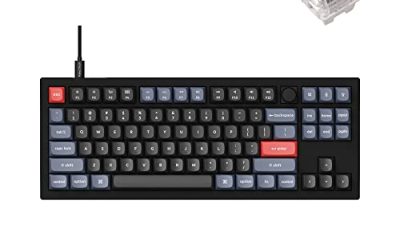
- Tenkeyless layout with rotary knob
- QMK and VIA remapping support
- Hot-swappable K Pro Brown switches
- Wired USB-C connection
The keyboard pick for desktop sessions: a tenkeyless board with QMK and VIA support lets you remap keys at the keyboard level, which keeps working across every Linux install you plug it into.
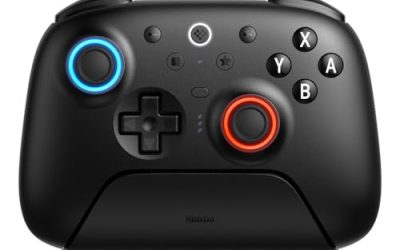
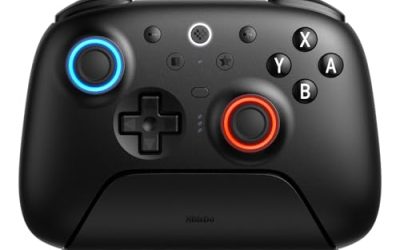
8BitDo Ultimate 2 Bluetooth Controller
- Connectivity: Bluetooth wireless and USB-C wired
- Joysticks: TMR electromagnetic, anti-drift design
- Triggers: Hall effect, with mode switching
- Extras: two remappable back buttons, motion control
A pad for the rest of the library rather than for this game: modern sticks and triggers, back buttons for shortcuts, and a dock that keeps it charged between titles that do read a controller natively.
Xbox Wireless Controller, Carbon Black
- Connectivity: Xbox Wireless and Bluetooth
- Port: USB-C for wired play
- Controls: hybrid D-pad, dedicated Share button
- Power: AA batteries or optional rechargeable pack
The guest-pad standard for a mixed library: it pairs over Bluetooth or its own wireless standard, and Steam Input can map it for games whose records, like this one, list no controller support.
Logitech G502 HERO
- HERO optical sensor, up to 25,600 DPI
- 11 programmable buttons
- Adjustable weight system
- Wired USB connection
A first-person game with menus, inventory and workstation screens is mouse work, and a precise wired mouse with eleven programmable buttons covers the confirm, cancel and interaction inputs a long session repeats.
Samsung T9 Portable SSD 2TB
- Capacity: 2 TB portable SSD
- Interface: USB 3.2 Gen 2×2, USB-C connector
- Maker-rated speeds: up to 2,000 MB per second read, 1,950 MB per second write
- Features: Dynamic Thermal Guard, maker-rated drop resistance
For moving a Linux game library between machines, or keeping an offline backup of installers, a fast USB-C drive is the simple answer. The headline figure needs a Gen 2×2 host port; on a lesser port the drive runs at that ceiling.
How to choose
Decide first whether an opening chapter is enough. Interstellar Prime sells an unfinished story: the store description itself frames the current content as the first chapter of a longer arc, and the Early Access flag has been on the record since January 2020. If you buy Early Access titles for what they are today, judge the chapter on its own length and systems, because the record offers no completion date to plan around.
Decide second how much missing data you can accept. Most Windows-only games arrive with a ProtonDB tier and a Deck sheet that price the translation layer; this one arrives with neither. A Linux buyer is running an unmeasured experiment: the Windows build may behave well under Proton, but no community file and no Valve test stand behind that hope. Players who need a known-good file before buying should treat the absence as the answer.
Decide third on input. The record lists no controller support, and the game plays in first or third person with workstation and zero-gravity sequences built around a keyboard and mouse. A desktop setup is not a compromise here; it is the configuration the record describes. Handheld-first players have no badge to lean on and should wait for Valve to test the game.
Who should skip
Skip Interstellar Prime if you buy native Linux builds only: there is no Linux depot, no Linux launch entry and no Linux requirements tab, and the Early Access state means that verdict describes a moving target that has nonetheless never moved toward Linux. Skip it if you need a ProtonDB track record before spending, because the file is empty — no tier, no reports, no confidence figure. Skip it if the Steam Deck is your main machine, since Valve’s category 0 leaves the handheld experience unexamined. And skip it if an unfinished opening chapter with no stated completion window frustrates you; the record has carried the Early Access label since 2020.
FAQ
Is Interstellar Prime native on Linux?
No. Steam’s record for app 644000 flags Windows only, the Linux requirements field is an empty list, the single content depot is the Windows build, and the only launch entry runs a Windows executable. There is no Linux tab, depot or client icon on the record.
How well does Interstellar Prime run under Proton?
Nobody has published the answer. ProtonDB’s summary endpoint returns not-found for this app while its control app answers normally, so ProtonDB holds no record for the game: no tier, no report count and no confidence figure exist to quote. Any Proton claim here is unmeasured.
Is Interstellar Prime Steam Deck Verified?
Valve has not reviewed it. Steam’s browse record lists the Deck compatibility category as 0, the untested state, so the game carries no Verified, Playable or Unsupported verdict. That is an absence of testing, not a failing grade, and no test sheet exists.
Can I buy Interstellar Prime on GOG instead?
No. The game’s natural GOG product address resolves to the general catalogue, and both GOG’s embed search and its product API return no product for it. No GOG edition exists on any operating system; the Steam package is the only PC edition.
Final verdict
Interstellar Prime is a Windows-only Early Access chapter with an unusually empty evidence file. The native ruling is not close: one Windows depot, one Windows launch entry, an empty Linux requirements list and no Linux client icon all point the same way, and the Unity engine changes none of it. What makes the game stand out is everything around that ruling — a ProtonDB record that does not exist, a Deck category Valve has never filled in, and a development branch still moving in 2026 without ever adding a platform. Buy it on a Linux desktop only if an unmeasured Proton experiment and an unfinished story sound like fair trades; everyone else should let the records fill in first.
Product and ASIN Reference
| Product | ASIN |
|---|---|
| Keychron V3 | B0B2DMMMG2 |
| 8BitDo Ultimate 2 Bluetooth Controller | B0F194QFT2 |
| Xbox Wireless Controller, Carbon Black | B08DF248LD |
| Logitech G502 HERO | B07GBZ4Q68 |
| Samsung T9 Portable SSD 2TB | B0CHFS9K14 |