Our Short List of 3

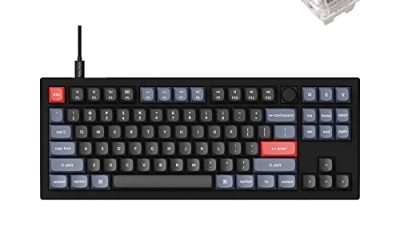
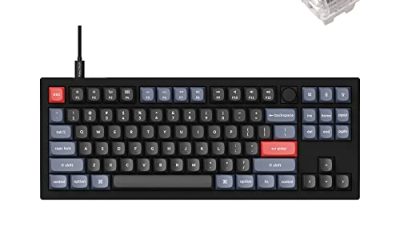
- Tenkeyless layout with rotary knob
- QMK and VIA remapping support
- Hot-swappable K Pro Brown switches
- Wired USB-C connection

- Connectivity: Bluetooth wireless and USB-C wired
- Joysticks: TMR electromagnetic, anti-drift design
- Triggers: Hall effect, with mode switching
- Extras: two remappable back buttons, motion control

- Connectivity: Xbox Wireless and Bluetooth
- Port: USB-C for wired play
- Controls: hybrid D-pad, dedicated Share button
- Power: AA batteries or optional rechargeable pack
All 5 Picks at a Glance
| Product | Specs | Action |
|---|---|---|
| Keychron V3 |
| Check price on Amazon |
| 8BitDo Ultimate 2 Bluetooth Controller |
| Check price on Amazon |
| Xbox Wireless Controller, Carbon Black |
| Check price on Amazon |
 Logitech G502 HERO |
| Check price on Amazon |
 Samsung T9 Portable SSD 2TB |
| Check price on Amazon |
Infinity: Battlescape is I-Novae Studios’ massively multiplayer space combat game, built around seamless planetary flight and battles that run from orbit down to a planet’s surface. It reached Steam in Early Access in September 2019 and is still developed by its small independent studio today. For Linux players the question is a simple one: is there a native build, and if not, what does the compatibility record actually say?
The short version is that Steam sells a Windows-only game here, and the paperwork around it needs careful reading. The store record carries Mac and Linux requirement blocks that turn out to be empty shells, Valve’s Steam Deck test is years out of date, and the community compatibility file is split between flawless runs and copies that never reach gameplay.
As an Amazon Associate, we earn from qualifying purchases.
Quick answer
Infinity: Battlescape has no native Linux build. Steam sells a Windows-only package with a single Windows depot and a single Windows launch entry, and Valve rates the game Unsupported on Steam Deck. On desktop Linux the only route is Proton, where eleven reports settle at Silver with a split record of flawless runs and start-up failures.
What the Steam record actually sells
The platform flags on the game’s record are unambiguous: Windows is true, Mac is false and Linux is false. The one purchase package repeats the same flags, so no edition hides a second build. SteamDB’s depot table holds a single content depot, numbered 1079621 and labelled Windows 64-bit Infinity: Battlescape Content, at 8.97 GiB; the only other depots are Windows redistributables.
The launch configuration tells the same story. There is exactly one launch entry, pointing at the executable Bin\Infinity Battlescape.exe with a -steam argument, marked for Windows and 64-bit systems only. No Linux launch entry exists for a native build to use. The asset list holds a standard client icon and no Linux client icon, and the record exposes no DLC array, so there is no add-on family carrying separate platform flags to audit.
Development, meanwhile, has not stopped: the public branch was updated in July 2026, so the game is still tended — on the Windows record only.
The empty requirements trap
Open the system requirements on the store page and the record looks, at a glance, more promising than it is. The app data carries a Mac requirements block and a Linux requirements block, each with minimum and recommended tiers. Read them closely, though, and both tiers of both blocks are empty lists — headings with nothing underneath. This is the populated-but-empty shell pattern: the scaffolding for a Linux tab exists, but no Linux specification was ever published into it, and no Linux depot or launch entry stands behind it.
That distinction matters because requirement blocks are the layer most often quoted out of context. A Linux heading proves nothing here; the flags, the depot table and the launch configuration are the delivery record, and all three say Windows only.
Steam Deck: Unsupported, on paperwork from 2022
Valve has reviewed this game for the Steam Deck, and the verdict on the record is Unsupported, for both the Deck category and SteamOS compatibility. The test sheet’s detail lines describe a game whose input class is recorded as other rather than gamepad, which needs the on-screen keyboard invoked by hand and shows small in-game text. The sheet names proton-stable as the recommended runtime, which underlines that even the test was run against the Windows build through Proton, not against any native port.
The staleness problem is significant. Valve’s test is dated 21 July 2022 and was run against build 8359941. The current public build is 24064290, shipped in July 2026 — years of Early Access development separate the two, so the badge measures a much older version of the game. It remains the only verdict Valve has published, and this article claims no other.
ProtonDB: a Silver file with two very different halves
The ProtonDB summary for the game was read in full: the settled tier is Silver, the best-reported tier is Platinum, the trending tier is Gold, across 11 reports with moderate confidence. That spread — Platinum at the top, Silver as the settled figure — is the signature of a file that splits by era and hardware rather than one with a single consistent behaviour.
The positive half is genuinely positive. Several reports describe the game running flawlessly out of the box, including online matches rated Excellent for multiplayer, on Proton versions from the 5.0 and 6.3 eras through to a Proton 9.0-1 report that found no notable issues. The negative half is just as specific: a black screen on spawn in an early report, load-screen crashes tied to a DirectX 11 renderer texture exception in another, and the most recent report in the file — on Proton 9.0-2 — records a game that installs and opens but stops before play begins, with an engine database exception on screen.
One more heading needs naming openly. The game’s ProtonDB page renders in full and carries a Natively Supports heading, the stray-tag pattern seen across this cluster. Steam’s record contradicts it on every layer — flags, depot and launch entry — so this article follows Steam and treats the heading as a labelling artefact, not evidence of a native build.
Anti-cheat, accounts and the multiplayer question
Because Battlescape is an online multiplayer game, the anti-cheat position matters, and here the honest answer is that the public record is silent. The Are We Anti-Cheat Yet database was read in full — 1,167 entries at the repo root — and it holds no entry for this game by name or app number, so it documents no status in either direction. Steam’s own record names no anti-cheat either. What it does name is a third-party account requirement: playing means holding an I-Novae account alongside your Steam account.
The practical reading is narrow. Nothing in the record points to a kernel-level anti-cheat of the kind that hard-blocks Proton titles, and the ProtonDB reports describing successful online play support that reading — but with no database entry and no named system, this article makes no stronger claim.
GOG and other storefronts
There is no GOG edition to fall back on. The game’s natural product address on GOG resolves to the general catalogue rather than a product page, and GOG’s own product searches return no entry for the title. Steam is the only storefront selling the game, which means the Windows-only Steam package described above is the whole of the PC offer.
Gear for a desktop Linux attempt
With the Deck rated Unsupported, the sensible setup is a Linux desktop, so the picks below are desktop gear. The game’s own record lists partial controller support, which is why two pads appear: they serve the wider library and Steam Input mapping, with keyboard and mouse doing the real work in a flight game of this kind.
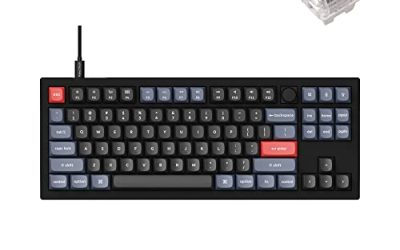
Keychron V3
- Tenkeyless layout with rotary knob
- QMK and VIA remapping support
- Hot-swappable K Pro Brown switches
- Wired USB-C connection
The keyboard pick for desktop sessions: a tenkeyless board with QMK and VIA support lets you remap keys at the keyboard level, which keeps working across every Linux install you plug it into.
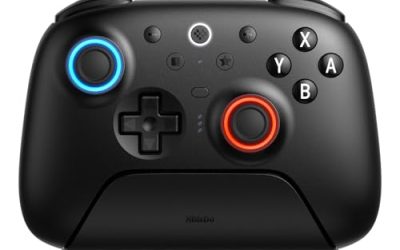
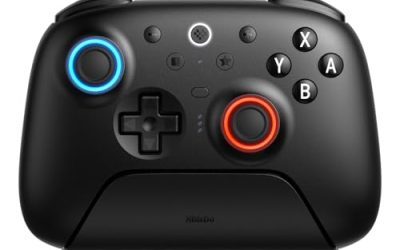
8BitDo Ultimate 2 Bluetooth Controller
- Connectivity: Bluetooth wireless and USB-C wired
- Joysticks: TMR electromagnetic, anti-drift design
- Triggers: Hall effect, with mode switching
- Extras: two remappable back buttons, motion control
The docked and desktop pad pick, with modern sticks and triggers plus back buttons that suit a game full of menu and map screens when a pad is mapped through Steam Input.
Xbox Wireless Controller, Carbon Black
- Connectivity: Xbox Wireless and Bluetooth
- Port: USB-C for wired play
- Controls: hybrid D-pad, dedicated Share button
- Power: AA batteries or optional rechargeable pack
The safest guest pad in PC gaming: Steam Input support is universal, the glyphs match what most games display, and it pairs over Bluetooth or its own wireless standard.
Logitech G502 HERO
- HERO optical sensor, up to 25,600 DPI
- 11 programmable buttons
- Adjustable weight system
- Wired USB connection
A space combat game built around menus, maps and target selection rewards a precise wired mouse, and eleven programmable buttons cover the inputs a long session repeats most.
Samsung T9 Portable SSD 2TB
- Capacity: 2 TB portable SSD
- Interface: USB 3.2 Gen 2×2, USB-C connector
- Maker-rated speeds: up to 2,000 MB per second read, 1,950 MB per second write
- Features: Dynamic Thermal Guard, maker-rated drop resistance
For moving a Linux game library between a desktop and a laptop, or keeping an offline backup of installers, a fast USB-C drive is the simple answer. The headline figure needs a Gen 2×2 host port; on a lesser port the drive runs at that ceiling instead.
How to choose your route in
Start from the ProtonDB file rather than the store page. The settled Silver tier with a Platinum best-reported tier means your outcome depends heavily on your hardware and Proton version, so read the newest reports first and weight them over the flawless older ones; the most recent report in the file is a failure to start play, and that recency cuts both ways.
On the Deck, treat Valve’s Unsupported badge as old but unreplaced: it was earned by a 2022 build, and nothing newer has been published to supersede it. On desktop, pick a current stable Proton, keep the game’s substantial download on fast storage, and set expectations for an Early Access multiplayer title whose engine has produced texture and database exceptions in community reports. If your first launch fails the way the newest report describes, the file offers no proven workaround — that absence is itself useful information before you commit time to troubleshooting.
Who should skip it
Skip this one if you need a native Linux build: none exists, and the empty requirements blocks are not a promise of one. Skip it if the Steam Deck is your only machine, since Valve’s published verdict is Unsupported. Skip it if you want offline play — this is an always-online multiplayer game tied to a third-party account — and skip it if a split compatibility record bothers you.
FAQ
Does Infinity: Battlescape have a native Linux version?
No. Steam’s platform flags are Windows only, the single content depot is a Windows 64-bit build, and the only launch entry runs the Windows executable. The Linux requirements block on the record is an empty shell with no published specification in it.
Can I play it on Steam Deck?
Valve’s published rating is Unsupported, from a test run in July 2022 against a much older build. The game has been updated many times since, but no newer verdict exists, so the Unsupported rating is the only official word available.
How well does it run under Proton on desktop Linux?
ProtonDB settles at Silver from 11 reports with moderate confidence, with a best-reported tier of Platinum and a trending tier of Gold. Reports range from flawless online play to failures that stop before gameplay, including in the most recent report, so results vary sharply by setup.
Is it sold on GOG or anywhere else?
No. There is no GOG product page for the game, and Steam is the only storefront carrying it. The Steam package is Windows only, so there is no DRM-free or alternative edition with different platform support.
Final verdict
Infinity: Battlescape is a Windows-only game whose Linux story is written entirely by Proton. The delivery record is clean and consistent — one Windows depot, one Windows launch entry, no native build anywhere — while the surrounding paperwork misleads in both directions: empty Linux requirement blocks on the store side, a stray native heading on the community side, and a Deck verdict too old to describe the current build. Desktop Linux players with patience for a Silver-rated, split-record Proton file can reasonably try it; everyone else should wait for a fresher verdict before treating it as a safe purchase.
Product and ASIN Reference
| Product | ASIN |
|---|---|
| Keychron V3 | B0B2DMMMG2 |
| 8BitDo Ultimate 2 Bluetooth Controller | B0F194QFT2 |
| Xbox Wireless Controller, Carbon Black | B08DF248LD |
| Logitech G502 HERO | B07GBZ4Q68 |
| Samsung T9 Portable SSD 2TB | B0CHFS9K14 |