Intel Core Ultra 265K Review Gaming
The Intel Core Ultra 7 265K is the middle of Intel’s high-end Core Ultra 200S desktop range. It has 8 performance cores and 12 efficient cores, for 20 cores in total, and like its bigger sibling it drops Hyper-Threading. For a gamer who wants a strong Intel processor without paying for the top model, the 265K is the chip that most often makes the shortlist.
This is a buying guide, not a lab report. It explains where the 265K fits, which buyers should choose it, and which alternatives make more sense for a different budget or resolution. The listing below is the closest match for this query. Confirm the exact model, cooler and current price on the card before buying.

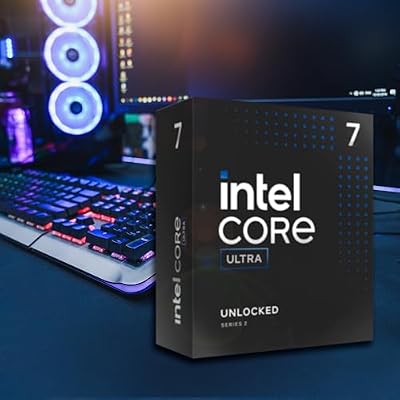
Intel Core Ultra 7 Desktop Processor 265K - 20 cores (8 P-cores + 12 E-cores) up to 5.5 GHz

Where the 265K Sits in the Intel Lineup
The 265K sits one step below the 285K. It keeps the hybrid performance and efficient core design, but with fewer cores in total. The top chip has more efficient cores for background work, while the 265K has fewer. For a pure gaming system that difference is small. For a machine that runs many background programs alongside a game, the gap grows.
Below the 265K, the 245K trims the core count further. That makes the 265K the sensible middle option for buyers who want more headroom than the value chip without paying for the flagship platform premium.
Key Specs and Build Requirements
The published specification is 20 total cores (8 performance and 12 efficient), a maximum turbo of up to 5.5GHz and a 125W base power rating. It uses the LGA 1851 socket, with a Z890 motherboard as the common choice and B860 boards supporting the series. Like the rest of the 200S line, it uses DDR5 memory and does not work with the older LGA 1700 platform.
Cooling and power for a gaming build
Under normal gaming load, the 265K runs comfortably with a good tower air cooler. For long renders or sustained multi-core work, a 240mm or 360mm AIO is a safer choice. A reliable 750W to 850W power supply gives headroom for a high-end graphics card, following the power supply guide.
Memory and storage
Pair the chip with a quality DDR5 kit and a fast NVMe SSD for the operating system and games. The DDR5 6000MHz guide covers practical memory choices, and the SSD guide for gaming PCs explains storage options that load games quickly.
Comparison Table: The 265K Against Its Neighbors
| Processor | Cores (P+E) | Max Turbo | Best For | Typical Price Range |
|---|---|---|---|---|
| Core Ultra 7 265K | 8+12 (20 total) | Up to 5.5GHz | High-end gaming with multitasking | Upper tier, check current price |
| Core Ultra 9 285K | 8+16 (24 total) | Up to 5.7GHz | Heavy parallel workloads | Top tier, check current price |
| Core Ultra 5 245K | 6+8 (14 total) | Up to 5.2GHz | Value gaming build | Mid tier, check current price |
The 265K is the balanced pick in this group. It gives more background capacity than the 245K and most of the gaming character of the 285K. Buyers who do not run heavy parallel work will often find the 265K enough, and they keep the savings for the graphics card.
Intel Core Ultra 7 Desktop Processor 265K - 20 cores (8 P-cores + 12 E-cores) up to 5.5 GHz




As an Amazon Associate we earn from qualifying purchases. Product prices and availability are accurate as of the date/time indicated.
Who Should Buy the 265K
Gamers who stream or run background software
If you game while running a stream, a voice app, a browser full of tabs and a few utilities, the 265K’s twelve efficient cores absorb that background load. The performance cores stay free for the game. This is where the chip earns its place over the value option.
Builders who want a high-end Intel gaming PC
For a mainstream high-end gaming build on Intel, the 265K is the most common choice. Pair it with a strong graphics card at 1440p or 4K, and the processor will rarely be the limit. The best CPU for 1440p gaming guide explains how the processor and resolution interact.
Who Should Skip It
Competitive players at 1080p
For high-frame-rate esports at 1080p, the cache advantage of AMD’s X3D chips is often more useful than an extra eight cores. The best CPU for Valorant guide explains why cache-heavy chips suit that workload.
Budget builders
If the total budget is limited, the 245K or a budget AMD chip will give more value. The budget CPU guide for gaming compares the cheaper options in detail.
Platform and Build Notes
The motherboard decides how much the platform can do. A Z890 board gives the full feature set, while a B860 board is a practical choice for a simpler build. The Intel motherboard guide lists boards by tier. Check the board’s BIOS version before installation, because new 200S platforms often need an update to support the chip.
A full build sequence is covered in the step-by-step build guide. For cooling, the CPU cooler guide is the best starting point. Keep case airflow balanced, because the chip’s heat adds to the overall thermal load.
How It Compares With AMD
The 265K’s natural rival is AMD’s high-end mainstream line, including the 9800X3D for gaming and the 9950X for productivity. Intel’s hybrid design favors multitasking and core count, while AMD’s X3D chips favor cache-heavy gaming. The Intel versus AMD gaming overview is the place to start, and the Intel 14900K versus 9800X3D comparison shows how the two sides compete at the high end.
Frequently Asked Questions
Is the Core Ultra 265K good for gaming?
Yes. It handles current games well, especially at 1440p and 4K, where the graphics card is usually the main limit. For the highest frame rates at 1080p, a cache-heavy chip may do better in some titles.
Is the 265K worth it over the 245K?
For gaming alone, the difference is often modest. The 265K is worth it if you run heavy background work, stream, or plan to keep the system for several years and want more headroom.
Does the 265K support Hyper-Threading?
No. The 200S series does not include Hyper-Threading, so each core runs one thread. The efficient cores handle background work, and most modern games perform well under this design.
Which motherboard should I use with the 265K?
A Z890 board is the full-featured choice, and a B860 board works for a simpler build. Check the board’s memory support list and BIOS version before buying.
Final Verdict
The Intel Core Ultra 7 265K is the balanced high-end choice in Intel’s current desktop range. It gives strong gaming performance, real multitasking headroom and a clear platform path, without the cost of the flagship. It is the chip most gamers should compare first on Intel. Pair it with a good board, a capable cooler and a quality DDR5 kit, and it will serve a high-end 1440p or 4K build well.