

Best Prebuilt Gaming PC $1500 2026
At around 1500 dollars, a prebuilt gaming PC moves from a basic 1080p machine into a more capable tier. The extra budget usually buys a stronger graphics card, more headroom for 1440p gaming, and better cooling. But the price alone does not guarantee a good system. A machine at this level can still hide weak power delivery, a thin cooler, or a graphics card that is less capable than its name suggests. This guide shows how to read a 1500-dollar prebuilt spec sheet so you can compare machines with confidence.
The shortlist below includes a featured listing and four alternatives. Use it as a set of candidates rather than a ranking. The listing above may be a close match to the 1500-dollar class, not an exact configuration, so check the components, warranty, and live price on the card. We have not included benchmark numbers, because results depend on the game, settings, and parts installed.


What the Extra Budget Buys at 1500 Dollars
Moving from 1000 dollars to 1500 dollars typically buys a stronger GPU class, more comfortable 1440p performance, and room for more memory. You may also see better motherboards and cases. For many players, this tier is the sweet spot. It supports high settings at 1080p and playable 1440p with upscaling in many modern games. It is not the right tier for maximum settings at 4K, but it can handle most mainstream titles well.
GPU Headroom for 1440p
At this price, the GPU matters even more. A stronger card gives room for 1440p and for games that lean heavily on graphics. Check the GPU model on the spec sheet and compare it with reviews of the same class at 1440p. Be wary of listings that emphasize the CPU and skip the graphics card, because the graphics card will determine most of your frame rates.
Memory and Storage Targets
Aim for 32GB of system memory if you plan to stream, edit, or run many applications. Sixteen gigabytes is still a valid minimum for gaming alone. Storage should be a 1TB or 2TB NVMe drive. A second M.2 slot is a useful bonus, since it lets you add storage later without replacing the drive you bought.

Lenovo Legion Tower 5i – AI-Powered Gaming PC - Intel® Core Ultra 7 265F Processor – NVIDIA® GeForce RTX™ 5060 Ti Graphics – 16 GB Memory – 1 TB Storage – 3 Months of PC GamePass
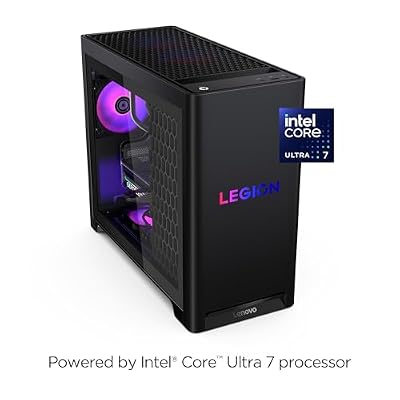


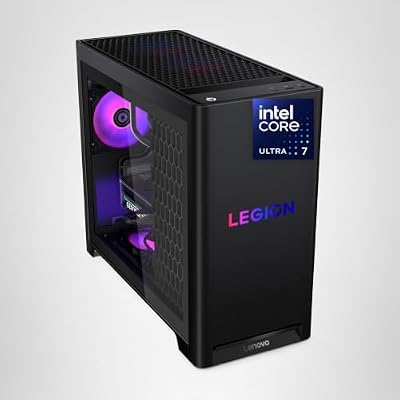
As an Amazon Associate we earn from qualifying purchases. Product prices and availability are accurate as of the date/time indicated.
1500-Dollar Prebuilt Options Compared
The table below compares the common configuration classes in this price range. It is a checklist for comparing listings, not a ranking of specific systems. Price ranges are approximate, and the live price on the card always takes precedence.
| Configuration class | Best for | Typical price range | What to verify |
|---|---|---|---|
| Mid-tier GPU, 16GB RAM, 1TB NVMe | High settings at 1080p and entry 1440p | Check current price | GPU model, PSU wattage, case airflow |
| Stronger GPU, 32GB RAM, 1TB or 2TB NVMe | 1440p gaming and streaming | Check current price | Cooling, motherboard quality, upgrade room |
| Compact small form factor build | Space-saving desk setups | Check current price | GPU length limits, thermal headroom |
| Open-box or refurbished prebuilt | Lower cost with careful inspection | Check current price | Warranty, return policy, component history |
Checks That Separate Good Prebuilts From Average Ones
Start with the power supply. At this tier, a quality PSU with enough headroom for future upgrades is important. Next, check the cooling. A tower with good airflow and an adequate CPU cooler keeps the system quiet and stable. Then look at the motherboard. A board with proper VRM cooling and spare PCIe and M.2 slots gives you room to grow. Finally, read the warranty terms and the support policy. A longer warranty on the system is worth more than a small discount.
Upgrade Room Over Two Years
Look for a case with space for a larger GPU and a motherboard with free RAM slots. If the prebuilt uses a proprietary layout, upgrades become harder and more expensive. Check the case dimensions against the GPU length you may want later.
Noise and Thermal Behavior
A well-cooled 1500-dollar system should stay quiet during everyday use and only get louder under heavy load. Reviews that measure noise at idle and under gaming load are helpful. Poor airflow often shows up as high fan speeds and warm components, so case design matters.

YAWYORE Gaming PC, AMD Ryzen 7 5700X, GeForce RTX 5060 Desktop Computer | 32GB DDR4 RAM, 1TB M.2 NVMe SSD,, ARGB Fans, WiFi+BT


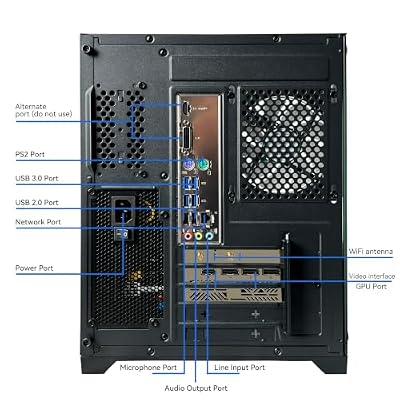

As an Amazon Associate we earn from qualifying purchases. Product prices and availability are accurate as of the date/time indicated.
Who Should Buy a 1500-Dollar Prebuilt
This tier suits players who want reliable 1440p performance, plus room for streaming and creative tasks. It is a good middle ground for buyers who do not want to build their own system. If your budget is lower, our 1000 dollar prebuilt guide covers the entry tier. If you have more to spend, our 2000 dollar prebuilt guide shows the next step up.
Streamers and Content Creators
Streamers and creators benefit from extra memory and a faster NVMe drive. Check whether the system has enough cooling for encoding workloads. Our gaming PC for streaming guide lists the features to prioritize.
Buyers Who Want a Custom Build Later
If you plan to upgrade the GPU later, choose a case and power supply with room to spare. Our gaming PC power supply guide explains how to pick a PSU with headroom for future cards.
Related Guides on GamingPCGuru
Use these guides alongside this article when you compare budgets, displays, cooling, and the wider market before you buy.
- gaming PC for 1500 dollars guide, for a mid-tier desktop build.
- gaming PC SSD guide, for storage speed and capacity.
- gaming PC case guide, for airflow and fit.
- complete gaming PC buying guide, for a checklist for every part.
- gaming PC deals roundup, for where discounts tend to show up.
Frequently Asked Questions
Is 1500 dollars enough for 1440p gaming?
For many modern games at medium-high settings, yes, especially with upscaling enabled. Demanding titles may need lower presets. Check reviews of the specific GPU class at 1440p before you decide.
Should I get 32GB of memory at this price?
If you stream, edit, or multitask, 32GB is a worthwhile upgrade. For gaming alone, 16GB is enough. Check whether the memory is in a configuration you can expand later.
Is a prebuilt worth the premium over a custom build?
A prebuilt offers one warranty, tested parts, and no assembly. A custom build can offer better value if you are comfortable choosing parts. Choose based on your time and comfort with building.
Final Verdict
The best 1500-dollar prebuilt gaming PC combines a capable GPU for 1440p, 32GB of memory if you can get it, a quality power supply, good cooling, and a clear warranty. Use the featured listing and the alternatives to build a shortlist, then verify the exact components, price, and support terms before buying.







