

Best Prebuilt Gaming PC $3000 2026
At 3000 dollars, a prebuilt gaming PC is a serious machine. This budget supports high-refresh 1440p gaming with maximum or near-maximum settings in most titles, and it leaves room for 4K in less demanding games with upscaling. It is also the tier where cooling, power delivery, and build quality become visible differences rather than footnotes. A well-designed system at this price stays quiet, holds its clocks, and gives you a clear upgrade path. A poorly designed one wastes the budget on a flashy graphics card with weak supporting parts.
The shortlist below includes a featured listing and four alternatives. It is a set of candidates to verify, not a ranking. The listing above may be a close match to the 3000-dollar class rather than an exact configuration, so check the components, warranty, and live price on the product card. We have not included benchmark numbers, because the results depend on the game, the resolution, and the exact parts.


What the 3000-Dollar Tier Delivers
At this price, the most important difference from lower tiers is headroom. A high-end GPU class can drive 1440p at high refresh rates in most games and handle 4K with upscaling in many titles. The processor is strong enough to avoid bottlenecks in CPU-heavy games. Memory is comfortable at 32GB, and storage can be generous. The real question is whether the system is balanced, because a flagship GPU paired with an underpowered PSU or a thin cooler will not deliver the experience you paid for.
High-End GPU and 4K Upscaling
A high-end GPU at this price is the core of the system. Look for strong reviews at 1440p and 4K, and check whether the card supports the upscaling technologies you plan to use. For 4K, check whether the monitor you plan to buy matches the GPU’s strengths. A high-end card on a low-refresh panel can be underused.
Cooling and Power Supply
A high-end GPU and CPU produce significant heat and draw significant power. Check that the case has strong airflow, that the CPU cooler matches the processor, and that the power supply has comfortable headroom. A quality PSU from a reputable brand with a long warranty protects the whole system. Reviews that test noise and temperatures under load help you choose a build that stays quiet.

Alienware Aurora Gaming Desktop, RTX 5080, Intel Core Ultra 9 285 | 1TB SSD, 32GB DDR5 RAM, 2.5Gb Ethernet, Wi‑Fi 7, Windows 11 Home, Wired Keyboard, ACT1250


As an Amazon Associate we earn from qualifying purchases. Product prices and availability are accurate as of the date/time indicated.
3000-Dollar Prebuilt Options Compared
The table below compares the classes you are likely to see at this price. It is a checklist for comparing listings rather than a ranking. Price ranges are approximate and move over time, so check the live price before you commit.
| Configuration class | Best for | Typical price range | What to verify |
|---|---|---|---|
| High-end GPU, 1440p high-refresh build | Competitive and single-player gaming at 1440p | Check current price | GPU model, CPU pairing, PSU headroom |
| High-end GPU, 4K-oriented build | 4K gaming with upscaling | Check current price | Cooling capacity, memory, monitor match |
| Creator-focused build, 64GB RAM | Gaming with heavy editing or rendering | Check current price | Storage size, cooling under sustained load |
| Premium quiet build | Low-noise gaming in shared spaces | Check current price | Fan count, radiator size, case acoustics |
What to Verify on a 3000-Dollar Prebuilt
Start with the parts list. Confirm the GPU, CPU, memory, and storage on the spec sheet, and check that the motherboard supports the memory speed the system is advertised with. Next, check the power supply brand and wattage. Then look at the case, the cooler, and the fan layout. Finally, read the warranty terms. At this price, a longer parts warranty and responsive support are worth as much as a few hundred dollars of hardware.
Memory Capacity and Speed
Thirty-two gigabytes is a solid baseline. If you edit video or work with large projects, 64GB is worth considering. Check that the memory runs at its rated speed, and confirm whether the board supports later upgrades.
Storage and Upgrade Room
A 2TB NVMe drive is a practical target at this price. Check whether the board has spare M.2 slots, since fast drives fill quickly with large games. Our gaming PC SSD guide explains what to look for in a drive.

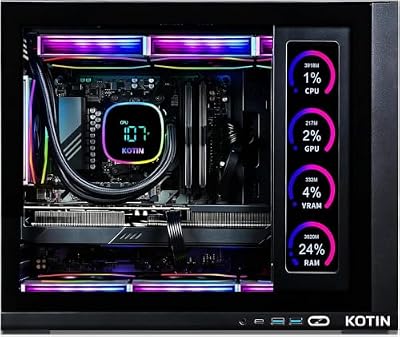
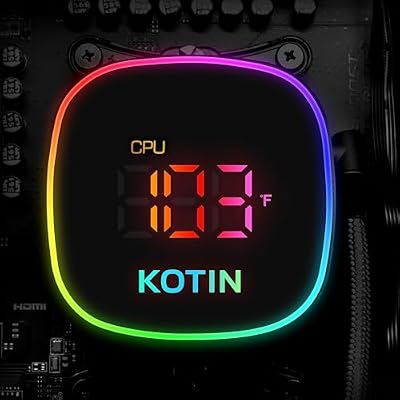
KOTIN Prebuilt Gaming PC RTX 5070 12GB, Ryzen 7 9700X, 32GB DDR5, 1TB SSD | 11.3in Smart Display, 850W 80+ Gold PSU, 360mm Liquid Cooler, WiFi 7, 1440p 4K ARGB Windows 11 Gaming Desktop Computer


As an Amazon Associate we earn from qualifying purchases. Product prices and availability are accurate as of the date/time indicated.
Who Should Buy a 3000-Dollar Prebuilt
This tier suits enthusiasts who want a high-end system without building one, creators who game on the same machine, and players who plan to use a high-refresh 1440p or 4K monitor. It is a poor value for players who only run esports at 1080p, since a lower tier will be enough. For those players, our 2000 dollar prebuilt guide is a better fit. If you want to build the machine yourself, our 3000 dollar gaming PC build guide shows how to spend the same money on parts.
Creators Who Game
Creators benefit from extra memory, fast storage, and strong multi-core performance. Check whether the processor and cooler can sustain long render jobs. Our gaming PC for streaming guide covers related workloads.
Enthusiasts Planning 4K
If 4K is your target, match the monitor to the GPU and check whether upscaling is part of your plan. Our gaming PC power supply guide explains the wattage and quality you should expect for a high-end build.
Related Guides on GamingPCGuru
Use these guides alongside this article when you compare budgets, displays, cooling, and the wider market before you buy.
- gaming PC specs guide, for what each component does.
- gaming PC requirements guide, for how much power games demand.
- gaming PC case guide, for airflow and fit.
- complete gaming PC buying guide, for a checklist for every part.
Frequently Asked Questions
Is 3000 dollars too much for a prebuilt?
It depends on your target. For high-refresh 1440p and 4K upscaling, the premium buys real headroom. For 1080p esports, it is unnecessary. Choose the tier that matches your display and games.
Do I need 64GB of memory?
For most gamers, 32GB is enough. Sixty-four gigabytes is worth it for heavy editing, rendering, or running virtual machines alongside games.
Is a prebuilt better than a custom build at this price?
A prebuilt offers one warranty and no assembly. A custom build can offer better part selection and easier future upgrades. Choose based on your comfort with building and how much you value the single warranty.
Final Verdict
The best 3000-dollar prebuilt gaming PC is a balanced system with a high-end GPU suited to your target resolution, a capable processor, 32GB or more of memory, fast storage, a reputable power supply, and strong cooling. Use the featured listing and alternatives as a shortlist, then verify the exact parts, warranty, and live price before you buy.







