Gaming Laptop RGB Keyboard in 2026: Lighting, Layout and Typing Feel
The keyboard is the part of a gaming laptop you touch for hours, yet it is often judged on looks alone. An RGB backlight is a useful feature, but lighting is only one part of the experience. Key travel, layout, typing comfort, durability and the software that controls the colours all shape whether you enjoy the machine. This guide explains what to look for in a gaming laptop keyboard with RGB lighting and how to compare listings without relying on the lighting pattern in a product photo.
This is a buying guide, not a detailed research. We do not describe the feel of a specific keyboard from personal use, and we do not quote switch ratings or durability figures. Where we describe a keyboard feature, we describe what it means in practice and the patterns that independent reviewers commonly report. Read reviews of the exact model before you decide.
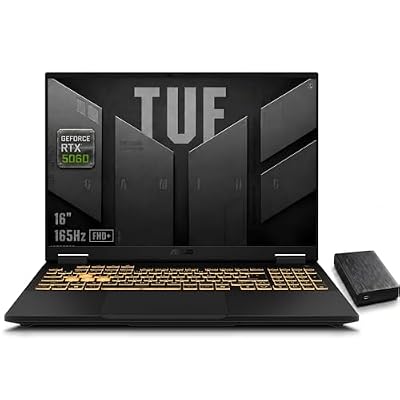
The listings below were returned for this search. The first is the primary pick and the others are close alternatives. The listing above may not match the exact model you had in mind, so confirm the keyboard lighting type, layout and price on the card before you buy.


Understanding RGB Lighting on a Laptop Keyboard
Laptop keyboards come with several lighting designs, and the difference matters more than the number of colours printed on the box. Per-key RGB lets you colour each key separately, which is useful for games with on-screen key prompts. Zone lighting splits the keyboard into a few sections, each with its own colour. Single-colour backlights are simpler and often use less power. Pick the design that matches how you want to use the light, not the one with the longest feature list.
Per-Key, Zone and Single-Colour Designs
Per-key lighting gives the most flexibility and is the choice of players who build custom profiles for different games. Zone lighting is often enough for a clean look and fewer configuration steps. Single-colour lighting suits buyers who want a simple backlight and fewer software dependencies. Each design has a different cost in complexity and, in some models, in battery consumption.
Brightness and Battery Use
A bright backlight is easy to see in a dark room, but it uses power. Most laptops let you lower the brightness or turn the backlight off when unplugged. Check whether the keyboard lighting is controlled through the manufacturer’s software and whether it switches off automatically on battery.
ASUS ROG Strix G16 (2025) Gaming Laptop, 16” FHD+ 16:10 165Hz/3ms, NVIDIA® GeForce RTX™ 5060, Intel® Core™ i7 Processor 14650HX, 16GB DDR5, 1TB Gen 4 SSD, Wi-Fi 7, Windows 11 Home, G615JMR-AS74


As an Amazon Associate we earn from qualifying purchases. Product prices and availability are accurate as of the date/time indicated.
Typing Feel, Layout and Durability
Key Travel and Feedback
Key travel is the distance a key moves before it registers. Laptop keyboards generally have shorter travel than desktop keyboards because the chassis is thin. Check reviews that comment on feedback and how firm the keys feel during long sessions. A keyboard that feels right for short bursts may tire you during a long writing or work session.
Layout and Numpad
Full-size layouts with a numeric keypad suit spreadsheet work and some games. Compact layouts give more room to the mouse, which many players prefer for shooters. Check the arrow keys, the placement of the function row and whether any key is unusually small. These details affect comfort more than the colour of the backlight.
Durability and Replacement
Keyboards on laptops are harder to replace than on desktops, so durability matters. Look for reviews that comment on wear, key stability and how the keyboard holds up over time. Check the warranty terms for keyboard coverage, because accidental damage such as spills is often excluded from standard cover.
Comparison Table: Keyboard Factors by Listing
The table lists the five listings returned for this search. It highlights the factors to check for each, rather than exact prices, because prices change often and differ by seller.
| Option | ASIN | Best for | Price guidance | What to check |
|---|---|---|---|---|
| Primary pick (hero) | B0HGQ8526Z | Gamers who want customisable lighting | Check current price | Lighting type, layout, software support |
| Alternative 1 | B0DZZWMB2L | All-round gaming and everyday use | Check current price | Key travel and typing feel in reviews |
| Alternative 2 | B0HLDVMMWS | Players who want a numeric keypad | Check current price | Full-size layout and arrow key placement |
| Alternative 3 | B0H6PVC4SC | Shooter players who want a compact layout | Check current price | Compact layout comfort and mouse space |
| Alternative 4 | B0GN1XZMGF | Buyers who prioritise battery and simplicity | Check current price | Backlight power use and software needs |
Use the table to frame the decision. Your daily tasks, your game list and your tolerance for software setup will point to the right row.
Software, Profiles and Customisation
Most laptop RGB keyboards are controlled by manufacturer software. That software can offer custom profiles, lighting effects and macro options, but it also adds to the list of programs running on your machine. Check whether the software is required for basic lighting, whether it is updated regularly and whether you can use the keyboard with default settings if you prefer not to install it.
If you are setting up a wider desk around the laptop, the RGB gaming setup guide covers how lighting can be coordinated across peripherals, and the best keyboard for gaming guide shows the external options for players who want a different feel.
Keyboard Options Beyond the Laptop
A built-in keyboard is not your only choice. Many gaming laptop owners use an external keyboard on a desk for longer sessions, which gives better key travel and comfort. An external keyboard also makes the laptop keyboard less critical in your buying decision. If you plan to do this, check that the laptop has enough USB ports or a wireless option. The best mechanical keyboard for gaming guide and the wireless gaming keyboard guide cover the main external choices.
Mistakes to Avoid
Choosing for the Lighting Alone
A striking backlight is pleasant to look at, but you type on the keys for far longer than you look at the glow. Put key feel, layout and durability ahead of lighting when you compare two models.
Ignoring Switch and Key Quality
Laptop keyboards vary a lot in how they feel. Two models with the same lighting can differ in travel, stability and noise. Read reviews that describe the typing experience, and if possible, try the keyboard in a store before buying.
If you want an external keyboard for desk sessions, the gaming keyboards for 2026, the keyboard switch guide, the affordable gaming keyboards, the best gaming laptop 2026, and the budget gaming laptops are useful next steps.
Frequently Asked Questions
Is per-key RGB worth paying extra for on a gaming laptop?
It is worth it if you use lighting for game prompts, custom profiles or personal style. If you mainly want a clean backlight, zone or single-colour lighting may be enough. Consider whether you will use the extra control regularly before paying more.
Does RGB lighting drain the battery quickly?
A bright backlight uses some power, and the effect is more noticeable on battery. Lowering the brightness or turning the backlight off when unplugged helps. Check the laptop’s power settings to see how the keyboard lighting behaves on battery.
Should I buy a gaming laptop with a numeric keypad?
If you do spreadsheet work or enter many numbers, a numeric keypad is useful. Shooter players often prefer a compact layout that leaves more space for the mouse. Choose based on your main tasks rather than the presence of the keypad alone.
Final Verdict
The best gaming laptop RGB keyboard is the one that feels comfortable for your long sessions and gives you the lighting control you actually use. Start with the layout and typing feel, then compare the lighting design and the software that controls it. Confirm the keyboard type and layout on the listing, read reviews of key feel and durability, and consider an external keyboard if you plan long desk sessions.