
CyberPower UPS for Gaming PCs 2026: Buying Guide and Spec Checklist
CyberPower is a long-established name in consumer battery backup, and its desktop-class units are a common choice for home PC setups. The brand covers everything from small units for a router and modem up to larger line-interactive boxes sized for a high-end PC and monitor. This guide focuses on how to choose a CyberPower UPS for a gaming rig, how to read its specification sheet, and where the brand fits against the rest of the market. It does not assume any single model is the right one for your build.
The listing above may be a close match for a CyberPower model in the consumer range rather than the exact unit you have in mind. CyberPower sells several families with similar names but different topologies, watt ratings and outlet counts. Check the model number, the watt rating, the battery-backed outlet count and the warranty on the card before you order. Everything below is written so the checklist holds for any CyberPower unit you compare.


CyberPower EC850LCD Ecologic UPS Battery Backup and Surge Protector | 850VA/510W, 12 Outlets, ECO Mode, Compact, UL Certified
Where CyberPower Fits in a Gaming Setup
A gaming PC has two very different power needs. The first is short-term protection: the machine should ride out a flicker or a brief outage without a hard reset. The second is clean shutdown: if the outage lasts longer than the battery, the PC should save state and power down before the battery runs flat. A CyberPower UPS is built around those two needs. Its consumer units typically combine a battery, voltage regulation and USB communication with the operating system, which covers both jobs for a single desktop.
The brand is a practical choice for players who want a dependable, widely supported unit without a specialist enterprise purchase. It is also common in home offices, where the same box protects a PC, a monitor and a network modem. Expect the value case to be strongest for mid-range desktops and less compelling for a workstation that needs an online double-conversion design.
Reading a CyberPower Spec Sheet
Watts, VA and the Real Load
CyberPower lists both VA and watts, and you should size against watts. The difference matters because a unit’s VA rating can look generous while its usable watts are lower. Measure your PC at the wall during a demanding game, record the peak, and add 20 to 30 percent headroom. A UPS running at its limit runs hot, drains faster and ages its battery sooner, so headroom is not optional for a gaming system.
Topology and Voltage Regulation
Most consumer CyberPower models use a line-interactive design with automatic voltage regulation. That means the unit corrects minor sags and swells without spending battery charge, which is the right behaviour for a home with ordinary grid variation. Standby designs are cheaper but correct less, and online designs are more than a desktop gamer usually needs. If your listing names an AVR range, a wider range is generally better on an older or unstable grid.
Waveform and PSU Compatibility
Check whether the output is pure sine wave or a simulated sine wave. Modern gaming power supplies usually accept either, but pure sine is the more comfortable match for active power factor correction. This is a detail to confirm on the spec sheet, not a reason to pay a large premium if the rest of the unit fits your load.
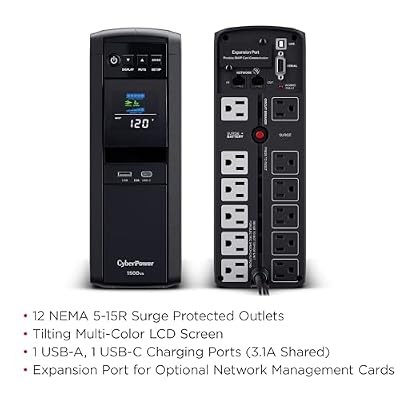
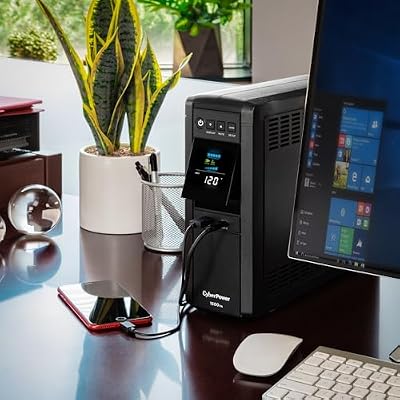
CyberPower CP1500PFCLCD PFC Sinewave UPS Battery Backup and Surge Protector | 1500VA/1000W, 12 Outlets, AVR, Mini Tower, UL Certified





As an Amazon Associate we earn from qualifying purchases. Product prices and availability are accurate as of the date/time indicated.
Outlets, Monitoring and Setup
Battery-Backed and Surge-Only Outlets
A good layout separates the outlets. Put the gaming PC and the monitor on battery-backed sockets so they keep working through a short outage. Put less critical loads, such as speakers, a phone charger or a lamp, on surge-only sockets. Avoid plugging a laser printer, a space heater or a kettle into the battery side, because these loads can drain the battery quickly and will not benefit from the protection.
Software and Automatic Shutdown
The USB link and the vendor software are where a UPS earns its place on a gaming PC. Install the monitoring software, confirm that it reports battery status, and set an automatic shutdown threshold that gives your PC enough time to close the game and save. Test the shutdown behaviour once by pulling the cable from the wall on a quiet day, and confirm that the system returns cleanly. A UPS that has never been tested is a guess.
Placement and Ventilation
Keep the unit on a hard, ventilated surface, away from the PC exhaust and the radiator. Batteries age faster in hot rooms, and a UPS that sits in a closed cabinet can run warm during a long outage. Leave a few centimetres of clearance on the sides and back, and mount it low to keep the heavier battery stable.
Comparison: CyberPower Use Cases
| Use case | Key spec to check | Why it fits | Typical price band |
|---|---|---|---|
| Mid-range gaming desktop with one monitor | Watt rating with 20 to 30 percent headroom, USB monitoring | Protects the PC through brownouts and gives a clean shutdown | Lower to mid band, check current price |
| High-end GPU build with a large monitor | Higher watt rating, pure or near-pure sine output | Handles a heavier load without running at its limit | Mid to higher band, check current price |
| Gaming PC plus router and modem | Battery-backed outlet count, outlet spacing | Keeps the network online during short outages | Mid band, check current price |
| Older house with frequent sags | Wide AVR range, surge protection rating | Corrects voltage without draining the battery | Mid band, check current price |
| Budget build on a clean grid | Adequate watt rating, clear battery replacement policy | Basic protection at a lower outlay | Lower band, check current price |
Use the table as a filter. A CyberPower unit that matches your measured load and outlet needs is a reasonable buy, while one that only matches the marketing headline is not. If your build is still on the drawing board, the budget gaming PC build guide and the $1000 gaming PC build guide 2026 show how power draw changes across tiers, which helps you size the battery before you commit.
Battery Life, Replacement and Ownership Cost
Every UPS battery has a finite life. Plan on replacing it every three to five years, and sooner if the unit sits in a warm room or handles frequent outages. Check whether the battery is user-replaceable and how the vendor prices the replacement. A cheap UPS with an expensive battery can cost more over five years than a slightly pricier unit with an easy swap, so compare the total cost of ownership and not just the sticker price.
Common Mistakes With CyberPower Units
The first mistake is sizing from VA instead of watts. The second is plugging the monitor, router and printer into the battery side without checking the total load, which leaves the PC with less runtime than it needs. The third is skipping the shutdown test, so the first real outage becomes the first test. The fourth is ignoring the battery age. A unit that reports a weak battery should be serviced before it is needed, not after.
Pair the UPS with the right supply inside the PC. A strong 650W to 850W power supply handles most mid-range builds, and the best PSU for gaming PC guide covers the internal side of the equation. For a quick check on budget supplies, the budget PSUs under 150 roundup is a useful companion.
Frequently Asked Questions
Is a CyberPower UPS good enough for a gaming PC?
For most desktop gaming setups it is a reasonable choice, provided the watt rating covers your measured peak load with headroom and the unit offers USB monitoring. The brand is not a substitute for a specialist online UPS on a critical server, but a desktop gamer rarely needs that level of protection.
How long will a CyberPower UPS keep my PC running?
Runtime depends on the battery and the load. At a full gaming load, expect minutes rather than hours. Use the runtime chart in the manual for your specific model, and keep the load below roughly 80 percent of rated capacity for longer battery life.
Should I buy a bigger CyberPower unit than I think I need?
Usually yes, within reason. A larger unit runs cooler at a given load, and it gives you room when you add a second monitor or a faster GPU later. Avoid buying a unit so large that it sits idle, because a bigger battery also costs more to replace.
Can I use the UPS with a gaming PC that has an RGB-heavy case?
Yes, the UPS does not interact with case lighting. The only practical concern is power draw, because the fans and lighting add a small load. Include them in your measured peak, and keep headroom in mind when you choose the watt rating.
Power protection is one part of a wider setup. If your network drops during long sessions, a battery-backed modem and router help more than a stronger GPU, and the best gaming router guide explains what to look for. For surge-only outlets and the cable side of the rig, the gaming PC surge protector picks complement a UPS well. Readers who want the bigger picture on power, cooling and component choices can start with the most powerful gaming PC build overview and the air versus AIO cooling comparison, since heat and power draw are linked.
For the UPS roundup covering several brands side by side, see the best UPS for gaming PC guide. Power supply sizing for the internal unit is covered in the 850W gaming PSU roundup.
Final Verdict
A CyberPower UPS makes sense for a mid-range or high-end gaming PC that needs brownout protection and a clean shutdown path. Size it from a measured watt load, confirm the battery-backed outlet layout, test the shutdown once, and plan the battery replacement. Use the listing above as a starting point and check the exact model, specification and price on the card before you buy.


