

- Top Pick: NEMIX RAM 128GB (4X32GB) DDR4 3200MHz PC4-25600 2Rx8 1.2V CL22 288-PIN ECC Unbuffered UDIMM KIT
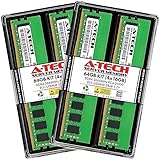
- Best Value: A-Tech Server 16GB Kit (2 x 8GB) 2Rx8 PC3L-12800E DDR3 1600MHz ECC Unbuffered UDIMM 240-Pin Dual Rank DIMM 1.35V Workstation Server Memory RAM Upgrade Stick Modules (A-Tech Enterprise Series)
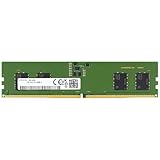
- Premium Choice: Silicon Power DDR4 16GB 3200MHz (PC4-25600) CL22 UDIMM 288-Pin Desktop Computer Memory SU016GBLFU320X02EC
Workstation RAM has different priorities to gaming memory. For professional applications — 3D rendering, video editing, large code compiles, virtual machines and big datasets — what matters most is capacity and rock-solid stability under hours of sustained load, not the last few megahertz of speed. More memory lets a workstation keep large projects and many tools in RAM at once instead of grinding to disk, while dependable modules from proven brands reduce the risk of crashes that cost you a render or a day’s work. This guide rounds up the best workstation RAM in 2026, focused on high-capacity, reliable DDR4 kits suited to demanding professional workloads.
- Best Workstation RAM at a Glance
- 1. CORSAIR Vengeance LPX DDR4 RAM 32GB (2x16GB) Up to 3200MHz CL16
- 2. G.SKILL Ripjaws V Series DDR4 RAM (XMP) 32GB (2x16GB) 3200MT/s CL16
- 3. Corsair Vengeance RGB Pro 32GB (2x16GB) DDR4 3200 (PC4-25600) C16 Desktop Memory
- 4. CORSAIR VENGEANCE LPX DDR4 RAM 16GB (2x8GB) 3600MHz CL18
- 5. Corsair Vengeance LPX DDR4 RAM 16GB (2x8GB) 3200MHz CL16
- 6. CORSAIR VENGEANCE LPX DDR4 RAM 16GB (2x8GB) 3000MHz CL15
- How to Choose Workstation RAM
- Frequently Asked Questions
- Related Guides
- Related Articles
One honest caveat up front: every kit here is standard non-ECC desktop memory, not registered ECC server RAM. ECC (error-correcting code) memory detects and corrects rare bit errors and is the gold standard for mission-critical workstations and servers, but it requires a compatible platform and costs more. For the vast majority of creative and professional desktops built on mainstream boards, high-capacity, reliable non-ECC kits like these are the practical choice — so we have chosen them on capacity, stability, dual-channel configuration and value, with prices from around $119 to around $240. Below is an at-a-glance comparison, then a closer look at each and a buyer’s guide built around what genuinely matters for a workstation.
As an Amazon Associate we earn from qualifying purchases at no extra cost to you.




🛒 Best Price Today on Amazon
Prime members get fast, free shipping on everything above, plus member-only deals. New members get a 30-day free trial — cancel anytime.
Best Workstation RAM at a Glance
| Memory Kit | Best For | Standout Spec | Approx Price |
|---|---|---|---|
| Corsair Vengeance LPX 32GB 3200 CL16 | Reliable 32GB workhorse | 2x16GB, CL16, low profile | around $223 |
| G.SKILL Ripjaws V 32GB 3200 CL16 (XMP) | 32GB pro capacity | 2x16GB, XMP, CL16 | around $240 |
| Corsair Vengeance RGB Pro 32GB 3200 C16 | 32GB with status RGB | 2x16GB, C16, RGB | around $130 |
| Corsair Vengeance LPX 16GB 3600 CL18 | Faster compute tasks | 2x8GB, 3600MHz, CL18 | around $130 |
| Corsair Vengeance LPX 16GB 3200 CL16 | Entry workstation 16GB | 2x8GB, CL16, low profile | around $119 |
| Corsair Vengeance LPX 16GB 3000 CL15 | Tight-timing 16GB | 2x8GB, CL15, 3000MHz | around $120 |
1. CORSAIR Vengeance LPX DDR4 RAM 32GB (2x16GB) Up to 3200MHz CL16

CORSAIR Vengeance LPX DDR4 RAM 32GB (2x16GB) Up to 3200MHz CL16-20-20-38 1.35V Intel XMP AMD EXPO Computer Memory – Black (CMK32GX4M2E3200C16)


As an Amazon Associate we earn from qualifying purchases. Product prices and availability are accurate as of the date/time indicated.
The Corsair Vengeance LPX 32GB kit leads the workstation list because it nails the priorities that matter for professional work: ample capacity, proven reliability and broad compatibility. It delivers 32GB across two 16GB modules at up to 3200MHz with a CL16 timing, in slim LPX heat spreaders that fit compact workstation chassis and tall coolers alike. At around $223 it is a dependable, no-drama foundation for a creative or professional desktop.
This is the kit to choose for a workstation that needs to stay up and stable for hours. The 32GB capacity lets you keep large projects, multiple applications and background services in memory at once, the CL16 3200MHz speed keeps everything responsive, and Corsair’s long track record means it plays nicely with a wide range of motherboards. The low-profile design avoids clearance headaches in dense builds. For a reliable high-capacity workhorse kit, the Vengeance LPX is the obvious starting point.
Pros: Reliable 32GB capacity, CL16 3200MHz, low-profile fit, broad workstation compatibility.
Cons: Non-ECC consumer memory; no error correction for mission-critical work.
2. G.SKILL Ripjaws V Series DDR4 RAM (XMP) 32GB (2x16GB) 3200MT/s CL16

G.SKILL RipjawsV Series DDR4 RAM (XMP) 32GB (2x16GB) Up to 3200MT/s* CL16-18-18-38 1.35V Intel AMD Desktop Computer Memory U-DIMM - Black (F4-3200C16D-32GVK)


As an Amazon Associate we earn from qualifying purchases. Product prices and availability are accurate as of the date/time indicated.
The G.SKILL Ripjaws V 32GB kit is the pro-capacity pick, offering the same 32GB-at-CL16 recipe with G.SKILL’s strong reputation for stability and a clearly labelled XMP profile. Two 16GB modules at 3200MT/s with a tight CL16 timing give a workstation plenty of headroom, and the low-profile heat spreader fits most coolers. At around $240 it is a popular, well-proven choice for a serious professional build.
This is the kit for the creator or developer who wants a large, dependable 32GB capacity and trusts G.SKILL’s track record under sustained load. The 32GB lets you run demanding creative suites, virtual machines or big compiles without constantly hitting disk, the CL16 3200MT/s speed keeps the system quick, and XMP applies the rated profile in one click. For a stable, high-capacity DDR4 kit that just works through long working days, the Ripjaws V earns its place near the top of the list.
Pros: 32GB pro capacity, stable G.SKILL reliability, easy XMP profile, low-profile design.
Cons: Non-ECC; XMP must be enabled in BIOS for the rated speed.
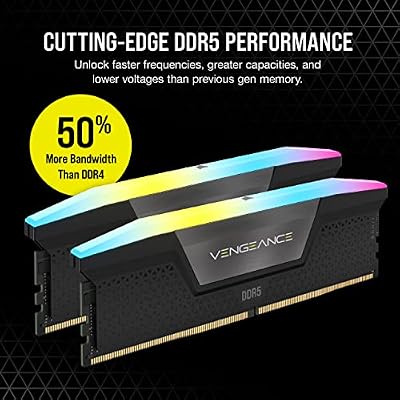
3. Corsair Vengeance RGB Pro 32GB (2x16GB) DDR4 3200 (PC4-25600) C16 Desktop Memory

CORSAIR Vengeance RGB DDR5 RAM 32GB (2x16GB) Up to 6000MHz CL30-36-36-76 1.40V AMD EXPO Intel XMP Desktop Computer Memory - Gray (CMH32GX5M2B6000Z30K)


As an Amazon Associate we earn from qualifying purchases. Product prices and availability are accurate as of the date/time indicated.
The Corsair Vengeance RGB Pro 32GB kit brings 32GB of workstation-grade capacity with a useful twist: per-module RGB that can double as an at-a-glance status indicator in an open creative build. It runs two 16GB modules at 3200MHz with a tight C16 timing and ties into Corsair’s iCUE software. As a high-capacity kit that also dresses up a desktop, it suits creators who care how their machine looks.
This is the kit for the professional whose workstation is also on display — a content creator, streamer or designer with a glass-side case. The 32GB capacity keeps large projects and many apps in memory, the C16 3200MHz speed stays responsive, and iCUE lets you coordinate the lighting (or dim it for focus). It is the same dependable Corsair memory underneath, simply with RGB on top. For a capable 32GB workstation kit that doubles as a showpiece, the Vengeance RGB Pro fits.
Pros: 32GB capacity, iCUE-controlled RGB, C16 3200MHz speed, dependable Corsair build.
Cons: Non-ECC; taller RGB modules may clash with large coolers.
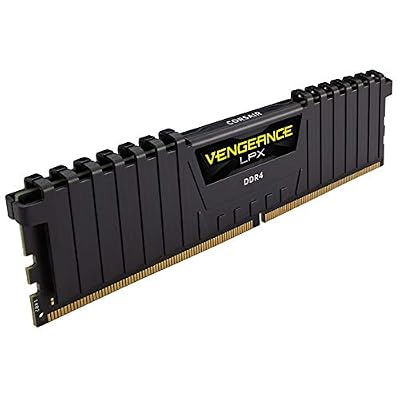
4. CORSAIR VENGEANCE LPX DDR4 RAM 16GB (2x8GB) 3600MHz CL18

CORSAIR VENGEANCE LPX DDR4 RAM 16GB (2x8GB) 3600MHz CL18-22-22-42 1.35V Intel AMD Desktop Computer Memory - Black (CMK16GX4M2D3600C18)

As an Amazon Associate we earn from qualifying purchases. Product prices and availability are accurate as of the date/time indicated.
The Corsair Vengeance LPX 3600MHz kit is the pick for faster compute-bound tasks where the higher data rate helps. It pairs a 3600MHz frequency with a CL18 timing across two 8GB modules in the low-profile LPX heat spreader, trading a slightly looser CAS number for more bandwidth. At around $130 it is a smart 16GB option for a workstation that benefits from memory speed.
This is the kit for the professional running tasks that respond to memory bandwidth — certain simulations, encoding pipelines or memory-intensive applications — where the extra 3600MHz throughput can help. The CL18 timing stays responsive at that speed, the low-profile design clears coolers in dense builds, and XMP applies the rated profile in one click. The 16GB capacity suits lighter professional workloads or a second machine; for memory-heavy projects, step up to a 32GB kit. For fast 16GB at a fair price, this is a solid choice.
Pros: Higher 3600MHz bandwidth, low-profile design, XMP support, good value for fast 16GB.
Cons: Non-ECC; 16GB limits very large projects; CL18 is looser than CL16.
5. Corsair Vengeance LPX DDR4 RAM 16GB (2x8GB) 3200MHz CL16

CORSAIR Vengeance DDR5 32GB (2 x 16GB) Up to 6000MHz AMD Intel RAM | Desktop Gaming Memory, AMD EXPO & Intel XMP 3.0 Compatible, CL30, Grey, CMK32GX5M2B6000Z30


As an Amazon Associate we earn from qualifying purchases. Product prices and availability are accurate as of the date/time indicated.
The Corsair Vengeance LPX 3200MHz CL16 16GB kit is the entry workstation pick. It delivers the proven CL16-at-3200MHz sweet spot across two 8GB modules in the trusted low-profile LPX heat spreader, at the lowest 32GB-class price point — around $119. For a budget-conscious professional build or a capable secondary machine, it covers the essentials reliably.
This is the kit to choose for an entry-level workstation, a starter creative PC, or a second system where 16GB is sufficient and dependability matters. The CL16 3200MHz speed keeps the machine responsive, the dual-channel pair delivers full bandwidth, and Corsair’s reliability and broad compatibility reduce the chance of headaches. XMP applies the rated speed in one click. It is not the kit for memory-hungry rendering or large datasets — choose 32GB for that — but for affordable, stable 16GB it is a sensible, well-priced default.
Pros: Affordable reliable 16GB, CL16 3200MHz sweet spot, low-profile fit, XMP support.
Cons: Non-ECC; 16GB is limiting for memory-heavy professional workloads.
6. CORSAIR VENGEANCE LPX DDR4 RAM 16GB (2x8GB) 3000MHz CL15

CORSAIR Vengeance RGB DDR5 RAM 32GB (2x16GB) 6400MHz CL36-48-48-104 1.35V AMD EXPO Intel XMP 3.0 Desktop Computer Memory – Gray (CMH32GX5M2B6400Z36)


As an Amazon Associate we earn from qualifying purchases. Product prices and availability are accurate as of the date/time indicated.
Rounding out the list is the Corsair Vengeance LPX 3000MHz CL15 kit, the tight-timing 16GB pick. It trades a little frequency for a notably tighter CL15 latency across two 8GB modules, keeping the memory exceptionally responsive at 3000MHz. In the low-profile LPX heat spreader and at around $120, it suits a workstation where snappy response matters as much as raw throughput.
This is the kit for the professional who values consistent, low-latency responsiveness on lighter workloads — office-heavy multitasking, code editing, or a focused single-application machine. The CL15 timing answers the CPU quickly at 3000MHz, the dual-channel pair delivers solid bandwidth, and the low-profile design fits dense builds. As with the other 16GB kits, step up to 32GB for memory-hungry creative work. For a responsive, reliable 16GB workstation kit that leans into tight timings, this Vengeance LPX is a dependable choice.
Pros: Tight CL15 timing, reliable Corsair build, low-profile fit, XMP support.
Cons: Non-ECC; 16GB only; 3000MHz is slightly slower than 3200MHz kits.
How to Choose Workstation RAM
For a workstation, capacity comes first. Professional workloads — 3D rendering, video editing, virtual machines, large datasets and big code compiles — devour memory, and running out forces the system to swap to disk, which slows everything to a crawl. If your work is memory-hungry, prioritise the 32GB kits here, such as the Vengeance LPX, Ripjaws V or RGB Pro. The 16GB kits suit entry-level professional machines, lighter workloads or a secondary system rather than heavy creative production.
Reliability and stability matter more than chasing the fastest possible speed. A workstation that crashes mid-render or corrupts a project costs you far more than a few megahertz ever saves, so favour proven modules from established brands — Corsair and G.SKILL here both have long track records — and stick to well-supported speeds your motherboard handles comfortably. A tight CL16 at 3200MHz is a dependable, broadly compatible sweet spot; a faster 3600MHz kit can help bandwidth-bound tasks if your platform supports it cleanly.
The honest question of ECC deserves a clear answer. ECC (error-correcting code) memory detects and corrects rare bit errors on the fly and is the gold standard for mission-critical workstations and servers — but it needs a compatible CPU and motherboard and costs more. None of the kits here are ECC; they are standard non-ECC desktop memory. For most creative and professional desktops on mainstream boards, that is the normal, practical choice. If your work is genuinely mission-critical and your platform supports ECC, buy ECC instead.
Finally, buy a matched dual-channel kit and enable its profile. Two modules in dual channel deliver markedly more bandwidth than one stick of the same capacity, and matched kits are tested to run together — every kit here is a matched pair. Confirm your platform is DDR4 (these will not fit a DDR5 board), check supported speeds, and enable the XMP profile in the BIOS so the kit runs at its rated frequency rather than a slow default. Size the capacity to your workload, prioritise reliability, decide honestly whether you need ECC, and pick the kit on this list that fits your professional build.
Frequently Asked Questions
Do I need ECC RAM for a workstation?
Only for mission-critical work on a compatible platform. ECC (error-correcting code) memory detects and corrects rare bit errors and is the gold standard for servers and critical workstations, but it requires a supporting CPU and motherboard and costs more. None of the kits in this guide are ECC — they are standard non-ECC desktop memory, which is the practical choice for most creative and professional desktops on mainstream boards.
How much RAM does a workstation need?
It depends on the work. Memory-hungry tasks like 3D rendering, video editing, virtual machines and large datasets benefit from 32GB or more, so prioritise the 32GB kits here such as the Vengeance LPX or Ripjaws V. Lighter professional workloads, code editing or a secondary machine can run well on the 16GB kits. Running out of RAM forces slow disk swapping, so buy enough headroom for your projects.
Is faster RAM or more RAM better for professional work?
For most workstation tasks, more capacity beats more speed. Having enough RAM to keep your whole project and tools in memory avoids slow disk swapping, which matters far more than the last few megahertz. Speed helps certain bandwidth-bound tasks — a faster 3600MHz kit like the Vengeance LPX can assist there — but if you must choose, prioritise capacity and stability first.
Will this DDR4 workstation RAM fit a DDR5 board?
No. Every kit here is DDR4, and DDR4 and DDR5 use physically different, incompatible slots. Confirm whether your CPU and motherboard platform use DDR4 or DDR5 before buying. All of these kits are desktop DIMMs, so they also will not fit a laptop, which uses SODIMM modules.
Related Guides
- Best RAM for Gaming
- Best DDR4 RAM Kits
- Best NVMe SSDs
- Best CPU Coolers
- Best Power Supplies
- Best Workstation and Gaming PCs
Affiliate Disclosure: As an Amazon Associate, we earn from qualifying purchases. If you click a link and make a purchase, we may earn a small commission at no extra cost to you. Prices and availability are accurate as of publication and may change.










