

- Top Pick: WD_Black SN8100 2TB NVMe SSD – PCIe 5.0×4, M.2 2280, Up to 14,900MB/s Read Speed, up to 11,000MB/s Write Speed, Best for AI Applications, Gaming, and Video Editing – WDS200T1X0M
- Best Value: GIGABYTE X870 Eagle WIFI7 AMD AM5 LGA 1718 Motherboard, ATX, DDR5, 4X M.2, PCIe 5.0, USB4, WIFI7, 2.5GbE LAN, EZ-Latch, 5-Year Warranty
- Premium Choice: MSI PRO B850M-A WiFi Motherboard, mATX – Supports AMD Ryzen 9000/8000 / 7000 Processors, AM5 – DDR5 Memory Boost (8200+ MT/s OC), PCIe 5.0 x16 & 4.0 x4, M.2 Gen5, Wi-Fi 7, 5G LAN
A video editing rig leans on the motherboard far more than a pure gaming build does. Editing means juggling huge media files, scratch disks and cache, so the board’s storage expansion — how many fast M.2 NVMe slots it offers — and its memory capacity directly shape how smoothly you can work. Fast I/O matters too: high-speed USB ports, and ideally Thunderbolt or USB4, move footage off cameras and external drives quickly, while strong networking helps with NAS-based workflows. This guide rounds up the best video editing motherboards in 2026 across AMD and Intel platforms, focusing on M.2 slots, RAM support and connectivity rather than RGB or overclocking headlines.
- Best Video Editing Motherboards at a Glance
- 1. GIGABYTE B650 AORUS Elite AX AMD AM5 ATX Motherboard, DDR5, Wi-Fi 6
- 2. MSI MAG B550 Tomahawk Gaming Motherboard, AM4, DDR4, dual M.2, 2.5G LAN
- 3. ASUS ROG Maximus XI Hero (Wi-Fi) Z390 Motherboard, LGA1151, triple M.2
- 4. Asus ROG Strix Z390-E Gaming Motherboard, LGA1151, ATX DDR4, dual M.2
- 5. MSI PRO B550M-VC WiFi ProSeries Motherboard, AM4, DDR4, Micro-ATX
- 6. ASUS M5A97 LE R2.0 DDR3 AMD AM3+ Motherboard
- How to Choose a Motherboard for Video Editing
- Frequently Asked Questions
- Related Guides
- Related Articles
- Related Guides
Our picks were chosen on what an editor actually uses: the number of M.2 NVMe slots for media and cache, maximum RAM capacity for large timelines and high-resolution footage, the quality and speed of rear I/O including USB and any high-speed external options, and overall value. We have included a deliberate spread, from around $80 up to around $400, spanning current AM5 and AM4 boards and proven Intel Z390 options, plus an honest budget legacy entry. Below is an at-a-glance comparison of all six, then a closer look at each and a buyer’s guide built around M.2 storage, memory, I/O and platform — the things that genuinely matter for an editing workstation.
As an Amazon Associate we earn from qualifying purchases at no extra cost to you.


Check Price on Amazon →



Check Price on Amazon →
🛒 Best Price Today on Amazon
Prime members get fast, free shipping on everything above, plus member-only deals. New members get a 30-day free trial — cancel anytime.
Best Video Editing Motherboards at a Glance
| Motherboard | Best For | Standout Spec | Approx Price |
|---|---|---|---|
| GIGABYTE B650 AORUS Elite AX | Modern AM5 editing build | AM5, DDR5, dual M.2, Wi-Fi 6 | around $138 |
| MSI MAG B550 Tomahawk | AMD value workstation | AM4, dual M.2, robust VRM, 2.5G LAN | around $160 |
| ASUS ROG Maximus XI Hero Z390 | High-end Intel editing rig | Z390, triple M.2, premium I/O | around $386 |
| ASUS ROG Strix Z390-E Gaming | Intel feature-rich board | Z390, dual M.2, Wi-Fi, strong I/O | around $400 |
| MSI PRO B550M-VC WiFi | Compact budget editor | Micro-ATX, M.2, Wi-Fi, pro-series | around $80 |
| ASUS M5A97 LE R2.0 | Legacy AM3+ upgrade | AM3+, DDR3, basic budget board | around $80 |
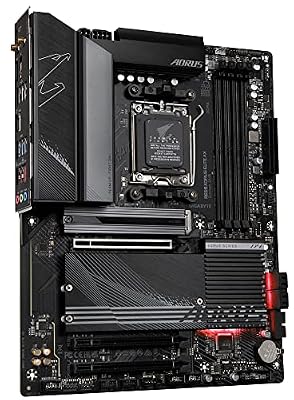
1. GIGABYTE B650 AORUS Elite AX AMD AM5 ATX Motherboard, DDR5, Wi-Fi 6

GIGABYTE B650 AORUS Elite AX AMD AM5 ATX Motherboard, Support Ryzen 9000/8000/7000 Series, DDR5, 14+2+1 Power Phase, PCIe 5.0 M.2, USB-C 3.2 Gen 2, WIFI6E, 2.5GbE, EZ-Latch, Q-Flash, RGB Fusion



As an Amazon Associate we earn from qualifying purchases. Product prices and availability are accurate as of the date/time indicated.
The GIGABYTE B650 AORUS Elite AX leads this list as the modern editing platform of choice. Built on AMD’s current AM5 socket, it supports Ryzen 7000/8000/9000 CPUs with fast DDR5 memory, provides multiple M.2 NVMe slots for media and cache drives, and includes Wi-Fi 6 networking and a generous rear I/O. At around $138 it is outstanding value for a future-proof workstation board.
This is the motherboard for an editor building a current-generation rig that will stay relevant for years. AM5 gives you a long upgrade path and high-bandwidth DDR5 for large timelines and high-resolution footage, the multiple M.2 slots let you separate your OS, working media and cache onto fast NVMe drives — exactly the storage layout video work benefits from — and Wi-Fi 6 plus solid USB connectivity keep file transfers and NAS workflows quick. For a modern, well-equipped editing foundation at a sensible price, the B650 AORUS Elite AX is the standout pick.
Pros: Current AM5 platform, DDR5, multiple M.2 slots, Wi-Fi 6, excellent value.
Cons: No onboard Thunderbolt; add a card if you need it.
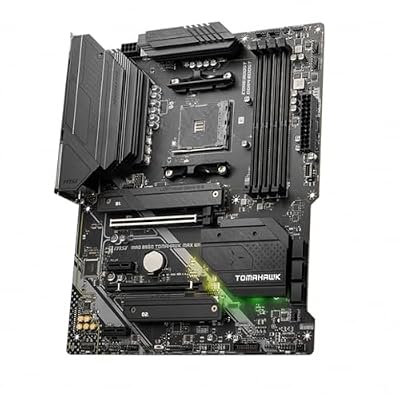
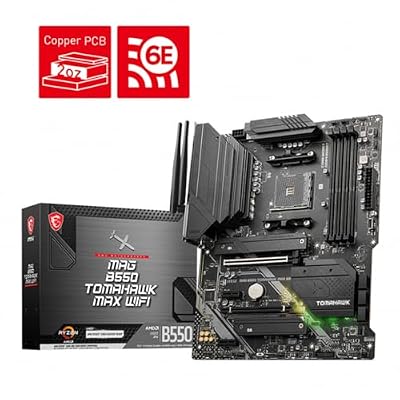
2. MSI MAG B550 Tomahawk Gaming Motherboard, AM4, DDR4, dual M.2, 2.5G LAN

MSI MAG B550 Tomahawk MAX WiFi Gaming Motherboard (AMD Ryzen 5000 Series, AM4, DDR4, PCIe 4.0, SATA 6Gb/s, M.2, USB 3.2 Gen 2, HDMI/DP, Wi-Fi 6E, Bluetooth 5.2, 2.5Gbps LAN, ATX)



As an Amazon Associate we earn from qualifying purchases. Product prices and availability are accurate as of the date/time indicated.
The MSI MAG B550 Tomahawk is the AMD value workstation pick and a deservedly popular board. It runs Ryzen 5000 CPUs on the AM4 socket with DDR4 memory, offers dual M.2 NVMe slots, a robust VRM for stable sustained loads, and 2.5G LAN for fast wired networking. At around $160 it is a dependable, well-rounded foundation for an editing machine.
This is the motherboard for an editor building on the mature, cost-effective AM4 platform who wants reliability and the storage flexibility editing demands. The dual M.2 slots let you run a fast OS drive plus a dedicated media or cache NVMe, the strong VRM keeps a multi-core Ryzen CPU stable through long exports, and the 2.5G LAN speeds up transfers to and from a NAS. DDR4 support keeps memory affordable when you want plenty of capacity. For a robust, great-value AMD editing board, the B550 Tomahawk is an easy recommendation.
Pros: Dual M.2 slots, robust VRM for sustained loads, 2.5G LAN, strong AM4 value.
Cons: AM4/DDR4 is a mature platform; less future headroom than AM5.
3. ASUS ROG Maximus XI Hero (Wi-Fi) Z390 Motherboard, LGA1151, triple M.2
The ASUS ROG Maximus XI Hero is the high-end Intel pick for an editing rig built on the proven Z390 platform. It supports 8th and 9th Gen Intel CPUs on LGA1151, pairs DDR4 memory with a premium power design, and offers extensive M.2 storage and a rich rear I/O with integrated Wi-Fi. At around $386 it is a premium board aimed at a serious Intel workstation.
This is the motherboard for an editor invested in the Intel Z390 ecosystem who wants top-tier components and storage expansion. The multiple M.2 slots make it easy to dedicate fast NVMe drives to OS, media and cache, the high-quality VRM and cooling support stable performance through demanding renders, and the comprehensive USB and networking I/O streamlines moving footage around. As a well-built, feature-rich Z390 board, it suits a high-end editing build on that platform, though it is a previous-generation socket rather than Intel’s latest. For a premium Z390 workstation foundation, the Maximus XI Hero delivers.
Pros: Triple M.2 storage, premium VRM and I/O, integrated Wi-Fi, strong Z390 build.
Cons: Previous-gen LGA1151 platform; premium price for an older socket.
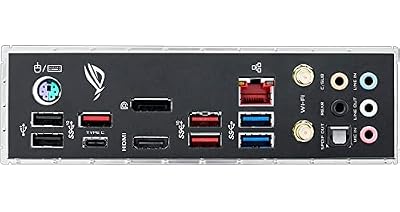
4. Asus ROG Strix Z390-E Gaming Motherboard, LGA1151, ATX DDR4, dual M.2

Asus ROG Strix Z390-E Gaming Motherboard LGA1151 (Intel 8th 9th Gen) ATX DDR4 DP HDMI M.2 USB 3.1 Gen2 802.11AC Wi-Fi


As an Amazon Associate we earn from qualifying purchases. Product prices and availability are accurate as of the date/time indicated.
The ASUS ROG Strix Z390-E Gaming is a feature-rich Intel board that doubles well as an editing platform. On the Z390 / LGA1151 platform it supports 8th and 9th Gen CPUs with DDR4 memory, dual M.2 NVMe slots, integrated Wi-Fi and a comprehensive rear I/O with DisplayPort output. At around $400 it sits at the premium end, reflecting its strong specification.
This is the motherboard for an editor on the Intel Z390 platform who wants a well-rounded, high-quality board with the storage and connectivity editing needs. The dual M.2 slots support a fast OS-plus-media drive layout, the solid VRM keeps a multi-core Intel CPU stable under sustained editing and export loads, and the integrated Wi-Fi plus generous USB ports make external-drive and network workflows smooth. Like the Maximus, it is a previous-generation socket, so weigh that against newer platforms, but as a capable, well-equipped Z390 editing board it holds up.
Pros: Dual M.2, integrated Wi-Fi, strong VRM and rear I/O, comprehensive connectivity.
Cons: Previous-gen platform; priciest board here for an older socket.
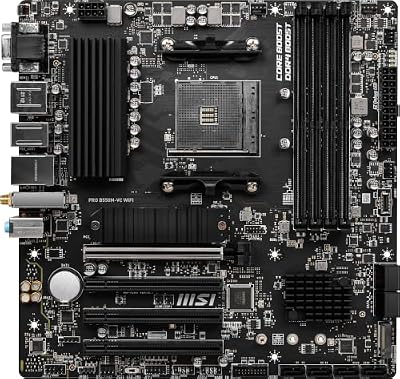
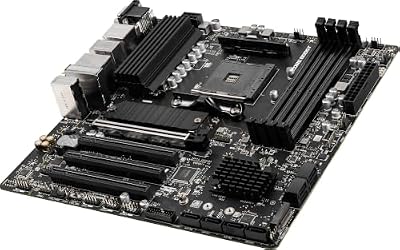
5. MSI PRO B550M-VC WiFi ProSeries Motherboard, AM4, DDR4, Micro-ATX

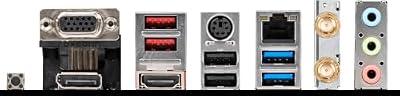
MSI PRO B550M-VC WiFi ProSeries Motherboard (AMD Ryzen 5000 Series, AM4, DDR4, PCIe 4.0, SATA 6Gb/s, M.2, USB 3.2 Gen 2, HDMI/DP, Wi-Fi 6E, Bluetooth 5.2, mATX)



As an Amazon Associate we earn from qualifying purchases. Product prices and availability are accurate as of the date/time indicated.
The MSI PRO B550M-VC WiFi is the compact budget editor’s pick. It is a Micro-ATX, AM4 ProSeries board for Ryzen 5000 CPUs, with DDR4 support, M.2 NVMe storage, integrated Wi-Fi and a clean, no-frills professional design. At around $80 it is the value choice for a small editing build or a cost-conscious workstation.
This is the motherboard for an editor who wants a tidy, affordable, small-form-factor system without giving up the essentials. The M.2 NVMe slot lets you run fast storage for your OS or working media, the AM4 platform keeps the CPU and DDR4 memory affordable so you can put more of the budget into RAM capacity and drives, and integrated Wi-Fi covers wireless networking. The ProSeries focus on stability and a clean BIOS suits a work machine. For a compact, dependable editing board on a budget, the PRO B550M-VC WiFi is a sensible, practical choice.
Pros: Compact Micro-ATX, M.2 NVMe, integrated Wi-Fi, affordable ProSeries stability.
Cons: Micro-ATX limits expansion; fewer M.2/PCIe slots than ATX boards.
6. ASUS M5A97 LE R2.0 DDR3 AMD AM3+ Motherboard


As an Amazon Associate we earn from qualifying purchases. Product prices and availability are accurate as of the date/time indicated.
Rounding out the list is the ASUS M5A97 LE R2.0, included honestly as a legacy budget board rather than a modern editing platform. It is an older AM3+ socket board using DDR3 memory, designed for FX-era AMD CPUs. At around $80 it is only relevant if you are repairing or upgrading an existing AM3+ system, not building a new editing rig.
We are being straight about this one: it is not a board we would recommend for a 2026 video editing workstation. It predates M.2 NVMe storage, uses slow DDR3 memory with limited capacity, and lacks the fast USB, networking and expansion a modern editor needs. Its place here is narrow but real — if you already own an AM3+ DDR3 system and need a replacement board to keep it running, the M5A97 LE R2.0 is a reliable, inexpensive ASUS option. For any new editing build, choose one of the AM5, AM4 or Z390 boards above instead; this is a legacy upgrade part, nothing more.
Pros: Reliable inexpensive legacy AM3+ board, useful for repairing an older DDR3 system.
Cons: Obsolete for modern editing: no M.2, DDR3 only, limited I/O and RAM.
How to Choose a Motherboard for Video Editing
Start with M.2 NVMe slots, because storage layout is central to a smooth editing workflow. Editors benefit from separating their operating system, active project media and scratch/cache onto different fast drives, so a board with two or three M.2 slots — like the GIGABYTE B650, the B550 Tomahawk or the triple-slot Maximus XI Hero — gives you the flexibility to do exactly that. More fast NVMe storage means less waiting on file reads and writes when scrubbing timelines or exporting, so make M.2 count a top priority.
Memory capacity is the next major factor. High-resolution footage, complex timelines and effects-heavy projects are hungry for RAM, so you want a board that supports plenty of it. Modern AM5 boards like the B650 AORUS Elite AX use fast DDR5 and support large capacities, while AM4 and Z390 boards use DDR4 — still very capable and more affordable when you want to load up on capacity. Check the board’s maximum supported RAM and number of DIMM slots, and prioritise headroom to add more memory as your projects grow.
Connectivity and I/O are where editing rigs differ most from gaming boards. Fast USB ports get footage off cameras and external SSDs quickly, and strong networking — 2.5G LAN on the B550 Tomahawk, Wi-Fi 6 on the B650 — speeds NAS and shared-storage workflows. If your camera or external storage uses Thunderbolt or USB4, note that none of these boards include it natively, so you would add a compatible expansion card; check the board supports the right header or PCIe slot if that workflow matters to you.
Finally, choose the platform with an eye on the future and right-size the rest. A current AM5 board like the B650 AORUS Elite AX offers the longest upgrade path and newest features; mature AM4 (B550 Tomahawk, PRO B550M-VC) and Intel Z390 (Maximus XI Hero, Strix Z390-E) remain capable and often better value, though they are previous-generation sockets. Avoid genuinely obsolete boards like the legacy AM3+ M5A97 for new builds. Decide your CPU and platform first, prioritise M.2 slots and RAM capacity, confirm the I/O matches your gear, and pick the editing motherboard on this list that fits your workflow and budget.
Frequently Asked Questions
How many M.2 slots do I need for video editing?
Two is a comfortable minimum and three is ideal. Editors benefit from separating the OS, active project media and scratch/cache onto different fast NVMe drives, which reduces waiting when scrubbing or exporting. Boards like the GIGABYTE B650 and MSI B550 Tomahawk offer dual M.2 slots, while the ASUS ROG Maximus XI Hero provides triple M.2 for the most storage flexibility.
How much RAM should a video editing motherboard support?
As much as your projects demand — high-resolution footage and complex timelines are RAM-hungry, so prioritise capacity and headroom. Modern AM5 boards like the B650 AORUS Elite AX use fast DDR5 and support large amounts, while AM4 and Z390 boards use DDR4 with plenty of capacity at a lower cost. Check the board’s maximum supported RAM and DIMM slot count before buying.
Do these motherboards have Thunderbolt for video editing?
None of the boards here include Thunderbolt or USB4 natively. If your camera or external storage relies on Thunderbolt, you would add a compatible expansion card, so confirm the board has the required header or a free PCIe slot. All of the modern picks do offer fast USB and strong networking — like 2.5G LAN on the B550 Tomahawk and Wi-Fi 6 on the B650 — which cover most transfer needs.
Is AMD or Intel better for a video editing motherboard?
Both can build an excellent editing rig — what matters more is M.2 slots, RAM capacity and I/O. AMD’s current AM5 platform, like the GIGABYTE B650, offers the longest upgrade path and DDR5; mature AM4 boards such as the B550 Tomahawk are great value. Intel’s Z390 boards here are capable but previous-generation. Choose your CPU first, then pick the board whose storage and connectivity fit your workflow.
Related Guides
- Best Motherboards
- Best CPUs for Video Editing
- Best NVMe SSDs
- Best RAM for Your Build
- Best Power Supplies
- Best PCs for Creators
Affiliate Disclosure: As an Amazon Associate, we earn from qualifying purchases. If you click a link and make a purchase, we may earn a small commission at no extra cost to you. Prices and availability are accurate as of publication and may change.










