

- Top Pick: HP 14" HD Chromebook Laptop for Students, Intel Quad-Core N4120(> N4020), 4GB RAM, 64GB eMMC, WiFi, Webcam, HDMI, USB-A&C, 14 Hours Battery Life, Zoom, Chrome OS, CUE Accessories
- Best Value: 15.6 Inch Laptop Computer, N4020, 4GB DDR4 RAM, 128GB eMMC,with Windows 11 | Supports 1TB TF Card Expansion, FHD LCD Display, Portable Notebook for Students & Home Office, Space Gray
- Premium Choice: Dell Chromebook 11 3100 11.6" Chromebook – 1366 x 768 – Celeron N4020-4 GB RAM – 16 GB Flash Memory – Chrome OS – Intel HD Graphics – English (US) Keyboard – Bluetooth (Renewed)
Shopping for a student laptop under 300 dollars is an exercise in knowing which specs to protect and which to let go. At that tier nobody gets a fast processor, a metal body and a bright panel all at once. What a student does need is a machine that opens a web browser, a document editor and a video call without freezing, then lasts through a school day. The seven laptops below are all built around that modest goal, and their titles show very different ways of reaching it.
The audience is a middle schooler getting a first computer, a college freshman who mostly writes papers, or a parent who wants a spare machine for homework. Two operating system families appear in this list, Chrome OS and Windows 11, and the choice between them shapes everything else. Memory and storage numbers in these titles are small, so reading them carefully will save frustration by the second semester of 2026. Where a title leaves out the processor brand or the operating system, treat that silence as a reason to look deeper before buying.
Quick Picks
As an Amazon Associate we earn from qualifying purchases at no extra cost to you.


| Product | Best for | Key spec from the title |
|---|---|---|
| HP 14-inch Chromebook (N4120) | Classroom cloud work | Quad-core N4120, 14 hours battery |
| 15.6-inch N4020 Laptop | Windows on a larger screen | 128GB eMMC, TF card up to 1TB |
| Dell Chromebook 11 3100 (Renewed) | Younger children | 11.6 in, 4GB RAM, Chrome OS |
| Phatom 15.6-inch | Portable full-size screen | FHD IPS, 3.46 lb, 128GB SSD |
| RIANIFEL 15.6-inch | Multitasking headroom | 16GB RAM, 256GB SSD |
| HP 14-inch Ultra-Light (N4500) | Light backpack carry | 12-hr battery, 64GB eMMC plus SD card |
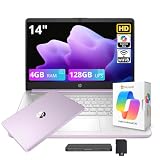
| HP Stream 14-inch (N150) | Office-suite bundle seekers | 128GB UFS, 1TB cloud, Wi-Fi 6 |
How to Choose
Chrome OS or Windows 11
Chromebooks boot fast, receive automatic updates and run light on hardware, which makes them forgiving at this level. They depend on web apps, so check that your school's software works in a browser. Windows laptops run traditional desktop programs but need more memory to feel smooth. One listing here ships in Windows 11 in S mode, which only installs apps from the official store unless you switch it.
Memory and storage thresholds
Four gigabytes of RAM is workable for a Chromebook and borderline for Windows, where a browser with several tabs can strain it. Sixteen gigabytes, as listed on one model, is a real advantage. For storage, eMMC and UFS are flash chips that are slower than a true SSD, and 64GB leaves little room once the system takes its share. Look for a card slot or cloud storage to compensate, and keep a habit of moving finished assignments off the device so the drive never fills to the brim.
Screen size, resolution and weight
An 11.6-inch panel at 1366 x 768 is easy to carry but cramped for long essays. A 14-inch screen is the middle ground, and 15.6-inch machines add room for a numeric keypad and split windows. Full HD at 1080p looks sharper than basic HD, and an IPS panel gives wider viewing angles. A weight near 3.5 pounds is acceptable in a backpack, while a thinner body helps more for daily commutes. Brightness matters outdoors; a panel listed at 300 nits is easier to read near a window than the dimmer panels common at this tier.
What to ignore and where corners get cut
Skip anything that boasts about gaming, since the processors named here are meant for light work. Be wary of titles that stuff in buzzwords without stating the processor model. Entry-level laptops typically cut corners on keyboards, speakers and battery capacity, and the trackpad can feel plasticky. A webcam resolution of 2MP is fine for classes. Battery claims in titles describe ideal conditions, so expect shorter runtime when video calls and many tabs are active.
The 7 Best Options
HP 14-Inch HD Chromebook (Quad-Core N4120)
Aimed squarely at school, this Chromebook lists a quad-core N4120, 4GB RAM, 64GB eMMC, a webcam, HDMI, USB-A and USB-C ports, and a 14-hour battery claim running Chrome OS.
- Strength: Both USB-A and USB-C ports mean old and new accessories work.
- Strength: The long battery life stated in the title suits a full school day.
- Trade-off: Only 64GB of eMMC, so keep files in the cloud.
It is a natural fit for schools that already run on Google accounts, since sign-in and file syncing happen in the browser. Skip it if your coursework needs Windows-only programs or lots of local files, or if you want more than a basic HD screen.
15.6-Inch Windows 11 Laptop (N4020)
This unbranded 15.6-inch laptop pairs an N4020 processor with 4GB DDR4 and a 128GB eMMC drive, and it supports up to 1TB of TF card expansion, with Windows 11 and an FHD display.
- Strength: Card expansion up to 1TB gives a low-effort path to more storage.
- Strength: A large FHD screen suits reading and writing.
- Trade-off: 4GB of memory on Windows can feel tight with many tabs open at once.
The big screen makes reading and typing less cramped than on an 11-inch machine, and Windows brings familiar desktop programs. Skip it if you need a recognizable brand with local service support, or if you demand fast multitasking from the processor.
Dell Chromebook 11 3100 (Renewed)
A compact 11.6-inch Chromebook with a Celeron N4020, 4GB RAM, 16GB of flash, Intel HD graphics, a 1366 x 768 display and Bluetooth, sold renewed.
- Strength: Small and easy for children to carry.
- Strength: Chrome OS keeps the system light on modest hardware.
- Trade-off: 16GB of flash is very small, so everything must live in the cloud.
It suits a younger student who needs only browsing, typing and online lessons. Skip it if the student writes long documents on a bigger screen, if you need a factory-new device, or if more than a sliver of local storage matters.
Phatom 15.6-Inch FHD Laptop
The listing highlights a 1080P IPS display, 4GB RAM, a 128GB SSD, a weight of 3.46 pounds, a cooling fan, HDMI and a 2MP webcam, with Windows 11 compatibility.
- Strength: A true SSD is named, a notch above eMMC storage.
- Strength: An IPS panel at 1080p with light weight for its screen size.
- Trade-off: The title says Windows 11 compatible, so confirm which operating system arrives installed.
The cooling fan named in the title hints at a design meant to keep a basic processor from heating up during longer sessions. Skip it if you want a well-known brand name behind the keyboard, or if you prefer the simplicity of a Chromebook.
RIANIFEL 15.6-Inch FHD Laptop
The most generous memory configuration here: a 6500Y processor with 16GB RAM and a 256GB SSD, a 300-nit IPS screen, a 4-speaker stereo layout, a privacy shutter and a numeric keypad, plus an office suite.
- Strength: 16GB RAM and 256GB SSD beat every other listed configuration.
- Strength: A privacy shutter and stereo speakers suit video classes.
- Trade-off: Wi-Fi 5 is slower than the Wi-Fi 6 on some competitors.
For a student who stretches into photo editing or runs many tabs, the extra memory is the feature to notice. Skip it if you want the newest wireless standard or a name you already know, and confirm which office suite is bundled before relying on it.
HP 14-Inch Ultra-Light (Celeron N4500)
This white 14-inch HP lists a Celeron N4500, 4GB RAM, 64GB eMMC with a 64GB SD card, a 12-hour battery claim, a webcam, fast charge, Wi-Fi 6 and one year of Office 365 on Windows 11 Home in S mode.
- Strength: Light build with Wi-Fi 6 and quick charging.
- Strength: The included SD card doubles the stated storage.
- Trade-off: S mode restricts apps to the official store until switched.
It is a sensible pick for students who mostly use web tools and the included office subscription. Skip it if you plan to install software from outside the store, or if storage beyond the card and eMMC is important.
HP Stream 14-Inch (Intel N150)
An Intel N150 processor, 4GB RAM and 128GB of UFS storage appear here alongside 1TB of cloud storage, one year of Office 365, an AI Copilot feature and Wi-Fi 6, in Lavender Purple.
- Strength: UFS storage and a large cloud allowance help a small drive go further.
- Strength: A year of office software is included for coursework.
- Trade-off: Only 4GB RAM, so keep browser tabs under control.
Cloud storage is a practical answer to a modest drive, provided the student has reliable internet at home. Skip it if you want more memory or a bigger screen, or if you often work offline with large files.
Which One Fits Your Situation
Your child lives in Google apps all day
The HP 14-Inch Chromebook with the N4120 fits that routine, with both port types and a stated 14-hour battery. Classroom devices get dropped, unplugged and shared, so the simplicity of Chrome OS is a feature here, not a limitation.
You want the most capable specs at this tier
RIANIFEL 15.6-Inch leads on memory and storage, which helps when Windows, a browser and a document editor are all open. A college student who also streams lectures in a second window will notice the difference quickly.
Space for files matters
The 15.6-Inch N4020 laptop supports TF card expansion up to 1TB, while the HP Stream includes a cloud allowance. The HP 14-Inch Ultra-Light adds a 64GB SD card on top of its onboard flash, which is handy for a student who carries files between a home computer and school.
The backpack is already heavy
Choose the HP 14-Inch Ultra-Light or the Dell Chromebook 11, both smaller than the 15.6-inch machines. The Dell is the more compact of the two, though its 1366 x 768 screen is the least roomy in the group.
Common Mistakes
- Choosing a laptop on screen size alone while ignoring RAM and storage.
- Buying Windows in S mode and then discovering a required program will not install.
- Expecting 16GB of flash storage to hold a semester of files.
- Assuming a bundled office suite lasts forever when the title says one year.
- Forgetting to check that school software runs on Chrome OS, or overlooking the Wi-Fi standard that the home router supports.
Related guides
- Battery Operated Smoke And Carbon Monoxide Detectors
- Combination Smoke And Carbon Monoxide Detectors
- Aio Liquid Coolers For High Performance Gaming
Frequently Asked Questions
Is a Chromebook enough for school?
For web-based classwork, documents, video calls and research, yes. If the curriculum requires specific desktop programs, check compatibility before buying.
Is 4GB of RAM enough?
It works for light use, especially on Chrome OS. For Windows with many browser tabs, 8GB or more would feel better, and one listed laptop offers 16GB.
What does eMMC mean?
It is a type of flash storage soldered to the board. It is slower than a regular SSD and usually small, so plan to use cloud or card storage.
Should I buy a renewed laptop?
A renewed machine can suit a younger child who may drop it. Just remember it is refurbished and read the condition terms in the listing. Also consider how long the manufacturer will keep sending updates to an older Chromebook model.









