The decision is not whether a laptop can play games, but whether it can do so without looking like a games machine in the room where you earn your living. A stealth gaming laptop has to pass in a client meeting at ten and run demanding titles at nine in the evening, and those two jobs pull the design in opposite directions: slim, quiet, plain on the outside, yet with a dedicated graphics card and real cooling inside.
This guide is for professionals who carry one laptop for everything, students who game in shared spaces, and creators who want a strong GPU without the gamer styling. Every pick below was chosen from the model names and specifications published on its Amazon product page, so the processors, graphics cards, memory and storage quoted here are the configurations actually listed for sale, not a manufacturer’s wider range.
Quick Picks
As an Amazon Associate we earn from qualifying purchases.
| Product | Best for | Key spec from title |
|---|---|---|
| Razer Blade 14 (2025) | Carrying to meetings every day | Ryzen AI 9 365 with RTX 5070 |
| ASUS ROG Zephyrus G16 (2025) | One big screen for desk work and play | RTX 5070 Ti with 2.5K OLED 240Hz |
| MSI Stealth 16 AI+ | Buyers who want to upgrade RAM later | 32GB DDR5 in two SO-DIMM slots |
| ASUS ROG Zephyrus G14 (2024) | The lightest bag-friendly option | RTX 4060 in a 1.5 kg chassis |
How to Choose
The GPU and Its Power Limit
The graphics card name alone does not tell you how fast a stealth laptop will be. Manufacturers set a power limit for the GPU, and a slim chassis usually means a lower ceiling: an RTX 5070 allowed 115W, as in the Razer Blade 14 here, will outrun the same chip restricted to 65W in a thinner rival. VRAM matters alongside wattage, because 12GB cards such as the RTX 5070 Ti hold high-resolution textures more comfortably than 8GB cards. If your shortlist leans toward AMD processors, our guide to the best gaming laptop AMD Ryzen models explains the current chip pairings. Always match the GPU to the resolution you actually play at.
A Display That Suits Work and Play
Every laptop in this guide uses an OLED panel, and that is deliberate: OLED gives the deep blacks and wide colour coverage that make documents, films and games all look right on one screen. For work, resolution counts more than speed, and the 3K panels on the 14-inch models render text sharply at arm’s length. For play, refresh rate takes over, and the 240Hz screens on the two 16-inch picks keep fast movement clear. Look for G-SYNC support, which lets the panel match the GPU’s output and avoids tearing without the input lag of older sync methods.
RAM, Storage and Upgradeability
Upgradeability is where these four laptops split into two camps. The Razer Blade 14 and both ASUS models use LPDDR5X memory soldered to the board, so the RAM in the listing is the RAM you keep for the life of the machine; buy 32GB now if you multitask heavily. The MSI Stealth 16 AI+ instead uses two DDR5 SO-DIMM slots, so its memory can be replaced or expanded later. Storage is more forgiving everywhere: each model takes standard M.2 SSDs, and the Zephyrus G16 and Stealth 16 AI+ provide a second slot, so adding a drive later does not mean discarding the original.
Ports, Chassis and Warranty
A stealth laptop usually serves as your only computer, so the port mix matters more than it does on a desktop replacement that never moves. HDMI 2.1 lets any of these machines drive a TV or monitor without a dongle, while USB-C with DisplayPort support covers single-cable desk setups. The MSI adds wired Ethernet, and the ASUS models include card readers that creators will use weekly. Chassis material is aluminium across this guide, which keeps lids rigid in a bag. Finally, check the warranty on the listing itself: most picks carry one year, and the G14 here is sold by a third-party seller, so its terms deserve a closer read.
The 4 Best Options
Razer Blade 14 (2025)

The Blade 14 is the easiest laptop here to carry into a meeting without a second thought. Its Mercury silver aluminium unibody looks like a business ultrabook, the keyboard lighting can be set to plain white or turned off, and at roughly 1.63 kg it disappears into a work bag. It is not a token gaming machine, though: the Ryzen AI 9 365 and an RTX 5070 running at up to 115W give it genuine pace at 1440p and at the panel’s native 3K resolution, which makes it the natural default for buyers who travel with their laptop daily.
Specs
- Processor: AMD Ryzen AI 9 365, 10 cores, up to 5.0 GHz, 50 TOPS NPU
- Graphics: NVIDIA GeForce RTX 5070 Laptop GPU, 8GB GDDR7, up to 115W TGP
- Display: 14-inch 3K (2880 x 1800) OLED, 120Hz, G-SYNC
- Memory: 32GB LPDDR5X-8000, soldered
- Storage: 1TB PCIe 4.0 NVMe SSD, single M.2 2280 slot
- Ports: 2x USB4 Type-C, 2x USB-A 3.2 Gen 2, HDMI 2.1, microSD UHS-II reader, 3.5mm combo jack
- Battery and weight: 72Wh, about 1.63 kg
- Connectivity: Wi-Fi 7
- Operating system: Windows 11 Home
Best for: Professionals who carry one laptop to meetings and game at native resolution in the evening.
Watch out for: The memory is soldered, so confirm the listing shows the 32GB configuration before ordering; it cannot be upgraded later.
ASIN: B0DYLFH8G2
ASUS ROG Zephyrus G16 (2025)

Choose the Zephyrus G16 if your laptop spends most of its life on a desk but still has to look respectable when it leaves the house. The 16-inch OLED runs at 240Hz, the RTX 5070 Ti carries 12GB of VRAM for high settings at 1600p, and Windows 11 Pro adds the business features some employers require. The Platinum White CNC chassis and lid lighting that can be switched off keep the styling quiet, while two M.2 slots mean storage can grow without replacing the fitted 2TB drive.
Specs
- Processor: Intel Core Ultra 9 285H, 16 cores, up to 5.4 GHz
- Graphics: NVIDIA GeForce RTX 5070 Ti Laptop GPU, 12GB GDDR7, up to about 120W in Turbo mode
- Display: 16-inch 2.5K (2560 x 1600) OLED, 240Hz, G-SYNC
- Memory: 32GB LPDDR5X, soldered
- Storage: 2TB PCIe 4.0 NVMe SSD, two M.2 2280 slots
- Ports: Thunderbolt 4, USB-C 3.2 Gen 2, 2x USB-A 3.2 Gen 2, HDMI 2.1, full-size SD UHS-II reader, 3.5mm combo jack
- Battery and weight: 90Wh, about 1.95 kg
- Connectivity: Wi-Fi 7
- Operating system: Windows 11 Pro
Best for: Desk-based buyers who want the strongest GPU and the biggest screen in this guide.
Watch out for: Memory is soldered at 32GB and the fans are audible in Turbo mode, so check the exact GU605CR-XS97 configuration on the listing.
ASIN: B0G1W7V6VP
MSI Stealth 16 AI+
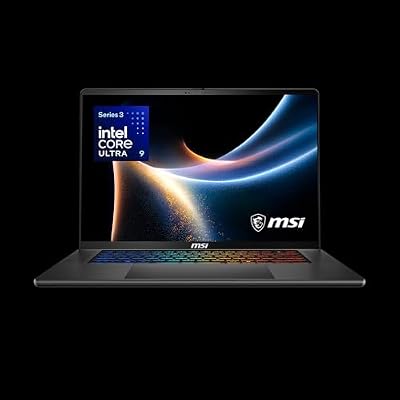
The Stealth 16 AI+ is the pick for buyers who keep a laptop for years and expect to open it up at some point. MSI fits two DDR5 SO-DIMM slots and two M.2 slots, a combination none of the other machines here offer, so memory and storage can both grow instead of being fixed at checkout. Performance is not the compromise: the RTX 5070 Ti and 240Hz QHD+ OLED match the Zephyrus G16 on paper, and the charcoal chassis with built-in Ethernet suits an office desk that becomes a gaming desk after hours.
Specs
- Processor: Intel Core Ultra 9 386H, 16 cores, up to 4.9 GHz, up to 50 NPU TOPS
- Graphics: NVIDIA GeForce RTX 5070 Ti Laptop GPU, 12GB GDDR7
- Display: 16-inch QHD+ (2560 x 1600) OLED, 240Hz
- Memory: 32GB DDR5-5600 (2x 16GB) in two SO-DIMM slots
- Storage: 1TB NVMe PCIe Gen4 SSD, two M.2 slots
- Ports: Thunderbolt 4, USB 3.2 Gen 2 Type-A, HDMI 2.1, RJ45 Ethernet
- Connectivity: Wi-Fi 7
- Warranty: One-year limited manufacturer warranty per the listing
- Operating system: Windows 11 Home
Best for: Long-term owners who want socketed RAM, dual SSD slots and wired Ethernet.
Watch out for: It ships with 1TB of storage where a rival here includes 2TB, so check the exact B3WH-036US configuration on the listing.
ASIN: B0GVPSK8M7
ASUS ROG Zephyrus G14 (2024)

The 2024 Zephyrus G14 is the lightest machine in this guide at about 1.5 kg, and for buyers whose laptop travels in a backpack every day that gap is felt more than any benchmark difference. The 3K OLED is sharp for documents, the aluminium shell looks like a premium ultrabook, and the Ryzen 9 8945HS is efficient enough for a full workday away from a charger. Its RTX 4060 is a step down from the 5070-class cards above, aimed at 1080p and 1440p play with DLSS rather than native-resolution gaming.
Specs
- Processor: AMD Ryzen 9 8945HS, 8 cores, up to 5.2 GHz
- Graphics: NVIDIA GeForce RTX 4060 Laptop GPU, 8GB GDDR6, up to 90W with Dynamic Boost
- Display: 14-inch 3K (2880 x 1800) OLED, 120Hz, G-SYNC
- Memory: 16GB LPDDR5X-6400, soldered
- Storage: 1TB PCIe 4.0 NVMe SSD, single M.2 2280 slot
- Ports: USB4 Type-C, USB-C 3.2 Gen 2, 2x USB-A 3.2 Gen 2, HDMI 2.1, microSD UHS-II reader, 3.5mm combo jack
- Battery and weight: 73Wh, about 1.5 kg
- Connectivity: Wi-Fi 6E
- Operating system: Windows 11 Home
Best for: Commuters and students who put low weight ahead of maximum frame rates.
Watch out for: This listing is sold by a third-party seller and the 16GB memory is soldered, so verify the seller’s warranty terms before ordering.
ASIN: B0D9JH9CW3
Which One Fits Your Situation
You Carry Your Laptop to Meetings Every Day
Pick the Razer Blade 14. It is the thinnest and among the lightest machines here, the Mercury finish reads as a business ultrabook, and the keyboard lighting can be muted to white. The 115W RTX 5070 still delivers strong native-resolution gaming at home, so the daily carry costs you little. Just order the 32GB configuration, because its memory can never be changed afterwards.
You Want One Big Screen for Work and Play
Choose the ASUS ROG Zephyrus G16. Its 16-inch 240Hz OLED replaces a separate monitor for most desk work, the RTX 5070 Ti is the strongest graphics card in this guide, and Windows 11 Pro covers business requirements such as BitLocker. The second M.2 slot lets you add storage later, which suits a machine that will hold a growing game library alongside work files.
You Plan to Upgrade in Two or Three Years
Go with the MSI Stealth 16 AI+. It is the only laptop here with socketed memory, so a future RAM upgrade is a pair of SO-DIMM modules rather than a new computer, and its second M.2 slot accepts another SSD without removing the first. Today’s RTX 5070 Ti performance matches the other 16-inch pick, so you give up nothing now for that flexibility later.
Your Bag Weight Matters More Than Raw Power
Take the ASUS ROG Zephyrus G14 (2024). At about 1.5 kg it is the lightest option here, the battery-friendly Ryzen platform suits long days on campus or between sites, and the 3K OLED keeps text crisp for reading and writing. Accept the trade-offs knowingly: the RTX 4060 targets 1080p and 1440p with DLSS, and the soldered 16GB memory is a fixed ceiling.
Common Mistakes
- Buying on the GPU name alone, without checking the wattage limit printed in the listing’s specifications.
- Ordering a soldered-memory model with 16GB and expecting to add more RAM later.
- Assuming every USB-C port supports charging and DisplayPort output; check the port list for the exact configuration.
- Ignoring who sells the listing, since a third-party seller can mean different warranty handling than the brand store.
- Leaving the keyboard and lid lighting on gamer settings in a workplace where the machine was bought to blend in.
Frequently Asked Questions
What makes a laptop count as a stealth gaming laptop?
It pairs a plain, professional chassis with a real dedicated graphics card. Stealth models use slim aluminium bodies in muted colours, avoid oversized glowing logos, and let you dim or switch off the keyboard and lid lighting. The same machine can sit in a client meeting during the day and run demanding games in the evening without a second computer.
Is soldered RAM a problem for gaming?
Not if you buy enough at the start. Sixteen gigabytes still runs today’s games, but 32GB leaves room for streaming, voice chat and a browser full of tabs, and it ages better. Three of the four laptops here have soldered memory that can never be changed, so treat the listing’s RAM figure as permanent and size it for the machine’s whole life.
Can a thin stealth laptop match a full-size gaming laptop?
It gets close, but power limits decide the result. A slim chassis restricts how much wattage the graphics card can use, so an RTX 5070 at 115W will trail the same chip in a thick laptop allowed more power. You trade a modest performance margin for a machine you can carry daily and use at work without it drawing attention.
Should I choose a 14-inch or 16-inch stealth laptop?
Choose 14 inches if the laptop travels daily; the weight saving is real, and an external monitor restores screen space at your desk. Choose 16 inches if the machine mostly stays in one place, because the larger OLED is easier on the eyes for long documents and games alike, and the bigger chassis usually allows a higher GPU power limit.