At this level the processor is rarely the hard part, because nearly every machine ships with a flagship HX chip and 32GB of memory. The real decision is where the rest of the money lands: a full-power RTX 5080 or a cheaper RTX 5070 Ti, an OLED panel or a fast IPS one, and storage and memory you can upgrade yourself later. Two laptops with the same GPU name can be built very differently underneath.
This guide is for competitive players chasing high frame rates at 1600p, creators who game on the same machine, and buyers replacing a desktop outright. Every pick was chosen from the model names and specifications printed on its Amazon product page, and each entry names the exact configuration so you can match it against the listing before ordering.
Quick Picks
As an Amazon Associate we earn from qualifying purchases.
| Product | Best for | Key spec from title |
|---|---|---|
| Lenovo Legion Pro 7i Gen 10 | High-refresh 1600p gaming on an OLED screen | RTX 5080 16GB, 16″ WQXGA OLED 240Hz |
| HP OMEN MAX 16 | Creators who want 2TB storage fitted from the factory | RTX 5080, 32GB DDR5, 2TB SSD |
| Alienware 16 Area-51 | A desk-bound replacement with a strong port and camera setup | RTX 5080 16GB GDDR7, 16″ QHD+ 240Hz |
| ASUS ROG Strix G16 (2025) | Ryzen HX performance with budget left for a monitor | RTX 5070 Ti, AMD Ryzen 9 9955HX |
| MSI Vector 16 HX AI | Docking to a full desk setup over one cable | RTX 5070 Ti, Thunderbolt 5, 2TB SSD |
How to Choose
GPU class and the wattage behind it
The GPU tier decides your settings ceiling, but the power limit decides how much of that tier you actually get. An RTX 5080 laptop chip running at its full 175W ceiling is a different product from the same chip capped far lower in a thin chassis, and the RTX 5070 Ti tops out at 140W with 12GB of VRAM instead of 16GB. Check the TGP figure on the listing or the manufacturer’s model page, and be wary of listings that name the GPU but never state wattage. Far below this class, the best gaming laptop under $500 roundup shows how sharply these numbers fall.
Display resolution, refresh rate and panel type
Every laptop here uses a 16-inch 2560×1600 panel at 240Hz, so the deciding factor is panel technology rather than size. OLED gives you per-pixel contrast and near-instant response, which suits dark single-player games and video work. IPS panels like the OMEN MAX 16’s avoid burn-in worries and usually hold brightness well for bright rooms and long office days. Mini-LED sits between the two on HDR impact. Match the panel to your room and your games, and confirm the exact panel on the listing, because some model lines sell the same chassis with a slower 144Hz or 165Hz screen in cheaper configurations.
RAM, SSD and whether you can upgrade later
Thirty-two gigabytes is the sensible floor in this class, and all five picks meet it. The important question is what happens in two years. The Legion Pro 7i, Strix G16, Vector 16 HX and Area-51 all use socketed DDR5 memory and offer a second M.2 slot or a replaceable drive, so a storage upgrade is a ten-minute job. Reseller-upgraded listings complicate this: a machine advertised with unusually large RAM or storage may have been opened and modified before sale, which can change who handles warranty claims. Prefer factory configurations, and check whether the second SSD slot is empty or already populated.
Cooling, ports and warranty coverage
Sustained performance depends on cooling headroom, and thicker chassis designs generally hold boost clocks longer during extended sessions than slim ones. Port selection matters if the laptop anchors a desk: Thunderbolt 5 on the MSI Vector allows fast docks and external storage, while full-size Ethernet still matters for stable competitive play. Warranty terms vary more than buyers expect. Most of these brands include one year as standard, sometimes with on-site service, and accidental-damage cover is usually a paid extra. Confirm the warranty named on the exact listing, especially when the seller is a third-party store rather than the manufacturer.
The 5 Best Options
Lenovo Legion Pro 7i Gen 10
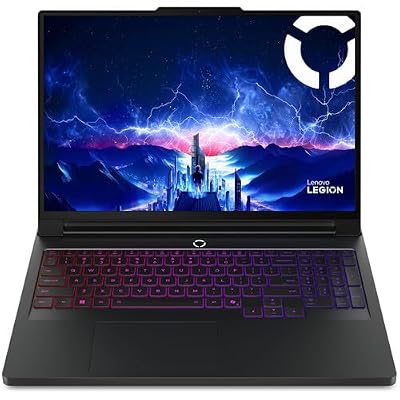
The Legion Pro 7i Gen 10 is the most complete package here for players who game at the native 1600p resolution. Its RTX 5080 runs at the full power ceiling Lenovo publishes for this model, and the WQXGA OLED panel pairs 240Hz with 500 nits, so fast shooters and dark RPG scenes both look right. The Core Ultra 9 275HX brings 24 cores for streaming and compile work, while the 1TB Gen 5 SSD loads large installs quickly. Both memory slots and both M.2 slots are user-accessible, which makes this the easiest pick to keep current over several years.
Specs
- Model: Legion Pro 7i Gen 10 (2025 model)
- Processor: Intel Core Ultra 9 275HX, 24 cores
- Graphics: NVIDIA GeForce RTX 5080, 16GB GDDR7
- Memory: 32GB DDR5 RAM
- Storage: 1TB Gen 5 NVMe SSD
- Display: 16.0″ WQXGA OLED, 500 nits, 240Hz
- Operating system: Windows 11 Home
Best for: Players who want full-power RTX 5080 performance and an OLED panel in one machine.
Watch out for: Many near-identical Legion listings are reseller-upgraded variants; confirm the RAM and SSD are the factory configuration before ordering.
ASIN: B0FL4HLJ56
HP OMEN MAX 16

The OMEN MAX 16 suits buyers who split their week between games and demanding creative software. The Ryzen AI 9 HX 375 pairs with an RTX 5080, and the factory 2TB SSD means large project files and a full game library can live on the internal drive from day one. Its WQXGA IPS panel runs at 240Hz with 500 nits and full sRGB coverage, a practical choice for bright rooms and long editing sessions where OLED burn-in is a background concern. Windows 11 Pro is fitted as standard, and the memory and storage sit in accessible slots for later upgrades.
Specs
- Model: OMEN MAX 16
- Processor: AMD Ryzen AI 9 HX 375
- Graphics: NVIDIA GeForce RTX 5080 (1334 AI TOPS)
- Memory: 32GB DDR5 RAM
- Storage: 2TB SSD
- Display: 16″ WQXGA IPS, 240Hz, 500 nits, 100% sRGB
- Connectivity: Wi-Fi 7, RGB backlit keyboard
- Operating system: Windows 11 Pro
Best for: Creators and professionals who want 2TB of factory storage and Windows 11 Pro.
Watch out for: This configuration uses an IPS panel rather than OLED, and third-party sellers are common, so verify the seller and warranty registration path.
ASIN: B0G7G8Q1KH
Alienware 16 Area-51
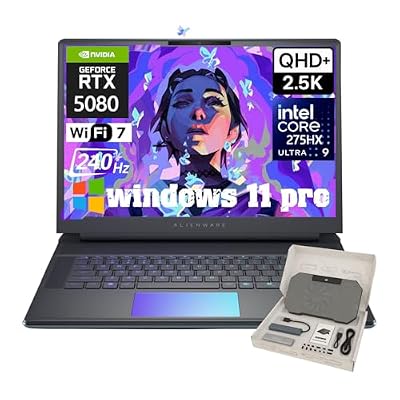
The Area-51 is built for a fixed desk rather than a backpack. Dell pairs the Core Ultra 9 275HX with an RTX 5080 and a 16-inch QHD+ 240Hz display, and the larger chassis gives the cooling system room to sustain performance through long sessions. The 4K camera is unusually sharp for a gaming laptop, which matters if the same machine handles video calls and streaming. Memory is socketed DDR5 and storage can be expanded in the spare M.2 capacity, so the specification you buy is not frozen. Expect a heavy power adapter and a chassis that makes its presence felt in a bag.
Specs
- Model: Alienware 16 Area-51
- Processor: Intel Ultra 9 275HX, up to 5.4GHz
- Graphics: NVIDIA GeForce RTX 5080, 16GB GDDR7
- Memory: 32GB DDR5 RAM
- Storage: 1TB SSD
- Display: 16″ QHD+ (2560×1600), 240Hz
- Camera: 4K camera
- Connectivity: Wi-Fi 7, AlienFX RGB lighting
- Operating system: Windows 11 Pro
Best for: Desk-based gamers who also stream or take frequent video calls.
Watch out for: Several listings share this name with reseller-upgraded memory and storage; match the exact configuration and seller before ordering.
ASIN: B0FK4WBMPV
ASUS ROG Strix G16 (2025)

The Strix G16 is the value route into this class that does not feel like a compromise. Its Ryzen 9 9955HX is a 16-core desktop-class chip, and the RTX 5070 Ti drives the 2.5K Nebula display at 240Hz for competitive titles, with DLSS covering heavier ray-traced games. You give up the RTX 5080’s extra VRAM and power ceiling, and in return the total spend leaves room for a good external monitor or a second SSD, both of which this chassis accepts easily thanks to its two memory slots and two M.2 slots. It is the pragmatic pick for high-refresh play.
Specs
- Model: ROG Strix G16 G614FR-ES96 (2025)
- Processor: AMD Ryzen 9 9955HX
- Graphics: NVIDIA GeForce RTX 5070 Ti
- Memory: 32GB DDR5-5600 RAM
- Storage: 1TB PCIe Gen 4 SSD
- Display: 16″ ROG Nebula 2.5K, 240Hz, 3ms
- Connectivity: Wi-Fi 6E
- Operating system: Windows 11 Home
Best for: Competitive players who would rather add a monitor and storage than pay for the RTX 5080 tier.
Watch out for: The RTX 5070 Ti carries 12GB of VRAM against 16GB on the RTX 5080 models, which matters for texture-heavy games at native resolution.
ASIN: B0F7MWTYJY
MSI Vector 16 HX AI

The Vector 16 HX AI is the docking-station pick. Thunderbolt 5 support means one cable can drive a desk of monitors and fast external storage, and the fitted 2TB SSD is generous at this specification level. The Core Ultra 9 275HX and RTX 5070 Ti combination handles 1600p gaming comfortably, and the QHD+ 240Hz panel matches the GPU well. MSI keeps both memory slots and M.2 capacity accessible, so the machine can grow with your library. It lacks the OLED contrast of the Legion and the brand polish of the Area-51, but as a connected workstation that also games hard, it makes a strong case.
Specs
- Model: Vector 16 HX AI A2XWHG-060US
- Processor: Intel Core Ultra 9 275HX
- Graphics: NVIDIA GeForce RTX 5070 Ti, 12GB GDDR7
- Memory: 32GB DDR5 RAM
- Storage: 2TB NVMe SSD
- Display: 16″ QHD+ (2560×1600), 240Hz
- Connectivity: Thunderbolt 5, Wi-Fi 7
- Operating system: Windows 11 Pro
Best for: Buyers who dock to monitors and external drives and want 2TB fitted from the start.
Watch out for: The Vector line also sells cheaper FHD+ 144Hz configurations under similar names; confirm the QHD+ 240Hz panel on the exact listing.
ASIN: B0DTN26DYR
Which One Fits Your Situation
You play competitive titles at 1600p
Choose the Lenovo Legion Pro 7i Gen 10. The full-power RTX 5080 and the 240Hz OLED panel are the strongest pairing here for fast games at native resolution, and the response characteristics of OLED keep motion clear when frame rates climb. The accessible slots also mean a storage upgrade later will not require replacing the machine.
The laptop replaces a desktop on a fixed desk
Choose the Alienware 16 Area-51. Its chassis and cooling are designed for sustained loads rather than portability, the 4K camera covers calls and streaming without extra hardware, and the port selection suits a permanent monitor and peripheral setup. The HP OMEN MAX 16 is the alternative if you would rather have 2TB of storage fitted immediately.
You split time between gaming and creative work
Choose the HP OMEN MAX 16. The 2TB factory SSD holds project files alongside a game library, Windows 11 Pro covers managed work environments, and the 500-nit IPS panel with full sRGB coverage is dependable for colour-sensitive tasks in bright rooms. The Ryzen AI 9 HX 375 also handles rendering and encoding workloads well.
You want money left over for the rest of the setup
Choose the ASUS ROG Strix G16 or the MSI Vector 16 HX AI. Both use the RTX 5070 Ti, which still drives 1600p gaming at high settings, and the savings can fund a quality external monitor, a second SSD or a mechanical keyboard. Pick the Vector if Thunderbolt 5 docking matters; pick the Strix for its Ryzen HX processor and Nebula display.
Common Mistakes
- Comparing GPU names only, without checking the wattage limit, and ending up with a low-power version of an expensive chip.
- Ordering a reseller-upgraded configuration without realising the warranty may be handled by the seller instead of the manufacturer.
- Assuming every configuration in a model line shares the same display, when cheaper variants often use slower 144Hz panels.
- Ignoring the second M.2 slot and paying extra for a large factory SSD that would have been cheaper to add later.
- Forgetting the adapter: full-power HX laptops ship with large, heavy power bricks that are part of the real carry weight.
Frequently Asked Questions
Is the RTX 5070 Ti enough for 1600p gaming?
For most current games, yes. The RTX 5070 Ti holds high settings at 2560×1600 in competitive and action titles, and DLSS frame generation extends its reach into heavier ray-traced games. The RTX 5080 pulls ahead mainly in texture-heavy releases, where its 16GB of VRAM and higher power ceiling give it more headroom at native resolution.
Why does GPU wattage matter so much in laptops?
Unlike desktop cards, laptop GPUs are configured by the manufacturer within a power range. A chip limited to low wattage in a thin chassis can perform closer to the tier below it, while the same chip at its full ceiling delivers the performance its name suggests. Always check the TGP figure for the exact model before comparing two listings.
Can I upgrade the RAM and SSD in these laptops later?
In most of these picks, yes. The Legion Pro 7i, Area-51, Strix G16 and Vector 16 HX AI use socketed DDR5 memory and standard M.2 SSD slots, so both upgrades are straightforward. Check whether the second SSD slot is empty before buying a drive, and keep the original parts in case a warranty claim requires the factory configuration.
Should I choose OLED or IPS for a gaming laptop display?
OLED offers the best contrast and response times, and it suits dark games and media work, but it carries a small long-term burn-in risk with static desktop elements. IPS panels avoid that concern, hold brightness well and are easier to live with for long office days. In this class both run at 240Hz, so choose by room lighting and workload.