Choosing headphones for Xbox is first a question of connection, and only second a question of sound. An Xbox console accepts audio through exactly three routes: the proprietary Xbox Wireless protocol, a USB transmitter that carries an Xbox licence, or a 3.5 mm cable plugged into the controller. Standard Bluetooth audio is not one of them — no Xbox console pairs with ordinary Bluetooth headphones for game audio, so the Bluetooth radio in the headsets below is for a phone or PC alongside the console, never instead of it. This guide compares five picks across all three connection types, states plainly how each one reaches the console, and flags the microphone, battery and accessory details that decide day-to-day use.
As an Amazon Associate we earn from qualifying purchases.
How Xbox Headset Connections Actually Work
Xbox Wireless. Microsoft’s own protocol pairs a headset to the console exactly the way a controller pairs — no dongle, no base station, no USB port used. The catch is licensing: only headsets built and certified for the protocol can use it, which is why the list of truly dongle-free Xbox headsets is short. Game/chat balance and mic monitoring are handled by the console itself when a headset connects this way.
USB transmitters. The second route is a low-latency 2.4 GHz link through a USB dongle or transmitter plugged into the console. The licence lives in that transmitter, so these headsets only work on Xbox with their own dongle in place — lose it and the Xbox connection is gone, even if the same headset pairs happily with a PC. The upside is platform switching: one headset can serve an Xbox, a PlayStation and a PC by moving or duplicating the transmitter.
3.5 mm through the controller. Every current Xbox controller has a 3.5 mm jack, and any wired headset with a single 3.5 mm plug works through it — game audio and microphone both travel down the cable, and the console’s audio settings control chat mix. There is no battery, no pairing and no latency concern. The limitation is range: you are tethered to the controller in your hands. Players still using the launch-era Xbox One controller without a jack need Microsoft’s stereo headset adapter, a detail covered in our guide to the best gaming headphones for Xbox One.
Spatial audio. Windows Sonic is built into the console at no extra cost. Dolby Atmos for Headphones and DTS Headphone:X are paid licences — some headsets below include the Atmos licence in the box, and on the others it is an optional app purchase. All three run on the console, so any pick here can use them.
1. Xbox Wireless Headset (2024) — The Dongle-Free Default

Microsoft’s own headset is the simplest connection on this list: it pairs directly to the console over Xbox Wireless, the same way a controller does, so setup is a single button press and no USB port is consumed. The 2024 revision (model TLL-00020) adds Bluetooth 5.3 that can run simultaneously with the console link, so a phone call or a podcast from a handset can mix over game audio. The rotating earcup dials remain the best control scheme on any Xbox headset — one side sets volume, the other sets game/chat balance, both without opening a menu. The boom microphone bends to position, and Microsoft lists auto-mute and voice isolation features intended to keep background noise out of party chat. The Dolby Atmos licence is included with this revision, which removes the separate app purchase the other picks may need. Battery life is rated at up to 20 hours, charged over USB-C.
Specs
- Connection: Xbox Wireless direct to console (no dongle); Bluetooth 5.3 simultaneously for phone/PC
- Driver: 40 mm
- Frequency response: 20 Hz – 20 kHz
- Impedance: 32 Ω
- Microphone: Adjustable boom with auto-mute and voice isolation
- Battery: Up to 20 hours, USB-C charging
- Spatial audio: Dolby Atmos licence included; Windows Sonic and DTS Headphone:X supported
- Weight: Around 320 g
- Platforms: Xbox Series X|S, Xbox One, Windows PC, mobile over Bluetooth
Best for: Xbox-first players who want the official pairing experience, console-level chat controls and an included Atmos licence, with no transmitter to keep track of.
2. Razer Kaira Pro — Xbox Wireless Plus a Real Mobile Mode

The Kaira Pro is the other genuinely dongle-free design here: it connects to the console over Xbox Wireless and adds Bluetooth 5.0 for everything else. Razer separates the two use cases at the microphone. For the console there is a detachable HyperClear Supercardioid boom — a 9.9 mm capsule with a pickup pattern chosen to reject sound from the sides and rear — and for mobile use a second, built-in microphone takes over when the boom is removed. The 50 mm TriForce Titanium drivers are larger than Microsoft’s, and EQ, mic monitoring and game/chat balance are adjusted through Razer’s Headset Setup app on the console itself. The trade-offs are the Chroma RGB earcup logos, which are cosmetic only, and battery life that depends on them: Razer rates the headset at up to 15 hours with the lighting on and up to 20 hours with it off.
Specs
- Connection: Xbox Wireless direct to console (no dongle); Bluetooth 5.0 for mobile/PC
- Driver: 50 mm Razer TriForce Titanium
- Frequency response: 20 Hz – 20 kHz
- Impedance: 32 Ω
- Microphone: Detachable HyperClear Supercardioid boom (9.9 mm) plus a built-in microphone for mobile calls
- Battery: Up to 15 hours with Chroma lighting, up to 20 hours without
- Spatial audio: Windows Sonic (Atmos available as a separate app licence)
- Weight: 365 g
- Platforms: Xbox Series X|S, Xbox One, mobile over Bluetooth; PC via Xbox Wireless adapter or Bluetooth
Best for: Players who split time between the console and a phone, and who want a stronger, detachable boom microphone for party chat without giving up dongle-free Xbox pairing.
3. Turtle Beach Stealth 700 Gen 3 — Two Transmitters, Every Console

The Stealth 700 Gen 3 takes the transmitter route and leans into it. Turtle Beach’s CrossPlay system ships with two wireless USB transmitters, so the headset can stay paired to an Xbox and a second platform — a PlayStation or a PC — and swap between them with a button press instead of a re-pairing routine. That also defines its Xbox connection honestly: audio reaches the console through the transmitter in a USB port, not through the console’s built-in Xbox Wireless radio, so a free USB port is required. Simultaneous Bluetooth 5.2 covers the phone. The 60 mm Eclipse drivers are the largest in this guide, the flip-to-mute microphone uses AI-based noise reduction, and the battery is rated at up to 80 hours — several times the runtime of the native-wireless picks above, which is the practical payoff of the transmitter design. EQ and settings live in the Swarm II app.
Specs
- Connection: 2.4 GHz low-latency via included USB transmitters (CrossPlay dual-transmitter system — Xbox connection is through the transmitter, not Xbox Wireless); Bluetooth 5.2 simultaneously
- Driver: 60 mm Eclipse dual drivers
- Frequency response: 20 Hz – 20 kHz
- Microphone: Flip-to-mute boom with AI noise reduction
- Battery: Up to 80 hours
- Spatial audio: Windows Sonic; Superhuman Hearing mode for competitive cues
- Platforms: Xbox Series X|S, Xbox One, PS5, PC, mobile
Best for: Multi-platform households that want one headset living on the Xbox and a second machine at once, and players who would rather charge monthly than weekly.
4. SteelSeries Arctis Nova 7X — One Dongle for Everything

The Arctis Nova 7X connects to Xbox through a USB-C wireless dongle — the Xbox licence sits in that dongle, which is what separates the 7X from its PlayStation-leaning Nova 7 sibling. A USB-A adapter is included for consoles and PCs without a free USB-C port. The dongle link runs alongside Bluetooth 5.1, so a phone can stay connected while the console plays. SteelSeries rates the battery at up to 38 hours and quotes a fast-charge figure of up to six hours of play from a 15-minute charge. The ClearCast Gen 2 microphone retracts fully into the earcup when not in use and uses AI noise cancelling; the deeper Sonar EQ toolset is PC-only, while on Xbox the headset works with the console’s own audio settings and Windows Sonic. At around 325 g it is also one of the lighter wireless picks here.
Specs
- Connection: 2.4 GHz via included USB-C wireless dongle (Xbox-licensed; USB-A adapter included); Bluetooth 5.1 simultaneously. Xbox audio does not use standard Bluetooth
- Driver: 40 mm neodymium magnetic
- Frequency response: 20 Hz – 22 kHz
- Microphone: ClearCast Gen 2 retractable boom, AI noise cancelling
- Battery: Up to 38 hours; fast charge rated by SteelSeries at up to 6 hours of play from 15 minutes
- Spatial audio: Windows Sonic on console; Sonar spatial and EQ on PC
- Weight: Around 325 g
- Platforms: Xbox Series X|S, PC, PS5, PS4, Switch, mobile, Quest headsets
Best for: Players who game across Xbox, PC and handhelds and want a single mid-weight headset with a retractable mic and a dongle that moves between machines.
5. HyperX CloudX — The Licensed Wired Option
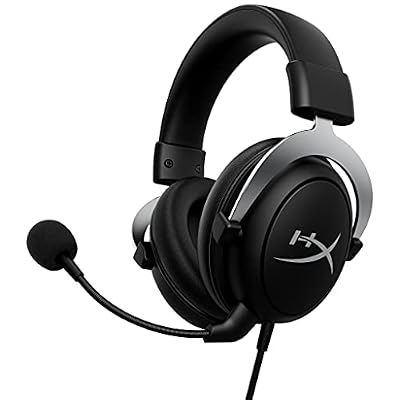
The CloudX is the cable-only pick, and it says so plainly: a 3.5 mm plug into the controller, no wireless of any kind, no battery, nothing to pair or charge. What it carries instead is the official Xbox licence — the headset is built for Xbox controllers with a 3.5 mm jack, with in-line controls for volume and mute on the cable itself. The 53 mm drivers are the largest wired units here, the frame is aluminium, and the detachable noise-cancelling boom microphone unplugs entirely for listening-only use. Because the controller carries the audio, game/chat balance is set in the console’s guide, and the same headset works unchanged on a PC or phone with a 3.5 mm jack. For a shared family console or a younger player, the absence of batteries, dongles and pairing steps is the feature.
Specs
- Connection: Wired 3.5 mm into the Xbox controller only — no wireless, no Bluetooth
- Driver: 53 mm dynamic
- Frequency response: 15 Hz – 25 kHz
- Impedance: 41 Ω
- Microphone: Detachable noise-cancelling boom; in-line volume and mute controls
- Battery: None — powered through the controller
- Weight: 325 g
- Platforms: Xbox Series X|S and Xbox One (controllers with a 3.5 mm jack), PC, mobile
Best for: Players who want zero setup and zero charging, a spare-proof headset for a shared console, or a dependable wired backup that works on every controller in the house.
Which Connection Should You Choose?
Start with the radio, not the driver size. If the headset will live on one Xbox, the two native Xbox Wireless models — Microsoft’s own headset and the Kaira Pro — are the cleanest installs, and the Kaira Pro is the pick when microphone quality and phone use matter as much as the console. If a PlayStation or gaming PC shares the desk, the transmitter models earn their USB port: the Stealth 700 Gen 3 for its twin-transmitter switching and 80-hour battery, the Nova 7X for its lighter build and retractable mic. And if pairing, charging and dongles all sound like friction, the wired CloudX removes them entirely at the cost of a cable. Whichever route you take, ignore any listing that promises a direct Bluetooth connection to an Xbox console — that feature does not exist, and every Bluetooth radio in this guide is there for the phone in your pocket, not the console under the TV.