

- Top Pick: Logitech G Pro X Superlight 2
- Runner-up: Lamzu Maya X
- Also consider: SteelSeries Aerox 5 Wireless
Fortnite asks a mouse to do three jobs at once: fast flicks for shotgun fights, steady tracking for rifle duels, and quick, reliable presses for building, editing, and swapping weapons. A mouse that feels perfect in a slow aiming drill can feel sluggish when you must throw up a wall, reset an edit, and take a shot in the same second.
Weight, shape, button layout, and sensor behaviour therefore matter more than any single headline number. A lighter mouse changes direction faster and tires your wrist less, while a shape that fits your grip keeps aim consistent when looting turns into a chaotic endgame.
As an Amazon Associate, we earn from qualifying purchases.
Quick Answer
For most Fortnite players, the Logitech G Pro X Superlight 2 is the safest all-round pick: light, accurate, and comfortable for long sessions. Claw players with smaller hands should try the Pulsar X2H Mini, while builders who want extra side buttons should try the SteelSeries Aerox 5 Wireless or the Corsair M75 Wireless. The Lamzu Maya X suits larger hands.
What Fortnite Actually Asks of a Mouse
Fortnite is not slow, deliberate aiming alone. Opponents change height and distance without warning, and a fight can move from a long-range poke to a point-blank box fight in seconds. A sensor that tracks cleanly at high speed helps when you flick to a player who just edited through a wall.
Building changes the button equation too. Many players bind wall, floor, ramp, and cone to mouse buttons, or bind edit and reset to a side button, because reaching across the keyboard for every piece slows a build fight down. Grip decides how this feels after an hour: fingertip players prefer a smaller shell, palm players want a taller shell, and claw players benefit from a higher rear hump.
1. Logitech G Pro X Superlight 2

The Superlight 2 is the default recommendation because it removes friction from almost every part of Fortnite. At 60 grams, it is light enough for fast flicks and repeated build movements without dragging, yet its symmetrical shell is familiar enough that most players can aim well with it within a few matches.
The two side buttons are large and easy to hit for edit or weapon-swap binds, while the main clicks feel crisp and consistent. The HERO 2 sensor tracks cleanly at very high sensitivity settings. Players who bind four build pieces to the mouse will want more than two side buttons, and players with very large hands may prefer the larger Maya X below.
Specs
- Weight: 60 grams
- Sensor: Logitech HERO 2, up to 44,000 DPI
- Polling rate: Up to 8,000 Hz wireless
- Buttons: 5 programmable buttons
- Switches: LIGHTFORCE hybrid optical-mechanical switches
- Connection: LIGHTSPEED wireless and USB-C wired
- Shape: Symmetrical, right- and left-hand friendly
2. Lamzu Maya X
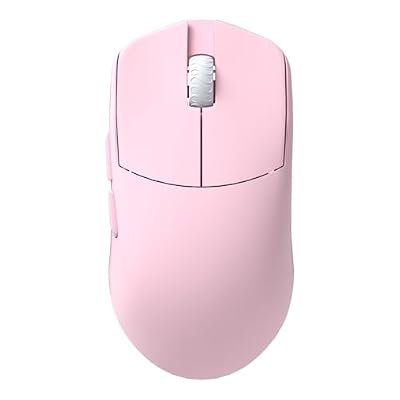
The Maya X is the larger-hand answer to the featherweight trend. At 47 grams, it is lighter than the Superlight 2 despite being bigger, and its symmetrical shell is longer and slightly taller, giving larger hands more contact and control. Most large mice are heavier, and most very light mice are small.
Its PAW3950 sensor is a current flagship sensor, with clean tracking at high speed. Fast flicks stay accurate, and small corrections at range do not feel jittery. The drawback is the same minimal button layout as most symmetrical mice, and small-handed fingertip players may find the 124 mm length too long.
Specs
- Weight: 47 grams
- Sensor: PixArt PAW3950, up to 30,000 DPI
- Polling rate: Up to 8,000 Hz wireless
- Buttons: 5 programmable buttons
- Switches: Optical switches
- Connection: 2.4 GHz wireless and USB-C wired
- Dimensions: 124 by 64 by 40 mm
- Shape: Symmetrical, larger size for medium to large hands
3. SteelSeries Aerox 5 Wireless

The Aerox 5 Wireless is the builder’s pick in this roundup. Where the first two mice keep things minimal, this one gives you nine buttons, including a dedicated up-and-down flick switch beside the left click that many players bind to building pieces or weapon slots. If you now stretch for build keys on the keyboard, those extra inputs can change how fast your builds feel.
Despite the extra buttons, it stays light at 74 grams, thanks to its perforated shell, and its water-resistant design adds some protection against spills. Nine buttons take time to learn, though, and a mis-press during a fight is worse than a slow press. Practise each button in creative mode before taking the layout into ranked matches.
Specs
- Weight: 74 grams
- Sensor: SteelSeries TrueMove Air, up to 18,000 DPI
- Polling rate: 1,000 Hz wireless
- Buttons: 9 programmable buttons
- Switches: Golden micro IP54 switches
- Connection: 2.4 GHz wireless, Bluetooth, and USB-C wired
- Battery life: Up to 180 hours in Bluetooth mode
- Shape: Ambidextrous, right-handed button layout
4. Corsair M75 Wireless

The M75 Wireless is the most flexible button layout here, because its side buttons are swappable. You can run a single large side button on each side, or swap in a two-button cluster, depending on how many binds you want and how your thumb naturally rests. Instead of adapting your thumb to the mouse, you adapt the mouse to your thumb.
Underneath that flexibility is a strong sensor and a clean, right-handed shape. The MARKSMAN optical sensor tracks at up to 26,000 DPI, so fast flicks and rapid recentring stay controlled. At 89 grams, this is the heaviest mouse here, and players coming from a 50-gram mouse will notice the difference at first. It is also right-handed only.
Specs
- Weight: 89 grams
- Sensor: Corsair MARKSMAN optical, up to 26,000 DPI
- Tracking: Up to 650 IPS and 50 G acceleration
- Buttons: Swappable side buttons, single or dual-button clusters included
- Switches: Optical switches
- Connection: SLIPSTREAM 2.4 GHz wireless, Bluetooth, and USB-C wired
- Shape: Right-handed, symmetrical profile with right-side button cluster
5. Pulsar X2H Mini

The X2H Mini is the small-hand claw specialist. Its high rear hump fills the palm and supports an aggressive claw grip, while its narrow waist lets your fingers control the mouse with precision. At 52 grams, it is light enough for fast flicks, yet the shape feels planted rather than twitchy, which helps when you need to stop precisely after a fast turn.
Its PAW3395 sensor is a proven flagship sensor with clean high-speed tracking, and the optical switches reduce the risk of double-click issues over time. The mouse also supports a higher polling-rate dongle, although the standard 1,000 Hz connection is already responsive for Fortnite. Palm players with large hands will likely find the mini size too short.
Specs
- Weight: 52 grams
- Sensor: PixArt PAW3395, up to 26,000 DPI
- Tracking: Up to 650 IPS and 50 G acceleration
- Polling rate: 1,000 Hz, with 4,000 Hz dongle support
- Buttons: 5 programmable buttons
- Switches: Optical switches
- Connection: 2.4 GHz wireless and USB-C wired
- Battery life: Up to 70 hours
- Shape: Symmetrical, high hump, mini size for claw and palm-claw grip
How to Choose
Start with your hand, not the specification sheet. Fingertip players usually want a smaller, lighter shell. Palm players usually want length and height. Claw players usually want a hump that supports the palm while leaving the fingers free to click quickly. A mouse that fights your natural grip will hurt your aim more than any sensor difference.
Next, count the binds you actually use: edit, reset, wall, floor, ramp, cone, weapon slots, and pickaxe. If the list is short, a clean five-button mouse is enough and easier to learn. If the list is long, a button-rich mouse such as the Aerox 5 Wireless or the M75 Wireless is worth the learning curve. Do not buy extra buttons you will never bind, because every unused button is still one you can hit by accident.
Then look at weight and wireless quality together. A lighter mouse helps with flicks and long sessions, but only if the wireless connection stays stable, so use the dedicated 2.4 GHz receiver rather than Bluetooth alone for competitive play. Finally, pair your sensitivity with your mousepad: most consistent players use a moderate sensitivity with a large pad, and keep one setting for several days before changing it.
Who Should Skip
Not every Fortnite player needs a new mouse. If your current mouse already feels comfortable, tracks cleanly, and has enough buttons for your binds, a new sensor will not fix missed shots or slow builds. Practice, comfortable keybinds, and a consistent sensitivity setting will do more.
Players on a strict budget should also pause: a good wired mouse can serve Fortnite well while you save for a wireless model you actually want. Left-handed players should note that the M75 Wireless is right-handed only, and the Aerox 5 Wireless uses a right-handed button layout.
Frequently Asked Questions
What DPI should I use for Fortnite?
There is no single best DPI, because in-game sensitivity, mousepad size, and grip all change the result. A common starting point is 800 DPI with a moderate in-game sensitivity, then adjust in small steps until flicks feel fast but controlled. Keep the Windows pointer speed at the middle setting and avoid acceleration.
Is wireless fast enough for Fortnite?
Yes, when you use the dedicated 2.4 GHz receiver that comes with the mouse. Modern wireless gaming mice report movement as quickly as wired mice in normal play. Bluetooth alone is best kept for browsing or casual play, because it can add latency and limit the polling rate.
How many side buttons do I need for building?
Two side buttons are enough for most players if you bind edit to one and a build piece or weapon swap to the other. Builders who want wall, floor, and ramp all on the mouse should look for four or more side inputs, such as the Aerox 5 Wireless or the M75 Wireless. More buttons only help if you practise them until they become automatic.
Does a lighter mouse actually improve aim?
A lighter mouse can improve flick speed and reduce fatigue, which helps aim stay consistent late in a session. It does not automatically make your aim more accurate, and some players aim better with a slightly heavier mouse that feels more planted. The best weight is the one that lets you stop precisely on a target.
Final Verdict
The best gaming mouse for Fortnite is the one that matches your hand, your grip, and your binds, not the one with the highest numbers on the box. The Logitech G Pro X Superlight 2 is the pick for most players because it is light, accurate, and easy to live with. The Lamzu Maya X is the pick for larger hands, the Aerox 5 Wireless and M75 Wireless are the picks for builders who need more buttons, and the Pulsar X2H Mini is the pick for small-hand claw players.
Choose by grip first, binds second, and weight third. Give your pick a full week of regular play before judging it, because a new shape always feels strange on day one.










